Alerts#
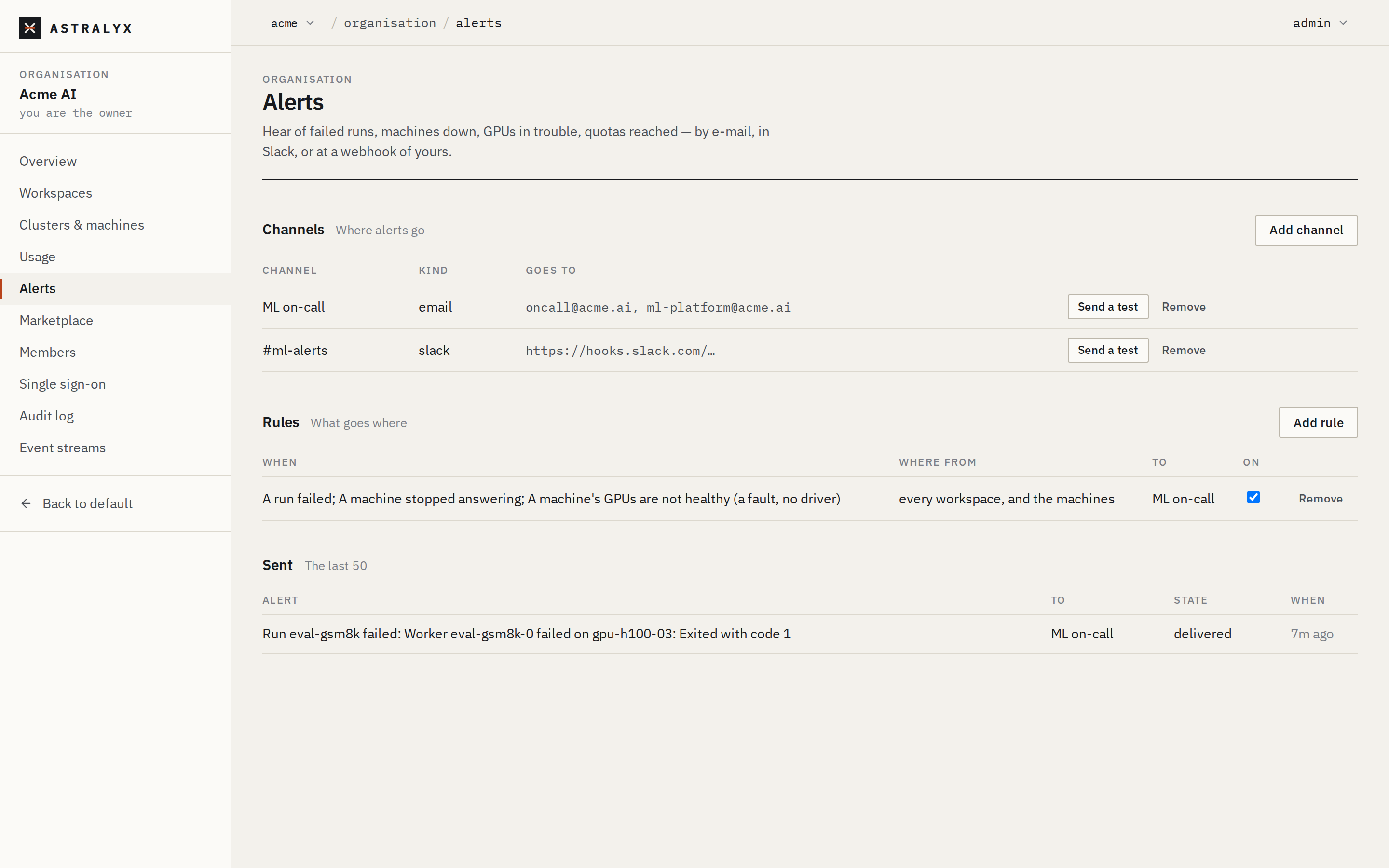
Alerts tell people about a few important events — a run failed, a machine stopped answering, GPUs are unhealthy, a workspace reached its quota — by e-mail, in a Slack channel, or at a webhook of yours. An organisation sets up channels (where alerts go) and rules (which events go to which channel). To send every event to a SIEM instead, use an event stream.
Before you begin#
- You are an owner or admin of the organisation. Only they see and change alerts.
- Alerts are derived from events. Every cluster Astralyx provides — Astraeus Cloud or a cluster dedicated to your organisation — sends its events to your organisation; nothing to configure.
How alerts work#
flowchart LR
  E[Cluster event] --> P["Astralyx control plane (SaaS)"]
  P -->|classified| R{Rules that want it}
  R --> D[Delivery queue]
D -->|e-mail / Slack / webhook| C[Channel]- Each event that reaches the platform is classified as one of the alerts below, or as none.
- Every enabled rule of the organisation that wants that alert, for the event's workspace or for every workspace, gets one delivery for that event.
- The platform sends deliveries in order of their due time, and retries failed ones (see Delivery and retries).
Alerts reference#
The names are used in rules and sent in payloads; they keep the API's words
(job is a run, task a worker).
| Alert | Console description | Sent when |
|---|---|---|
job_failed |
A run failed | A run enters Failed. |
job_completed |
A run completed | A run enters Completed. |
task_failed |
A worker failed (each one of a run's) | A worker enters Failed: one alert per worker. |
quota_reached |
A run waits because its workspace reached its quota | A run starts waiting on its workspace's quota: once when it starts waiting, not again while it keeps waiting. |
machine_down |
A machine stopped answering | A machine enters Down. |
machine_up |
A machine answers again | A machine is Up again after its heartbeat returns. |
gpu_degraded |
A machine's GPUs are not healthy (a fault, no driver) | A machine's GPUsHealthy or GPUSubsystemReady condition turns False. |
machine_condition |
A machine's disks, memory or RAID are in trouble | MemoryPressure, DiskPressure or CPUPressure turns True, or StorageRedundant turns False. |
deployment_down |
A deployment failed, or has served nothing for 5 minutes while not scaled to zero | A deployment enters Failed; or it left Ready for Pending or Starting and stayed there 5 minutes (checked every minute; not when it scaled to zero on purpose). |
Recoveries other than machine_up (a condition back to normal, a run
restarting) are not alerts.
Machine events belong to the organisation, not to a workspace: only rules
for every workspace, and the machines receive machine_down,
machine_up, gpu_degraded and machine_condition.
Add a channel#
| Kind | Settings | Notes |
|---|---|---|
E-mail (email) |
Addresses: 1 to 20, comma-separated | Sent from the platform's mail sender. |
Slack (slack) |
URL: a Slack incoming webhook, https://hooks.slack.com/… |
Create one in Slack under Apps → Incoming Webhooks for the channel. |
Webhook (webhook) |
URL: http:// or https:// |
Signed; see Webhook payload. |
Slack and webhook URLs are credentials: they are stored encrypted and shown
afterwards only as their scheme and host (https://hooks.slack.com/…). The
platform reaches them only on public addresses (400 UNREACHABLE_ADDRESS
otherwise).
- Open Organisation → Alerts.
- Under Channels, select Add channel.
- Choose the Kind, enter a Name (for example
on-call), and the Addresses or URL. - Select Add. For a webhook, the next dialog shows The webhook's signing key once: copy it now.
- Select Send a test in the channel's row. The test appears under Sent within seconds.
$ curl -sS -X POST "$ASTRA_URL/api/v1/orgs/acme/alerts/channels" \
    -H "Authorization: Bearer $ASTRA_TOKEN" -H "Content-Type: application/json" \
    -d '{"kind": "webhook", "name": "pager", "url": "https://hooks.example.com/astraeus"}'
{"id":"0192…","kind":"webhook","name":"pager","signing_key":"9c1f…e04a"}
signing_key is in this answer only, and null for e-mail and Slack.
For e-mail, send "addresses": "[email protected], [email protected]"
instead of url.
| Error | Cause |
|---|---|
400 INVALID_CHANNEL |
Unknown kind; no address or more than 20; an address without @ or over 254 characters; a URL that is not http(s); a Slack URL not on hooks.slack.com. |
400 UNREACHABLE_ADDRESS |
The URL's host is not a public address. |
Add a rule#
A rule sends one or more alerts, from one workspace or from all of them and the machines, to one channel. A channel needs to exist first.
- In Organisation → Alerts, under Rules, select Add rule.
- Under When, tick the alerts.
job_failed,machine_downandgpu_degradedare ticked by default. - Under Where from, choose a workspace, or every workspace, and the machines.
- Under To, choose the channel.
- Select Add.
Untick On in a rule's row to pause it; Remove deletes it.
$ curl -sS -X POST "$ASTRA_URL/api/v1/orgs/acme/alerts/rules" \
    -H "Authorization: Bearer $ASTRA_TOKEN" -H "Content-Type: application/json" \
    -d '{"channel_id": "0192…", "workspace": null, "events": ["job_failed", "machine_down", "gpu_degraded"]}'
{"id":"0192…"}
Change it with PATCH /orgs/{org}/alerts/rules/{id} and
{"enabled": false} and/or {"events": [...]}; delete it with
DELETE /orgs/{org}/alerts/rules/{id}.
| Error | Cause |
|---|---|
400 INVALID_RULE |
No events, or an unknown alert name. |
404 CHANNEL_NOT_FOUND |
The channel is not the organisation's. |
404 WORKSPACE_NOT_FOUND |
No workspace with that slug. |
Removing a channel removes its rules too.
Messages#
E-mail#
Subject [Astraeus] <title>, for example [Astraeus] Run train failed: exit
code 1. The body gives the title, the workspace and cluster (or the cluster,
for machines), the organisation, the time, and a link to the run, worker or
cluster in the console.
Slack#
One message per alert: the title in bold, where it happened, and an Open in Astraeus link.
Webhook payload#
Each delivery is a POST with a JSON body:
{
  "alert": "job_failed",
  "title": "Run train failed: exit code 1",
  "org": "acme",
  "cluster": "lab-a",
  "workspace": "vision",
  "kind": "job",
  "name": "train",
  "state": "Failed",
  "reason": "exit code 1",
  "at": "2026-10-01T09:12:44.103Z",
  "delivery": 4812,
  "url": "https://console.astralyx.cloud/o/acme/w/vision/jobs/lab-a/train"
}
| Field | Description |
|---|---|
alert |
The alert name; test for a test. |
title |
A one-line summary. |
org, cluster |
Slugs. |
workspace |
The workspace's slug, or null for a machine's event. |
kind |
job, task, node or deployment (test for a test). |
name |
The run, worker, machine or deployment, as the workspace names it. |
state, reason |
The state entered and why. |
at |
When it happened (RFC 3339). |
delivery |
The delivery's ID: the same on every retry of it. |
url |
The console page it is about. |
Headers:
| Header | Value |
|---|---|
Content-Type |
application/json |
User-Agent |
Astraeus-Alerts |
X-Astraeus-Delivery |
The delivery ID. Use it to drop duplicates: a delivery may arrive more than once. |
X-Astraeus-Event |
The alert name. |
X-Astraeus-Signature |
sha256= and the hex HMAC-SHA256 of the raw body. |
Verify the signature#
The HMAC key is the signing key exactly as shown (its 64 characters as ASCII bytes; do not hex-decode it). Compute the HMAC over the raw request body, before any JSON parsing, and compare in constant time.
import hashlib
import hmac

def verified(body: bytes, header: str, key: str) -> bool:
    expected = "sha256=" + hmac.new(key.encode(), body, hashlib.sha256).hexdigest()
    return hmac.compare_digest(expected, header)
From a shell, for a saved body:
$ printf 'sha256=%s\n' "$(openssl dgst -sha256 -hmac "$SIGNING_KEY" -hex < body.json | sed 's/.*= //')"
sha256=5b0c7e…
Delivery and retries#
- Deliveries are sent within seconds of the event reaching the platform.
- A webhook or Slack delivery succeeds on any
2xxanswer within 15 s. - A failed delivery is retried after 1, 2, 4, 8, 16 and 32 minutes, then
after 1 hour; after 8 attempts it is marked
failed. - Sent in the console lists the last 50 deliveries with their state
(
pending,delivered,failed), attempts and last error. - Delivery is at least once. Deduplicate on
X-Astraeus-Delivery.
Test a channel#
Send a test (or POST /orgs/{org}/alerts/channels/{id}/test, answered
202 {"delivery": <id>}) queues a message titled "Test alert: this channel
works", delivered like any other alert, with alert and kind set to test.
Check its state under Sent.
Troubleshooting#
| Symptom | Cause | Fix |
|---|---|---|
| No alerts at all from a cluster | No enabled rule wants these alerts, or the rule is for another workspace. | Check the rules under Organisation → Alerts; check the cluster's events under Organisation → Clusters & machines → the cluster → Events. |
| Machine alerts never arrive | The rule is for one workspace. | Use every workspace, and the machines. |
A delivery is failed with answered 401 |
The webhook refused the request. | Check the receiving end, then Send a test. |
A delivery is failed with … is not reachable from here |
The URL resolves to a private address. | Use a public endpoint. |
| Signature mismatch | The HMAC was computed over parsed JSON, or with a hex-decoded key. | Use the raw body and the key's ASCII bytes. |
| E-mails never arrive | The message was filtered as spam, or an address is wrong. | Check the delivery's state under Sent, then the recipients' spam folder. |