Drives#
A drive gives a name to data on your machines so runs can mount it by that name. The scheduler takes drives into account: it places workers where the data is or where it can be reached, and it says why a run is waiting when no machine qualifies.
Use a drive to:
- Cache model weights or downloaded datasets on every machine that needs them. Each machine keeps its own copy, and later runs reuse it.
- Keep a dataset next to the GPUs. Name a directory on one machine's NVMe array. Workers on that machine bind-mount it, and workers on other machines read it over NFS (over RDMA when both machines can).
- Mount a shared filesystem (Lustre, GPFS, Weka, NFS) that every machine already sees at the same path, for checkpoints that several runs share.
- Give each worker scratch space on the local disk of whichever machine runs it.
In the API, a drive is a datavolume (/v1/drives, also /v1/datavolumes). A run mounts a drive through datavolume_refs. A network mount of a drive (a claim) is listed under /v1/mounts (also /v1/datavolume-claims).
Kinds of drive#
Every drive has one or more sources. The node_scope of a source sets its kind:
| Kind (console) | node_scope |
Where the data is | Workers on other machines | Can Astraeus delete the data? |
|---|---|---|---|---|
| On each machine's data location | placed |
A copy on each machine that uses the drive, at <data location>/drives/<drive>/<path> |
Use their own machine's copy | Yes. Deleting the drive deletes every copy, and copies of a cache drive can be evicted |
| On one machine | "" (empty, the default) |
path on the machine named in node |
Mount it over NFS, unless transport is Local |
No |
| Shared filesystem | shared |
path on a filesystem that every eligible machine mounts at the same path |
Read it directly. No network mount is made | No |
| Scratch on each machine | local-any |
path on whichever machine runs the worker. It is created if missing |
Use their own machine's directory | No |
Only placed drives are ever deleted
Astraeus deletes data only in the copies of drives kept on each machine's data location: it created those directories. A path on one machine, a shared filesystem or a scratch path belonged to you before it was a drive, and it stays yours. Deleting such a drive never touches the files.
Before you begin#
- You need the admin or editor role in the workspace to create or delete drives. Viewers can list them.
- Drives kept on each machine's data location need the machines to have a data location. See Choose where a machine keeps data.
- Drives on one machine, shared filesystems and scratch name host paths. An organisation admin must first grant the workspace those directories in its cluster access (Host access — nothing unless granted → Host paths). A path outside the grant is refused with
403 HOST_ACCESS_FORBIDDEN:spec.sources[].path "/home": this namespace may not use that path on the machines. - Network mounts (a drive on one machine used from another) need the agent's drives part (
astraeus-agent-drives) on both machines (installed by default) and the kernel NFS server and client tools (exportfs,mount.nfs). The installer does not install the NFS tools. -
For the API examples on this page, set these variables. Create the token in the console under Account → API tokens.
$ export TOKEN=<your API token>
$ export API=https://<console host>/api/v1/orgs/<org>/workspaces/<workspace>/clusters/<cluster>/api
Names on this path are local to the workspace: write
imagenet, not the namespace. Names cannot contain a dot.
No CLI commands for drives
The astraeus CLI has no drive commands. Use the console or the API.
Choose where a machine keeps data#
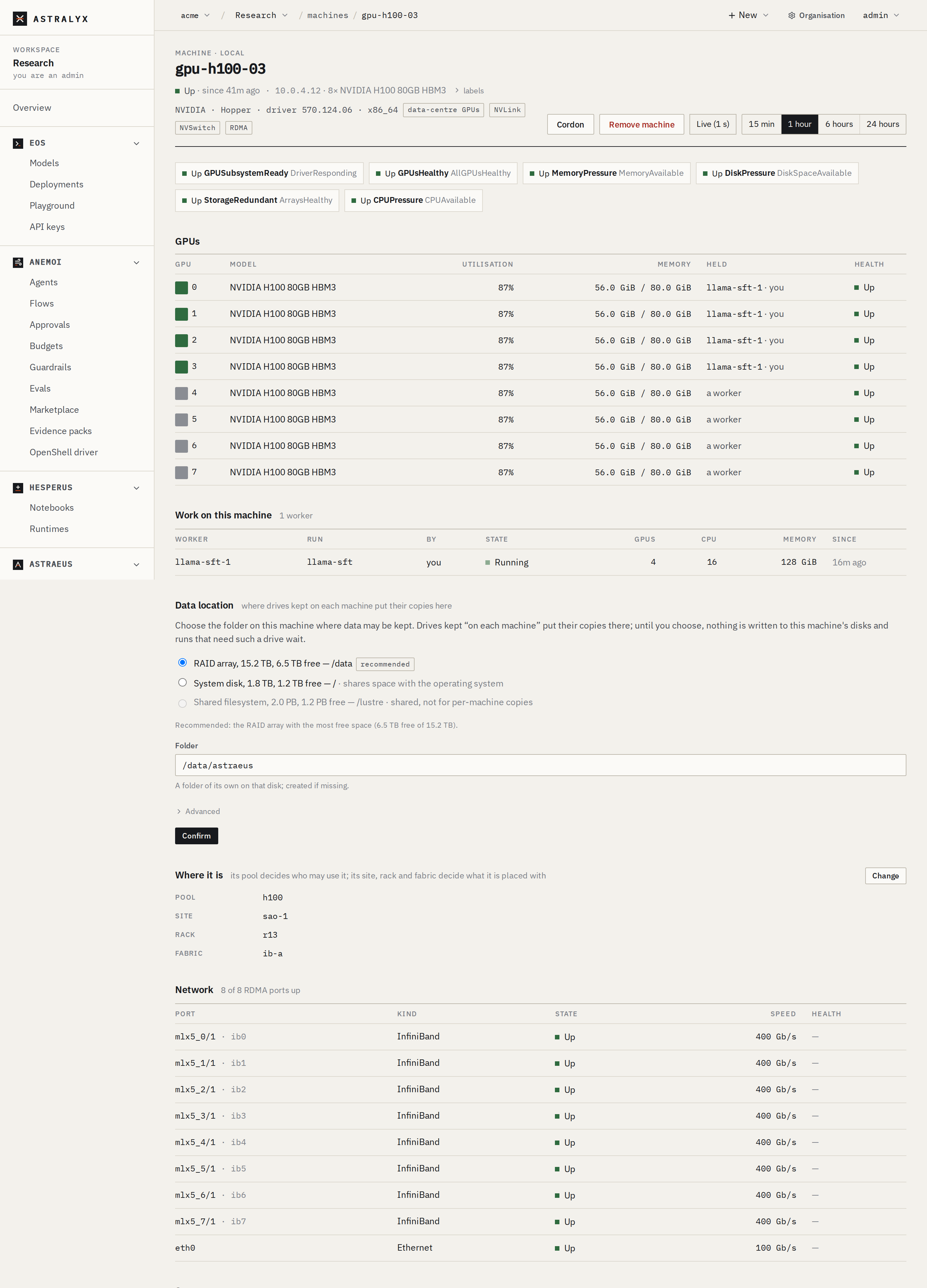
Each machine has one data location: the folder where it keeps its copies of placed drives. Astraeus never guesses this folder. Until someone chooses it, nothing is written to the machine's disks, and a run that needs a placed drive waits with the reason Choose where to keep data on gpu-01 (or Choose where to keep data on the machines when several machines are affected).
You set the data location in one of two ways:
- When you install the machine. In a terminal, the installer lists the disks, marks the one it recommends and asks. Without a terminal, pass
--data-dir /mnt/nvme0/astraeus.--no-data-dirskips the question. -
In the console, as an organisation admin:
- Open Machines and select the machine.
- In Data location, pick a disk. Disks are listed in plain words (NVMe SSD, SSD, RAID array, hard disk, shared). The recommended disk is preselected: a local disk that is not the system disk, fastest medium first (NVMe, then SSD, RAID, hard disk), then the most free space.
- Check Folder. The default is
<mount>/astraeus(/var/lib/astraeuson/). The folder is created if it is missing. - Optional: under Advanced, set Most space drive copies may take (for example
500Gor2T). Empty means no limit but the disk. - Click Confirm. Nothing is set until you confirm.
Rules the cluster checks:
- The path must be absolute, with no
.or... - It must be on a filesystem the machine reported, and that filesystem must be local. A path on a shared filesystem is refused: a data location must be on this machine's own disk — to use shared storage, make a shared drive instead.
- The system disk is allowed, with a warning: this is the system disk: drive copies share its space with the operating system.
- A machine that has not reported its disks yet cannot be given one: machine gpu-01 has not reported its disks yet; wait until it is up, then choose again.
- Changing the data location leaves existing copies where they are. They are neither moved nor deleted, and new copies go to the new folder. Clearing it is refused while the machine holds any copy.
The API equivalent, for organisation admins, is PUT /api/v1/orgs/<org>/clusters/<cluster>/nodes/<machine>/data-location with {"path": "/mnt/nvme0/astraeus", "max_bytes": 0} (max_bytes: 0 means no limit). DELETE on the same path clears it.
Create a drive#
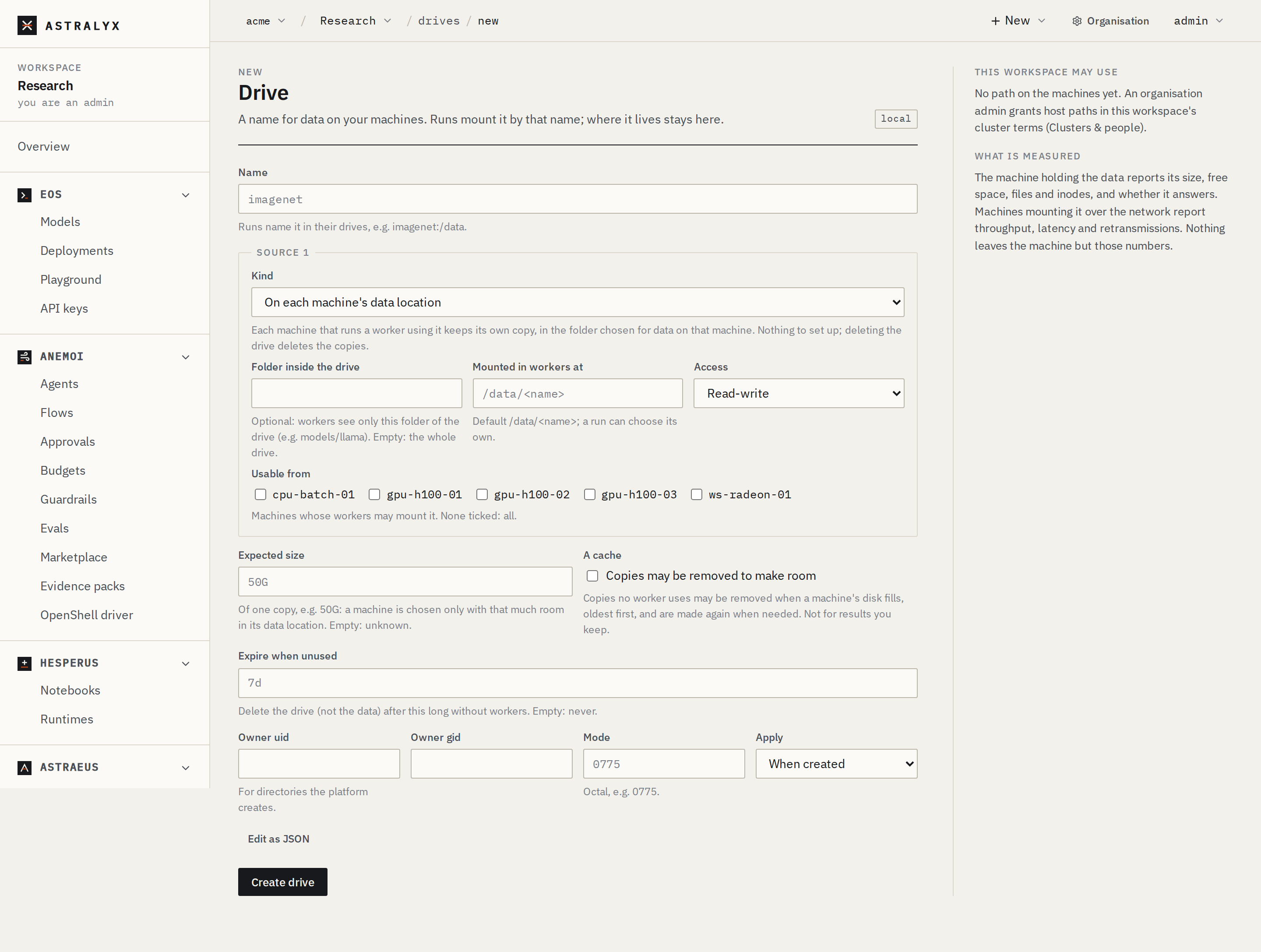
- Open Drives in the workspace and click New drive.
- Enter a Name: lowercase letters, digits and hyphens (for example
imagenet). -
- On each machine's data location: optionally set Folder inside the drive (a relative path such as
models/llama; empty means the whole drive). - On one machine: choose the Machine and enter the Path on the machine.
- Shared filesystem: choose the machine in Measured by (it reports the drive's size) and enter the Path on the machine.
- Scratch on each machine: enter the Path on the machine.
Under Source 1, choose a Kind:
Under Found on your machines, the form suggests the shared filesystems and local disks your machines reported. Choosing one fills the source in.
- On each machine's data location: optionally set Folder inside the drive (a relative path such as
-
Set Mounted in workers at (for example
/data) and Access (Read-write or Read-only). - Optional: tick machines under Usable from. With none ticked, every machine may use the drive.
- For a drive kept on each machine, set Expected size (for example
50G) and tick A cache if copies may be removed to make room. - For a drive on one machine, choose Across machines: RDMA when both have it, else TCP (the default), NFS over RDMA only, NFS over TCP, or Never — workers run where the data is.
- Click Create drive. The drive's page opens.
Edit as JSON shows the exact body sent to the cluster.
A cache for Hugging Face downloads, one copy per machine, 100 GiB expected:
$ curl -sS -X POST "$API/drives" \
    -H "Authorization: Bearer $TOKEN" -H "Content-Type: application/json" \
    -d '{
      "metadata": {"name": "hf-cache"},
      "spec": {
        "sources": [{"node_scope": "placed", "path": "", "mount_path": "/root/.cache/huggingface", "mode": "ReadWrite"}],
        "evictable": true,
        "size_hint_bytes": 107374182400
      }
    }'
The cluster answers 201 Created with the drive. GET $API/drives/hf-cache returns it with its status, the workers that use it (used_by), its network mounts (claims) and, for a placed drive, its copies.
More examples#
{
  "metadata": {"name": "imagenet"},
  "spec": {
    "sources": [{"node": "gpu-01", "path": "/mnt/nvme0/datasets/imagenet", "mount_path": "/data", "mode": "ReadOnly"}],
    "transport": "Auto"
  }
}
{
  "metadata": {"name": "lustre-ckpt"},
  "spec": {
    "sources": [{"node_scope": "shared", "node": "gpu-01", "path": "/lustre/checkpoints", "mount_path": "/checkpoints", "mode": "ReadWrite"}]
  }
}
{
  "metadata": {"name": "scratch"},
  "spec": {
    "sources": [{"node_scope": "local-any", "path": "/scratch/astraeus", "mount_path": "/scratch", "mode": "ReadWrite"}]
  }
}
Mount a drive in a run#
A run lists its drives in datavolume_refs on its worker template (spec.task_template, or each worker group's task_template):
{
  "metadata": {"name": "finetune"},
  "spec": {
    "task_template": {
      "image": "pytorch/pytorch:2.4.0-cuda12.4-cudnn9-runtime",
      "command": "python",
      "args": ["train.py", "--data", "/data", "--out", "/checkpoints/finetune"],
      "requested_resources": {"cpu_cores": 16, "memory_bytes": 137438953472, "gpu_requests": {"count": 8}},
      "datavolume_refs": [
        {"name": "imagenet", "mount_path": "/data", "mode": "ReadOnly"},
        {"name": "lustre-ckpt"},
        {"name": "hf-cache"}
      ]
    }
  }
}
| Field | Type | Default | Description |
|---|---|---|---|
name |
string | required | The drive. It must be in the run's workspace. |
mount_path |
string | the source's mount_path |
Where the drive appears in the container. It must be absolute. |
sub_path |
string | none | A folder inside the drive to mount instead of the whole drive. |
mode |
ReadOnly | ReadWrite |
the source's mode |
Read-only or read-write for this run. |
source_index |
integer | 0 |
Which source of a drive with several sources. |
In the console's New run form, the Drives field takes name or name:/mount/path, comma-separated. For anything else (sub_path, mode), use Edit as JSON.
Every mount needs a mount path
The API has no default mount path. If neither the run nor the drive's source sets mount_path, the worker fails with Invalid task: data volume <name>: mount_path must be absolute. The console's New run form always sends one: /data/<name> when you give none, which overrides the drive's own Mounted in workers at.
How each kind reaches the worker:
- Placed: the machine creates its copy directory the first time a worker using the drive is prepared there, then bind-mounts it. Workers see only their own drive's copy.
- Shared and scratch: bind-mounted from the same path on the worker's machine. Scratch directories are created if missing.
- On one machine: bind-mounted when the worker runs on that machine. On any other machine, a network mount is made first (see Network mounts), and the worker starts only once it is mounted.
How placement follows a drive#
The scheduler checks every drive of a worker before placing it on a machine. A machine is not a candidate when:
| Reason the run shows | Cause |
|---|---|
Choose where to keep data on gpu-01 |
A placed drive, and the machine has no data location. |
drive hf-cache needs 107 GB at this machine's data location, 40.0 GB free |
A placed drive with size_hint_bytes, no copy on the machine yet, and not enough free space. |
drive hf-cache needs 107 GB; this machine's data location holds 450 GB of its 500 GB limit |
The same, against the limit set on the data location. |
drive imagenet: source 0 is local to machine gpu-01 and its transport is Local |
A drive on one machine with transport: Local, and this is another machine. |
drive imagenet: source 0 is not usable from machine gpu-07 |
The machine is not in the source's eligible_nodes. |
drive lustre-ckpt: /lustre/checkpoints is not on a shared filesystem mounted here |
A shared drive, and the machine did not report that filesystem. |
drive imagenet is on gpu-01, in another site (eu-west) |
A drive on one machine, and the two machines carry different topology.astraeus.io/site labels. Data is never read across sites. |
drive imagenet does not exist |
The run names a drive that is not in the workspace. |
Sizes in these messages are in decimal units (1 GB = 10⁹ bytes).
Among the machines that qualify, the scheduler prefers:
- a machine that holds the bytes: the machine of a drive on one machine, or a machine that already has a copy of a placed drive;
- for a drive on one machine, a machine near it: in the same rack, InfiniBand fabric or NVLink domain, and with RDMA at both ends.
When room is unknown (the machine has not measured its data location yet), the scheduler does not refuse the machine. The worker makes the copy and reports.
Copies on each machine#
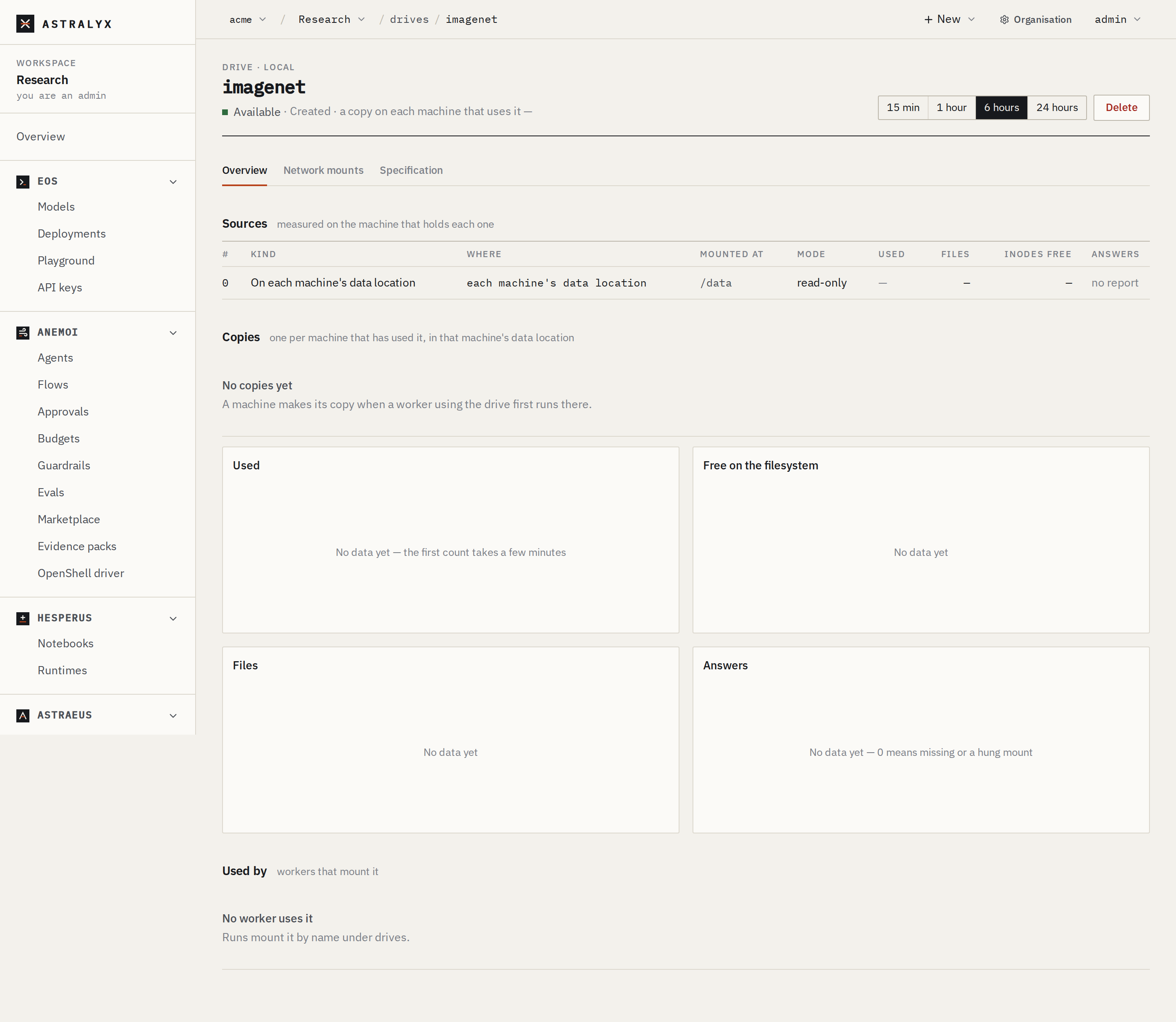
A placed drive's page lists its Copies: one per machine that has used the drive, with the Machine, Folder, Size and Last used.
- Each machine measures its copies and the free space at its data location. The record is updated when something changes materially: a copy appears or goes, or a size moves by more than 1 GiB or 1 % of the filesystem. Last used is updated at most once an hour.
- Copies are independent. Astraeus does not synchronise them between machines: what a worker writes into its machine's copy is not seen on another machine.
- A drive with an expected size goes only to machines with that much room, unless they already hold a copy.
Eviction of cache copies#
A drive marked A cache (evictable: true) can lose copies that no worker on the machine is using. The machine evicts copies when:
- the filesystem of its data location has less than 10 % free. It then evicts until 15 % is free again, and each removal reads evicted: the disk it is on is nearly full;
- the copies take more than the limit set on the data location. It evicts until they are within it, and each removal reads evicted: the machine's data location is over its limit.
The least recently used copies go first (copies never used before copies used, then by name). Each eviction is recorded on the drive as an event: Copy removed from gpu-01: evicted: …. The next worker that needs the drive on that machine makes a new copy.
Do not keep results in a cache drive
Evicted copies are deleted. Write checkpoints and results to a drive that is not a cache, or to a shared filesystem.
Only placed drives can be caches. evictable on any other kind is refused: spec.evictable: only a drive kept on the machines' data locations can be evictable.
Network mounts#
When a worker uses a drive on one machine from another machine, Astraeus makes a network mount (an API claim) for that pair of machines:
- The machine holding the data exports the path over NFS to the client machine's address only.
- The client machine mounts it under its work root (
datavolumes/mounts/<drive>-<source>). - The worker starts once the mount is Bound. Until then it waits with a reason such as
waiting for imagenet to be mounted from gpu-01 (Exported). - When no worker on the client needs it any more, the client unmounts first, then the source stops exporting.
The transport is decided when the mount is made:
transport |
Behaviour |
|---|---|
Auto (default) |
NFS over RDMA when both machines are on the same RDMA network (both InfiniBand on the same fabric, or both RoCE) and each has an address on it. NFS over TCP otherwise. |
RDMA |
NFS over RDMA. |
TCP |
NFS over TCP. |
Local |
Never over the network: workers run only on the machine that holds the data. |
When an RDMA mount fails, the client falls back to TCP and says so: mounted over TCP (RDMA did not work). The drive's Network mounts tab lists each mount with its machines, transport, mode and state (Pending, Exported, Bound, Releasing, Released, Failed), with charts of throughput, operations, round trip, retransmissions and timeouts.
Monitor a drive#
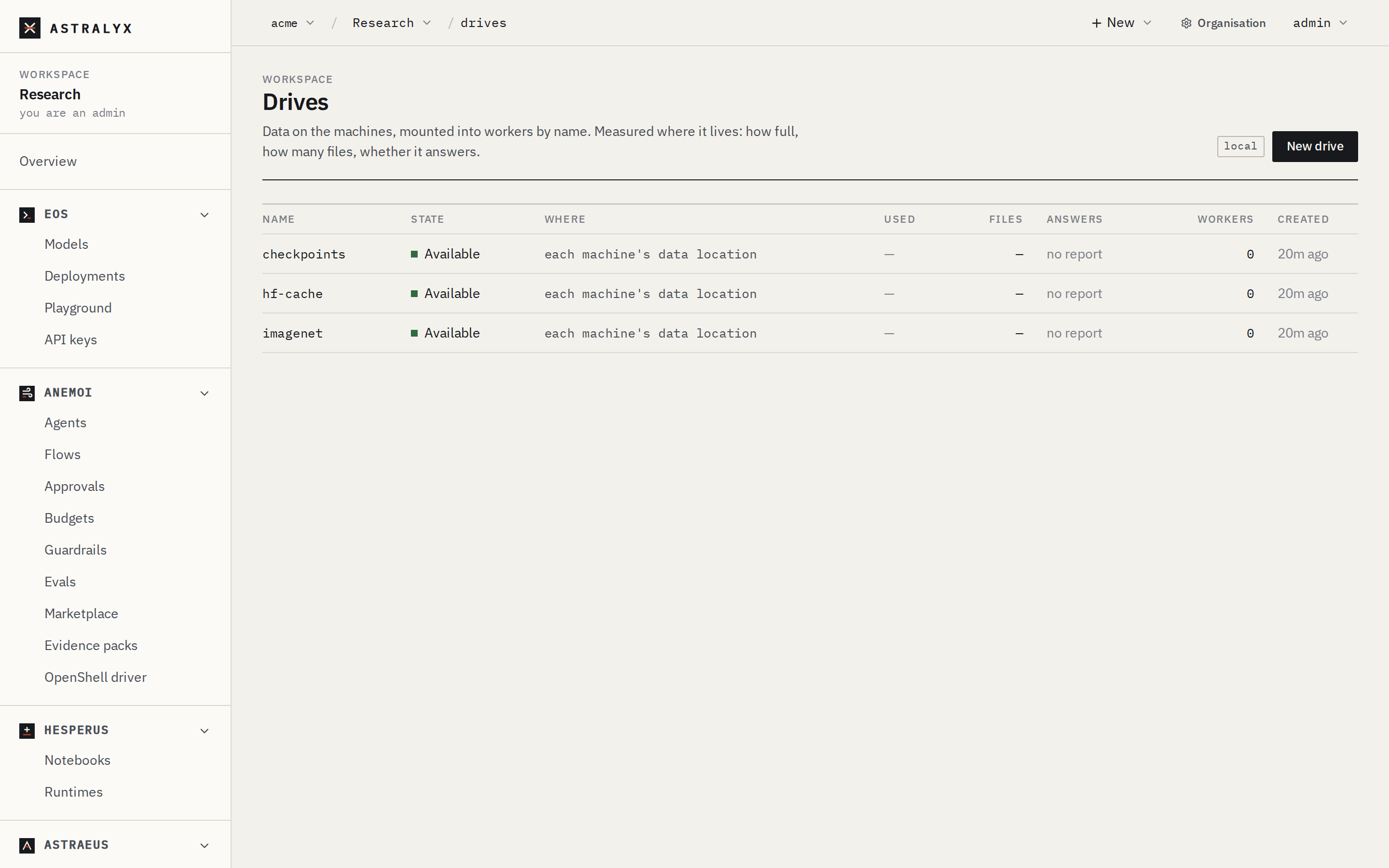
The Drives list shows each drive's State, Where, Used, Files, Answers and the number of Workers using it.
- State is
Available, orUnreachablewhile the machine of a drive on one machine is notUp(for examplesource 0 is on machine gpu-01 which is Down). - The machine that holds the data measures it every five minutes: size, files, free space and inodes, and whether it answers. A hung mount reports Answers as 0 and is left alone for five minutes. Nothing leaves the machine but these numbers.
Delete a drive#
- Open the drive and click Delete.
- Confirm. For a placed drive, the dialog says its copies on every machine are deleted too. Otherwise it says the data on the machines is not deleted. If workers still use the drive, the dialog asks before deleting it anyway, and their mounts are released.
Deleting a placed drive deletes every copy
Each machine deletes its copy once it has the complete list of the workspace's drives. This cannot be undone.
Drives that Astraeus manages for another object, such as a model's weights (shown as managed by model/llama), cannot be deleted directly. The API answers 409 DATAVOLUME_MANAGED: drive model-llama is managed by model/llama; delete model/llama instead.
Reference#
Drive fields#
| Field | Type | Default | Description |
|---|---|---|---|
metadata.name |
string | required | The drive's name. No dot. |
metadata.labels |
map | none | Labels. |
spec.sources |
list | required | At least one source. A placed drive has exactly one. |
spec.transport |
Auto | RDMA | TCP | Local |
Auto |
How workers on other machines reach a drive on one machine. |
spec.evictable |
boolean | false |
Placed drives only: copies may be evicted. |
spec.size_hint_bytes |
integer | 0 (unknown) |
Placed drives only: the expected size of one copy, in bytes. |
spec.fill |
object | none | Placed drives only: a run that fills each machine's copy before anything else uses it (Astraeus uses it for model weights). fill.template is a worker template; it needs an image, may not have drives or external accesses of its own, sees the copy at /drive and must write the file .astralyx-filled there last. Until then, workers using the drive on that machine wait: Waiting for drive X to be filled on M. |
spec.permissions.create |
boolean | false |
Create the source's directory when it is missing. |
spec.permissions.owner_uid, owner_gid, dir_mode, apply, recursive |
Accepted and stored. The current release does not apply ownership or mode. | ||
spec.idle_ttl_seconds |
integer | 0 |
Accepted and stored (the console's Expire when unused). The current release does not expire drives. |
spec.managed_by |
string | none | Set by Astraeus for drives it manages. Refused on create: the field is set by Astraeus only, never through the API. |
Source fields#
| Field | Type | Default | Description |
|---|---|---|---|
node_scope |
"" | placed | shared | local-any |
"" |
The kind of source. See Kinds of drive. |
node |
string | none | On one machine: the machine holding the data. Shared: the machine that measures it. Must be empty for a placed drive. |
path |
string | required | Absolute, without ... For a placed drive: a relative folder inside the copy, without .. (may be empty). |
mount_path |
string | none | The default mount path in workers. Absolute. |
mode |
ReadOnly | ReadWrite |
ReadOnly |
The default access mode. |
eligible_nodes |
list | all machines | Machines whose workers may use this source. |
Limits#
| Limit | Value |
|---|---|
| Sources of a placed drive | 1 |
| Eviction starts / stops | below 10 % / at 15 % free on the data location's filesystem |
| Copy record threshold | 1 GiB or 1 % of the filesystem |
| Measurement of a drive's size and files | every 5 minutes per path |
Drives have no quota of their own. The only cap on disk use is each machine's data location limit.
Troubleshooting#
| Symptom | Cause | Fix |
|---|---|---|
| Run waits: Choose where to keep data on gpu-01 | A placed drive and no data location on the machine. | An organisation admin chooses one on the machine's page. |
Worker fails: data volume X: mount_path must be absolute |
Neither the drive nor the run sets a mount path. | Set mount_path in datavolume_refs or on the drive's source. |
Worker stays in Preparing: waiting for X to be mounted from gpu-01 (Pending) |
The NFS export or mount has not happened. | Check that astraeus-agent-drives runs on both machines and that the NFS server and client tools are installed. Look at the drive's Network mounts tab for a Failed state and its reason. |
Create refused: 403 HOST_ACCESS_FORBIDDEN |
The path is outside the host paths granted to the workspace. | An organisation admin adds the directory to the workspace's Host paths. |
| A cache copy disappeared | The disk fell below 10 % free, or the copies exceeded the limit. | Expected for caches; see the drive's events. Raise the limit, or do not mark the drive as a cache. |