Credentials#
A credential tells Astraeus where a secret is kept and how a machine proves who it is to fetch it. The value stays in your secret manager. When a worker needs it, the machine that runs the worker fetches it with its own identity, writes it to a private directory on that machine, and hands it to the worker as files or environment variables.
Use a credential to give a run:
- a database password or an API key (as an environment variable);
- cloud keys for reading a bucket (for example
AWS_ACCESS_KEY_IDandAWS_SECRET_ACCESS_KEY); - a TLS certificate or a service-account key file (as files in a directory);
- the username and password of a private container registry.
Data sources use credentials the same way, on the machine that serves them.
In the API, a credential is an externalsecret (/v1/credentials, also /v1/external-secrets).
Secret values are never accepted
Neither the console nor the Astralyx control plane ever holds a credential's value. A credential has no field for a value: every field is a locator (a region, a secret name, a URL) or, in auth, an identifier or a path to a file on the machine. A field you add that is not part of the format, such as secret_access_key, is dropped and never stored. Data sources go further and refuse such fields with 400 CREDENTIALS_NOT_ACCEPTED.
How a value reaches a worker#
sequenceDiagram
    participant CP as Astralyx control plane (SaaS)
    participant SS as astraeus-agent-credentials (on the machine)
    participant SM as Your secret manager
    participant W as Worker
    CP-->>SS: credential reference (where, which auth mode), on the machine's outbound HTTPS connection
    SS->>SM: authenticate with the machine's identity, fetch
    SM-->>SS: value
    SS->>SS: write /var/lib/astraeus/worker/secrets/<name>/ (0700, files 0600)
    SS-->>CP: Synced on node gpu-01 (state only, never the value)
W->>W: env vars set and directory mounted at start- A worker that names the credential is placed on a machine. Only then does that machine learn of the credential.
- The agent's credentials part on the machine (
astraeus-agent-credentials, installed by default) authenticates to your secret manager with something the machine holds: its cloud instance identity, a token or key file you put on it, or a certificate. - It writes the value to
/var/lib/astraeus/worker/secrets/<name>/. The directory is mode0700and each file0600. A new value is written beside the old one and swapped in, so a reader never sees half a secret. - It reports only whether it worked. Astraeus keeps
SyncedorErrorwith a message such ason node gpu-01, never the value. - The worker waits in
Preparinguntil the files are there:waiting for external secret db-credentials (key password) to be synced to this node. It then starts with the values as environment variables, or the directory mounted read-only. - When no worker on the machine needs the credential any more, its directory is deleted.
Before you begin#
- You need the admin or editor role in the workspace.
- Decide how your machines authenticate to the secret manager. The machine's own cloud identity (an EC2 instance role, a GCE service account, an Azure managed identity, an OCI instance principal) needs nothing configured and nothing stored. Other modes read a file on the machine: a token, a key, a certificate.
- Every file path in
authmust be inside the workspace's granted Host paths (set by an organisation admin in the workspace's cluster access). Otherwise the credential is refused with403 HOST_ACCESS_FORBIDDEN. - Put those files on every machine that may run the workers, readable by root.
- For the API examples, set
TOKENandAPIas described in Drives.
No CLI commands for credentials
The astraeus CLI has no credential commands. Use the console or the API.
Create a credential#
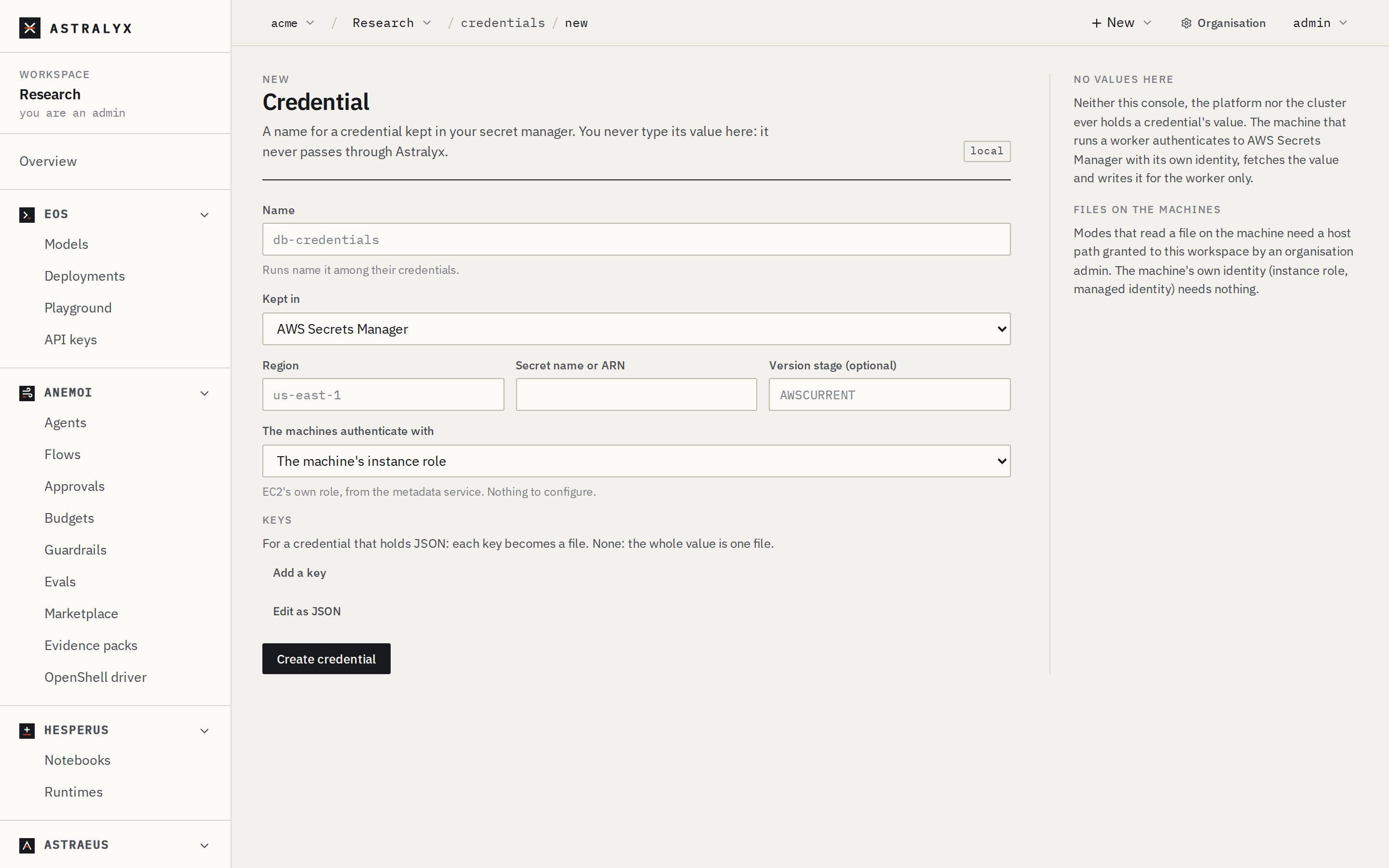
- Open Credentials in the workspace and click New credential.
- Enter a Name (for example
db-credentials). - Choose where it is Kept in: AWS Secrets Manager, AWS Parameter Store, Google Secret Manager, Azure Key Vault, HashiCorp Vault, Oracle Cloud Vault, CyberArk Conjur, 1Password (Connect), Doppler or Infisical. Fill in the fields that appear (for example Region and Secret name or ARN).
- Choose how The machines authenticate with, for example The machine's instance role. Fill in any file paths it asks for.
- Under Keys, for a secret that holds JSON, add each Key you need and the File it becomes (default: the key). With no keys, the whole value is one file named
value, plus one file per field of a JSON value. - Click Create credential. Its page opens.
Edit as JSON shows the body sent to the cluster.
A PostgreSQL password in AWS Secrets Manager, fetched with the machine's instance role:
$ curl -sS -X POST "$API/credentials" \
    -H "Authorization: Bearer $TOKEN" -H "Content-Type: application/json" \
    -d '{
      "metadata": {"name": "db-credentials"},
      "spec": {
        "backend_type": "AWSSecretsManager",
        "region": "eu-west-1",
        "secret_name": "prod/postgres",
        "auth": {"mode": "instance_profile"},
        "data": [{"key": "password", "file_name": "password"}, {"key": "username", "file_name": "username"}]
      }
    }'
The cluster answers 201 Created. A new credential is Pending until a machine fetches it.
The credential is not fetched when you create it. It is fetched on a machine when a worker that uses it is placed there.
Use a credential in a run#
A run names its credentials in secret_refs on its worker template:
{
  "task_template": {
    "image": "ghcr.io/acme/etl:1.4",
    "requested_resources": {"cpu_cores": 2, "memory_bytes": 4294967296},
    "secret_refs": [
      {
        "external_secret_name": "db-credentials",
        "env_vars": {"username": "PGUSER", "password": "PGPASSWORD"}
      },
      {
        "external_secret_name": "gcs-key",
        "mount_path": "/var/run/secrets/gcs"
      }
    ]
  }
}
| Field | Type | Default | Description |
|---|---|---|---|
external_secret_name |
string | required | The credential, in the run's workspace. |
env_vars |
map | none | File name → environment variable. Each named file's content becomes the variable's value. |
mount_path |
string | none | Mount the whole directory of files read-only at this path in the container. |
A reference needs env_vars, mount_path or both. With neither, the value is fetched onto the machine but the worker cannot see it.
The console's New run form
The Credentials field of New run adds references without env_vars or mount_path. Use Edit as JSON to say how the worker receives each credential.
Which files a credential makes#
The keys in env_vars and the files under mount_path are file names:
data |
Files written |
|---|---|
| Set | Exactly the listed keys, each as its file_name. A missing key fails the fetch. If the value is not JSON and data has one entry, that file holds the whole value. |
| Empty | One file per field of a JSON value (a JSON object, a Vault KV map, a 1Password item's fields, a Doppler config), plus the whole value as output_file (default value). |
Field values that are not strings are written as JSON text.
Private container registries#
To pull a run's image from a private registry, name a credential in registry_secret_ref on the worker template:
{
  "task_template": {
    "image": "ghcr.io/acme/private-trainer:2.0",
    "registry_secret_ref": {"external_secret_name": "ghcr-pull"}
  }
}
The machine reads one file from the credential's directory and expects JSON with username, password (or a token) and server (also accepted as url). Because a JSON value otherwise becomes several files, make the credential produce exactly one file: store the login as an object under one key and map only that key.
{"registry": {"username": "acme-bot", "password": "<token>", "server": "ghcr.io"}}
{
  "metadata": {"name": "ghcr-pull"},
  "spec": {
    "backend_type": "AWSSecretsManager",
    "region": "eu-west-1",
    "secret_name": "ci/ghcr",
    "auth": {"mode": "instance_profile"},
    "data": [{"key": "registry", "file_name": "registry.json"}]
  }
}
Until the file is there, the worker waits: waiting for registry secret ghcr-pull to be synced to this node.
Use a credential in a data source#
Name it in the data source's external_secret_ref. It is fetched onto the machine that serves the data source, and the keys each kind reads are listed in Data sources.
Providers#
Every provider below is fetched by the machine. The fields go directly in spec, next to backend_type. The auth object has a mode and that mode's fields.
AWS Secrets Manager#
backend_type: AWSSecretsManager
| Field | Required | Description |
|---|---|---|
region |
no | The region. Default: the machine's region, from the EC2 metadata service. |
secret_name |
yes | The secret's name or ARN. |
version_id |
no | A specific version. Default: the current one. |
version_stage |
no | A stage, such as AWSPREVIOUS. Default: AWSCURRENT. |
auth |
yes | See AWS authentication. |
A SecretString is used as is (and split into fields when it is JSON). A SecretBinary is decoded.
AWS Systems Manager Parameter Store#
backend_type: AWSParameterStore
| Field | Required | Description |
|---|---|---|
region |
no | The region. Default: the machine's region. |
parameter_name |
yes | The parameter's name or path, such as /prod/db/password. |
with_decryption |
no | Decrypt a SecureString. Default: true. |
auth |
yes | See AWS authentication. |
AWS authentication#
mode |
Fields | The machine proves itself with |
|---|---|---|
instance_profile |
none | The EC2 instance's role, from the metadata service (IMDSv2). Recommended on EC2. If the agent's environment has AWS_ACCESS_KEY_ID and AWS_SECRET_ACCESS_KEY, those are used instead. |
roles_anywhere |
trust_anchor_arn, profile_arn, role_arn, certificate_path, private_key_path |
IAM Roles Anywhere, with an X.509 certificate and key held on the machine. For machines outside AWS. |
assume_role |
role_arn, optional external_id_path |
The machine's base identity (as for instance_profile), then sts:AssumeRole into role_arn (session name astraeus-secretsync). The external ID, when the role requires one, is read from a file. |
shared_config |
profile |
A profile in the machine's AWS credentials file ($AWS_SHARED_CREDENTIALS_FILE, else ~/.aws/credentials of the agent's user, /root by default). |
Google Cloud Secret Manager#
backend_type: GCPSecretManager
| Field | Required | Description |
|---|---|---|
project |
yes | The project holding the secret. |
secret |
yes | The secret's ID. |
version |
no | A version. Default: latest. |
auth |
yes | One of the modes below. |
mode |
Fields | The machine proves itself with |
|---|---|---|
metadata |
none | The instance's attached service account, from the metadata server. Recommended on GCE. |
workload_identity_federation |
credential_config_path |
A credential configuration file ("type": "external_account", as gcloud iam workload-identity-pools create-cred-config writes it) on the machine. The subject token comes from a file or a local URL the file names. Federation from an AWS credential source is not supported. |
service_account_key_file |
path |
A service-account key file on the machine. A long-lived key: prefer the other two. |
Azure Key Vault#
backend_type: AzureKeyVault
| Field | Required | Description |
|---|---|---|
vault_url |
yes | The vault's URL. Must start with https://, for example https://acme-prod.vault.azure.net. |
secret_name |
yes | The secret's name. |
version |
no | A version. Default: the current one. |
auth |
yes | One of the modes below. |
mode |
Fields | The machine proves itself with |
|---|---|---|
managed_identity |
optional client_id |
The VM's managed identity. Set client_id for a user-assigned identity. Recommended on Azure. |
workload_identity |
tenant_id, client_id, token_path |
Workload identity federation with a token file on the machine. |
client_certificate |
tenant_id, client_id, certificate_path |
A service principal's certificate (PEM including the key) on the machine. |
HashiCorp Vault#
backend_type: Vault
| Field | Required | Description |
|---|---|---|
addr |
yes | Vault's address, reachable from the machines, such as https://vault.internal:8200. |
path |
yes | The secret's path, such as secret/data/db for KV version 2. |
namespace |
no | A Vault Enterprise namespace (X-Vault-Namespace). |
kv_version |
no | 1 or 2. Default: detected from the answer. |
auth |
yes | One of the modes below. |
mode |
Fields | The machine proves itself with |
|---|---|---|
cert |
certificate_path, private_key_path, optional role |
The cert auth method (auth/cert/login), with a client certificate on the machine. |
app_role |
role_id_path, secret_id_path |
The approle method (auth/approle/login), both parts read from files. |
jwt |
role, token_path |
The jwt method (auth/jwt/login), with a JWT in a file. |
token_file |
path |
A Vault token in a file, such as one a local Vault agent writes. |
Auth methods are used at their default mount paths (auth/cert, auth/approle, auth/jwt).
Oracle Cloud Vault#
backend_type: OCIVault
| Field | Required | Description |
|---|---|---|
region |
no | The region. |
secret_ocid |
yes | The secret's OCID. |
version_number |
no | A version number. Default: the current one. |
auth |
yes | One of the modes below. |
mode |
Fields | The machine proves itself with |
|---|---|---|
instance_principal |
none | The instance principal. Recommended on OCI. |
config_file |
path, optional profile |
A profile in an OCI config file on the machine (~/.oci/config layout), with the API key it names. |
CyberArk Conjur#
backend_type: CyberArkConjur
| Field | Required | Description |
|---|---|---|
appliance_url |
yes | The Conjur URL. Must start with https://. |
account |
yes | The Conjur account. |
variable_id |
yes | The variable, such as prod/db/password. |
auth |
yes | One of the modes below. |
mode |
Fields | The machine proves itself with |
|---|---|---|
api_key_file |
login, api_key_path |
authn: a host identity (such as host/astraeus/node-1) and its API key in a file. |
jwt |
service_id, token_path |
authn-jwt: a JWT in a file. |
1Password#
backend_type: OnePassword, through a 1Password Connect server you run.
| Field | Required | Description |
|---|---|---|
connect_host |
yes | The Connect server's URL. |
vault |
yes | The vault's name or ID. |
item |
yes | The item's title or ID. |
field |
no | One field of the item. Default: every field, one file per field label. |
auth |
yes | {"mode": "token_file", "path": "/etc/astraeus/op-connect-token"}: the Connect token in a file. |
Doppler#
backend_type: Doppler
| Field | Required | Description |
|---|---|---|
project |
yes | The project. |
config |
yes | The config, such as prd. |
secret_name |
no | One secret. Default: every secret of the config. |
auth |
yes | {"mode": "token_file", "path": "…"}: a service token in a file. |
Infisical#
backend_type: Infisical
| Field | Required | Description |
|---|---|---|
site_url |
no | Your instance's URL. Default: Infisical Cloud (https://app.infisical.com). |
project_id |
yes | The project's ID. |
environment |
yes | The environment slug, such as prod. |
secret_path |
no | The folder, starting with /. Default: /. |
secret_name |
no | One secret. Default: every secret of the folder. |
auth |
yes | One of the modes below. |
mode |
Fields | The machine proves itself with |
|---|---|---|
universal_auth |
client_id, client_secret_path |
A machine identity, its client secret in a file. |
token_file |
path |
A service or access token in a file. |
Common fields#
| Field | Type | Default | Description |
|---|---|---|---|
metadata.name |
string | required | The credential's name. No /. |
spec.backend_type |
string | required | One of the providers above. |
spec.data |
list | none | {"key": "<field in the secret>", "file_name": "<file>"} items. file_name must be a bare file name. |
spec.output_file |
string | value |
Without data: the file that holds the whole value. A bare file name. |
spec.target_path |
string | none | Accepted and checked against the workspace's host paths. The current release always writes to the machine's secrets directory. |
Rotation and refresh#
- Each machine fetches every credential it holds again every 5 minutes (the agent's
ASTRAEUS_SECRET_RESYNC, default5m). After a failure it retries after 30 seconds. - To fetch now, after rotating a secret: open the credential and click Fetch again, or call
POST $API/credentials/<name>/resync. Its state returns toPendingand every machine that holds it fetches it again. - Environment variables are read when the container starts. A running worker keeps the value it started with. Restart the run to pick up a rotated value.
Mounted files in a running worker
In the current release, each refresh replaces the credential's directory on the machine with a new one. A worker that mounted the directory with mount_path keeps the directory it started with, which the refresh removes. Read mounted files when the worker starts, and restart the worker to read them again.
Manage credentials#
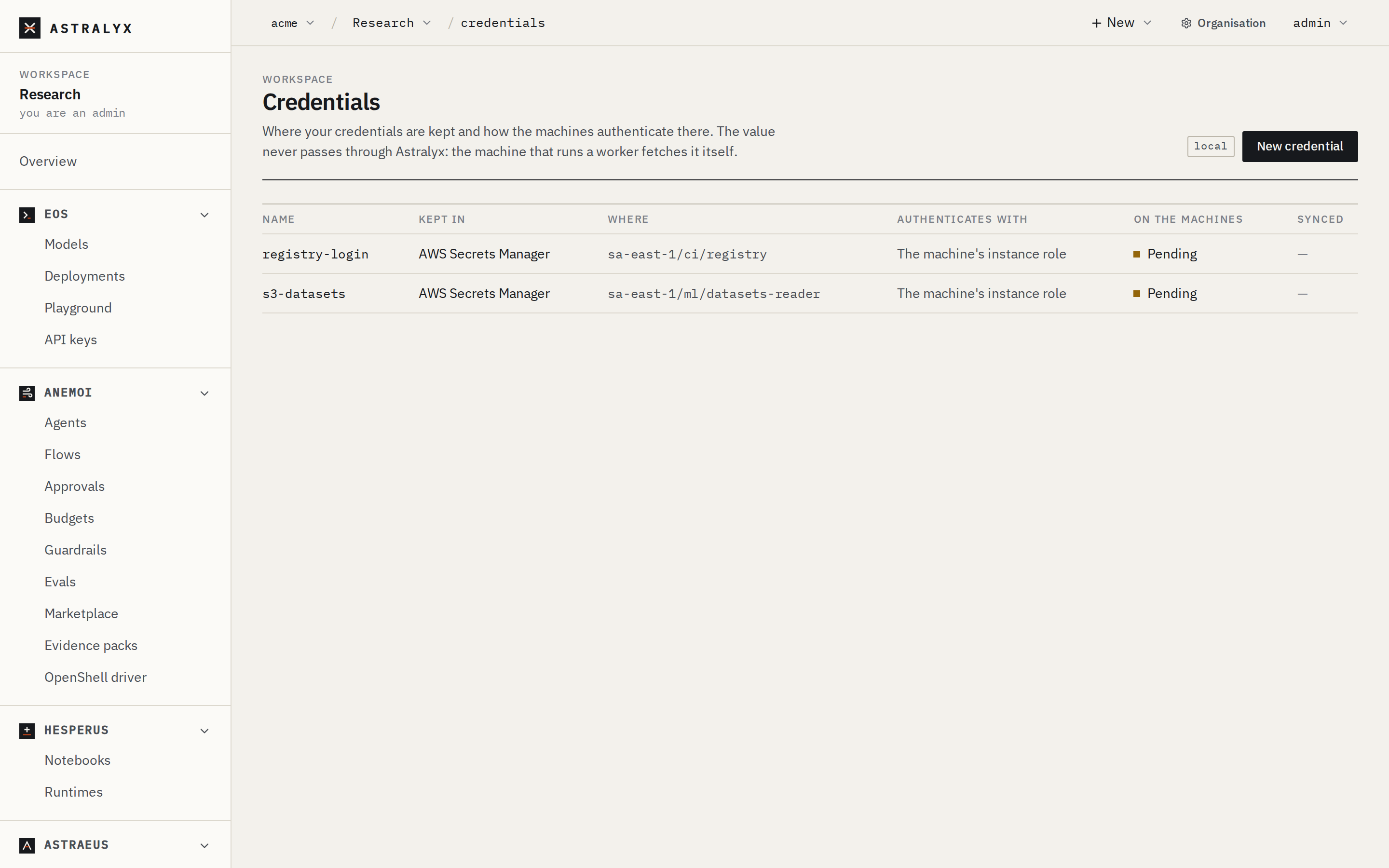
The Credentials list shows each credential's Name, where it is Kept in, Where, how it Authenticates with, its state On the machines and when it was Synced. A credential's page shows Where it is kept and In a worker (its keys and files).
| State | Meaning |
|---|---|
Pending |
Not fetched yet: no worker using it has been placed, or a refetch was requested. |
Synced |
The last fetch on a machine worked. synced_at says when. |
Error |
The last fetch failed. message says on which machine and why. |
The state is the latest report from any machine that holds the credential.
To delete a credential, open it and click Delete, or call DELETE $API/credentials/<name> (204 No Content). The value in your secret manager is not touched. Runs that still use the credential wait for it.
What the control plane stores#
| Stored | Never stored |
|---|---|
| The credential's name and labels | The secret's value |
| The provider, region, secret name or path, URL, version | Tokens, keys, passwords or certificates used to authenticate |
| The auth mode and identifiers (role ARN, tenant and client IDs, Vault role) | The contents of the files named in auth |
| Paths of files on the machines | |
| The sync state and the agent's error message (at most 4096 bytes) |
Troubleshooting#
| Symptom | Cause | Fix |
|---|---|---|
Worker stays in Preparing: waiting for external secret X (key K) to be synced to this node |
The machine has not fetched it, or the fetched value has no file K. |
Open the credential: Error shows the provider's answer. Check that K is a file name the credential produces (see Which files a credential makes). |
Error: authentication failed: the instance has no IAM role attached |
instance_profile on a machine without an instance role. |
Attach a role to the instance, or use another mode. |
Error: authentication failed: reading /etc/astraeus/vault-token: No such file or directory (os error 2) |
The file named in auth is missing on that machine. |
Put the file on every machine that may run the workers. |
Error: a key is missing |
data names a key the value does not have. |
Fix the key name, or remove data to get every field. |
Create refused: 403 HOST_ACCESS_FORBIDDEN |
A file path in auth is outside the workspace's host paths. |
An organisation admin grants the directory. |
Create refused: 400 INVALID_EXTERNAL_SECRET, such as azure.vault_url "http://…" must be an https:// URL |
A required field is missing or invalid. | Fix the field the message names. |
| The run sees no file and no variable | The reference has neither env_vars nor mount_path. |
Add one of them. |
Registry pull fails: registry secret X is not valid |
The credential produced several files, or not the expected JSON. | Map a single key to one file, as in Private container registries. |