Drives and data#
A drive gives a name to data where it already is — a directory on a
machine, a shared filesystem, or a folder kept on each machine — so runs can
mount it by name. Astraeus never moves your data to the control plane. When a
worker runs on another machine than the data, Astraeus mounts it there over
NFS for as long as the worker needs it. In the API a drive is a datavolume
(/datavolumes, also /drives); a mount between two machines is a
claim (/datavolume-claims, also /mounts).
Use a drive when:
- Your dataset lives on a shared filesystem (Lustre, GPFS, NFS, Weka): name its path once, mount it read-only in every run.
- Your data is on one machine's NVMe: runs placed there read it locally; runs placed elsewhere reach it over NFS (over RDMA when both machines have it).
- You download the same weights or datasets in every run: a drive kept on each machine is a cache — each machine keeps its own copy, and runs go where a copy already is.
- A run needs fast scratch space: a scratch drive is a local directory on whichever machine runs the worker.
- Runs produce results you keep: write them to a drive on a machine or a shared filesystem, which Astraeus never deletes.
Kinds of drive#
| Kind (console) | node_scope |
Where the data is | Deleting the drive |
|---|---|---|---|
| On each machine's data location | placed |
Each machine that runs a worker using it keeps its own copy, in the folder chosen for data on that machine | Deletes every copy |
| On one machine | "" (empty) |
A path on one machine; workers elsewhere reach it over NFS | Leaves the data |
| Shared filesystem | shared |
The same path on every machine (Lustre, GPFS, NFS…); a named machine measures it | Leaves the data |
| Scratch on each machine | local-any |
A local directory on whichever machine runs the worker, made when needed | Leaves the data |
A drive can have several sources; a worker picks one by index. Paths on machines (all kinds but On each machine's data location) must be under the host paths granted to the workspace — see Organisations, workspaces and clusters.
Mounts across machines#
The scheduler prefers the machine that holds a drive's data. When a worker runs elsewhere, Astraeus creates a mount for that worker's machine: the machine holding the data exports the path to that one machine over NFS, the worker's machine mounts it, and the worker starts only once the mount is ready. It is undone when the worker ends.
transport (console: Across machines) |
Behaviour |
|---|---|
Auto (default) |
NFS over RDMA when both machines are on the same InfiniBand fabric or RoCE network, else over TCP — and TCP if RDMA does not work. |
RDMA |
NFS over RDMA only. |
TCP |
NFS over TCP. |
Local |
Never over the network: workers run where the data is. |
Data locations, copies and caches#
Each machine has a data location: the folder where it keeps copies of
drives On each machine's data location. It is always a person's choice,
never guessed. The installer asks in a terminal (or takes --data-dir);
otherwise an organisation admin chooses it on the machine's page, where the
console lists the disks in plain words and pre-selects the local disk with
the most free space, fastest first. Until a machine has one, nothing is
written to its disks, and a run that needs a copy there says Choose where to
keep data on <machine>.
- Copies. The drive's page lists each machine's copy, its size and when it was last used. A run goes to a machine that already has a copy when it can.
- Expected size (
size_hint_bytes): a machine without a copy is chosen only if its data location has that much room. - A cache (
evictable): copies no worker is using may be removed when a machine's disk fills or passes its data location's limit, least recently used first; the next worker that needs one makes it again. Each removal is an event on the drive. Do not keep results in a cache. - Changing a machine's data location leaves existing copies where they are; new copies go to the new folder.
Deleting a placed drive deletes its data
A drive On each machine's data location is the only kind whose data Astraeus deletes: deleting the drive deletes its copies on every machine. The other kinds name data that stays yours.
Using a drive in a run#
A run lists the drives it mounts in its worker template, with where they appear and how:
"datavolume_refs": [
  {"name": "imagenet", "mount_path": "/data", "mode": "ReadOnly"},
  {"name": "hf-cache", "mount_path": "/root/.cache/huggingface"}
]
| Field | Default | Description |
|---|---|---|
name |
— | The drive. |
mount_path |
The drive's own, else /data/<name> in the console |
Where it appears in the container. |
sub_path |
The whole drive | A folder inside the drive. |
mode |
The drive's | ReadOnly or ReadWrite. A run can narrow a read-write drive to read-only, never the reverse. |
In the console's New run form, Drives takes name or
name:/mount/path, comma-separated.
Data sources#
A data source connects a workspace to data in object storage or on a
filesystem — Local, NFS, S3, MinIO, Google Cloud Storage, Azure Blob, Oracle
Cloud Object Storage. A machine serving it indexes the files (sizes,
partitions, Parquet schemas and statistics) and keeps the index on the
machine; the control plane holds totals only. Its credentials are
credentials, fetched on that machine. In the API a data
source is a connector (/connectors, also /data-sources). See
Data sources.
Create one#
A read-only drive for a dataset on a shared Lustre filesystem, mounted at
/data in workers. The workspace must be granted the host path
/lustre/datasets.
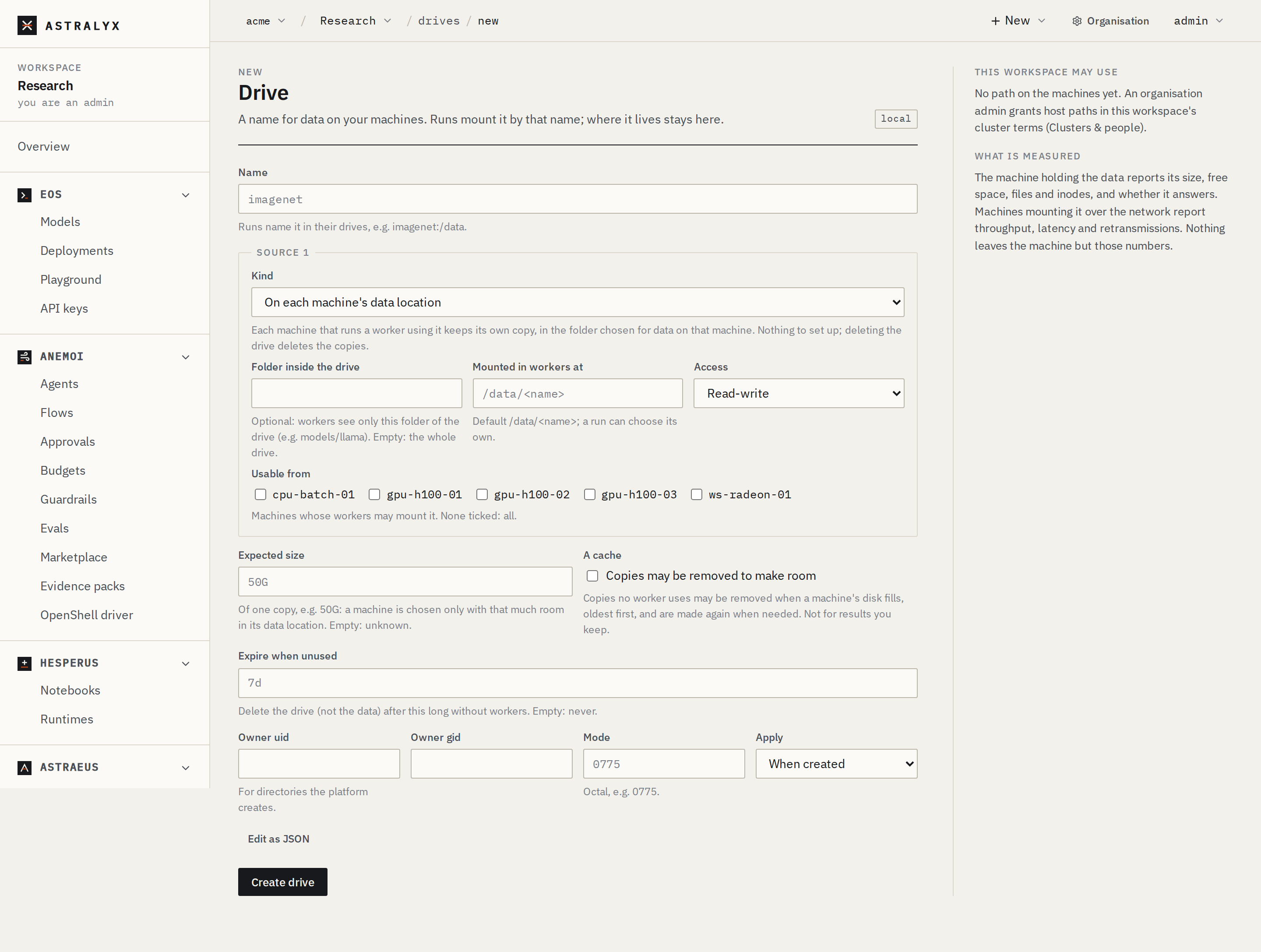
- New → Drive.
- Name
imagenet. - Under the source: Kind Shared filesystem, the machine that
measures it, Path on the machine
/lustre/datasets/imagenet, Mounted in workers at/data, Access Read-only. - Create drive.
The form also suggests drives from the disks and shared filesystems your machines report: pick one to fill it in.
{
  "metadata": {"name": "imagenet"},
  "spec": {
    "sources": [{
      "node_scope": "shared",
      "node": "gpu-01",
      "path": "/lustre/datasets/imagenet",
      "mount_path": "/data",
      "mode": "ReadOnly"
    }]
  }
}
$ curl -sS -X POST "$WS_API/drives" -H "Authorization: Bearer $ASTRAEUS_TOKEN" \
    -H 'content-type: application/json' -d @drive.json
A cache of Hugging Face downloads kept on each machine needs no path on the machine and no host access:
The astraeus CLI has no drive commands: use the console or the API, then
mount the drive in runs.