Usage, cost and budgets#
Every cluster meters what each workspace holds — GPU-hours by GPU model, core-hours, memory GiB-hours, worker-hours — and the tokens its deployments serve through a gateway. The platform prices that with each cluster's price table and shows it per workspace and per day. This page explains what is measured, how prices apply, and how to get the numbers out.
What is measured#
A worker holds its GPUs, CPU cores and memory from the moment it is placed on a machine until it is released, whatever it does with them: a reservation is capacity nobody else could use. Usage is what was held, not what was utilised.
| Measure | Unit | What counts |
|---|---|---|
| GPU-hours | hours, by GPU model | Each GPU a worker holds. The model is the name the machine reports, for example NVIDIA H100 80GB HBM3; unknown when the machine did not report it. |
| Core-hours | hours | CPU cores the machine reserved for the worker. |
| GiB-hours | GiB × hours | Memory the machine reserved for the worker. |
| Worker-hours | hours | Workers holding anything, times how long. |
| Tokens | count, by model | Prompt and completion tokens, and requests, that a deployment answered through a gateway with an API key. Counted under the workspace's model name. |
How it is collected:
- The cluster samples every placed worker's reservation every 60 s and charges the time since the last sample to the workspace's bucket for that hour, split across hours when needed.
- If sampling stopped for more than 10 minutes (for example during a control-plane outage), that gap is not charged: what was held then is not known.
- Gateways report tokens per minute; a report retried after a lost answer is not counted twice.
- Hourly buckets are kept on the cluster for 400 days.
- Work outside any workspace is metered under
_cluster.
What agents spend on model providers is metered separately; see Anemoi.
Prices#
Each cluster has a price table, in the platform's currency (USD unless the
platform is configured otherwise). A resource without a price costs nothing;
its hours and tokens are still counted.
| Resource | Unit | Applies to |
|---|---|---|
gpu:<model> |
per GPU-hour | GPUs of that model (the name the machine reports, compared case-insensitively). Up to 100 characters. |
gpu |
per GPU-hour | GPUs of any model without a gpu:<model> price. |
cpu_core |
per core-hour | CPU cores. |
memory_gib |
per GiB-hour | Memory. |
tokens_prompt:<model> |
per million prompt tokens | Tokens of that workspace model. |
tokens_prompt |
per million prompt tokens | Any model without its own price. |
tokens_completion:<model> |
per million completion tokens | Tokens of that workspace model. |
tokens_completion |
per million completion tokens | Any model without its own price. |
Prices are non-negative numbers. A deployment priced both by its GPU-hours and by its tokens is charged both; a price table usually prices one or the other.
Who sets them:
- A cluster dedicated to your organisation: organisation owners and admins. The prices are your internal cost, for showback and chargeback.
- Astraeus Cloud: Astralyx. Organisations see them, read-only.
Set a cluster's prices#
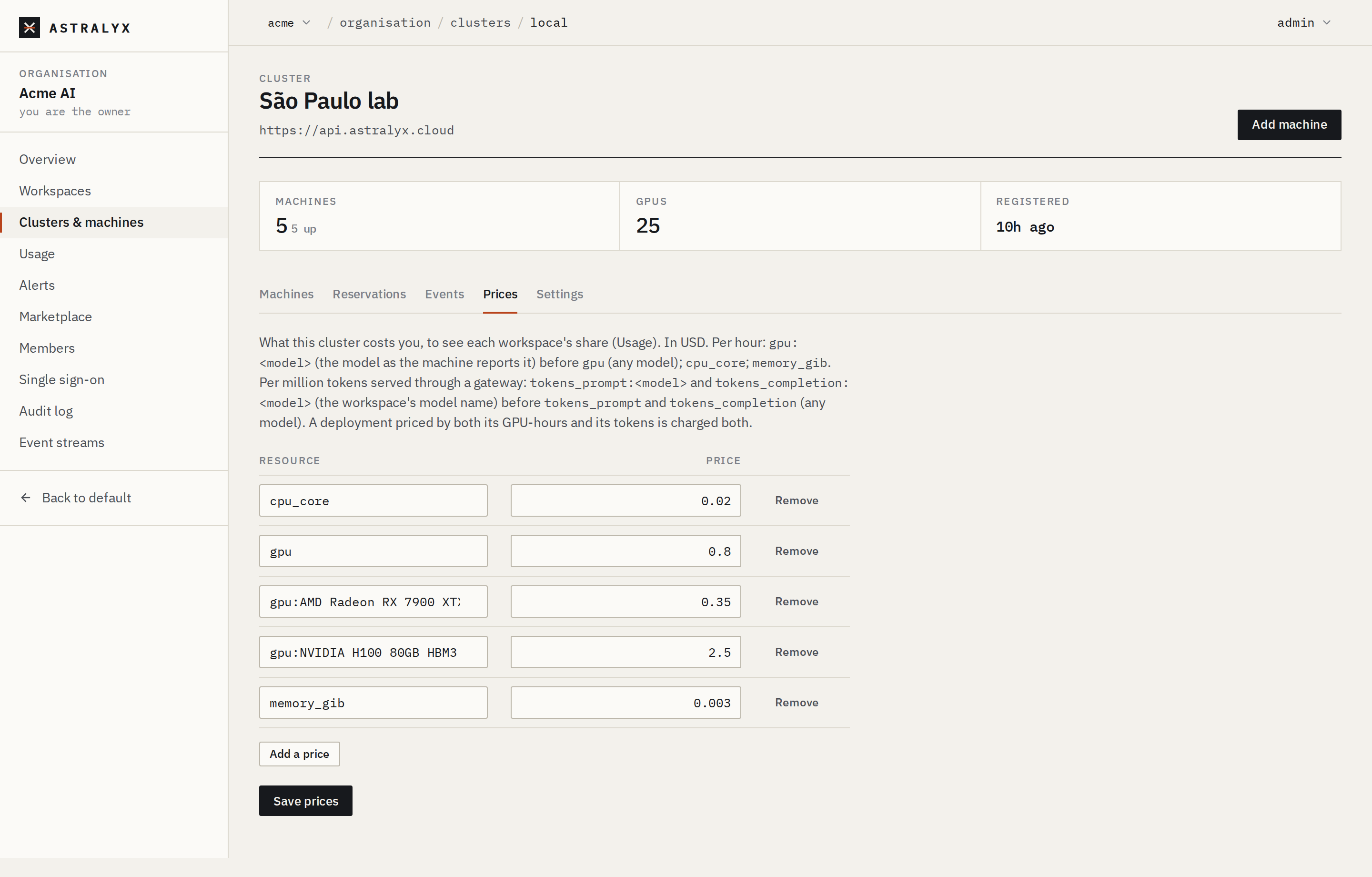
- Open Organisation → Clusters & machines and select the cluster.
- Open the Prices tab.
- Select Add a price, choose or type the Resource, and enter the Price. Repeat for each resource.
- Select Save prices. The table replaces the previous one; usage is re-priced at once, for every period.
The table you send replaces the whole table:
$ curl -sS -X PUT "$ASTRA_URL/api/v1/orgs/acme/clusters/lab-a/prices" \
    -H "Authorization: Bearer $ASTRA_TOKEN" -H "Content-Type: application/json" \
    -d '{"prices": {"gpu:NVIDIA H100 80GB HBM3": 2.5, "gpu": 0.8, "cpu_core": 0.02, "memory_gib": 0.003}}'
{"prices":{"cpu_core":0.02,"gpu":0.8,"gpu:NVIDIA H100 80GB HBM3":2.5,"memory_gib":0.003}}
GET /orgs/{org}/clusters/{cluster}/prices returns
{"prices": {…}, "currency": "USD", "editable": true}; editable is
false on Astraeus Cloud.
Note
Cost is computed when you ask for it, from the current price table. A price change therefore applies to past periods too. Record the table you used if you need a fixed historical figure.
| Error | Cause |
|---|---|
400 INVALID_PRICE |
An unknown resource name, an empty model, or a negative or non-finite price. |
403 HOSTED_CLUSTER |
Astraeus Cloud's prices are set by Astralyx. |
View usage and cost#
Owners and admins see every workspace of the organisation and, on the organisation's dedicated clusters, a line for work outside its workspaces. Members see only the workspaces they belong to.
Open Organisation → Usage and choose the period: This month, Last month or Last 30 days (UTC). The page shows the totals, a bar per day, and a row per workspace and cluster with GPU-hours, Core-hours, GiB-hours, Worker-hours, Tokens in / out and Cost. Hover a GPU-hours cell for the hours by GPU model. Tokens by model lists what deployments answered.
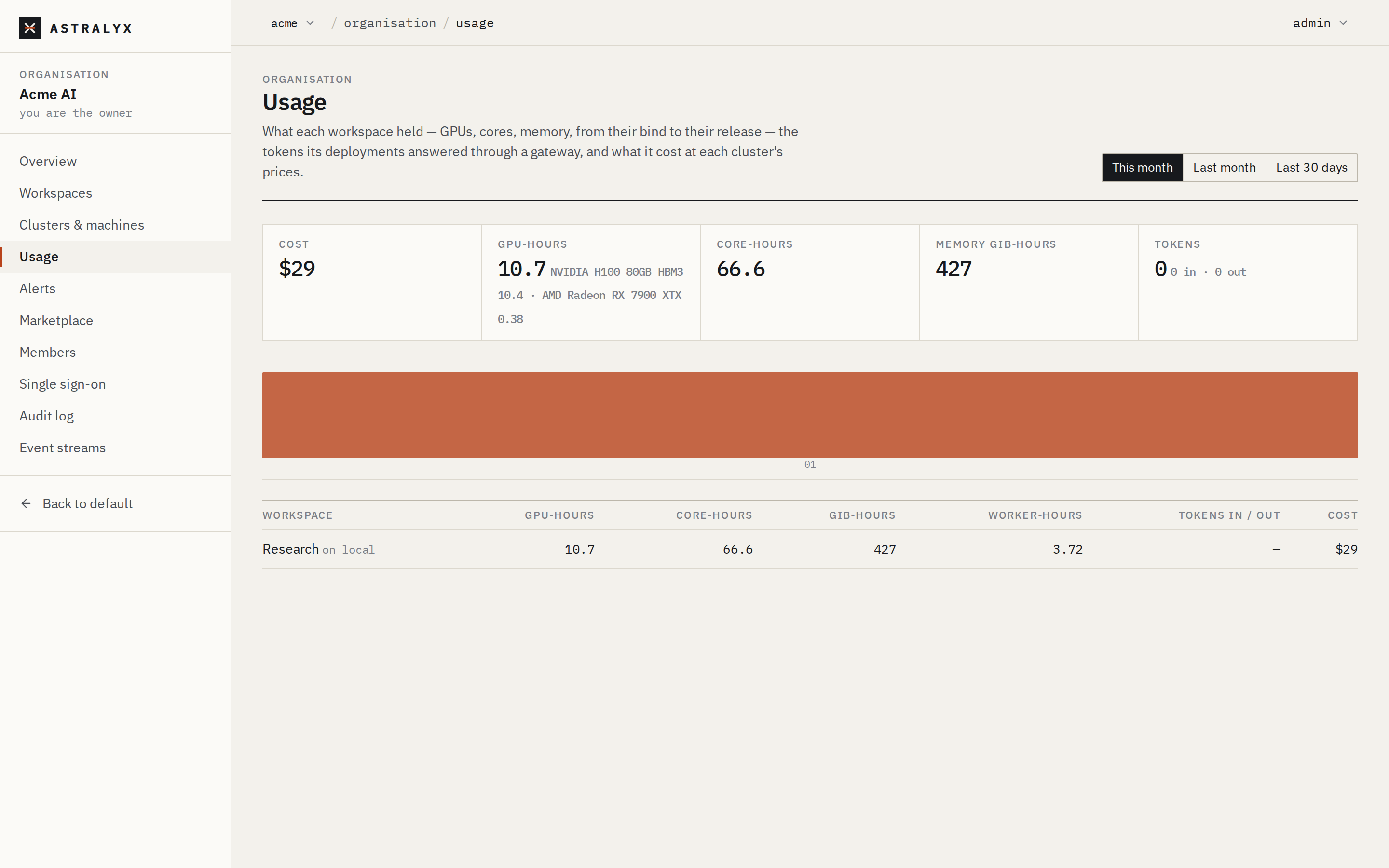
If a cluster did not answer, a notice says which: its usage is missing from the totals.
$ astra astraeus usage --since 2026-09-01T00:00:00Z
WORKSPACE             CLUSTER       GPU-H      CORE-H     COST
vision                lab-a         412.5      6600.0     1163.25 USD
nlp                   lab-a         96.0       1536.0     270.72 USD
(outside workspaces)  lab-a         0.0        12.0       0.24 USD
total: 1434.21 USD
Without --since, the period starts at the beginning of the current
month (UTC) and ends now.
$ curl -sS "$ASTRA_URL/api/v1/orgs/acme/usage?start=2026-09-01T00:00:00Z&end=2026-10-01T00:00:00Z" \
    -H "Authorization: Bearer $ASTRA_TOKEN"
| Parameter | Default | Description |
|---|---|---|
start |
the first day of the month of end, 00:00 UTC |
RFC 3339. |
end |
now | RFC 3339; a later time is treated as now. |
start must be before end, at most 400 days apart
(400 INVALID_PERIOD).
The usage response#
{
  "start": "2026-09-01T00:00:00Z",
  "end": "2026-10-01T00:00:00Z",
  "currency": "USD",
  "total": { "gpu_hours": {"NVIDIA H100 80GB HBM3": 508.5}, "cpu_core_hours": 8148.0,
             "memory_gib_hours": 65184.0, "task_hours": 640.0, "token_cost": 0.0, "cost": 1434.21 },
  "items": [
    { "cluster": "lab-a", "hosted": false, "workspace": "vision", "workspace_name": "Vision",
      "usage": { "gpu_hours": {"NVIDIA H100 80GB HBM3": 412.5}, "cpu_core_hours": 6600.0,
                 "memory_gib_hours": 52800.0, "task_hours": 520.0, "token_cost": 0.0, "cost": 1163.25 } }
  ],
  "days": [ { "day": "2026-09-01", "usage": { "…": "…" } } ],
  "unreachable": [],
  "shared_by": {}
}
| Field | Description |
|---|---|
total |
The sum of every line, as a cost object. |
items[] |
One line per workspace and cluster. workspace is null for work outside the organisation's workspaces on its dedicated clusters (admins only). shared: true marks a workspace's use of a deployment another organisation shared with it, priced by that organisation's cluster. |
days[] |
One cost object per UTC day, over every line. |
unreachable |
Clusters that did not answer; their usage is not counted. |
shared_by |
The owners of shared deployments named in token lines. |
A cost object:
| Field | Type | Description |
|---|---|---|
gpu_hours |
map | GPU-hours by GPU model. |
cpu_core_hours |
number | Core-hours. |
memory_gib_hours |
number | GiB-hours of memory. |
task_hours |
number | Worker-hours. |
tokens |
map | By model: prompt, completion, requests, cost. Omitted when empty. Tokens served by another workspace's shared deployment appear as shared:<owner-namespace>.<model>. |
token_cost |
number | What the tokens cost; part of cost. |
cost |
number | Everything, at the cluster's prices, in currency. |
Hourly usage from a cluster#
The cluster keeps the hourly buckets the platform reads. Through a workspace's view of a cluster you get that workspace's own rows:
$ curl -sS "$ASTRA_URL/api/v1/orgs/acme/workspaces/vision/clusters/lab-a/api/usage?start=2026-09-30T00:00:00Z" \
    -H "Authorization: Bearer $ASTRA_TOKEN"
{"start":"2026-09-30T00:00:00Z","end":"2026-10-01T09:14:22Z","items":[
  {"namespace":"ws-3f9a1c07b2e4","hour":"2026-09-30T10:00:00Z","gpu_seconds":{"NVIDIA H100 80GB HBM3":28800.0},
   "cpu_core_seconds":460800.0,"memory_gib_seconds":3686400.0,"task_seconds":3600.0}]}
| Parameter | Default | Description |
|---|---|---|
start |
30 days before end |
RFC 3339. |
end |
now | RFC 3339. |
namespace |
all visible | Only this namespace. |
Rows are in seconds (gpu_seconds by model, cpu_core_seconds,
memory_gib_seconds, task_seconds), plus tokens and agents' spend when
present.
Export#
There is no file export in the console. To export usage, call the API and store the JSON:
GET /orgs/{org}/usagefor priced totals per workspace and per day;- the cluster's
GET …/api/usagefor unpriced hourly rows per workspace.
For example, last month's priced usage per day as CSV, with jq:
$ curl -sS "$ASTRA_URL/api/v1/orgs/acme/usage?start=2026-09-01T00:00:00Z&end=2026-10-01T00:00:00Z" \
    -H "Authorization: Bearer $ASTRA_TOKEN" \
  | jq -r '.days[] | [.day, (.usage.gpu_hours | add // 0), .usage.cpu_core_hours, .usage.cost] | @csv'
"2026-09-01",48,768,136.8
Budgets#
Astraeus has no spending budget for compute: nothing stops a run because a
workspace has spent an amount. To cap what a workspace can consume on a
cluster, give it a quota; to be told when it reaches the quota,
add an alert rule for quota_reached (Alerts).
Budgets do exist for agents: a workspace's agents can have period budgets that stop their runs when spent. They are part of Anemoi.
Troubleshooting#
| Symptom | Cause | Fix |
|---|---|---|
| Hours shown, cost 0 | The cluster has no price for those resources. | Set the cluster's prices. |
A GPU model is not priced by gpu:<model> |
The name differs from what the machine reports. | Copy the model name from the hover on GPU-hours, or set a gpu price. |
| "Not counted — the cluster did not answer" | The platform could not reach the cluster's API. | Check the cluster; the hours are kept on the cluster and appear once it answers. |
| A short period is missing | The control plane was down more than 10 minutes. | Gaps are not charged by design. |
400 INVALID_PERIOD |
start is after end, or the period exceeds 400 days. |
Narrow the period. |