Schedules#
A schedule starts a new run from a run specification at a set time: every day, or once a week on a given day, in a time zone of your choice. Use it for work that repeats — a nightly evaluation, a weekly retrain, a daily data export. In the API a schedule is a cronjob (/v1/cronjobs, alias /v1/schedules).
Not cron syntax
A schedule is an hour and a minute, optionally a day of the week, and a time zone. Cron expressions (*/15 * * * *), several times a day and days of the month are not supported. For those, run your own timer and start runs through the API.
How a schedule works#
- When: at
hour:minuteintimezone(an IANA name such asEurope/Paris; UTC when empty), every day, or only onday_of_week(0 = Sunday … 6 = Saturday). - What: each time, a new run is created from
job_template— the same fields as a run'sspec, checked in full when you create the schedule — named<schedule>-<n>, wherencounts from 1. - Labels: each run carries the schedule's labels plus
cronjob=<schedule>,cronjob-run=<n>andcronjob-trigger(scheduleormanual). Its creator is recorded asschedule:<schedule>. - Overlap: every fire starts a new run, even if the previous one is still running. There is no concurrency setting: give the template a
time_limit_secondsshorter than the interval if runs must not overlap. - Missed times: the scheduler checks every 30 seconds. If Astraeus was unavailable when a run was due, it fires once when it is back, not once per missed time, and the next time is computed from then.
- Daylight saving: a local time skipped by the clock change fires the next day at that wall-clock time; a local time that happens twice fires once, at the first.
- Old runs: runs are not deleted by the schedule. Deleting a schedule leaves its runs; delete them as any run.
max_runs: after that many runs (manual triggers included), the schedule becomesCompletedand never fires again.0(the default) means forever.
| State | Meaning |
|---|---|
Active |
Fires on schedule. |
Paused |
Does not fire; its next time is cleared. |
Completed |
Reached max_runs. |
Create a nightly evaluation#
Every night at 02:30 Paris time, evaluate the latest checkpoint on one GPU, with a two-hour limit so two nights never overlap.
{
  "metadata": { "name": "nightly-eval", "labels": { "team": "nlp" } },
  "spec": {
    "schedule": { "hour": 2, "minute": 30, "timezone": "Europe/Paris" },
    "max_runs": 0,
    "job_template": {
      "task_template": {
        "image": "registry.example.com/nlp/eval:2026-09",
        "registry_secret_ref": { "external_secret_name": "registry-login" },
        "command": "python",
        "args": ["/ckpt/code/eval.py", "--checkpoint", "/ckpt/llama-sft/latest.pt"],
        "restart_policy": "Never",
        "time_limit_seconds": 7200,
        "datavolume_refs": [{ "name": "checkpoints", "mount_path": "/ckpt", "mode": "ReadOnly" }],
        "requested_resources": {
          "cpu_cores": 8,
          "memory_bytes": 68719476736,
          "gpu_requests": { "count": 1 }
        }
      }
    }
  }
}
- Open the workspace's Resources page → Schedules (
/o/<org>/w/<workspace>/resources?kind=cronjobs), and pick the cluster. - Select New. The dialog holds a starting point as JSON.
- Replace it with the schedule above and select Create.
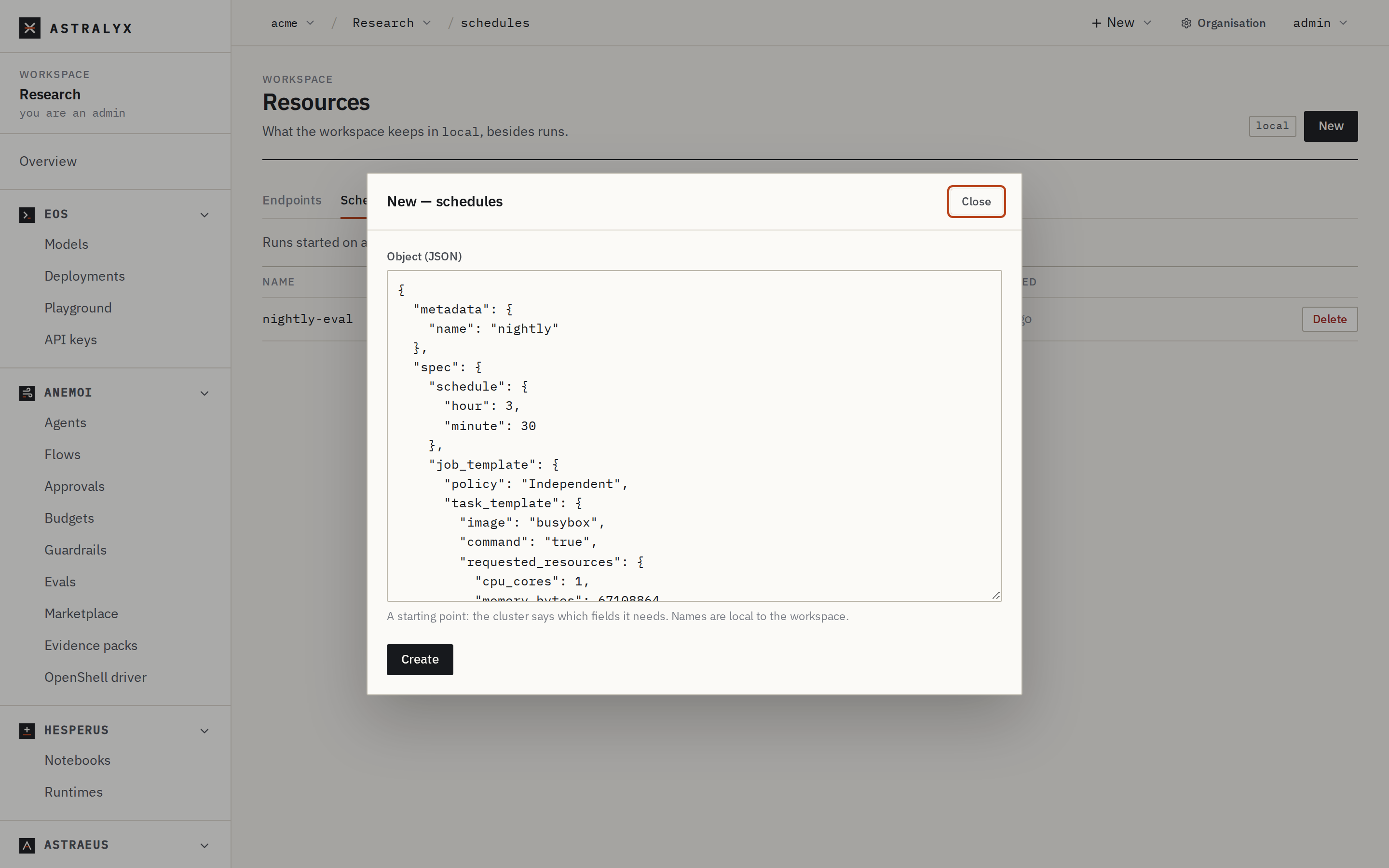
The list shows each schedule's state; selecting a row shows its full specification. Delete removes it (its runs stay).
Neither astra nor astraeus has a schedule command. Use the console or the API.
$ curl -sS -X POST "$API/cronjobs" -H "Authorization: Bearer $ASTRA_TOKEN" \
    -H 'Content-Type: application/json' --data-binary @nightly-eval.json | jq -r .metadata.name
nightly-eval
$ curl -sS "$API/cronjobs/nightly-eval" -H "Authorization: Bearer $ASTRA_TOKEN" \
    | jq '{state: .status.state, next_run_at, total_runs}'
{
  "state": "Active",
  "next_run_at": "2026-10-02T00:30:00Z",
  "total_runs": 0
}
next_run_at is in UTC: 02:30 in Paris is 00:30 UTC in October.
More examples#
Sundays at 22:00 UTC, an 8-GPU gang that must finish within 12 hours:
{"metadata": {"name": "weekly-retrain"},
 "spec": {
   "schedule": {"day_of_week": 0, "hour": 22, "minute": 0},
   "job_template": {
     "start": "Gang",
     "task_template": {
       "image": "nvcr.io/nvidia/pytorch:24.08-py3",
       "command": "bash",
       "args": ["-c", "exec torchrun --nproc-per-node=$ASTRAEUS_GPU_COUNT /ckpt/code/retrain.py"],
       "time_limit_seconds": 43200,
       "datavolume_refs": [{"name": "checkpoints", "mount_path": "/ckpt", "mode": "ReadWrite"}],
       "requested_resources": {
         "gpu_requests": {"count": 8, "min_per_machine": 8},
         "per_gpu": {"cpu_cores": 12, "memory_bytes": 128849018880}}}}}}
Every day at 06:15 New York time, stopping after 30 runs:
{"metadata": {"name": "daily-export"},
 "spec": {
   "schedule": {"hour": 6, "minute": 15, "timezone": "America/New_York"},
   "max_runs": 30,
   "job_template": {
     "task_template": {
       "image": "python:3.12",
       "command": "python", "args": ["/data/code/export.py"],
       "time_limit_seconds": 3600,
       "datavolume_refs": [{"name": "warehouse", "mount_path": "/data"}],
       "requested_resources": {"cpu_cores": 2, "memory_bytes": 4294967296}}}}}
Pause, resume and run now#
These are API calls; the console has no buttons for them.
$ curl -sS -X POST "$API/cronjobs/nightly-eval/pause"  -H "Authorization: Bearer $ASTRA_TOKEN" -w '%{http_code}\n'
204
$ curl -sS -X POST "$API/cronjobs/nightly-eval/resume" -H "Authorization: Bearer $ASTRA_TOKEN" -w '%{http_code}\n'
204
$ curl -sS -X POST "$API/cronjobs/nightly-eval/trigger" -H "Authorization: Bearer $ASTRA_TOKEN"
{"job":"nightly-eval-4","run":4}
- Pause stops it firing and clears its next time.
- Resume computes the next time from now: times missed while paused are not run.
- Trigger starts a run now (
cronjob-trigger=manual), only when the schedule isActive, and counts towardmax_runs. It answers202 Acceptedwith the run's name.
To change a schedule's time or template, delete it and create it again: there is no update. Its run numbers start again from 1, so delete or rename old runs first if the names would collide.
Reference#
spec#
| Field | Type | Default | Description |
|---|---|---|---|
schedule.hour |
integer, 0–23 | required | Hour, in timezone. |
schedule.minute |
integer, 0–59 | required | Minute. |
schedule.day_of_week |
integer, 0–6 | every day | 0 = Sunday, 1 = Monday … 6 = Saturday. |
schedule.timezone |
IANA name | UTC | Europe/Paris, America/Sao_Paulo. An unknown name is refused. |
max_runs |
integer | 0 |
Stop after this many runs; 0 (or negative) means forever. |
job_template |
run spec |
required | What each run is: every field of a run's spec. Its priority is capped by the workspace's maximum priority. |
metadata.name is required and must not contain /; the runs it creates (<name>-<n>) must also be valid run names. Labels under astraeus.io/ are refused.
What GET /v1/cronjobs/<name> returns#
| Field | Description |
|---|---|
status.state |
Active, Paused or Completed, with reason (Schedule created, Schedule paused by user, Schedule resumed by user, Reached max_runs limit of 30). |
total_runs |
Runs created so far. |
last_run_at, next_run_at |
RFC 3339, UTC. next_run_at is empty while paused. |
job_names |
The runs it created. |
history |
Every state change. |
Errors#
| Code | Meaning |
|---|---|
400 VALIDATION_ERROR with spec.schedule |
hour must be between 0 and 23, got 24, day_of_week must be between 0 (Sunday) and 6 (Saturday), got 7, invalid timezone "Paris". |
400 VALIDATION_ERROR with spec.job_template.* |
The template is not a valid run. |
409 CRONJOB_ALREADY_EXISTS |
The name is taken. |
400 CRONJOB_NOT_ACTIVE |
Trigger on a paused or completed schedule: Schedule is Paused; resume it before triggering. |
400 CRONJOB_MAX_RUNS_REACHED |
Trigger after max_runs. |
409 CRONJOB_TRIGGER_CONFLICT |
Two triggers at once; retry. |