Share a GPU fleet between teams#
You split one cluster between two teams. Vision trains large models and gets most of the H100 machines; Eval runs short, deadline-bound evaluations, gets less capacity but may jump the queue. Each team has its own workspace: its own runs, drives, credentials and people, a quota, a fair-share weight, the machines it may use and the highest priority it may ask for. Neither team sees the other's work.
What you need:
- An organisation owner or admin: workspaces, their access to a cluster and machine labels are theirs to set.
- A cluster with machines. The example: 6 machines with 8 × H100
(
h100-01…h100-06, 48 GPUs) and 2 with 8 × L40S (l40s-01,l40s-02, 16 GPUs). - For the API: an API token,
curlandjq(How the recipes are written).
The plan#
| Term | vision |
eval |
Effect |
|---|---|---|---|
Pools (node_selector) |
pool=h100 |
none: any machine | Vision runs only on the H100 machines; Eval anywhere. |
Quota (quota) |
40 GPUs | 24 GPUs, 32 workers | Hard caps on what is in use at once. A run that would exceed them waits. |
Weight (weight) |
2 | 1 | Between runs of equal priority, the workspace least served against its quota goes first; Vision counts double. |
Max priority (max_priority) |
10 | 50 | Eval may submit at up to 50 and preempt Vision's work below that. |
The quotas add up to more than the cluster (64 of 64 GPUs here, and Vision could hold 40 of the 48 H100s): what one team does not use, the other can, up to its own quota.
1. Label the machines into pools#
A pool is a machine label. A workspace whose access names
pool=h100 sees and uses only machines labelled so.
For each H100 machine: Machines → h100-01 → Where it is → Change,
set pool to h100, save. Do the same with l40s on the L40S
machines. The panel shows which workspaces will see the machine with
the new labels before you save.
The same panel sets site, rack and fabric
(topology.astraeus.io/site, /rack, /fabric), which placement uses for
multi-machine runs (Pools, labels and topology).
2. Create the workspaces#
Organisation → Workspaces → New workspace. Name Vision,
Short name vision (lower-case letters, digits and dashes, 2 to 40).
Create workspace opens its settings. Repeat for Eval / eval.
$ ORG=https://console.astralyx.cloud/api/v1/orgs/acme
$ curl -fsS -X POST "$ORG/workspaces" -H "Authorization: Bearer $ASTRAEUS_TOKEN" \
    -H 'content-type: application/json' -d '{"name": "Vision", "slug": "vision"}'
{"id":"0192f1c4-…","namespace":"ws-3f9c2a1b7d4e","slug":"vision"}
$ curl -fsS -X POST "$ORG/workspaces" -H "Authorization: Bearer $ASTRAEUS_TOKEN" \
    -H 'content-type: application/json' -d '{"name": "Eval", "slug": "eval"}'
{"id":"0192f1c4-…","namespace":"ws-8a41d07c55e2","slug":"eval"}
Each workspace has one namespace (ws- and 12 hex digits), the same in
every cluster it has access to. Names inside it never meet the other
workspace's.
3. Give each workspace access to the cluster, on its terms#
Giving access creates the workspace's namespace in the cluster with these terms; the cluster enforces them on every request, whoever makes it.
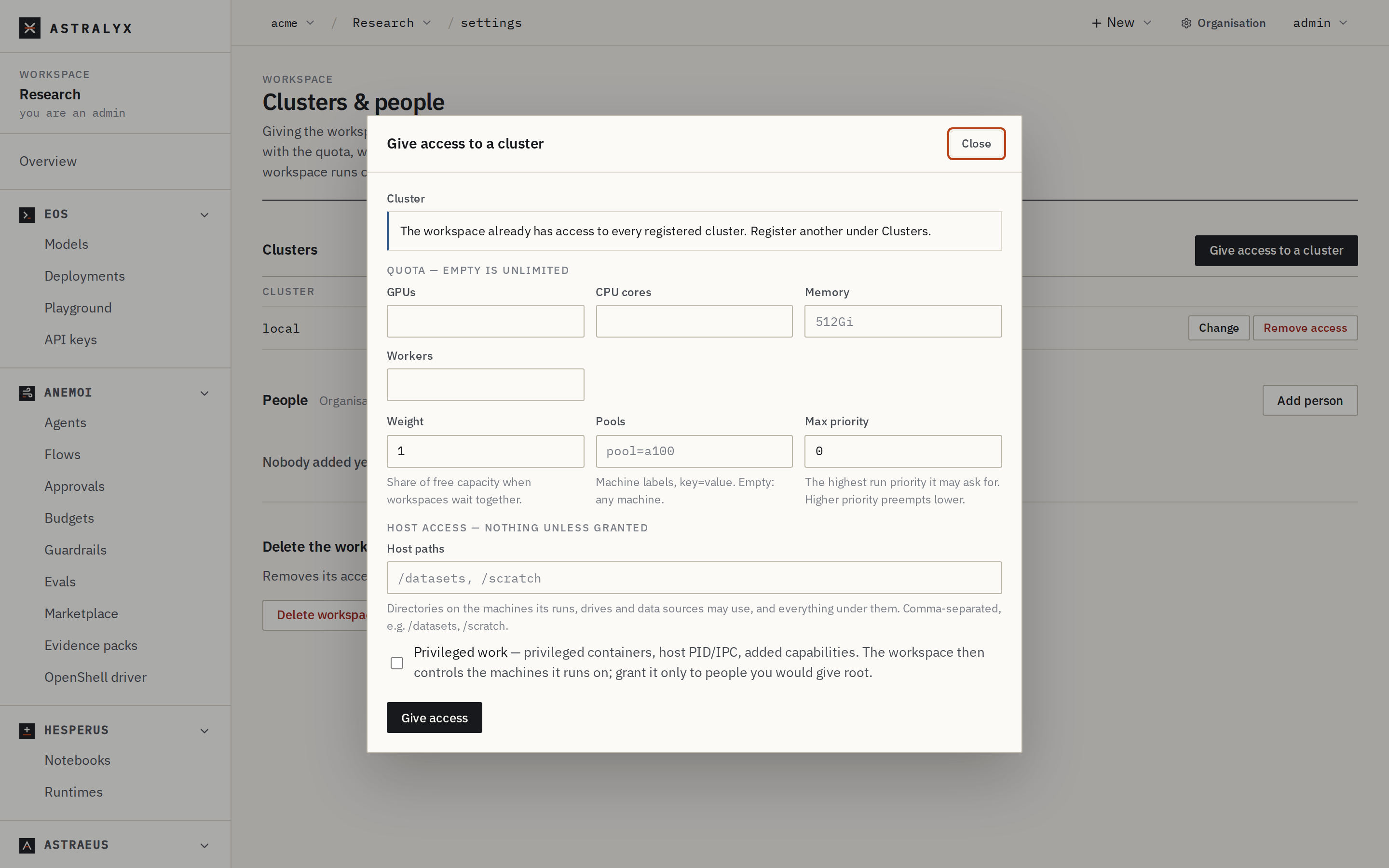
In the workspace, Settings (Clusters & people) → Give access to a cluster:
| Field | vision |
eval |
|---|---|---|
| Cluster | main |
main |
| Quota: GPUs / CPU cores / Memory / Workers | 40 / empty / empty / empty | 24 / empty / empty / 32 |
| Weight | 2 | 1 |
| Pools | pool=h100 |
empty |
| Max priority | 10 | 50 |
| Host paths | /data/vision |
empty |
An empty quota field is unlimited. Host paths are the directories on the machines the workspace's drives and runs may use (here, for Vision's checkpoint drives); nothing is granted by default.
$ curl -fsS -X POST "$ORG/workspaces/vision/clusters" -H "Authorization: Bearer $ASTRAEUS_TOKEN" \
    -H 'content-type: application/json' -d '{
      "cluster": "main",
      "quota": {"gpus": 40},
      "weight": 2,
      "node_selector": {"pool": "h100"},
      "max_priority": 10,
      "host_access": {"paths": ["/data/vision"]}
    }'
{"cluster":"main","namespace":"ws-3f9c2a1b7d4e"}
$ curl -fsS -X POST "$ORG/workspaces/eval/clusters" -H "Authorization: Bearer $ASTRAEUS_TOKEN" \
    -H 'content-type: application/json' -d '{
      "cluster": "main",
      "quota": {"gpus": 24, "tasks": 32},
      "weight": 1,
      "max_priority": 50
    }'
{"cluster":"main","namespace":"ws-8a41d07c55e2"}
| Field | Type | Default | Description |
|---|---|---|---|
quota.gpus, quota.cpu_cores, quota.memory_bytes, quota.tasks |
integer | unlimited | In use at once, across the workspace's placed workers. |
weight |
integer ≥ 1 | 1 | Fair-share weight. |
node_selector |
map | any machine | Labels a machine must all carry. |
max_priority |
−1000 to 1000 | 0 | The highest run priority the workspace may ask for. |
host_access.paths |
list | none | Host path prefixes its runs, drives and data sources may use. |
host_access.privileged |
boolean | false |
Privileged containers, host PID/IPC, added capabilities. |
Privileged work owns the machine
A workspace allowed privileged work, or a host path such as /, controls
the machines its runs land on, and every other workspace's work there.
Grant it only to people you would give root.
4. Add the people#
Settings → People → Add to the workspace, with a role:
| Role | May |
|---|---|
admin |
Everything in the workspace, and manage its people. |
editor |
Create and delete runs, drives, credentials, schedules, endpoints. |
viewer |
See them. |
auditor |
Read the governance record of the workspace's agents and make evidence packs; changes nothing (Members, roles and SSO). |
A person can be in both workspaces with different roles.
5. What each team sees#
Sign in as a member of Vision and work in its workspace:
$ astra login
Open https://console.astralyx.cloud/device?code=KXQT-BRMW and approve code KXQT-BRMW
Signed in as [email protected], working in acme/default
$ astra use acme/vision@main
Working in acme/vision
$ astra astraeus machines
MACHINE               STATE     GPUS                CPU    POOL
h100-01               Up        8× NVIDIA H100 80GB HBM3  224    h100
h100-02               Up        8× NVIDIA H100 80GB HBM3  224    h100
h100-03               Up        8× NVIDIA H100 80GB HBM3  224    h100
…
| Vision sees | Eval sees | |
|---|---|---|
| Machines, GPUs, Topology | Only h100-* (its pool). |
All 8 machines. |
| A GPU the other team holds | Held by another workspace, with its use, not the run's name. | The same. |
| Runs, Drives, Credentials, Events | Its own only. | Its own only. |
| Why its run was preempted | Preempted by higher-priority work (a job in another namespace). | — |
| Names | train-0, ckpt — never the other's. |
Astraeus enforces this on every request, whatever the client: a request acts as the person, in their workspace, and reaches only that workspace's namespace and pools.
6. See the terms at work#
Quota. Eval has 24 GPUs. With 16 in use, a 16-GPU run waits, without blocking anyone else, and says why:
$ astra astraeus runs
NAME                          CLUSTER       STATE       REASON
eval-mmlu-b                   main          Pending     Gang waits for namespace quota: gpus 16 in use + 16 asked > 24
eval-mmlu-a                   main          Running     2 of 2 workers running
A run that asks for more than the quota at all says more than the
namespace's quota allows at all … raise the quota or ask for less. The
first time a run waits on the quota, an event is recorded; an alert rule on
quota_reached tells the team (Alerts).
Fair share. When both teams have runs of the same priority waiting, the next free GPUs go to the workspace whose use, against its quota and divided by its weight, is lowest. The share is the largest of its fractions (GPUs, cores, memory, workers) that have a quota:
| Vision | Eval | |
|---|---|---|
| In use / quota | 32 / 40 GPUs = 0.8 | 8 / 24 GPUs = 0.33 |
| ÷ weight | 0.8 ÷ 2 = 0.40 | 0.33 ÷ 1 = 0.33 |
Eval is less served, so its waiting run goes first. Then, among runs of one workspace, the earlier submission first. Priority always comes before fair share.
Preemption across teams. All H100s are busy with Vision's runs at priority 0. Eval submits an urgent evaluation at priority 50 that needs 16 GPUs. Astraeus stops the fewest units of lower-priority work that make room (lowest priority first, then the most recently started; a gang whole), and holds the freed GPUs for Eval's run:
{
  "metadata": {"name": "eval-release"},
  "spec": {
    "priority": 50,
    "task_template": {
      "image": "registry.example.com/eval/harness:3",
      "command": "python",
      "args": ["-m", "harness", "--suite", "release"],
      "restart_policy": "Never",
      "time_limit_seconds": 7200,
      "requested_resources": {
        "gpu_requests": {"count": 16, "models": ["H100"]},
        "per_gpu": {"cpu_cores": 4, "memory_bytes": 17179869184},
        "node_selection": {"mode": "Any"}
      }
    }
  }
}
$ curl -fsS -X POST "$ORG/workspaces/eval/clusters/main/api/runs" -H "Authorization: Bearer $ASTRAEUS_TOKEN" \
    -H 'content-type: application/json' -d @eval-release.json | jq -r .metadata.name
eval-release
astra astraeus run has no flag for priority or GPU model, so this run is
submitted with the API (or the console's Edit as JSON).
In Vision's workspace:
$ astra astraeus runs
NAME                          CLUSTER       STATE       REASON
train-vit                     main          Pending     Preempted by higher-priority work (a job in another namespace); waiting to run again
train-vit gets SIGTERM, has the machine's stop grace to save a
checkpoint, and goes back to the queue with its restart count unchanged
(Preemptible fine-tuning with checkpoints). If
Vision tries the same trick at priority 60, Astraeus refuses it with
403 Forbidden and priority 60 is above namespace ws-3f9c2a1b7d4e's
maximum of 10.
7. Change the terms later#
Settings → Clusters → Change on the cluster's row, edit, Save terms.
PATCH replaces every term: send them all, or the ones you leave out
return to their defaults (no quota, weight 1, any machine, max priority
0, no host access).
New terms apply to what is placed next. Runs already running are not stopped because a quota went down.
8. Watch usage#
Organisation → Usage shows GPU hours and cost per workspace over time; GPUs in each workspace shows, GPU by GPU, who holds what now (Usage, cost and budgets).
Clean up#
Removing access deletes the workspace's work there
Settings → Clusters → Remove access (or
DELETE $ORG/workspaces/eval/clusters/main) deletes the namespace in
the cluster: every run, drive, credential, schedule and endpoint of the
workspace there. Deleting a workspace removes its access to every
cluster first.
Variations#
Separate pools, no sharing. Give each team its own pool
(pool=vision, pool=eval) and no quota: each has exactly its machines,
and fair share and cross-team preemption never come into play.
A protected window. To keep machines free for one team for a time (a release, a demo), reserve them rather than raising priorities (Reservations).
More than one pool for a team. node_selector requires every label it
names, so one workspace cannot be given pool=h100 or pool=l40s. Give
the machines a second label (team-eval=yes) and select on that, or leave
the pools empty.
Troubleshooting#
| Symptom | Cause | Fix |
|---|---|---|
| A workspace sees no machines | Its pools match no machine's labels. | Check the labels on Machines → machine → Where it is, or the workspace's Pools. |
the organisation has several clusters: … when connecting |
The workspace must be told which. | Use Give access to a cluster and pick one. |
| Fair share seems not to apply | No quota is set: shares are measured against quotas, so without one every workspace's share is 0 and only priority and submission time order the queue. | Set quotas. |
403 Forbidden: priority … is above namespace …'s maximum |
The run asks for more than the workspace's max priority. | Lower it, or ask an organisation admin to raise Max priority. |