Reservations#
A reservation sets machines aside for a window of time: for some workspaces (a deadline, a large run that needs a whole rack at once) or for nobody (maintenance). During the window only those workspaces' work is placed on the machines. Before it, other work may still use them, but only if it is sure to end before the window opens. It is Astraeus' form of a Slurm reservation.
How a reservation works#
A reservation names machines (by name, or by a label such as a pool), a window (start, end), and the workspaces it is for.
| When | Who may be placed on the reserved machines |
|---|---|
| Before the window | Anyone whose run has a time limit on every worker that ends before start. A run with no time limit stays off as soon as a reservation is ahead of it. |
| During the window | Only the listed workspaces. With none listed (maintenance), nobody. |
| After the window | Anyone. |
- A reservation decides placement, not eviction: work already running when the window opens keeps running. To have the machines free at the start, rely on time limits (see above) or stop the work yourself.
- A reservation does not move the listed workspaces' runs onto the machines: their runs go wherever they fit, reserved machines included. To use exactly the reserved machines, select them in the run.
- A machine left out for a run because of a reservation is not considered at all: it does not appear in the run's per-machine reasons.
- When a machine is removed from the cluster, it is taken out of every reservation that names it; a reservation left with no machine is deleted.
Before you begin#
- You are an owner or admin of the organisation that registered the cluster (on Astralyx Cloud, the organisation whose machines you reserve).
- The machines you reserve are the organisation's own, and the workspaces are the organisation's.
Reserve machines for a deadline#
The example reserves four H100 machines for the workspace nlp from Friday 18:00 to Monday 08:00 UTC, for a 70B training run.
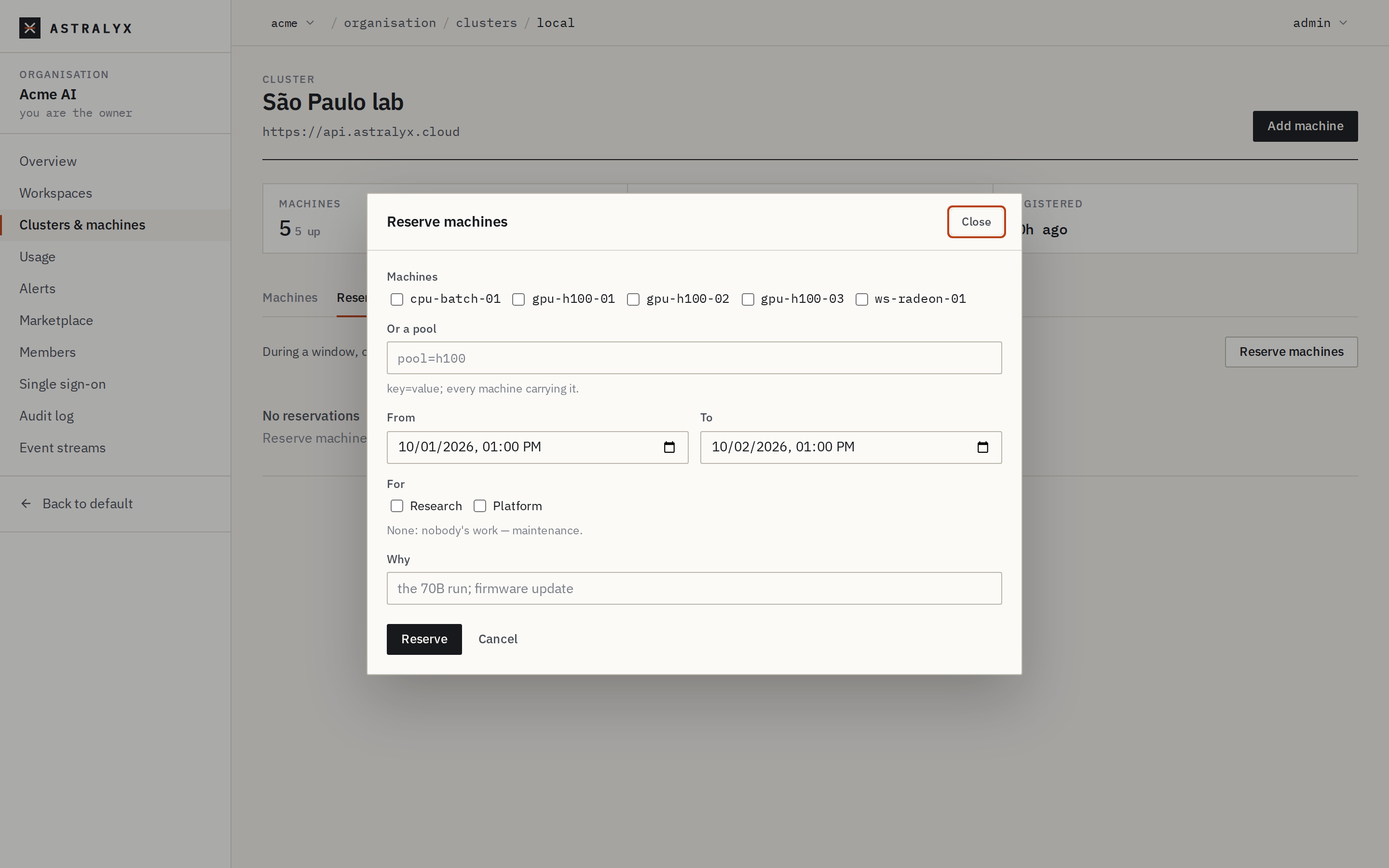
- Open Clusters → the cluster (
/o/<org>/clusters/<cluster>) → Reservations. - Select Reserve machines.
- Tick the Machines (
gpu-09…gpu-12), or write Or a pool:pool=h100(every machine carrying the label). - Set From and To. They are in your browser's time zone.
- Under For, tick
NLP. Tick nothing to reserve for maintenance. - Why:
the 70B run. - Select Reserve. The reservation is listed with its window, machines, the workspaces it is for, and now while the window is open.
Remove on a row deletes the reservation.
Neither astra nor astraeus has a reservation command. Use the console or the API.
As an organisation admin, through the console's API:
$ curl -sS -X POST "https://console.astralyx.cloud/api/v1/orgs/acme/clusters/gpu-east/reservations" \
    -H "Authorization: Bearer $ASTRA_TOKEN" -H 'Content-Type: application/json' \
    -d '{"machines": ["gpu-09", "gpu-10", "gpu-11", "gpu-12"],
         "start": "2026-10-02T18:00:00Z", "end": "2026-10-05T08:00:00Z",
         "workspaces": ["nlp"], "reason": "the 70B run"}' | jq -r .metadata.name
r-3f9a0c1d
| Field | Type | Description |
|---|---|---|
machines |
list of strings | Machines by name. |
pool |
map of string to string | Machines by label, every pair matching: {"pool": "h100"}. Give machines, pool or both. |
start, end |
RFC 3339 time | The window; end after start. |
workspaces |
list of workspace slugs | Who may use the machines during the window. Empty: nobody (maintenance). |
reason |
string | Why, for people. |
The reservation's name is generated (r- and 8 hex digits). GET …/reservations lists them with the workspaces they are for; DELETE …/reservations/<name> removes one. Each create and delete is recorded in the organisation's audit log.
Start the reserved run#
A run of a listed workspace may use the reserved machines; to make sure it uses them, select them. Give it a time limit if it should also be able to start before the window.
In New run, under Machines to use select Choose machines… and tick the reserved machines.
If the reservation is by pool, astra astraeus run --pool h100 …. To name machines, use astra slurm sbatch --nodelist=gpu-09,gpu-10,gpu-11,gpu-12 … (see Slurm compatibility).
Submit it any time: it waits (Pending) until the window opens and the machines are free, then the gang starts.
Plan maintenance#
Reserve the machines for nobody, starting when the maintenance starts. From the moment the reservation exists, no new run without a time limit is placed on them, and runs with a time limit are placed only if they end before the window. When the window opens, cordon the machines if work is still running (see Update, drain and remove); a reservation never stops running work.
Troubleshooting#
| Symptom | Cause | Fix |
|---|---|---|
400 INVALID_RESERVATION: name machines, or a pool |
Neither machines nor a pool. | Choose machines or a pool. |
400 INVALID_NODE_RESERVATION: end must be after start |
The window is empty. | |
404 WORKSPACE_NOT_FOUND |
A slug in workspaces is not the organisation's. |
Use the workspace's slug. |
| The reserved run does not start when the window opens | Work started before the window is still running there. | Wait for it, or stop it; reservations do not evict. |
| Runs of other workspaces avoid the machines days before the window | They have no time limit, so nothing says they would end in time. | Give them time limits, or reserve later. |