Machines#
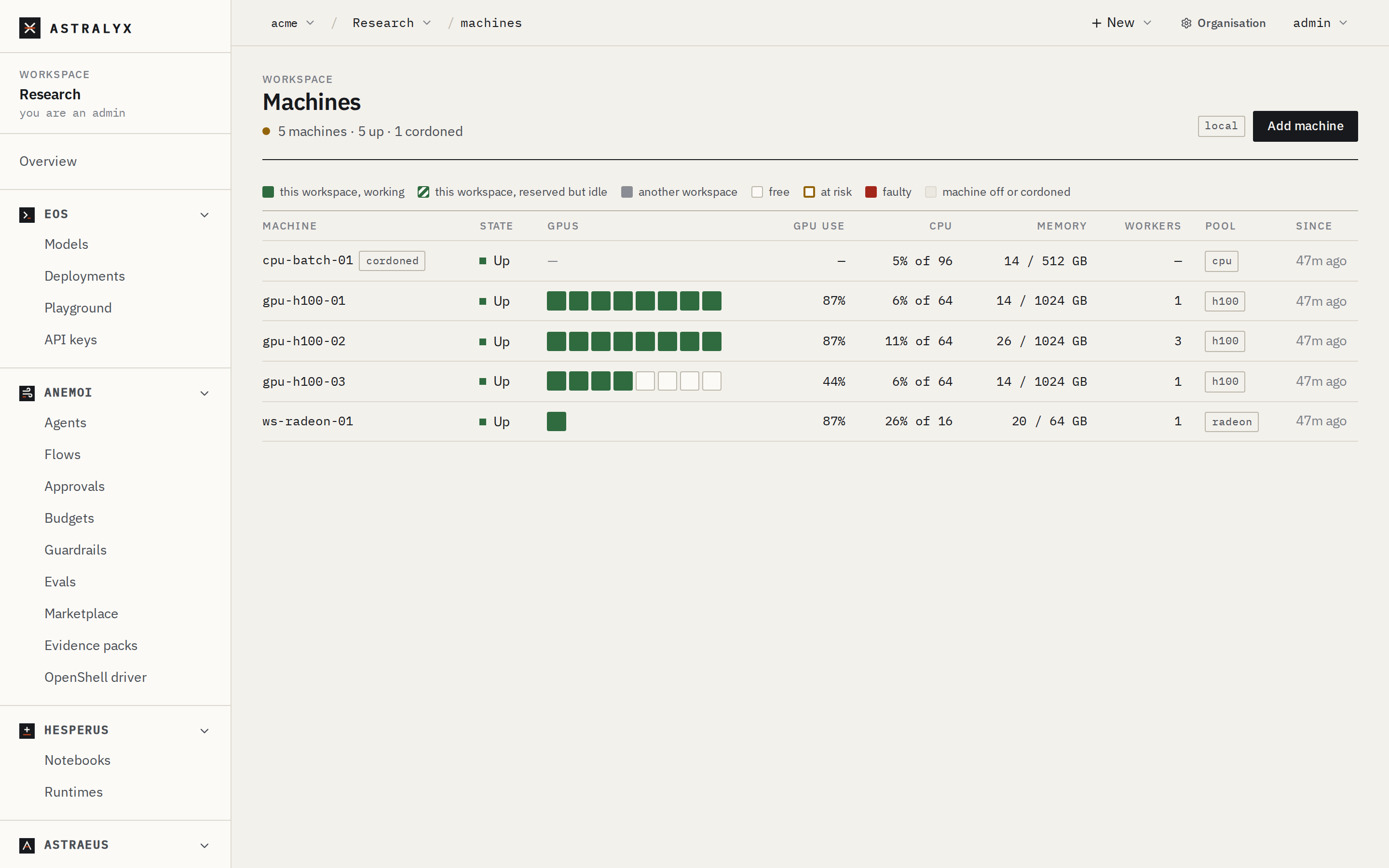
A machine is a computer that runs the Astraeus agents and, on them, the
workers of runs. It can be a GPU server in your rack, a cloud instance, a
workstation, or a Mac serving models. The agents connect out to the cluster;
nothing connects to the machine. In the API a machine is a node
(/nodes, also /machines).
Add a machine when:
- You have GPUs to use: a server with eight H100s, a cloud reservation, a workstation with an RTX or Radeon card.
- You need CPU capacity: data preparation, evaluation, CPU-only simulations. A machine without a GPU runs CPU work.
- You need an entry point for services: a machine running the agent's edge part publishes endpoints and holds requests while a replica group scaled to zero wakes.
- You want to serve models on a Mac: a Mac with Apple silicon joins as an inference machine for Eos (see macOS).
What a machine is#
A Linux machine runs one agent, astraeus-agent, as a native program under
systemd. Its main part (astraeus-agent.service) always runs; its drives,
credentials and data parts (astraeus-agent-drives,
astraeus-agent-credentials, astraeus-agent-data) by default; its edge
part (astraeus-agent-edge) when asked. Only the workers of runs run in
containers, on a containerd that ships with the agent (or the machine's
Docker Engine). See How it
works.
A machine takes its hostname as its name, unless the installer is given
--name. Reinstalling it keeps its name and identity.
What it reports#
The worker reports what the machine has, and the scheduler places by it:
- GPUs: model, memory, use, temperature and health, read from the NVIDIA
driver (NVML) or AMD's
amdgpudriver; their NVLink connections. - CPU and memory: cores, use, memory and pressure.
- Disks and filesystems: local disks, RAID arrays and their health, shared filesystems — what the console suggests for drives and data locations.
- Network: InfiniBand and RoCE ports, their speed and fabric.
The machine's page shows how its GPUs were read in the GPUs section:
driver: healthy (the driver answered), nvidia-smi (read through the
command-line tool), no-gpu, unresponsive or unavailable (the GPUs did
not answer: the last known ones are kept).
States#
| State | Meaning | New work |
|---|---|---|
Idle |
Registered, has not reported yet. | No |
Up |
Reporting. | Yes |
Down |
Reports stopped: its heartbeat (60 s) lapsed. Its workers become Down too; they keep their GPUs until the machine returns and says whether they still run. |
No |
Maintenance |
Taken out of service for maintenance; its reports do not bring it back. | No |
Cordoning a machine (Cordon on its page) stops new work from being placed there; what runs there continues. Uncordon reverses it. A machine under memory or disk pressure also takes no new work until it recovers.
See Run and worker states and Update, drain and remove.
Pools and topology#
Labels place machines. Two kinds matter:
- Pools. A machine's pool is a label, usually
pool=<name>(pool=h100), set when it is added. Workspaces are granted pools: their work runs only on machines carrying all the labels they were granted. See Organisations, workspaces and clusters. -
Topology. Where a machine is, for placing runs that span machines:
Label Meaning Set by topology.astraeus.io/siteA site: a run never spans sites, because their machines talk over the internet The label, or the network the machine connects from topology.astraeus.io/rackA rack The label topology.astraeus.io/fabricAn InfiniBand fabric Found from the subnet the ports report; the label wins topology.astraeus.io/nvlink-domainAn NVLink domain (GB200 NVL72) Found from the GPUs
See Pools, labels and topology.
GPU health#
Every GPU has a health the scheduler acts on:
| Health | Meaning | Placement |
|---|---|---|
Healthy |
No sign of trouble. | Used. |
AtRisk |
Shows what comes before a fault: correctable memory errors growing, a link retrying, running hot. | Avoided while healthy GPUs are free; never given to a run that asks for healthy GPUs only. |
Faulty |
Reported a fault (an NVIDIA Xid, an AMD reset). | Fenced: never used until an organisation admin clears the fault. |
Foreign |
A process Astraeus did not start holds its memory. | Not used meanwhile. |
See GPUs.
Where a machine keeps data#
A machine's data location is the folder where it keeps copies of drives
kept "on each machine". It is always a person's choice: the installer asks
in a terminal (or takes --data-dir), or an organisation admin chooses it
later on the machine's page. Until one is chosen nothing is written to the
machine's disks, and a run that needs such a drive says Choose where to keep
data on <machine>. See Drives and data.
Create one#
Adding a machine is two steps: get a single-use install command, then run it on the machine as root. You must be an organisation owner or admin.
- In a workspace, open Astraeus → Machines → Add machine.
- Set the Pool (
pool=a100), or leave it empty. - Choose Get the install command and copy it.
- Run it on the machine. The dialog shows Machine <name> connected. when it registers.
Ask for an enrollment token; the answer carries the install command:
$ curl -sS -X POST https://console.astralyx.cloud/api/v1/orgs/acme/clusters/default/enrollment-tokens \
    -H "Authorization: Bearer $ASTRAEUS_TOKEN" -H 'content-type: application/json' \
    -d '{"labels": {"pool": "a100"}, "ttl_seconds": 86400}' | jq -r .install
echo '<token>' > ./astraeus-token && curl -fsSL https://console.astralyx.cloud/api/v1/install.sh | sudo sh -s -- --apiserver https://api.astralyx.cloud --token-file ./astraeus-token --releases https://console.astralyx.cloud/releases --org 'Acme' --org-id <id> && rm -f ./astraeus-token
Run the printed command on the machine. labels are the machine's
pool; ttl_seconds is how long the unused token stays valid.
On the machine, the installer prints what it does and starts the agent:
$ echo '<token>' > ./astraeus-token && curl -fsSL https://console.astralyx.cloud/api/v1/install.sh \
    | sudo sh -s -- --apiserver https://api.astralyx.cloud --token-file ./astraeus-token --org 'Acme' --org-id <id>
Useful installer options: --name gpu-01, --data-dir /mnt/nvme0/astraeus,
--agents drives,credentials,data,edge, --runtime docker,
--network host. See Add a machine and the
installer reference.