GPUs#
This page explains how a machine's GPUs become schedulable: what the driver must provide, how the machine agent finds and reports each GPU, how a worker receives exactly its GPUs, and how faults take a GPU out of service. Read it when you prepare GPU machines, or when a GPU is missing, faulty or "used outside Astraeus".
What the machine must have#
| Vendor | On the host | Not needed |
|---|---|---|
| NVIDIA | The NVIDIA kernel driver, loaded (/proc/driver/nvidia exists, nvidia-smi -L answers). 535 or newer recommended; CUDA 12 images need 525.60.13 or newer. |
CUDA on the host, the NVIDIA container runtime. The release bundles nvidia-ctk and nvidia-cdi-hook. |
| AMD | The kernel's amdgpu driver bound to the GPU, /dev/kfd, and the GPU firmware. |
ROCm on the host, AMD's container toolkit. Images bring ROCm. |
A GPU without a working driver does not stop the machine from joining. It runs CPU work, and the agent picks the GPU up by itself once the driver loads; a reboot may be needed.
Install the driver#
The installer installs a driver only where the distribution has an official
way, and asks before it adds a package repository. Without a terminal
(cloud-init, Ansible), pass --install-nvidia-driver or
--install-amd-driver to allow it. Pass --no-nvidia-driver or
--no-amd-driver to never install one.
| Distribution | What the installer does | Asks first |
|---|---|---|
| Ubuntu | Installs ubuntu-drivers-common if missing, then ubuntu-drivers install (the driver Ubuntu recommends for the GPU). |
No: Ubuntu's own repositories. |
| Debian | Adds contrib non-free (and non-free-firmware from Debian 12) in /etc/apt/sources.list.d/astraeus-nvidia.list when nvidia-driver is not available, then installs linux-headers-$(uname -r) nvidia-driver firmware-misc-nonfree. |
Yes, when it adds the repository. |
| Fedora | Adds RPM Fusion free and nonfree, then installs akmod-nvidia xorg-x11-drv-nvidia-cuda. The module builds in the background. |
Yes, when it adds RPM Fusion. |
| RHEL, Rocky Linux, AlmaLinux, CentOS | Adds EPEL and NVIDIA's CUDA repository for the major version, installs kernel headers, then dnf module install nvidia-driver:latest-dkms (or cuda-drivers). |
Yes, when it adds the repositories. |
| Others | Nothing. It prints what to install. | — |
With Secure Boot on, the module must be signed; the distribution's packages may ask you to enrol a key at the next boot. After installing, the installer loads the module or tells you to reboot:
- If
amdgpudoes not drive every AMD GPU, the installer loads it (modprobe amdgpu). - On Ubuntu it installs the packages that carry
amdgpuon server and cloud kernels, and the firmware:linux-modules-extra-$(uname -r)andlinux-firmware, from Ubuntu's repositories, without asking. On Fedora and the RHEL family it installslinux-firmware. - If the GPU is still not driven, or
/dev/kfdis missing, it offers AMD's packaged driver (amdgpu-dkmsfromrepo.radeon.com, release31.50by default, set withASTRAEUS_AMDGPU_VERSION) — only on Ubuntu 22.04 and 24.04 on x86-64, only after you agree or with--install-amd-driver. A reboot loads it.
Elsewhere, install a kernel new enough for the GPU (Radeon RX 7000 and
Radeon PRO W7000: 6.2 or newer; Instinct MI300: 6.8 or newer) with the
firmware, or AMD's packaged driver. The machine agent runs as root, so no
user needs to be added to the video or render groups.
How GPUs are found#
The machine agent (astraeus-agent) reads the GPUs at start and on every
report:
- NVIDIA through NVML, loaded at run time from
libnvidia-ml.so.1, ornvidia-smiwhere NVML cannot be loaded. NVML runs on a thread of its own: a GPU that hangs an NVML call is reported as unresponsive, and nothing else on the machine waits for it. - AMD from the files the
amdgpudriver publishes in sysfs, whereamd-smiandrocm-smiread them too. No ROCm library is loaded. - The PCI bus, whatever the driver. A GPU the driver does not report
(no driver,
nouveau, or passed to a VM throughvfio-pci) is still listed, under GPUs on the bus, with what is missing. - Apple silicon on a Mac: one GPU of vendor
apple; see macOS.
For each GPU the machine reports:
| Field | NVIDIA | AMD |
|---|---|---|
| Id | UUID (GPU-…) |
unique_id (AMD-…), else the PCI address |
| Model | NVML name (NVIDIA H100 80GB HBM3) |
Board name, else derived from device id and memory (AMD Radeon RX 7900 XTX), else the PCI database |
| Memory, memory used | NVML | mem_info_vram_total, mem_info_vram_used |
| Architecture | From the compute capability (hopper) |
From the KFD topology (gfx1100, gfx942) |
| Utilisation, temperature, power, clocks, fan | NVML | The GPU's hwmon |
| Errors | ECC (volatile and aggregate), retired pages, row remapping, NVLink link state and errors, PCIe replays, Xid events | RAS uncorrectable counts, bad VRAM pages, driver resets |
| Driver | Driver version | amdgpu module version, or the kernel release; ROCm version when /opt/rocm exists |
The machine also reports a summary of what it is (its capabilities): GPU vendor, model, architecture, count and driver, whether the GPUs are data-centre boards, and whether it has NVLink, an NVSwitch fabric, IMEX channels and RDMA.
How a worker gets its GPUs#
The scheduler assigns concrete GPUs to each worker. The machine agent then hands those GPUs, and only those, to the container.
With the bundled containerd, GPUs are handed over through the Container Device Interface (CDI):
- When the NVIDIA driver is loaded and sees GPUs, the agent runs the
bundled
nvidia-ctkto write/var/run/cdi/nvidia.yaml. It records a fingerprint (driver version and GPU set) in/var/run/cdi/.nvidia.yaml.astraeus-fingerprintand writes the spec again when either changes. A spec it did not write is replaced the first time; a spec it wrote is removed when the GPUs or the driver go away. - For each worker it requests
nvidia.com/gpu=<UUID>for each assigned GPU and applies the spec's device nodes, library mounts and hooks. - Specs are read from
/etc/cdiand/var/run/cdi;/var/run/cdiwins. Two files in the same directory defining the same device is a conflict: that device is refused rather than picked at random.
With --runtime docker, GPUs are requested from Docker by id through
the NVIDIA runtime (Docker needs the NVIDIA Container Toolkit).
The agent writes its own CDI spec, /var/run/cdi/amd-astraeus.json
(kind amd.com/gpu), from sysfs, before a GPU container starts and on
its periodic pass. For each GPU it lists:
- the GPU's render node (
/dev/dri/renderD<N>) and card, matched to the GPU by PCI address, not by card number; /dev/kfd, shared by all;- the host groups owning them (
render,video), added as the container's supplementary groups, so a non-root image can open them.
Under the default seccomp profile, a worker with AMD GPUs may also call
the NUMA memory-policy system calls ROCm uses (mbind,
set_mempolicy, get_mempolicy, set_mempolicy_home_node), instead of
running unconfined. With --runtime docker the same devices and groups
are passed to Docker.
Inside the worker#
A worker sees only its own GPUs, numbered from 0. Astraeus does not set
CUDA_VISIBLE_DEVICES, HIP_VISIBLE_DEVICES or ROCR_VISIBLE_DEVICES: the
container has only its GPUs' device nodes, so host indices would point past
them.
$ nvidia-smi -L
GPU 0: NVIDIA H100 80GB HBM3 (UUID: GPU-5f1e2d3c-4b5a-6978-8a9b-0c1d2e3f4a5b)
GPU 1: NVIDIA H100 80GB HBM3 (UUID: GPU-8c9a3a0e-7d2b-4a47-9c1b-3f0c7a1e5d01)
When a worker has GPUs, it also gets these variables, unless the run sets them itself:
| Variable | Value |
|---|---|
ASTRAEUS_GPU_COUNT |
Number of GPUs assigned to this worker. |
SLURM_GPUS_ON_NODE, SLURM_GPUS_PER_TASK |
The same number, for Slurm-style scripts. |
NCCL_DEBUG |
WARN |
NCCL_ASYNC_ERROR_HANDLING |
1 |
NCCL_SOCKET_IFNAME |
^lo,docker,virbr,veth,cni,wg |
NCCL_IB_HCA |
The RDMA ports that are up and fast enough, when the run uses RDMA. |
NCCL_IB_DISABLE |
1 when a multi-machine run was placed over Ethernet, so NCCL does not try InfiniBand that cannot reach the other machines. |
The full environment is in Inside a worker.
NVLink and NVLink domains#
- Inside a machine, NVLink and NVSwitch are reported per GPU: link count, links down, errors. The console's GPU page shows each link.
- Across machines (for example GB200 NVL72), each GPU reports the NVLink fabric it registered with. The machine's NVLink domain is the fabric's cluster UUID and clique id. The scheduler treats machines in the same domain as one tier of the network, tighter than InfiniBand, and a worker placed in a domain gets IMEX channel 0. See Pools, labels and topology.
Health#
What fences a GPU#
A GPU with a fault is never assigned. The rule is the same for the scheduler and the console:
| Fault | Reported as |
|---|---|
| A fatal Xid: 48, 63, 74, 79, 92, 95, 119, 120, 149 or 154 (or another Xid the driver confirmed as a fault) | Xid <n> fault |
| An AMD GPU whose reset failed | driver fault: <kernel message> |
| Row remapping failed | row-remap failure — GPU needs RMA |
| Uncorrectable rows remapped | <n> uncorrectable row(s) remapped |
| Uncorrectable ECC errors since the driver loaded | <n> active uncorrectable ECC error(s) |
| Every NVLink link inactive | all <n> NVLink link(s) inactive |
| NVLink fabric route unhealthy, or fabric registration failed | NVLink fabric route unhealthy, fabric registration failed (status <n>) |
Xid events are read from the kernel log (/dev/kmsg, lines NVRM: Xid
(PCI:…)); AMD resets and ring timeouts from the same log. A fault is
latched: it is kept in the agent's state file, survives agent restarts
and reboots, and stays until an admin clears it — or until the GPU is
replaced (its UUID changes).
Historical scars that were repaired (aggregate ECC counts, retired pages, a pending remap, some NVLink links down) do not fence a GPU.
At risk#
A GPU that still works but shows what usually precedes a fault is at risk. Over the last 24 hours:
| Sign | Threshold |
|---|---|
| Correctable memory errors | More than 50 |
| PCIe replays | More than 100 |
| NVLink errors | More than 10 |
| Slowed down by heat | More than 10 minutes |
| Temperature | 87 °C or more |
| A memory row waiting to be remapped | Any |
New work avoids GPUs at risk while healthy ones are free. A run that sets
gpu_requests.healthy_only never gets one; it waits for healthy GPUs
instead.
Used outside Astraeus#
A GPU with more than 10 % of its memory in use while Astraeus has not assigned it is taken to be in use by something else on the machine (a desktop session, a process started by hand). It is not assigned until that memory is freed.
The machine's GPU conditions#
| Condition | Reason | Meaning |
|---|---|---|
| GPU subsystem ready | DriverResponding |
The driver answers. |
DriverUnresponsive |
An NVML call hangs. | |
DriverUnavailable |
The driver does not answer. | |
DriverNotInstalled |
A GPU on the bus has no driver. | |
WrongDriver |
A GPU is held by nouveau. |
|
GPUPassedThrough |
A GPU is bound to vfio-pci. |
|
| GPUs healthy | AllGPUsHealthy / GPUFault |
Whether any GPU is fenced, and why. |
The GPUs page#
Compute → GPUs in a workspace shows every GPU the workspace can see: which are free, which need attention, and who holds the rest. Each square is one GPU, coloured by health first, then by whose work holds it; a striped square is held by work but nearly idle (below 5 % busy).
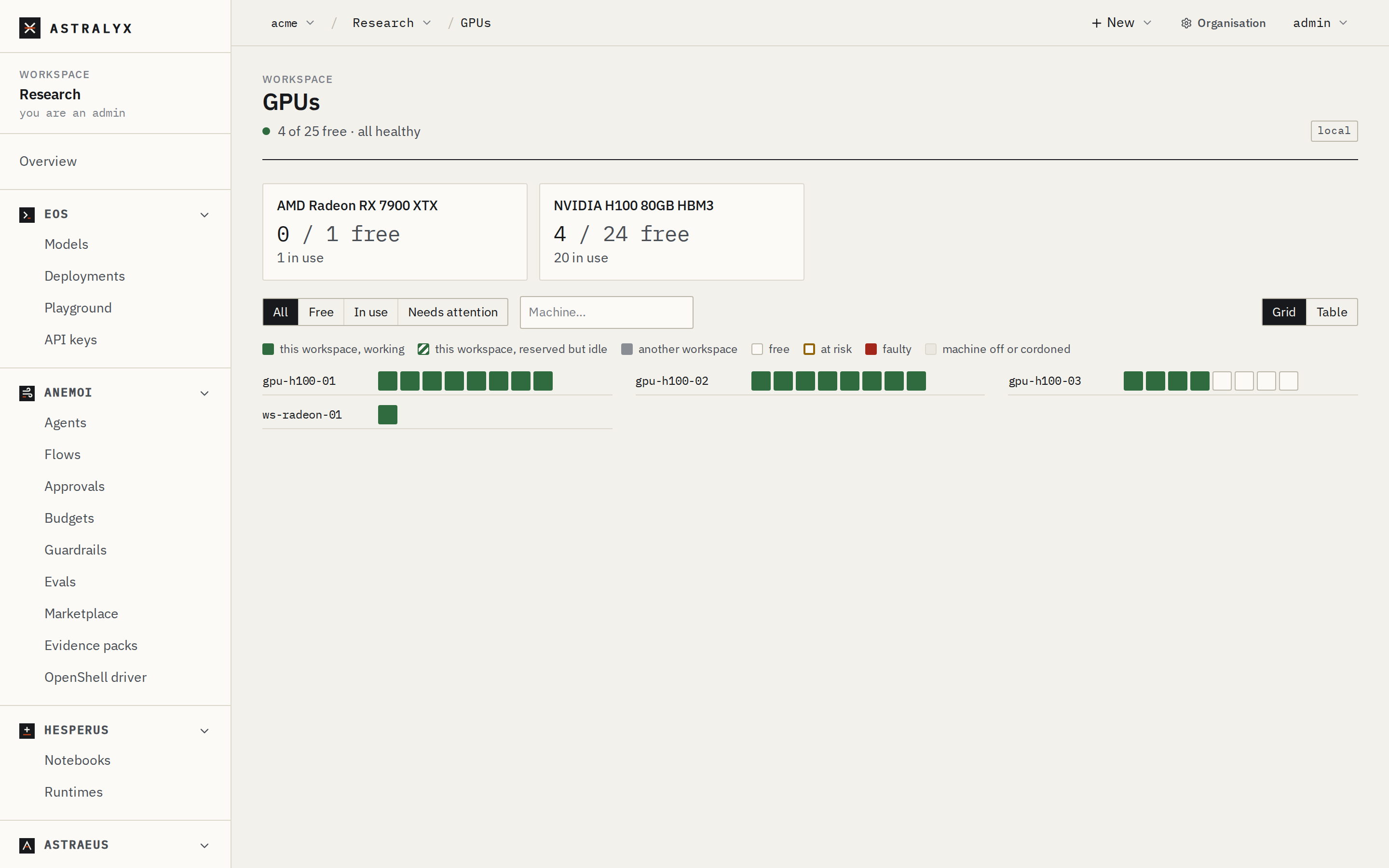
| Health | Meaning |
|---|---|
| Healthy | Usable. |
| Faulty | Fenced: never assigned until the fault is cleared. |
| At risk | Usable, avoided by new work while healthy GPUs are free. |
| Used outside Astraeus | Memory in use by something Astraeus did not start. |
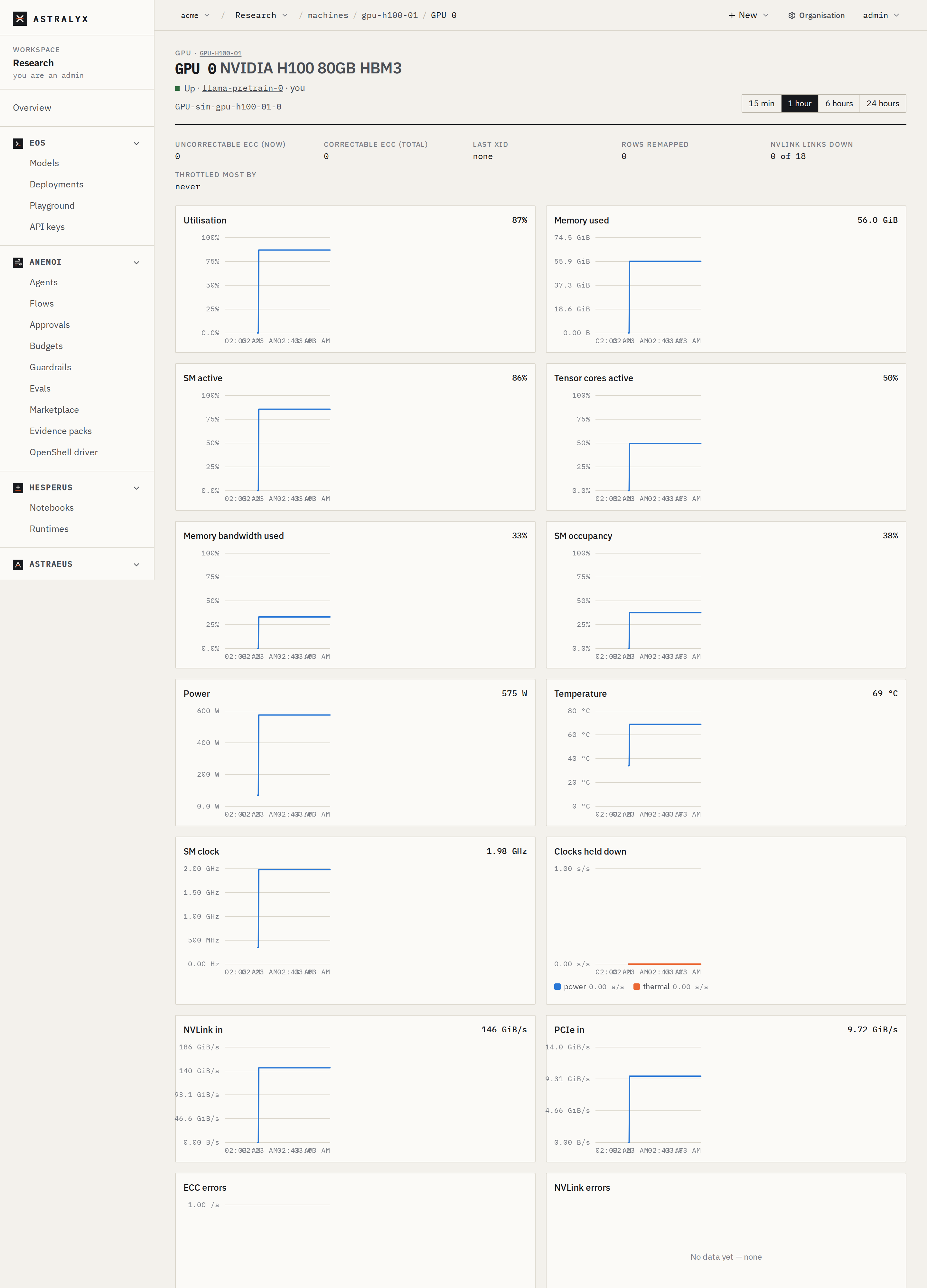
Open a GPU to see its errors, links, utilisation, memory, power, temperature and clocks over time.
Clear a GPU fault#
Clear a fault only after the GPU was reset or replaced. If the fault comes back, the GPU is fenced again.
- Open Compute → GPUs and click the faulty GPU.
- Click Clear fault (organisation admins only) and confirm.
astra has no command for this. Use the console or the
API.
$ curl -sS -X POST \
    "https://console.astralyx.cloud/api/v1/orgs/acme/clusters/fra-1/nodes/gpu-01/gpus/GPU-5f1e2d3c-4b5a-6978-8a9b-0c1d2e3f4a5b/clear-fault" \
    -H "Authorization: Bearer $ASTRAEUS_TOKEN"
{"uuid":"GPU-5f1e2d3c-4b5a-6978-8a9b-0c1d2e3f4a5b","cleared":true}
The machine must be connected: the request is delivered to it, and
cleared is false when it had no fault latched for that GPU.
Limits#
- MIG partitions are not scheduled: a GPU is given whole to one worker.
- GPU counts are whole numbers; GPUs are not shared between workers.
- A sandboxed worker (
isolation: sandbox, gVisor) cannot have GPUs.