Use cloud credentials without storing them#
You list and copy objects from an S3 bucket in a run. The keys the run uses live in AWS Secrets Manager. Astraeus stores a credential: a reference saying where the secret is and how the machine proves who it is, here the EC2 instance's own role. The machine that runs the worker fetches the secret itself and hands it to the container as environment variables. The secret value never passes through the console or the control plane, and nobody types it into Astraeus.
flowchart LR
  subgraph cp["Astralyx control plane (SaaS)"]
    cred["credential s3-reader<br/>AWSSecretsManager · eu-west-1<br/>astraeus/s3-reader · instance_profile"]
  end
  subgraph m["Your machine (EC2)"]
    sync["credential agent"] -- "instance role" --> sm[("AWS Secrets Manager")]
    sync -- "files, owner-only" --> w["worker: AWS_ACCESS_KEY_ID,<br/>AWS_SECRET_ACCESS_KEY"]
  end
  cred -- "reference only" --> sync
  w -- "HTTPS" --> s3[("S3 bucket")]
What you need:
- GPU or CPU machines on EC2, with an instance role (instance profile). For machines outside AWS, see Variations.
- An AWS account where you can create a secret and IAM policies, and the AWS CLI on your workstation.
- An S3 bucket to read,
acme-datasetsineu-west-1in this example. - The editor role in the workspace, an API token,
curlandjq(How the recipes are written).
1. Put the keys in AWS Secrets Manager#
Create (or reuse) an IAM identity that may only read the bucket, and store its access key as a JSON secret. Each field of a JSON secret becomes a separate value Astraeus can hand to a run.
{
  "Version": "2012-10-17",
  "Statement": [
    {"Effect": "Allow", "Action": ["s3:ListBucket"], "Resource": "arn:aws:s3:::acme-datasets"},
    {"Effect": "Allow", "Action": ["s3:GetObject"], "Resource": "arn:aws:s3:::acme-datasets/*"}
  ]
}
$ aws secretsmanager create-secret --region eu-west-1 --name astraeus/s3-reader \
    --secret-string '{"AWS_ACCESS_KEY_ID":"AKIAIOSFODNN7EXAMPLE","AWS_SECRET_ACCESS_KEY":"wJalrXUtnFEMI/K7MDENG/bPxRfiCYEXAMPLEKEY"}'
{
    "ARN": "arn:aws:secretsmanager:eu-west-1:123456789012:secret:astraeus/s3-reader-Ab12Cd",
    "Name": "astraeus/s3-reader",
    "VersionId": "a1b2c3d4-5678-90ab-cdef-EXAMPLE11111"
}
2. Let the machines read that secret, and nothing else#
Allow the machines' instance role to read this one secret:
{
  "Version": "2012-10-17",
  "Statement": [
    {
      "Effect": "Allow",
      "Action": "secretsmanager:GetSecretValue",
      "Resource": "arn:aws:secretsmanager:eu-west-1:123456789012:secret:astraeus/s3-reader-*"
    }
  ]
}
$ aws iam put-role-policy --role-name astraeus-gpu-nodes --policy-name read-s3-reader-secret \
    --policy-document file://machine-role-policy.json
Machines in your workspace's pools whose role lacks this permission cannot run workers that use the credential: those workers wait (step 5).
3. Create the credential#
The credential names the secret and the way the machine authenticates. It holds no key, token or password: there is no field for one.
{
  "metadata": {"name": "s3-reader"},
  "spec": {
    "backend_type": "AWSSecretsManager",
    "region": "eu-west-1",
    "secret_name": "astraeus/s3-reader",
    "auth": {"mode": "instance_profile"}
  }
}
- Credentials → New credential. Name
s3-reader. - Kept in: AWS Secrets Manager. Region
eu-west-1, Secret name or ARNastraeus/s3-reader. - The machines authenticate with: The machine's instance role.
- Leave Keys empty: every field of the JSON secret is kept under its own name.
- Create credential.
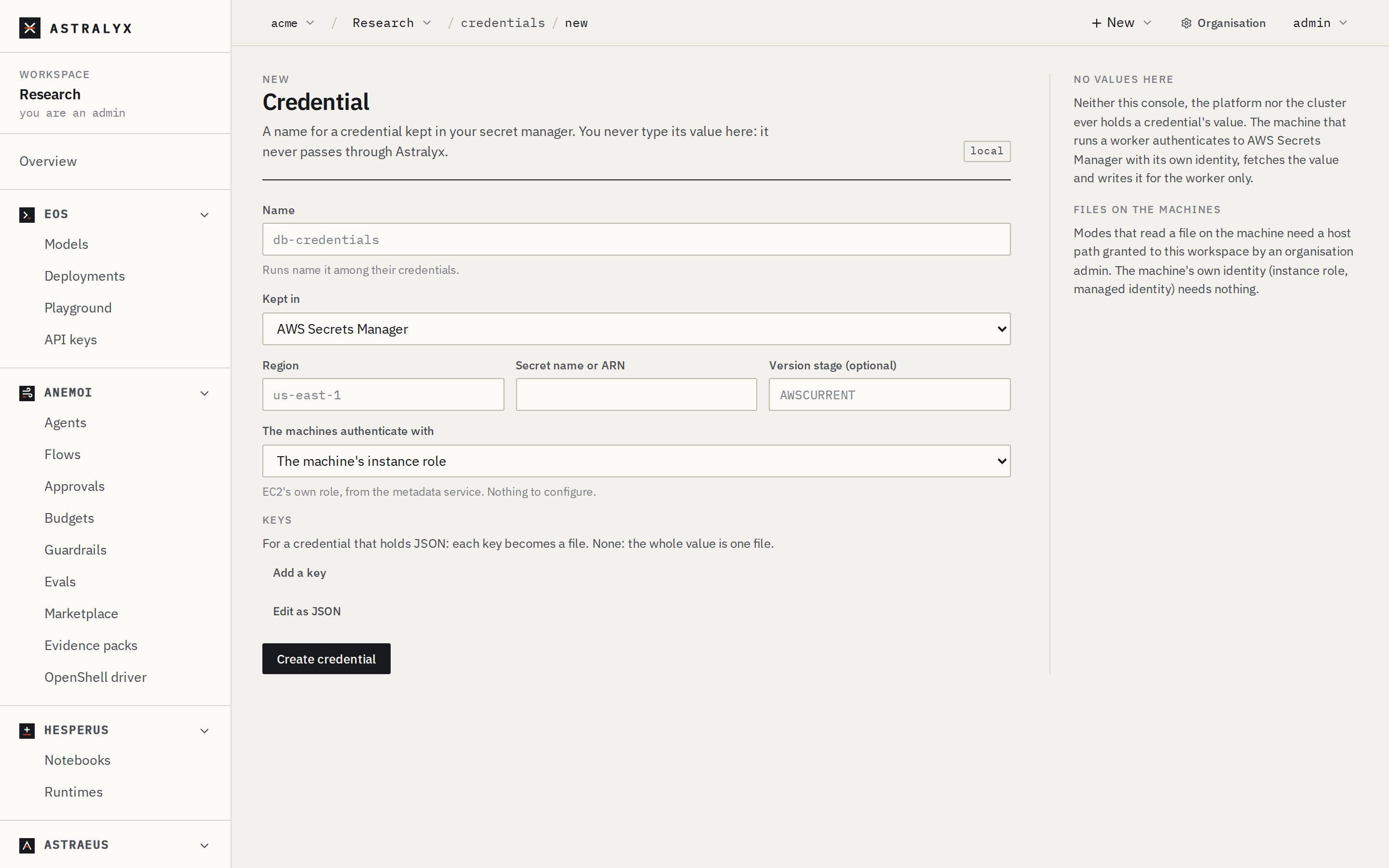
With Keys (data) you pick fields and name the files they become:
"data": [{"key": "AWS_ACCESS_KEY_ID", "file_name": "id"}]. Without it,
each field of a JSON secret is a value under its own name, plus the whole
secret as value.
4. Use it in a run#
A run names the credential in secret_refs and says what to do with each
value: env_vars maps a value's name to an environment variable,
mount_path mounts all of them as read-only files.
{
  "metadata": {"name": "list-food101"},
  "spec": {
    "task_template": {
      "image": "amazon/aws-cli:2.17.0",
      "command": "aws",
      "args": ["s3", "ls", "s3://acme-datasets/food101/", "--region", "eu-west-1", "--human-readable", "--summarize"],
      "restart_policy": "Never",
      "requested_resources": {"cpu_cores": 1, "memory_bytes": 536870912, "node_selection": {"mode": "Any"}},
      "secret_refs": [
        {
          "external_secret_name": "s3-reader",
          "env_vars": {
            "AWS_ACCESS_KEY_ID": "AWS_ACCESS_KEY_ID",
            "AWS_SECRET_ACCESS_KEY": "AWS_SECRET_ACCESS_KEY"
          }
        }
      ]
    }
  }
}
Runs → New run → Edit as JSON, paste list-bucket.json,
Start run.
The form's Credentials field only names a credential: the worker
gets nothing from it until the reference has env_vars or a
mount_path, which you add in the JSON.
5. Check that it worked#
-
The run completes and lists the bucket:
-
The credential reports where it got to, as the machine said:
$ curl -fsS "$API/credentials/s3-reader" -H "Authorization: Bearer $ASTRAEUS_TOKEN" | jq .sync_status { "state": "Synced", "synced_at": "2026-10-01T09:20:11Z", "updated_at": "2026-10-01T09:20:11Z" }Pendingmeans no machine has fetched it yet (no worker needed it);Errorcomes with the machine'smessage. -
The secret is nowhere in the control plane: the credential's JSON is the reference you sent, and the worker's page lists its Environment as given in the specification, without the credential's values (they arrive on the machine). The values exist only on the machine that runs the worker, in files readable by their owner only, and in the container.
6. Clean up#
$ astra astraeus delete list-food101
list-food101 deleted
$ curl -fsS -X DELETE "$API/credentials/s3-reader" -H "Authorization: Bearer $ASTRAEUS_TOKEN"
$ aws secretsmanager delete-secret --region eu-west-1 --secret-id astraeus/s3-reader --recovery-window-in-days 7
How values reach the worker#
- Only machines that run a worker using the credential fetch it, with their own identity, when the worker is placed there. They fetch it again every 5 minutes by default, so a rotated value arrives without changes in Astraeus.
- Environment variables are set when the container is created: a running worker keeps the value it started with. Workers started after a rotation get the new value.
- Until the machine has the value, the worker waits: its state says waiting for external secret … (key AWS_ACCESS_KEY_ID) to be synced to this node.
- A value you name in
env_varsthat the secret does not have keeps the worker waiting in the same way: check the field names in the secret. - Your own
envnever overrides a credential's variable: a credential's values win.
Variations#
Lock the run's network down to S3. The machine fetches the secret, not the worker, so the worker itself needs to reach only S3. An outbound policy refuses everything else, on the machine, where the container cannot change it:
"network": {
  "egress": {
    "default": "deny",
    "allow": [
      {"host": "*.s3.eu-west-1.amazonaws.com", "ports": [443]},
      {"host": "s3.eu-west-1.amazonaws.com", "ports": [443]}
    ]
  }
}
*. matches exactly one label (the bucket's virtual host). A run with a
policy is placed only on machines that can enforce it (the bundled
containerd runtime, workers on the mesh network). Refusals appear in the
run's Outbound network panel and as events.
Machines outside AWS. Use IAM Roles Anywhere: the machine presents an X.509 certificate it holds, and the credential names only the ARNs and the files' paths on the machine:
"auth": {
  "mode": "roles_anywhere",
  "trust_anchor_arn": "arn:aws:rolesanywhere:eu-west-1:123456789012:trust-anchor/…",
  "profile_arn": "arn:aws:rolesanywhere:eu-west-1:123456789012:profile/…",
  "role_arn": "arn:aws:iam::123456789012:role/astraeus-gpu-nodes",
  "certificate_path": "/etc/astraeus/aws/cert.pem",
  "private_key_path": "/etc/astraeus/aws/key.pem"
}
Other modes: assume_role (role_arn, optional external_id_path) from
an identity the machine already has, and shared_config (profile) from
the machine's own AWS configuration. Paths on the machine must be under a
host path granted to your workspace.
Google Cloud and Azure. The same pattern with the machine's own identity:
{"backend_type": "GCPSecretManager", "project": "acme-ml", "secret": "gcs-reader", "auth": {"mode": "metadata"}}
{"backend_type": "AzureKeyVault", "vault_url": "https://acme-ml.vault.azure.net", "secret_name": "blob-reader", "auth": {"mode": "managed_identity"}}
Vault (certificate, AppRole, JWT or token file), Oracle Cloud Vault, CyberArk Conjur, 1Password Connect, Doppler and Infisical are supported the same way (Credentials).
Files instead of variables. "mount_path": "/var/run/secrets/s3"
mounts every value as a read-only file (/var/run/secrets/s3/AWS_ACCESS_KEY_ID, …).
Use it for certificates and key files, and for tools that read files.
The instance role directly. A worker can also use the machine's role through the EC2 metadata service with no credential at all. Workers on the mesh network are one network hop from the machine, so IMDSv2 answers them only if the instance's metadata hop limit is 2 or more; and every worker on the machine then has the role's permissions. A credential scopes the access to the runs that name it.
A private registry. registry_secret_ref in the task template takes a
credential the same way, for pulling the run's image.
Troubleshooting#
| Symptom | Cause | Fix |
|---|---|---|
The worker stays waiting for the credential, and its state is Error with AccessDeniedException |
The machine's role may not read the secret. | Fix the role's policy (step 2); the machine retries every 30 s. |
Error with a message about the region or the secret not found |
Wrong region or secret_name. |
A credential cannot be edited: delete it and create it again. |
An error occurred (AccessDenied) when calling the ListObjectsV2 operation in the run |
The keys in the secret may not list the bucket. | Fix the IAM identity's S3 policy. |
Could not connect to the endpoint URL with an outbound policy |
The policy does not allow the host the tool uses. | Check the run's Outbound network panel for the refused name and allow it. |