Pools, labels and topology#
Labels say two things about a machine: who may use it (its pool) and where it is (its site, rack, InfiniBand fabric and NVLink domain). Use this page to put machines in pools, to grant those pools to workspaces, and to describe your racks and fabrics so that multi-machine runs land on the fastest network that has room.
Labels#
A label is a key=value pair on a machine. Labels come from three places:
| Source | Which labels | When |
|---|---|---|
| The join token | Any labels outside the astraeus.io domain, usually pool=… |
When the machine registers. See Add a machine. |
| Organisation admins, in the console or the API | pool, topology.astraeus.io/site, topology.astraeus.io/rack, topology.astraeus.io/fabric |
Any time. |
| The machine itself | Site, fabric, NVLink domain, GPU architecture, when not labelled | Derived by Astraeus from what the machine reports when it places work; never kept as labels. |
The astraeus.io/tenant label says which organisation a machine on a shared
cluster belongs to. It is set by the join token and cannot be changed: to
give a machine to another organisation, remove it and install it again.
Pools#
A pool is the label pool=<name>. Workspaces are granted pools on each
cluster; a workspace whose access lists pools runs only on machines carrying
all of those labels.
A pool restricts workspaces, not machines
A workspace whose cluster access lists no pools may use every machine of the cluster, including machines in pools. To keep machines for some workspaces only, give every workspace on the cluster a pool, or reserve the machines for a window.
Put a machine in a pool#
- Open Compute → Machines and click the machine.
- In Where it is, click Change.
- Type the pool, for example
h100. Below the fields, the console shows which workspaces can use the machine now and after the change. - Click Save.
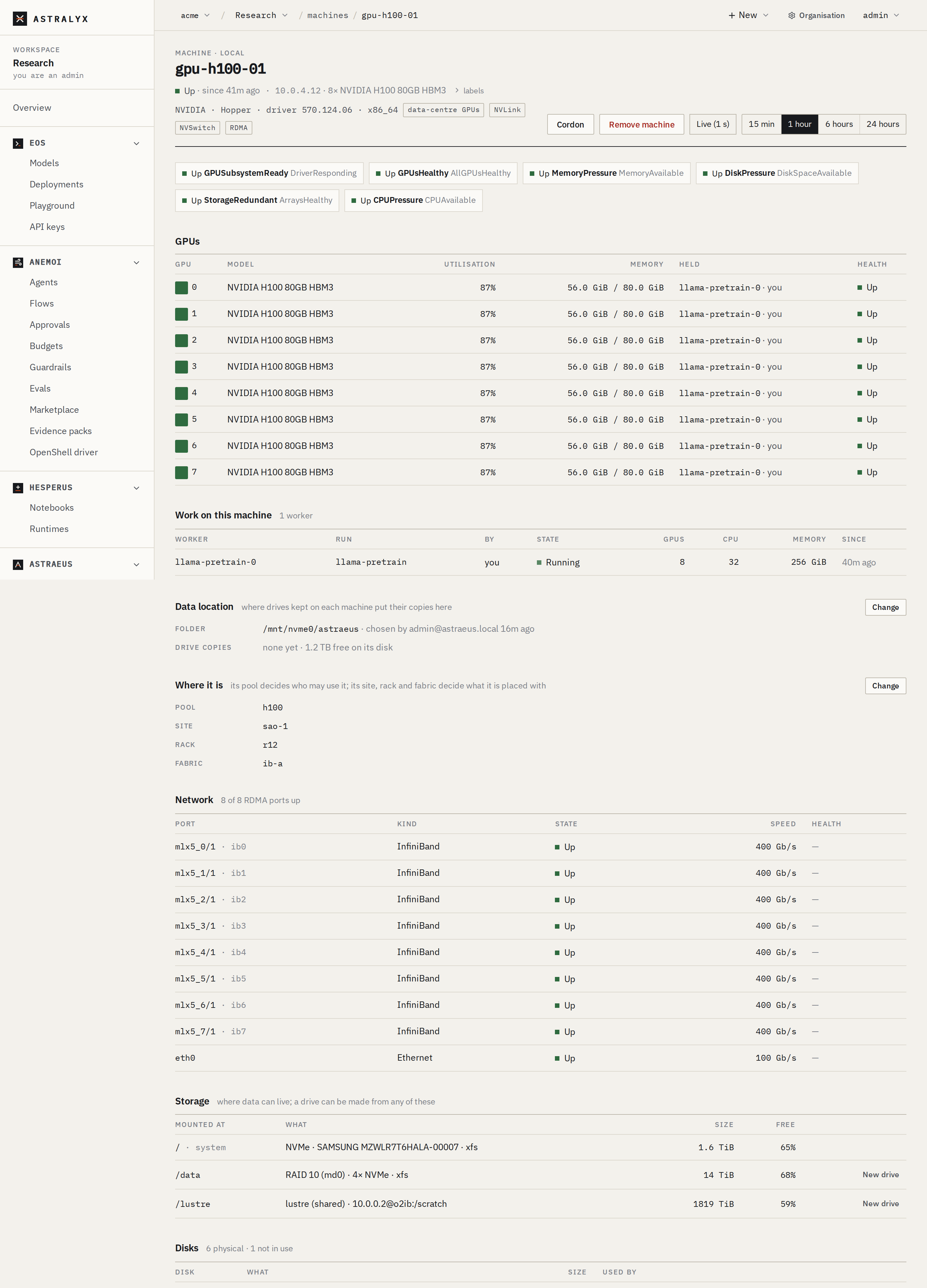
Running work stays where it is; only new work follows the change.
astra has no command for labels. Use the console or the
API.
$ curl -sS -X PUT \
    "https://console.astralyx.cloud/api/v1/orgs/acme/clusters/fra-1/nodes/gpu-01/placement" \
    -H "Authorization: Bearer $ASTRAEUS_TOKEN" \
    -H 'content-type: application/json' \
    -d '{"pool": "h100"}' | jq '.metadata.labels'
{
  "pool": "h100"
}
| Field | Type | Description |
|---|---|---|
pool |
string | The pool label. |
site |
string | topology.astraeus.io/site. |
rack |
string | topology.astraeus.io/rack. |
fabric |
string | topology.astraeus.io/fabric. |
A field left out is unchanged; an empty string removes the label. Values
are letters, digits and -._:/, at most 63 characters (INVALID_LABEL
otherwise). Only organisation admins may call it. The change is
recorded in the organisation's audit log with the labels before and
after.
Grant a pool to a workspace#
In the workspace, open Settings (Clusters & people), edit the
cluster's access, and set Pools to the machine labels, for example
pool=h100. Empty means any machine. See
Workspaces, quotas and pools.
Workspace members see every machine of the cluster in Compute → Machines (on a shared cluster, every machine of their organisation), including machines outside their pools. Other workspaces' work on a machine is shown only as taken.
Choose a pool at join time#
In the Add machine dialog, the Pool field becomes the token's labels.
Through the API, pass labels when you create the token. See
Add a machine.
Topology#
The scheduler places a run of several workers on the tightest network that has room for all of them, trying in this order:
- One machine
- One NVLink domain
- One InfiniBand fabric, within one rack
- One InfiniBand fabric
- One RDMA network of one kind (InfiniBand or RoCE), within one rack
- One RDMA network of one kind
- One rack, over Ethernet
- Anywhere, over Ethernet
A run never spans sites. The rules a run can set (keep within, spread over, minimum link speed) are in GPUs and placement.
Sites#
A site is where a machine is on the network. Machines in different sites talk over the internet, which is too slow for collectives, so a run never spans sites.
- Set it with the
sitefield (topology.astraeus.io/site), for examplefra-dc1. - Without a label, the site is worked out from the address the machine's
reports arrive from:
net:<network>, where the network is the address's/16for private IPv4 (and CGNAT100.64.0.0/10), its/24for public IPv4, and its/48for IPv6. Machines behind one NAT, or on one private network, are one site; a workstation at home and a rack in a datacentre are two.
The machine's page shows the derived site with "worked out from where it connects". Set a name to fix it, for example when machines of one site connect through different NAT addresses.
Racks#
A rack has no automatic detection: set rack
(topology.astraeus.io/rack) on each machine, for example r12. Runs that
must stay in one rack, or spread over racks, use it.
InfiniBand fabrics#
A fabric is a set of machines whose InfiniBand ports share a subnet.
- Discovered: when every InfiniBand port of a machine knows its subnet,
the machine is on the fabric those subnets name:
gid-<prefix>from the port's GID subnet prefix when it is not the default, otherwisesm-<guid>from the subnet manager's GUID (read withsminfo, frominfiniband-diags, at most every ten minutes). A machine with several rails gets a name for the set. - Labelled:
fabric(topology.astraeus.io/fabric). A label always wins over discovery.
RoCE ports count as RDMA but not as an InfiniBand fabric. A machine with RDMA ports uses the host network (Network and firewalls).
NVLink domains#
Machines whose GPUs registered with the same multi-node NVLink fabric (for example the trays of a GB200 NVL72) are one NVLink domain. The domain is reported by the GPUs (the fabric's cluster UUID and clique id); there is nothing to label. A run placed in a domain gets IMEX channel 0, which the domain's IMEX daemons must serve.
See it in the console#
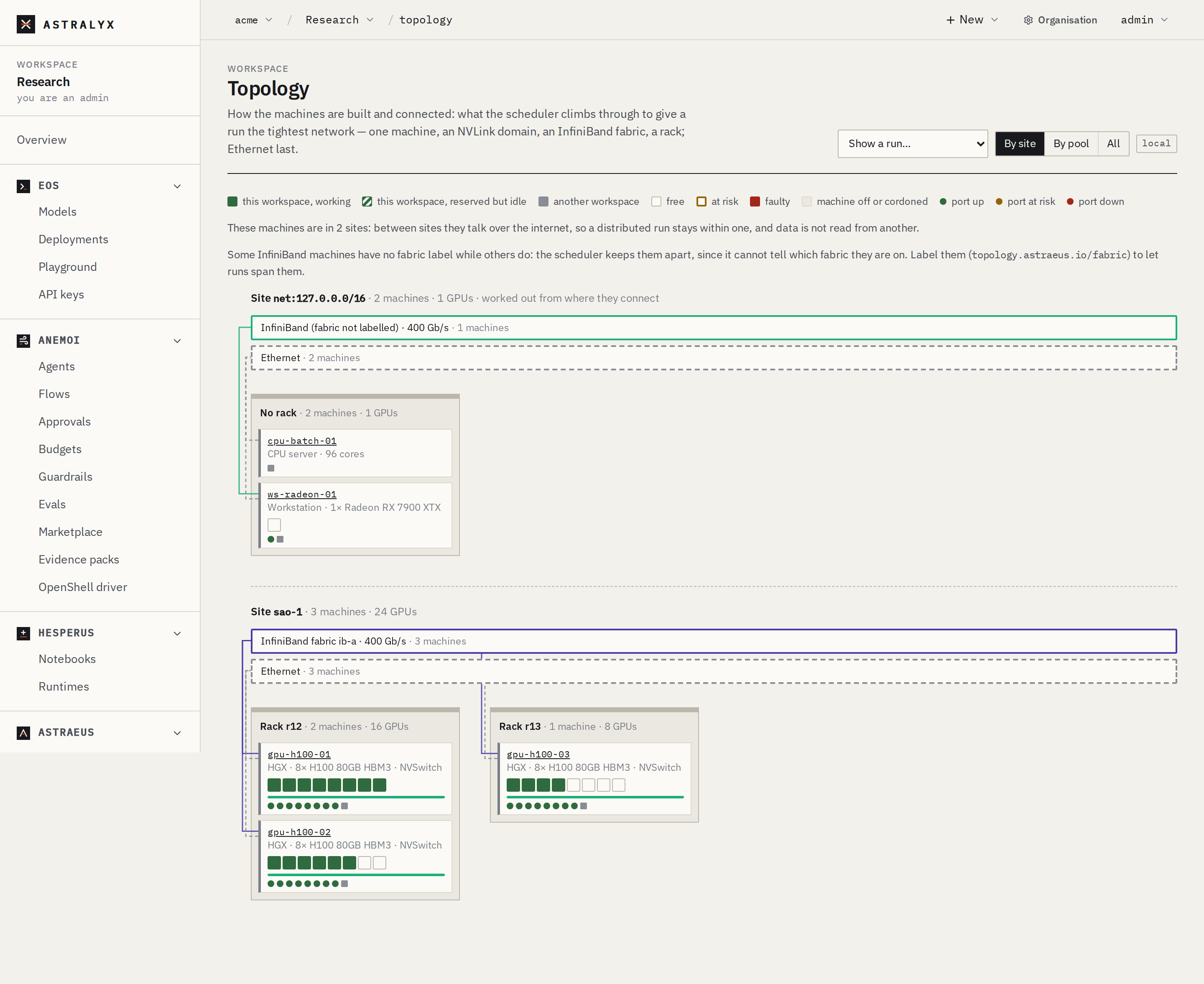
Compute → Topology draws the cluster as it is built: racks of machines, each drawn as what it is (an NVL72 tray, an HGX board, a workstation, a CPU server), its GPUs coloured by health and use, its NVLink domain, and its links to InfiniBand, RoCE and Ethernet. Group by site or pool, and choose Show a run… to see where a run's workers are.
Reference: labels the scheduler reads#
| Label | Set by | Meaning |
|---|---|---|
pool |
Token, admin | The machine's pool. A convention: the console's Pool column and placement fields use this key. |
topology.astraeus.io/site |
Admin; else derived (net:<network>) |
Network location. Runs never span sites. |
topology.astraeus.io/rack |
Admin | Rack. |
topology.astraeus.io/fabric |
Admin; else derived (gid-…, sm-…) |
InfiniBand fabric. |
topology.astraeus.io/nvlink-domain |
Derived from the GPUs | Multi-node NVLink domain. |
astraeus.io/gpu-arch |
Derived from the GPUs | GPU architecture (hopper, gfx1100). |
astraeus.io/tenant |
The join token, on a shared cluster | The organisation the machine belongs to. Fixed. |
Derived values are computed by the scheduler from what the machine reports; they do not appear in the machine's labels.