Update, drain and remove#
This page covers a machine's life after it joins: keeping its agent on the release Astraeus runs, taking it out of service for maintenance, moving it to another organisation, and retiring it. Each section says what happens to the work running there.
Machine states#
| State | Meaning |
|---|---|
| Idle | Registered, but has not reported yet. |
| Up | Reporting. Eligible for new work unless cordoned or under pressure. |
| Down | Its reports stopped: no report for 60 seconds. Nothing new is placed on it. |
A machine reports every 10 seconds; 60 seconds without a report marks it Down. A machine that comes back is Up again at its first report.
Being cordoned is not a state: a cordoned machine stays Up, runs what it has, and takes nothing new.
Update the agent#
Every machine reports its agent's release (for example sha-1a2b3c4). The
console marks a machine whose agent differs from the release Astraeus runs
as behind.
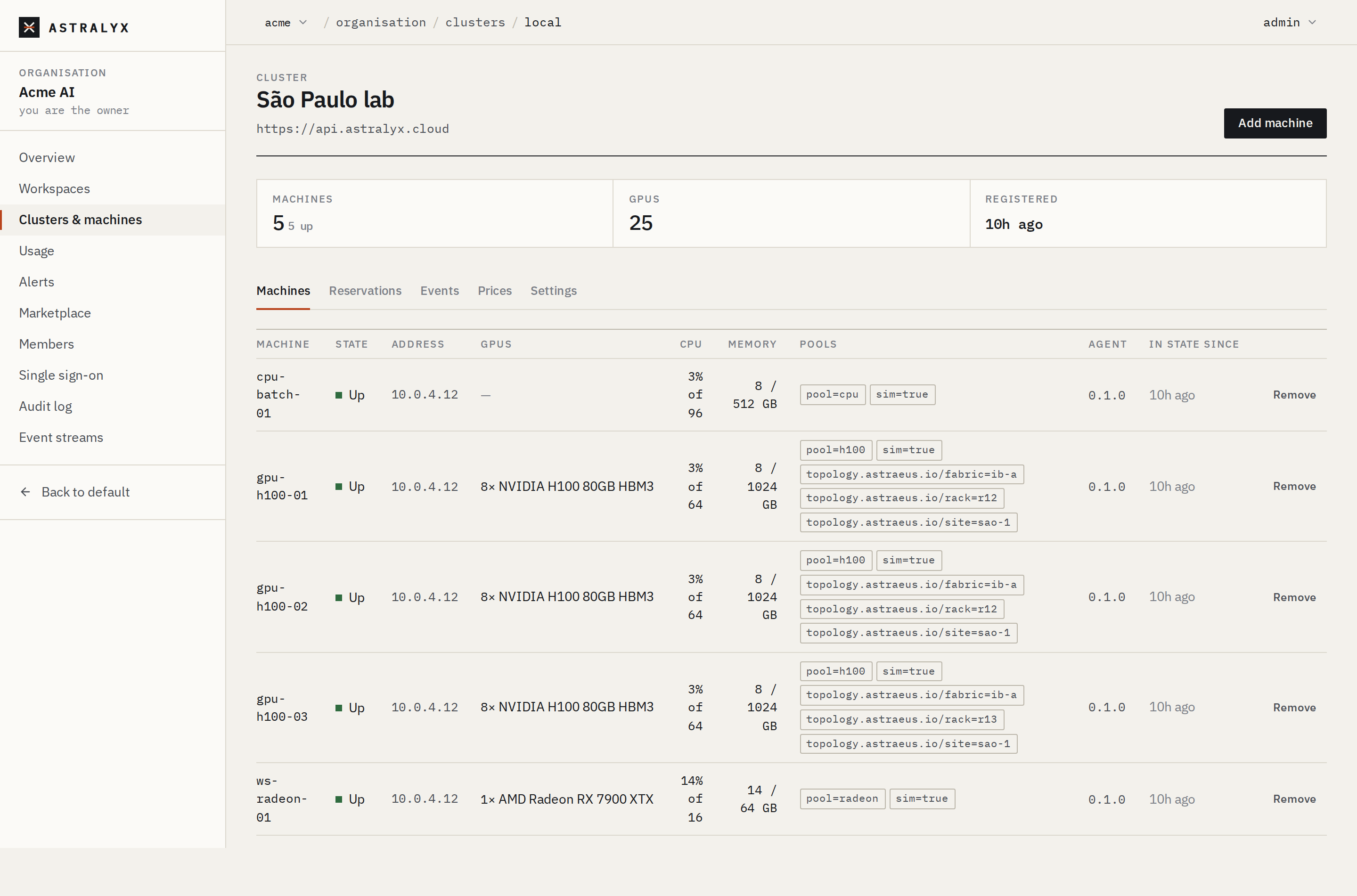
- Open the organisation's Clusters and click the cluster. The Machines tab has an Agent column.
- Click Update next to a machine marked behind, or Update all N behind above the table (machines that are Up).
- Confirm. The console says "Updating gpu-01: its agents restart in a few seconds."
astra has no update command. Use the console, the API,
or run the installer again.
$ curl -sS -X POST \
    "https://console.astralyx.cloud/api/v1/orgs/acme/clusters/fra-1/nodes/gpu-01/upgrade" \
    -H "Authorization: Bearer $ASTRAEUS_TOKEN" \
    -H 'content-type: application/json' \
    -d '{"version": "sha-1a2b3c4"}'
{"from":"sha-0f9e8d7","to":"sha-1a2b3c4","installed":["astraeus-containerd","astraeus-agent","astraeus-agent-drives","astraeus-agent-credentials","astraeus-agent-data"],"restarting":true}
| Field | Type | Default | Description |
|---|---|---|---|
version |
string | "" |
The release to install: letters, digits and ._-, at most 64 characters. Empty: the latest the machine's releases address serves. |
GET /api/v1/orgs/{org}/clusters/{cluster}/version returns the release
Astraeus runs. The request waits for the machine's answer, up to
180 seconds; a failure on the machine is returned as UPGRADE_FAILED
with its reason.
What the machine does:
- Downloads
astraeus-agent-linux-<arch>.tar.gzandSHA256SUMSfrom its own releases address (the one it was installed from,ASTRAEUS_RELEASES_URL). The request names only a version. - Refuses to install on a checksum mismatch.
- Replaces, by rename, the agent (
/usr/bin/astraeus-agent), the units of the parts it runs, and the bundled runtime's files that changed; restores their SELinux labels where SELinux is enabled. - Answers, then has systemd restart the agent's services a few seconds
later.
astraeus-containerdrestarts only if its binary changed. The answer'sinstalledlists the services restarted.
Running work keeps running. Containers outlive a restart of the agent and of containerd; the new agent adopts them.
An update does not change /etc/astraeus/agent.env,
/etc/astraeus/containerd.toml, the runtime the agent requires, or which of
its parts run. For those, run the installer again.
Agent names before October 2026
Machines installed before October 2026 ran one binary and one service
per part: astraeus-worker (now astraeus-agent), astraeus-dvagent
(now astraeus-agent-drives), astraeus-secretsync
(now astraeus-agent-credentials), astraeus-catalog
(now astraeus-agent-data) and astraeus-ingress
(now astraeus-agent-edge), configured by /etc/astraeus/worker.env
(now /etc/astraeus/agent.env).
Such a machine moves to the new names by itself:
- Update from the console installs the new agent under the former
names; it then switches the machine to the new services, with the
parts that ran before, the same configuration and the same runtime,
and removes the former services and
worker.env. Running work keeps running. If the new agent does not start, the former services are started again and the machine stays as it was. - Running the installer again does the same: it stops the former
services, installs the new ones and writes
agent.envfrom the former configuration.--agentsstill accepts the former names (dvagent,secretsync,catalog,ingress).
A Mac moves only when you run the installer again
(macOS). If a machine still shows
astraeus-worker, see
Troubleshooting.
Note
The machine downloads the update without an HTTP proxy. Behind a proxy, run the installer again instead. See Network and firewalls.
Run the installer again#
Running the installer on a machine that is already connected, to the same
cluster, under the same name, for the same organisation (--org-id), is an
upgrade: the machine keeps its name, its credential and its identity, and
the installer rewrites its units and configuration.
The simplest way is a new command from Add machine in the console: its token is not used and expires. Or reuse the machine's own credential as the token file, and pass the same values the original command had:
$ curl -fsSL https://console.astralyx.cloud/api/v1/install.sh | sudo sh -s -- \
    --apiserver https://api.astralyx.cloud \
    --token-file /etc/astraeus/token \
    --releases https://console.astralyx.cloud/releases \
    --org 'Acme Research' --org-id 0192f0c4-7d1e-7a51-9c33-5e8b2a4f6d10
· network: each task gets an address of its own, the machines are joined by WireGuard (UDP 51820)
· gpu-01 is in Acme Research already: upgrading, keeping its identity
· NVIDIA GPU with its driver: ready (the NVIDIA Container Toolkit comes with the agent)
· downloading astraeus-agent-linux-amd64.tar.gz (latest)
· installing
· starting
…
· gpu-01 is connected to https://api.astralyx.cloud
On a rerun, the installer keeps the machine's name, runtime and data location. It does not keep:
--releases: without it, the default is GitHub.--agents: without it, the default isdrives,credentials,data, and any other part (for exampleedge) is stopped and disabled.- Edits to
/etc/astraeus/agent.envand/etc/astraeus/containerd.toml: both are rewritten. Use systemd drop-ins for your own settings.
Astraeus Cloud
On Astraeus Cloud, unused join tokens count towards your organisation's
machine limit until they expire (24 hours for console tokens). Prefer
--token-file /etc/astraeus/token for reruns.
Cordon: stop new work#
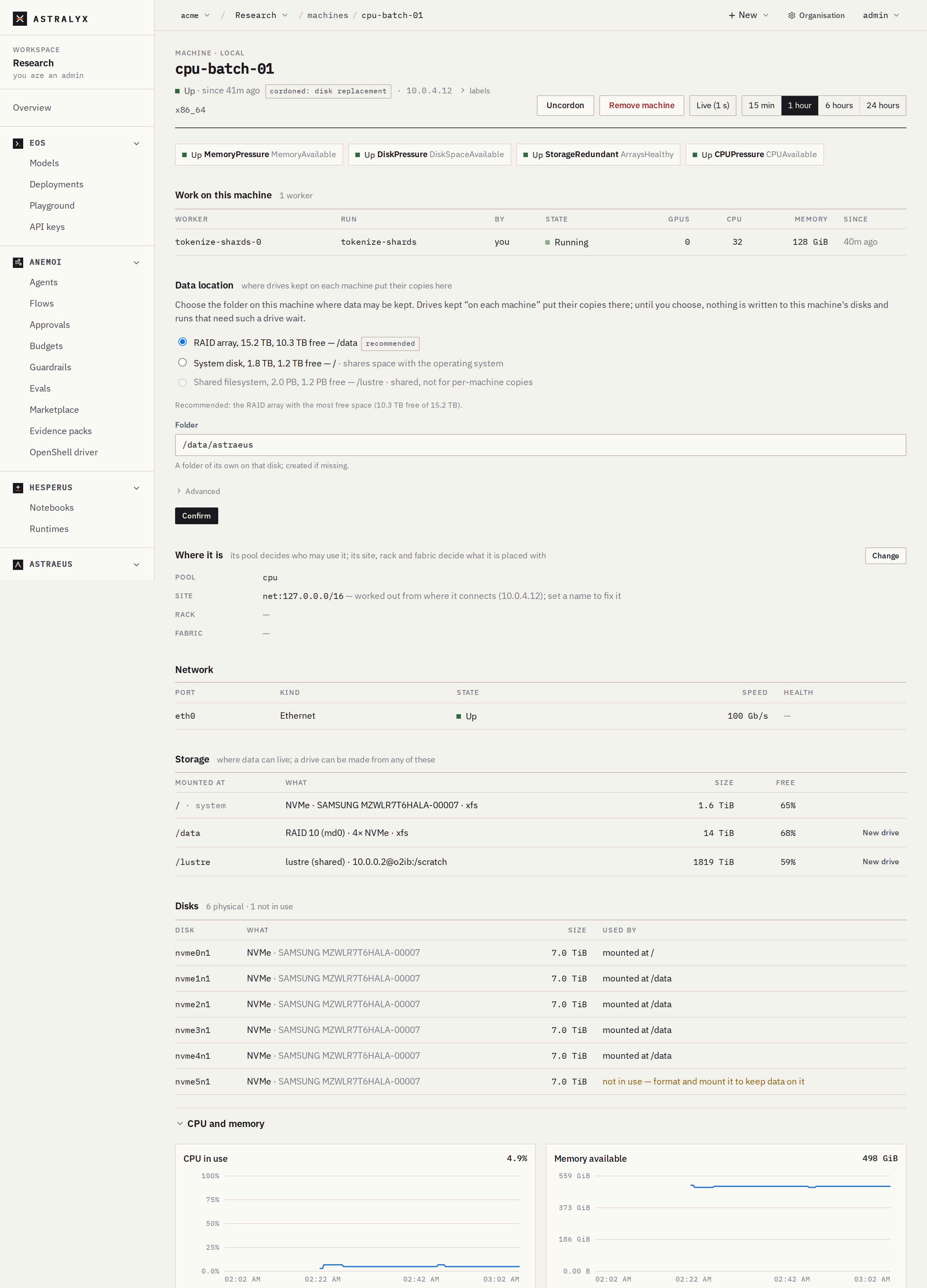
Cordoning a machine keeps the work running there and places nothing new on it.
- Open Compute → Machines and click the machine.
- Click Cordon. Enter why (the default is
maintenance); it shows on the machine ascordoned: maintenance, with who and when. - To put it back in service, click Uncordon.
astra has no cordon command. Use the console or the API.
$ curl -sS -X POST \
    "https://console.astralyx.cloud/api/v1/orgs/acme/clusters/fra-1/nodes/gpu-01/cordon" \
    -H "Authorization: Bearer $ASTRAEUS_TOKEN" \
    -H 'content-type: application/json' \
    -d '{"reason": "firmware update"}' | jq '.spec.scheduling | {accepts_jobs, reason, cordoned_at}'
{
  "accepts_jobs": {
    "enabled": false
  },
  "reason": "firmware update",
  "cordoned_at": "2026-10-01T14:02:11.204511873Z"
}
$ curl -sS -X POST \
    "https://console.astralyx.cloud/api/v1/orgs/acme/clusters/fra-1/nodes/gpu-01/uncordon" \
    -H "Authorization: Bearer $ASTRAEUS_TOKEN"
Organisation admins only. Both are recorded in the organisation's audit log under your name.
Drain a machine for maintenance#
Astraeus has no automatic drain: it does not evict work. To empty a machine:
- Cordon it (above). Nothing new lands on it.
- Plan ahead with a reservation (optional). Reserve the machine for nobody over the maintenance window; before the window, only work sure to end in time is placed there. See Reservations.
- Wait for the work to finish, or stop it. The machine's page lists Work on this machine. Stop or delete the runs you do not want to wait for; a run whose restart policy allows it is placed again elsewhere.
- Do the maintenance. Stopping the agent does not stop the workers
(
systemctl stop astraeus-agentleaves containers running); a reboot does. - Uncordon it once it is back Up.
What happens to running work#
| Event | Running workers |
|---|---|
| Cordon | Keep running. |
| Agent restart, update | Keep running; the new agent adopts them. |
astraeus-containerd restart |
Keep running (each is held by its shim). |
| The machine loses its network | After 60 seconds the machine and its workers are Down. They keep their GPUs, cores and quota while their placement stands. If the machine comes back with the containers still running, they are adopted again; otherwise they fail with Container not found and their run's restart policy decides. |
| Reboot | Containers stop. After the reboot the agent reports them gone, and the run's restart policy decides. |
| Remove the machine | Work stops at once; each run is placed again if its restart policy says so, otherwise it ends as lost. |
Remove a machine#
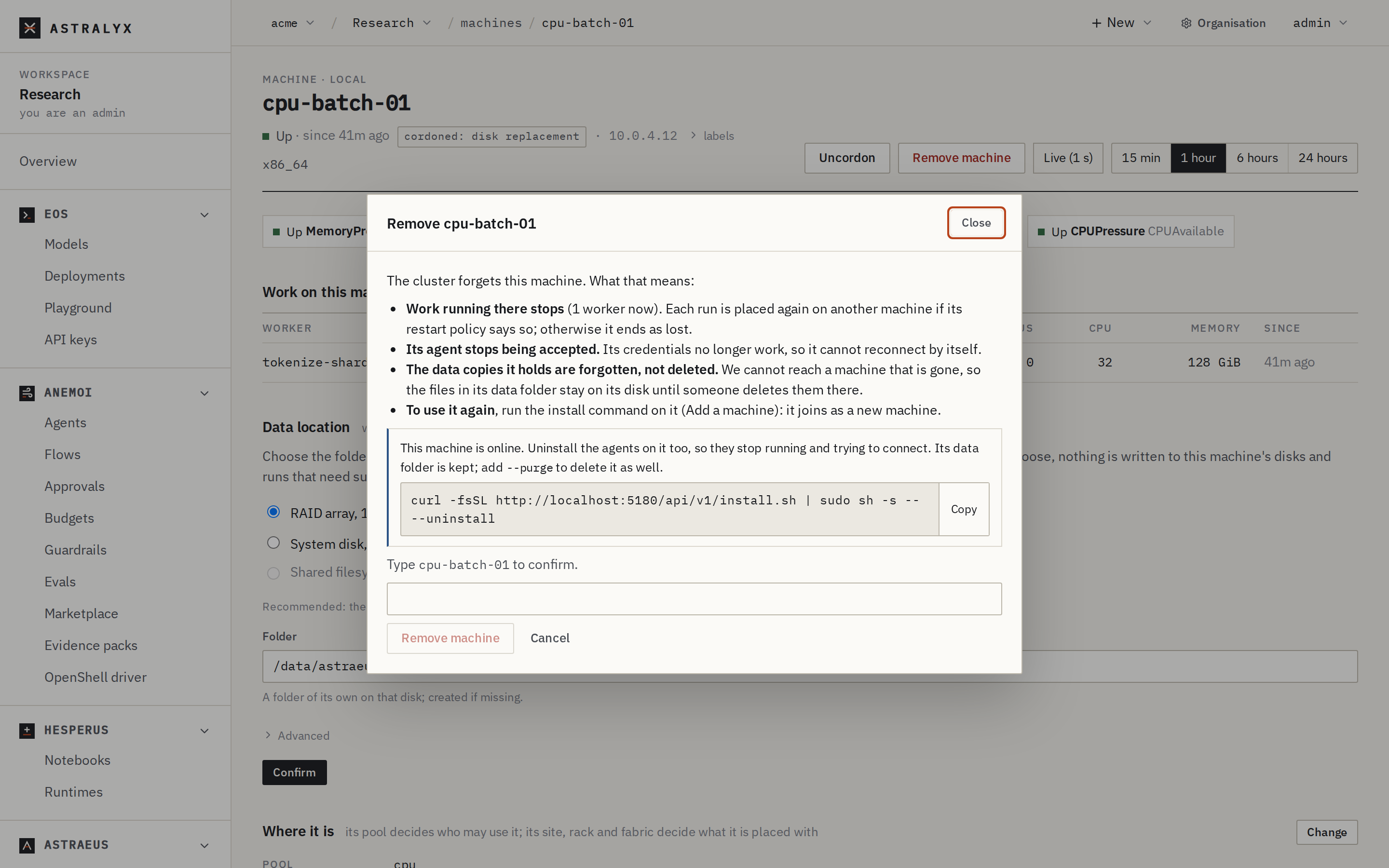
Remove a machine that is gone, wiped or retired. The cluster forgets it.
- Open the machine's page and click Remove machine (or Remove in the cluster's Machines tab).
- Read what it means, type the machine's name, and click Remove machine.
- If work still runs there, the dialog says so; click Stop the work and remove to continue.
- If the machine is still online, the dialog gives the uninstall command to run on it.
astra has no command for this. Use the console or the API.
$ curl -sS -X DELETE -w '%{http_code}\n' \
    "https://console.astralyx.cloud/api/v1/orgs/acme/clusters/fra-1/nodes/gpu-01" \
    -H "Authorization: Bearer $ASTRAEUS_TOKEN"
{"code":"NODE_IN_USE","message":"machine gpu-01 still has 2 live worker(s)"}
409
$ curl -sS -X DELETE -w '%{http_code}\n' \
    "https://console.astralyx.cloud/api/v1/orgs/acme/clusters/fra-1/nodes/gpu-01?force=true" \
    -H "Authorization: Bearer $ASTRAEUS_TOKEN"
204
Without force=true, the request is refused with NODE_IN_USE (409)
while workers run there.
When a machine is removed:
- Its credentials stop working at once. Its token is revoked, and any
certificate issued before the removal is refused (
NODE_REMOVED). It cannot reconnect by itself. - Work running there stops, and is placed again as each run's restart policy says.
- The drive copies it held are forgotten, not deleted. The files stay in its data location until someone deletes them there.
- Its subnet and its reservations are released.
Danger
Removing a machine cannot be undone. To use it again, install it again: it joins as a new machine.
Uninstall the agent#
Run on the machine, as root:
$ curl -fsSL https://console.astralyx.cloud/api/v1/install.sh | sudo sh -s -- --uninstall
· uninstalling the Astraeus agent
· stopping and removing 2 Astraeus container(s)
· removing its network: rules, namespaces, the mesh and the tasks' bridges
· removing its files
· kept the data location /mnt/nvme0/astraeus (drive copies): delete it by hand (rm -rf /mnt/nvme0/astraeus) if nothing there is needed
· the Astraeus agent is uninstalled
  If this machine is still listed in its cluster, remove it there (the console: the machine's page, Remove machine).
It stops and disables the agent's services and astraeus-containerd, stops and removes
the Astraeus containers (in the bundled containerd and in Docker), and
removes the units, binaries, /usr/lib/astraeus, /etc/astraeus,
/var/lib/astraeus, /run/astraeus, the mesh interface, the workers'
bridges and network namespaces, its iptables rules, its CDI specs, its
SELinux rules and its firewalld zone. Running it twice is harmless.
- The data location is kept. Add
--purgeto delete it too. - GPU drivers and the packages it installed stay, as do the package
repositories it added for a driver
(
/etc/apt/sources.list.d/astraeus-nvidia.list,/etc/apt/sources.list.d/astraeus-amdgpu.list). - It does not remove the machine from the cluster. Remove it in the console, before or after.
Full details: Installer reference.
Install a removed machine again#
Run a new install command on it. The installer sees that the cluster no longer accepts the machine's credential and joins it as a new machine, with the new token:
If the machine was wiped and installed afresh while its old record is still in the cluster, the name is taken:
install: the cluster has a machine named gpu-01 already, from another installation (this machine installed afresh keeps no proof it is that one).
  Run this again with --name <another name>, or remove the old record from the cluster
  (in the console: the machine's page, Remove machine; …): this machine then connects by itself.
Move a machine to another organisation or cluster#
Run the other organisation's install command on the machine. The installer says where the machine is connected and asks:
This machine is connected already:
  organisation  Acme Research
  as            gpu-01
  cluster       https://api.astralyx.cloud
Moving it to Vision Lab: it leaves the one above, and what runs on it there stops.
Move this machine to Vision Lab? [y/N]
Without a terminal, pass --move (or --no-move to leave it). When it
moves:
- On the same cluster, the machine proves with its old credential that it is the same machine. Its old record is removed (what ran there is lost to it), its old credential is revoked, and it registers anew with the new token's labels, under the same name.
- To another cluster, its record on the old cluster stays, Down, until someone removes it there.
Change the runtime#
Rerun the installer with --runtime docker or --runtime containerd.
Workers run by one runtime are invisible to the other, so the installer
stops and removes the Astraeus containers of the old runtime first, and the
agent starts the workers again under the new one:
· moving from Docker to the bundled containerd: stopping and removing this machine's 3 Astraeus container(s) in Docker; the worker starts its tasks again under containerd
Credentials and identity#
| Credential | Where | Lifetime | Rotation |
|---|---|---|---|
| Join token, then the machine's token | /etc/astraeus/token (root only) |
Once used, valid until the machine is removed. Astraeus keeps only its SHA-256 hash. | No rotation in place. Remove the machine and install it again for a new one. |
| Machine certificate (mutual TLS) | /var/lib/astraeus/worker/identity |
24 hours, renewed automatically 8 hours before expiry | Automatic. Refused for good once the machine is removed. |