Troubleshooting and FAQ#
Each entry gives the symptom as you see it, the cause, and the fix. Start with the reason Astraeus gives: every waiting or failed run and worker carries one, in words, and the console explains it. For machine-side problems in depth, see Machine troubleshooting; for every error code, Errors.
Runs#
My run is stuck in Pending. How do I see why?#
Every waiting run and worker has a reason. Read it first.
Open the run. The header gives the reason in words. Under Why it is not running yet, the console lists how many machines were considered, how many are up, and what each one lacks — or the single reason they all give.
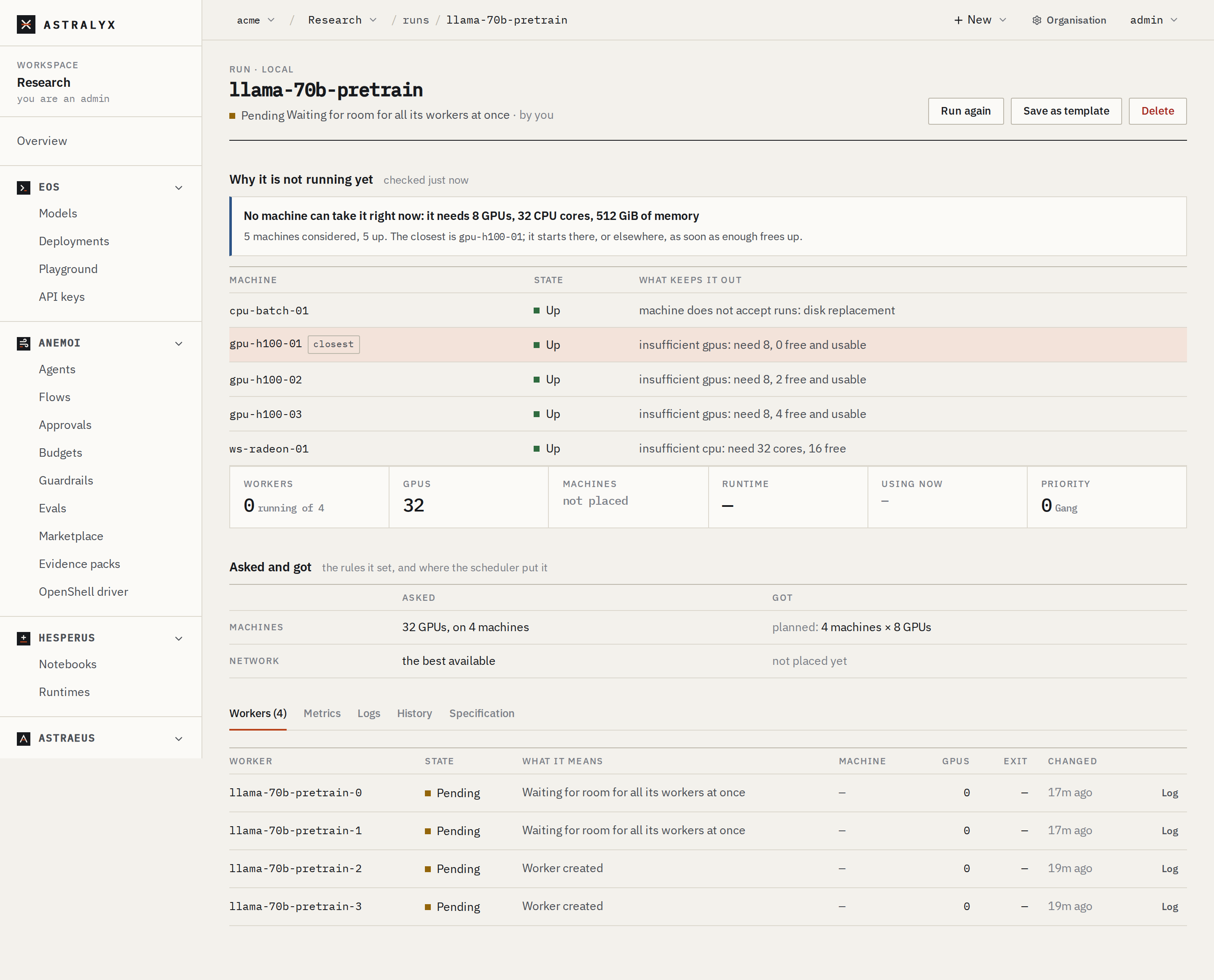
The REASON column shows the run's reason. The precise reason is on the
run's waiting workers, in the REASON column of workers, for example
Gang waits for namespace quota: gpus 12 in use + 8 asked > 16.
$ curl -sS "$WS_API/runs/train" -H "Authorization: Bearer $ASTRAEUS_TOKEN" | jq '.status | {state, reason}'
$ curl -sS "$WS_API/workers?job=train" -H "Authorization: Bearer $ASTRAEUS_TOKEN" \
    | jq '.items[] | {name: .metadata.name, state: .status.state, reason: .status.reason}'
A waiting worker also carries placement: the machines considered and
each one's reasons.
Then find the reason below.
| Reason (console headline, or the raw reason) | Cause | Fix |
|---|---|---|
Waiting for a machine with room (No machine fits, Insufficient…) |
Not enough free GPUs, cores or memory on any machine the workspace may use. | Wait, or ask for less. Check the run's CPU and memory: the console's form starts at 8 cores and 64 GiB per GPU (or per worker without GPUs). |
| No machine here can ever run it: it needs … | No machine the workspace may use is big enough, even empty. | Ask for less per worker, more machines, or have an admin grant the workspace a pool with bigger machines. |
Waiting for room for all its workers at once (Gang cannot be placed whole) |
A gang starts all together or not at all. | Wait, ask for fewer workers, or use start: Independent or MinAvailable if your program tolerates it. |
The workspace has used its quota on this cluster (… waits for namespace quota: gpus 12 in use + 8 asked > 16) |
The workspace holds its quota. | It starts when the workspace's other work ends. An organisation admin can raise the quota. See the next question. |
| No machine has … GPUs | No machine the workspace may use has the GPU model asked for. | Choose another model, or any. |
| Waiting for healthy GPUs | The run asked for healthy GPUs only, and free ones are at risk. | Wait, or run without Only healthy GPUs. |
Waiting for a better network (Waiting up to … more for …) |
The run asked to wait for a tighter network. | Nothing: it takes what there is when the wait ends. |
| No machine has InfiniBand with room | The run asked for InfiniBand or RDMA only. | Wait, or set the network to Best available. |
| No single NVLink domain / fabric / rack can hold the whole run right now | The run must stay inside one, and none has room. | Wait, use fewer workers, or remove the boundary. |
| No single site has room for the whole run | A run never spans sites. | Wait for one site to have room. |
| Choose where to keep data on <machine> | The run uses a drive kept on each machine, and that machine has no data location. | An organisation admin chooses it on the machine's page. See Drives and data. |
| Fetching the weights onto <machine> | The first start on a machine fills the drive first. | Nothing: later starts there are quick. |
| Waiting for a credential to reach the machine | The machine has not fetched a credential the run uses. | Open the credential: its status, per machine, says what failed. See Credentials. |
| Waiting for a drive / Waiting for drive … to be mounted from … | The drive's data is on another machine, and the mount is not ready, or that machine is down. | Open the drive. Check that the holding machine is Up. |
| The machine is short of memory or disk | Machines under pressure take no new work. | Free memory or disk on the machine. |
My run says it is over quota#
The workspace's quota on that cluster caps what it holds at once: GPUs, CPU cores, memory, workers. A run that would exceed it waits, without blocking other workspaces' runs. If the run alone asks more than the whole quota, the reason says more than the namespace's quota allows at all: it never starts until the quota is raised or the run asks less.
Fix: wait for the workspace's other runs to end, delete runs you no longer need, or ask an organisation admin to raise the quota (workspace Settings → the cluster → quota). See Workspaces, quotas and pools.
My run was preempted#
The worker's reason is Preempted by higher-priority work (Paused to make room for higher-priority work in the console). A run of higher priority needed its GPUs. The worker was stopped gracefully — the stop signal, then 30 s by default before it is killed — and queued again. It does not spend its restart budget, and it starts again as soon as there is room.
Fix: nothing to do for the run. To lose less work, save checkpoints and
handle the stop signal (SIGTERM) by saving one. To avoid preemption, run at
a higher priority — up to your workspace's maximum. See Priorities,
preemption and checkpoints.
Creating a run fails with 403 PRIORITY_NOT_ALLOWED#
The run asks for a priority above the workspace's maximum on that cluster
(priority 50 is above namespace ws-…'s maximum of 10). The maximum is 0
unless an organisation admin raised it.
Fix: ask for at most the maximum (the New run form shows it under Priority), or ask an admin to raise it.
Creating a run fails with 400 UNKNOWN_FIELD#
The specification has a field Astraeus does not know (fields this API does not know: spec.replicas). Unknown fields are refused rather than ignored, so a typo never runs a different run than the one you wrote.
Fix: correct the field name. See Run specification.
Creating a run fails with 409 JOB_ALREADY_EXISTS#
A run with that name exists in the workspace. Fix: choose another name, or
delete the old run first. Run again in the console picks
<name>-again.
My run fails with The container image could not be downloaded#
The worker's reason mentions the pull: the image name or tag is wrong, the registry refused the machine (a private registry, or a rate limit), or the machine cannot reach the registry.
Fix:
- Check the image name and tag exactly.
- For a private registry, create a credential
holding the registry login and set it as the run's registry credential
(
registry_secret_refin the worker template). - Check that the machine reaches the registry over HTTPS: pulls are made by the machine, not the control plane.
My run fails with It ran out of memory (exit code 137)#
The container went over its memory limit and was killed. Fix: ask for
more memory (memory_bytes, or per_gpu.memory_bytes), or make the program
use less: a smaller batch, fewer data-loader workers.
My run fails with It reached its time limit and was stopped#
The worker ran past time_limit_seconds. A worker stopped by its time limit
is never restarted. Fix: give it a longer limit, or save progress so a new
run can resume.
A worker keeps restarting (keeps crashing: restarted N times)#
With the default restart_policy: OnFailure, a failing worker is restarted
up to 10 times, waiting 10 s and doubling up to 5 min. After that the reason
is Retry budget exhausted after 10/10 restarts and the run fails.
Fix: open the worker's log — each failure is the same, and the log says
why. Fix the cause and run it again. Use restart_policy: Never for runs that
should fail at once.
The log says it is unavailable#
409 TASK_NOT_PLACED: the worker has not been placed on a machine yet; there is no log.400 TASK_LOG_UNAVAILABLE: the machine could not read it, for example because the container is gone.- No answer: logs are read from the machine over its own connection. If the
machine is
Down, its logs cannot be read until it reconnects.
Deleting a run removes its workers and their logs. Download logs you want to keep before deleting.
Machines#
A machine is Down, or the console says it is not responding#
The machine's reports stopped and its heartbeat (60 s) lapsed. Nothing new is
placed on it. Its workers are marked Down but keep their GPUs: if the
machine comes back with them still running, they are re-adopted.
Fix, on the machine:
-
Check it is on and the agent runs:
-
Check it reaches the Astraeus address shown in the console over HTTPS (on Astraeus Cloud,
https://api.astralyx.cloud), through any proxy or firewall:Any HTTP status means the address is reachable; a timeout or a TLS error means the network or a proxy is in the way.
-
Restart the agent if it is stuck:
sudo systemctl restart astraeus-agent.
A machine that is gone for good: remove it on its page (Remove machine). Its work is marked lost at once, so runs and replica groups replace it. See Update, drain and remove.
The machine never appears after the install command#
The installer failed, or the agent cannot register.
- Read the installer's output: it stops with the reason (an unsupported system, a failed download, a checksum mismatch).
- The token works once and expires after 24 hours unused: get a new command.
- The machine needs outbound HTTPS to the console (the installer and the releases) and to the Astraeus address shown in the console.
journalctl -u astraeus-agentshows a refused registration. A name already taken by another machine is refused (NODE_NAME_TAKEN): install with--name.
The machine is Idle#
It registered but has not reported. It usually turns Up within seconds. If
it stays Idle, the agent started and stopped: read
journalctl -u astraeus-agent.
The installer says the machine is already connected to another organisation#
A machine belongs to one organisation. The installer names the one it is in
and asks whether to move it; without a terminal, pass --move (or
--no-move). Moving stops what runs there for the old organisation, keeps
the machine's name and joins it to the new one. Reinstalling for the same
organisation is an upgrade and keeps its identity.
Get the install command fails with LIMIT_REACHED#
On Astraeus Cloud an organisation may have 10 machines by default, counting install commands not used yet. Fix: remove a machine, wait for unused commands to expire (24 hours), or ask Astralyx for more at [email protected].
Only admins can add machines#
Add machine is shown to organisation owners and admins only; others see An organisation admin adds machines to the workspace. Ask an admin, or to be made one.
GPUs#
The machine is Up but shows no GPUs#
Open the machine's page: the GPUs section says how they were read
(driver: …).
| Shows | Cause | Fix |
|---|---|---|
no-gpu |
The driver reports no GPU, or no NVIDIA driver is installed. | Run nvidia-smi on the machine. Install the driver (535 or newer recommended); rerunning the installer offers it where the distribution packages it. A reboot may be needed; the machine picks the GPUs up by itself afterwards. |
unavailable, unresponsive |
The GPU stack stopped answering. The last known GPUs are kept. | Check nvidia-smi and the kernel log (dmesg) for driver errors and Xids. |
| No AMD GPU | amdgpu is not loaded, or there is no /dev/kfd. |
Rerun the installer: it loads amdgpu and, on Ubuntu, installs the missing kernel modules and firmware. RX 7000 GPUs need kernel 6.2 or newer; MI300, 6.8 or newer. |
Until GPUs are visible, the machine runs CPU work. See GPUs.
A GPU is Faulty and nothing runs on it#
The GPU reported a fault (an NVIDIA Xid, an AMD reset). It is fenced: nothing new is placed on it. Runs that were on it failed with A GPU reported a fault (Xid N); start them again, and they avoid it.
Fix: reset or replace the GPU, then an organisation admin clears the fault on the GPU's page. A fault that returns fences it again.
A GPU is Foreign#
A process Astraeus did not start holds the GPU's memory — something run by hand on the machine. Astraeus places nothing on it meanwhile. Fix: stop that process.
My container does not see the GPU#
The run asked for no GPU (gpu_requests.count is 0): a worker sees only the
GPUs it was given. Set the count. For AMD, use an image with ROCm
(rocm/pytorch): ROCm is not on the machine.
Networking#
Workers on different machines cannot reach each other#
Machines in the mesh reach each other over WireGuard on UDP 51820. Fix: allow UDP 51820 between the machines. Machines with RDMA, or where WireGuard could not be set up, use the host network instead: their workers reach each other by machine address, and must be allowed on the ports they use. See Network and firewalls.
A name does not resolve inside a worker#
Names resolve within the workspace (train-0, <run>, <endpoint>) for
workers on the mesh. Host-networked workers use the machine's resolver and
cannot resolve cluster names; use machine addresses there. A worker only
resolves once it runs. See Names and service discovery.
Access#
403 RBAC_FORBIDDEN: role viewer may not create jobs in ws-…#
Your role in the workspace does not allow the action. Viewers and auditors read; editors and admins change. Fix: ask a workspace admin for the editor role. See Roles and permissions.
403 NAMESPACE_FORBIDDEN#
The request names or references an object outside the workspace — a
credential, a drive or a run of another workspace. Fix: use names of your
workspace, written without a namespace (train, not ws-….train). A name
containing a . is refused (names cannot contain '.').
403 HOST_ACCESS_FORBIDDEN#
The run or drive uses a host path, or privileged work, the workspace was not granted. Fix: an organisation admin grants the path (as narrowly as possible) under the workspace's Settings → the cluster → Host paths, or Privileged work. See Organisations, workspaces and clusters.
403 WORKSPACE_ADMIN_REQUIRED#
Managing a workspace's members needs its admin role. Organisation admins are admins of every workspace.
The CLI says not signed in or the session is over#
astra: not signed in means astra has no session or token; the session is
over or the token is wrong means the session (30 days) ended or the API
token was revoked or has expired. Fix: run astra login, or set a valid
ASTRA_TOKEN. See Install the CLI.