Submit a run#
A run is a container image, a command and what it needs (GPUs, CPU, memory, data), started on your workspace's machines. This page shows how to start one in each of the three ways — console, CLI and API — and how to set everything a typical run needs: the image and its registry, the command and its environment, resources, a time limit and what happens on failure. It ends with what happens after you submit, and how to stop, delete or repeat a run.
For the complete list of fields, see the run specification. For several machines, see Multi-machine runs.
Before you begin#
- You are an editor or admin of a workspace that has access to at least one cluster with a machine. Viewers can read runs but not start them. See Organisations, workspaces and clusters.
-
For the CLI: install
astra, sign in and choose the workspace (Install the CLI):$ astra login Open https://console.astralyx.cloud/device?code=QWRT-PLKM and approve code QWRT-PLKM Signed in as [email protected], working in acme/default $ astra use acme/vision Working in acme/vision -
For the API: an API token from the console (Account → API tokens → New token). The examples below put it in
ASTRA_TOKEN.
Start a training run#
The example trains a ResNet-50 on one GPU, reading ImageNet from the drive imagenet, with a 12-hour limit. The console and API examples run code kept on the drive; the CLI example sends the code in the current directory with the run.
- Open the workspace, then Runs → New run (
/o/<org>/w/<workspace>/new-run). - Choose the Cluster, and give the run a Name:
resnet50. Lower-case letters, digits and-. - Image:
nvcr.io/nvidia/pytorch:24.08-py3. - Command:
python. Arguments:/data/code/train.py --epochs 90(separated by spaces; the code is on the drive mounted in step 6). - GPUs:
1. With GPUs, the next two fields are CPU cores per GPU (8) and Memory per GPU (64Gi). - Drives:
imagenet:/datamounts the driveimagenetat/data. - Open More options and set Time limit to
12h. - Select Start run. The console opens the run's page; its state is
Pendinguntil a machine takes it.
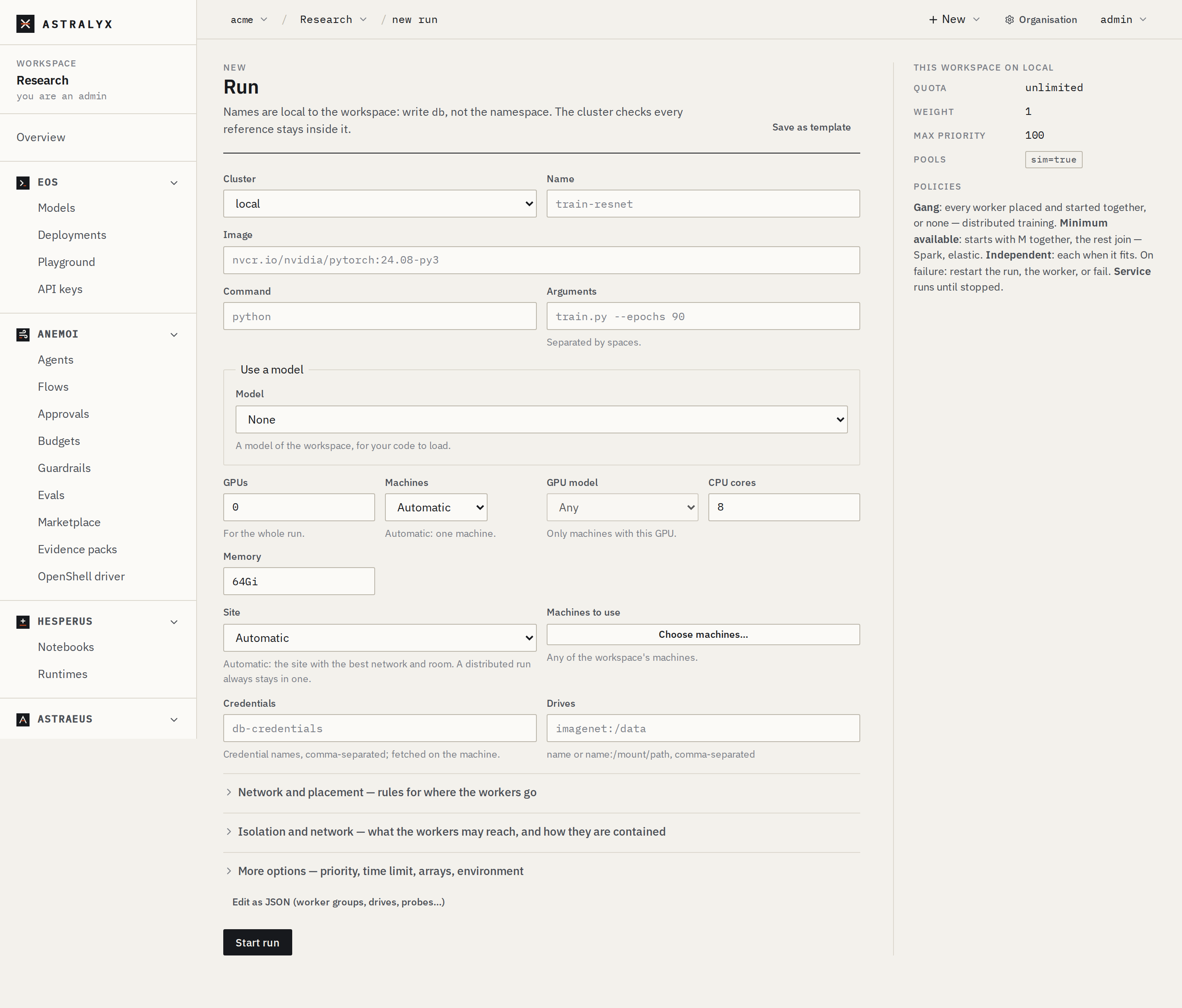
The panel on the right shows what the workspace has on this cluster: its Quota, Weight, Max priority and Pools.
--code . packs the current directory (code only, at most 900 KiB) and unpacks it in /workspace, where the command runs.
$ astra astraeus run --name resnet50 \
    --image nvcr.io/nvidia/pytorch:24.08-py3 \
    --gpus 1 --cpus 8 --mem 64G --time 12h \
    --code . -- python train.py --epochs 90
resnet50 submitted to gpu-east: https://console.astralyx.cloud/o/acme/w/vision/jobs/gpu-east/resnet50
$ astra astraeus runs
NAME                          CLUSTER       STATE       REASON
resnet50                      gpu-east      Running     1 of 1 workers running
Add --wait to follow the log until the run ends; the command then exits non-zero if the run did not complete.
astra astraeus run has no flag for drives or credentials. For a run that mounts the imagenet drive, save the spec as a template and start it with --template, or use the API.
The workspace's view of a cluster is https://console.astralyx.cloud/api/v1/orgs/<org>/workspaces/<workspace>/clusters/<cluster>/api, the cluster's /v1 with your workspace's names.
{
  "metadata": { "name": "resnet50" },
  "spec": {
    "task_template": {
      "image": "nvcr.io/nvidia/pytorch:24.08-py3",
      "command": "python",
      "args": ["/data/code/train.py", "--epochs", "90"],
      "time_limit_seconds": 43200,
      "datavolume_refs": [{ "name": "imagenet", "mount_path": "/data" }],
      "requested_resources": {
        "gpu_requests": { "count": 1 },
        "per_gpu": { "cpu_cores": 8, "memory_bytes": 68719476736 }
      }
    }
  }
}
$ API=https://console.astralyx.cloud/api/v1/orgs/acme/workspaces/vision/clusters/gpu-east/api
$ curl -sS -X POST "$API/jobs" \
    -H "Authorization: Bearer $ASTRA_TOKEN" \
    -H 'Content-Type: application/json' \
    --data-binary @resnet50.json | jq -r .metadata.name
resnet50
The answer is 201 Created with the run as created. /runs is accepted as an alias of /jobs.
From a spec file#
Keep runs you repeat as files next to your code. The API takes JSON; YAML works if you convert it as you send it.
- In New run, select Edit as JSON (worker groups, drives, probes…). The form's run appears as the JSON body.
- Paste or edit your spec. Names are local to the workspace: write
imagenet, not a namespace. - Select Start run.
astra has no command that submits a file. Use the API (next tab), or keep the spec as a workspace template and start it with --template (see Run again and templates).
A field the cluster does not know is refused, never ignored: 400 UNKNOWN_FIELD with fields this API does not know: spec.replicas.
Name the run#
- Letters, digits,
-and_, no-at either end, at most 57 characters (less with worker groups). The console accepts lower-case only; use lower-case everywhere. - Unique in the workspace on that cluster: a second run with the same name is refused with
409 JOB_ALREADY_EXISTS. Delete the old one, or pick another name. - Workers are named after the run:
resnet50-0,resnet50-1… (<run>-<group>-<rank>with worker groups). astra astraeus runwithout--namenames the run after the command:python-48213.
Choose the workspace and cluster#
A run lives in one workspace, on one cluster. The workspace's quota, pools and maximum priority on that cluster apply to it.
The Cluster field of New run lists the clusters the workspace has access to. The runs list (Runs) shows every cluster's runs together.
astra use <org>/<workspace> chooses the workspace; astra use <org>/<workspace>@<cluster> also fixes the cluster. Without a cluster, astra uses the workspace's first. ASTRA_ORG, ASTRA_WORKSPACE and ASTRA_CLUSTER override the saved choice for one command.
The organisation, workspace and cluster are in the path: /api/v1/orgs/<org>/workspaces/<workspace>/clusters/<cluster>/api/jobs.
Images and private registries#
image is any OCI image reference; busybox means docker.io/library/busybox:latest. pull_policy decides when the machine pulls it:
pull_policy |
Behaviour |
|---|---|
IfNotPresent (default) |
Pull only if the image is not on the machine. Use a new tag for a new build. |
Always |
Pull every time the worker starts. |
None |
Never pull; the worker fails with Image <image> is not present and the pull policy is None if it is missing. |
To pull from a private registry:
-
Create a credential whose value is JSON with the registry login:
-
Reference it from the run:
The machine fetches the credential itself; Astralyx never sees its value. Until the credential is on the machine, the worker stays in Preparing with waiting for registry secret registry-login to be synced to this node. A wrong name or login ends the worker with ErrImagePull: <error>.
Command, arguments and environment#
commandis one executable. It replaces the image'sENTRYPOINTandCMD;argsare its arguments. Withoutcommand, the image'sENTRYPOINTruns withargs(or the image'sCMD).-
There is no shell.
"args": ["--nodes=$WORLD_SIZE"]passes the literal text$WORLD_SIZE. To expand variables, run a shell: -
envsets variables. Yours override the ones Astraeus injects (RANK,MASTER_ADDR…); see Inside a worker. -
Secrets do not go in
env, which anyone who can read the run can see. Reference a credential instead; the machine resolves it:
In the console, Environment takes KEY=value pairs (comma-separated or one per line) and Credentials takes credential names. With astra, use -e KEY=value (repeatable).
Resources#
Every worker states its CPU and memory, in one of three forms:
| Form | Fields | When to use it |
|---|---|---|
| Per worker | cpu_cores, memory_bytes |
CPU runs, arrays, and GPU runs on a fixed number of machines. |
| Per GPU | per_gpu.cpu_cores, per_gpu.memory_bytes |
GPU runs: a worker with 8 GPUs gets 8 times the amount, whatever shape the scheduler picks. The console and astra use this form whenever you ask for GPUs. |
| Share of a machine | node_fraction (0–1] |
A fixed share of whichever machine it lands on. The container then has no CPU or memory limit. |
- Memory is a hard limit. A worker that exceeds it is killed:
OOMKilled: the container exceeded its memory limit. - Cores are a hard quota unless you set
cpu_burst: true, which lets a worker use idle cores while keeping its share under contention. gpu_requests.countis the run's total; the scheduler splits it across machines. Choose GPU models, memory and health in GPUs and placement.- Units: the console reads
512Mi,64Giand64Gas binary sizes (64 GiB) and a plain number as bytes;astrareads64Gand64Gias 64 GiB and a plain number as MiB; the API takes bytes (68719476736is 64 GiB).
Time limits#
time_limit_seconds (60 s to 366 days) bounds how long each worker runs, counted from when it is Running. Past it, the worker is stopped — SIGTERM, then SIGKILL after its machine's stop grace (30 s by default) — and the run fails with Worker resnet50-0: Exceeded its time limit of 12h. A timed-out worker is never restarted.
Set one whenever you know roughly how long a run takes: a run with a time limit can backfill into room held for a larger run, so it often starts sooner.
More options → Time limit: 90m, 2h, 1h30m, 1d, or a number of seconds.
--time 12h. astra also reads Slurm's forms: 30 (minutes), 02:00:00, 1-12:00:00.
"time_limit_seconds": 43200 in task_template.
Failures and restarts#
Three settings decide what a failure does. The defaults suit a single-worker batch run: a worker that exits non-zero is restarted (after 10 s, doubling up to 5 min), at most 10 times.
| Setting | Values | Default |
|---|---|---|
task_template.restart_policy |
OnFailure, Always, Never |
OnFailure |
spec.on_failure |
RestartJob (all workers), RestartTask (the failed one), FailJob (no restart; the run fails) |
RestartJob for a gang, else RestartTask |
spec.lifetime |
Batch (runs to completion), Service (restarted whenever it ends, until deleted) |
Batch |
The CLIs do not restart
astra astraeus run and astra slurm sbatch set restart_policy: Never: a failed worker fails its run at once. The console and the API keep the default, OnFailure.
For a run that should never repeat work (it writes results as it goes), use on_failure: FailJob. For a server or a notebook, use lifetime: Service. See Run and worker states for the exact back-off and budget.
What happens after you submit#
- The run is accepted as
Pending(Run created) and Astraeus creates its workers. - The queue orders waiting runs by priority, then fair share, then submission time, and places workers on machines that pass every filter. A run that waits says why: see Read a pending reason.
- Each placed worker's machine prepares it (
Preparing), pulls the image (Pulling), starts it (Starting) and reportsRunning. - The run ends
Completedwhen every worker exits 0,Failedwhen a worker fails for good, orCancelledwhen its workers were stopped.
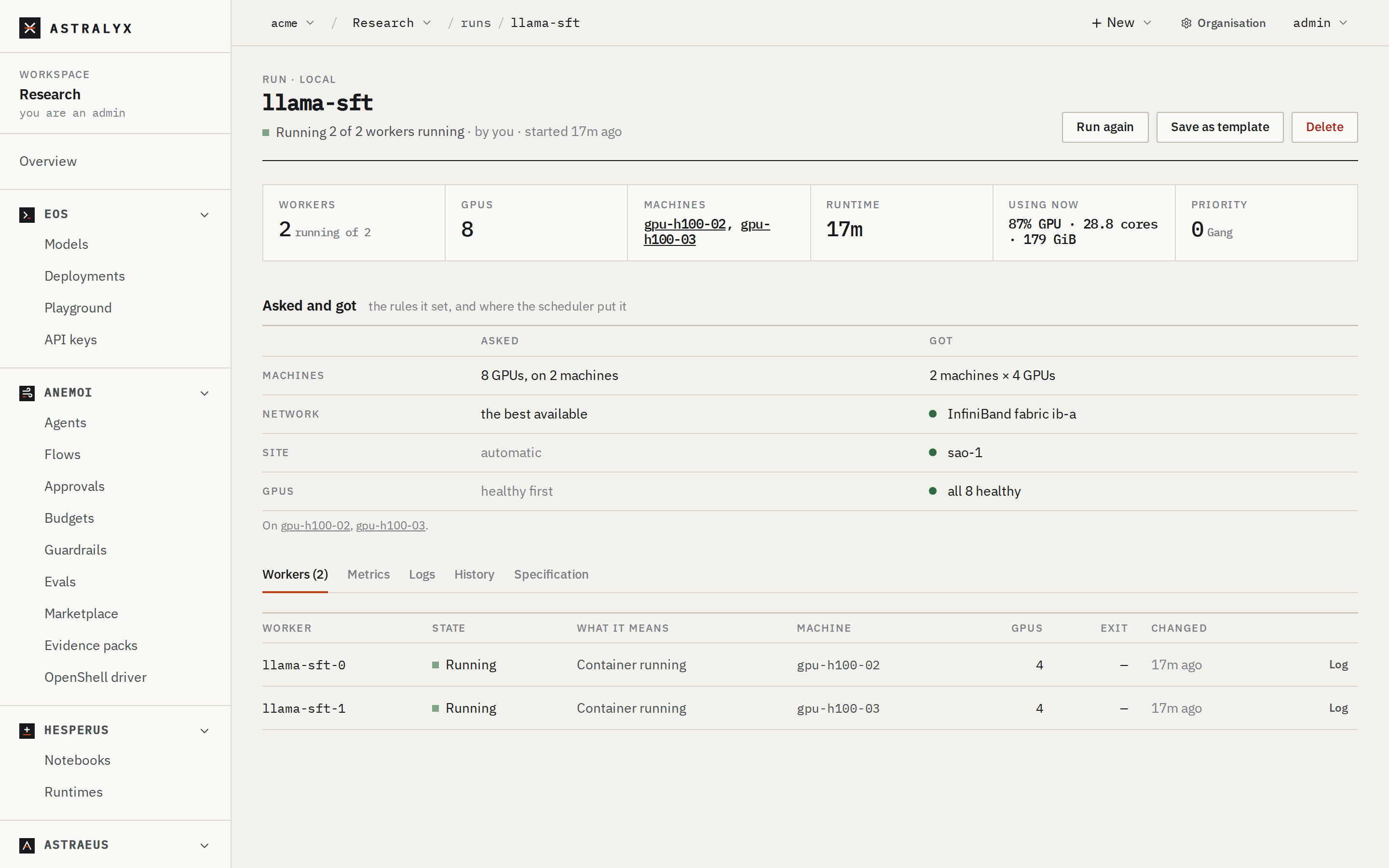
Follow it on the run's page, with astra astraeus status resnet50, or with GET $API/jobs/resnet50. See Logs, metrics and debugging.
Run again and templates#
- Run again on a run's page opens New run with that run's specification as JSON, named
<run>-again. Change what you need and select Start run. - Save as template (on a run's page, or in New run) keeps the specification in the workspace under a name; saving under an existing name replaces it.
- In New run, Start from a template… lists the workspace's templates; Use it loads one as JSON, Remove deletes it.
$ astra astraeus templates
llama-70b finetune  16 H100, 24 h, checkpoints on /ckpt
$ astra astraeus run --template "llama-70b finetune" --name finetune-oct
finetune-oct submitted to gpu-east: https://console.astralyx.cloud/o/acme/w/vision/jobs/gpu-east/finetune-oct
With --template, the template's specification is used as it is; --image, --gpus and the other resource flags are ignored.
Templates belong to the workspace, not the cluster:
$ curl -sS "https://console.astralyx.cloud/api/v1/orgs/acme/workspaces/vision/templates" \
    -H "Authorization: Bearer $ASTRA_TOKEN" | jq -r '.items[].name'
llama-70b finetune
$ curl -sS -X POST "https://console.astralyx.cloud/api/v1/orgs/acme/workspaces/vision/templates" \
    -H "Authorization: Bearer $ASTRA_TOKEN" -H 'Content-Type: application/json' \
    -d '{"name": "resnet50", "description": "1 GPU, 12 h", "spec": '"$(jq .spec resnet50.json)"'}'
A template's spec is checked by the cluster only when a run is made from it. Templates are at most 256 KiB. DELETE …/templates/<id> removes one.
To start a run on a timetable, use a schedule.
Stop or delete a run#
Deleting a run stops its workers (each gets SIGTERM, then SIGKILL after the stop grace) and removes the run, its workers and their logs.
Deleting removes the logs
Download what you need from the run's Logs tab first. There is no undo.
On the run's page select Delete, type the run's name to confirm, and select the confirm button. The dialog says how many workers will be stopped and how many GPUs freed.
To stop a run but keep its record and logs, stop its workers instead: POST $API/tasks/<worker>/stop (optional body {"reason": "…"}). A stopped worker ends Cancelled and is not restarted; once every worker has ended, the run is Cancelled (All workers ended; some were cancelled). There is no console button or CLI command for this.
astra astraeus run flags#
| Flag | Default | Description |
|---|---|---|
--name |
from the command | The run's name. |
--image |
$ASTRA_IMAGE |
The container image. Required unless --template. |
-g, --gpus |
0 |
GPUs for the whole run; the scheduler picks the machines. |
--machines |
0 |
Exactly this many machines, GPUs split evenly. |
--cpus |
4 |
Cores — per GPU when there are GPUs, else per worker. |
--mem |
16G |
Memory — per GPU when there are GPUs, else per worker. 64G, 512M; a plain number is MiB. |
--time |
none | Time limit: 2h, 1h30m, 90 (minutes), 02:00:00, 1-00:00:00. |
-e, --env |
— | KEY=value, repeatable. |
--code |
— | Pack this directory (at most 900 KiB packed; .git, target, node_modules, __pycache__, .venv, venv, .mypy_cache, .pytest_cache, .ipynb_checkpoints skipped) and run the command in /workspace. Needs a command. |
--template |
— | Start from a workspace template. |
--pool |
— | Only machines labelled pool=<value>. |
--model |
— | Mount a model of the workspace at /model. |
--model-path |
/model |
Where the model is mounted. Needs --model. |
--with-engine |
off | Serve the model beside the run. Needs --model. |
-w, --wait |
off | Follow the first worker's log until the run ends. |
-- <command> [args…] |
the image's | The command and its arguments. |
astra sets restart_policy: Never and does not set start: a run on several machines starts its workers independently. For a gang, use the console, the API, or a template whose spec sets start: Gang.
Troubleshooting#
| Symptom | Cause | Fix |
|---|---|---|
400 UNKNOWN_FIELD: fields this API does not know: spec.replicas |
A field the API does not have. | Workers come from machines, node_selection.count or array; see the run specification. |
400 VALIDATION_ERROR with detail |
A value out of range or a contradiction. | Each detail entry names the field and the rule. |
400 NAME_NOT_DNS_SAFE |
The name (or a derived worker name) is not a DNS label. | Shorter name, letters, digits and - only. |
403 PRIORITY_NOT_ALLOWED: priority 50 is above namespace …'s maximum of 0 |
The workspace may not ask for that priority. | Lower it, or ask an admin to raise the maximum. |
409 JOB_ALREADY_EXISTS |
The name is taken. | Delete the old run or pick another name. |
astra: the workspace has no cluster yet: add a machine in the console |
The workspace has no cluster. | Add a machine. |
The run stays Pending |
No room, quota, or rules that no machine meets. | Read the pending reason. |