Events and audit#
Astraeus keeps two records. Events say what happened to resources — a run started, a worker failed, a machine went down — and come from the clusters. The audit log says who changed what on the platform — memberships, workspaces, clusters, settings. This page describes both, how long they are kept, and how to send events to your SIEM with an event stream.
Events#
Where events come from#
Every state change of a resource on a cluster — a run starting, a worker failing, a machine going down — is recorded together with an entry in the resource's history. Astraeus derives an event from each of these recorded changes, so an event always describes a change that really happened.
flowchart LR
  M[Your machines] -->|reports over HTTPS| C["Astralyx control plane (SaaS)"]
  Y[You: console, CLI, API] -->|changes| C
  C --> H[Workspace and cluster events]
  C --> A[Alerts]
  C --> X[Event streams to your SIEM]
Events are a best-effort record, as in Kubernetes: after a long interruption of the control plane, some events of that period can be missing. The resources' own status and history remain the source of truth.
Event fields#
| Field | Type | Description |
|---|---|---|
id |
string | Unique and stable: <revision>:<key> of the write. The same event replayed keeps its ID. |
kind |
string | The resource kind; see below. |
name |
string | The resource's name within its workspace. |
type |
string | StateChanged, Deleted, StatusChanged, Indexed, OutboundDenied, ToolCallDenied, ReceiptKept or Changed. |
state |
string | The state entered, for a transition. See Run and worker states. |
reason |
string | Why, in words. |
at |
time | When it happened: the transition's own time. |
details |
object | Structured context, depending on the kind (for example a machine condition, or that a run waits on its quota). |
In the listings (console and API), id is the event's numeric position in
the history, used for paging, and cluster names the cluster.
| Kind | Resource | Types |
|---|---|---|
job |
Run | StateChanged, Deleted |
task |
Worker | StateChanged, Deleted, OutboundDenied, ToolCallDenied |
node |
Machine | StateChanged (state and conditions), Deleted |
cron_job |
Schedule | StateChanged, Deleted |
scaling_group |
Replica group | StateChanged, Deleted |
data_volume |
Drive | StateChanged, Deleted |
data_volume_claim |
Mount | StateChanged, Deleted |
connector |
Data source | StatusChanged, Indexed, Deleted |
model, deployment, deployment_share |
Eos models and deployments | StateChanged, Deleted |
agent, oauth_connection, approval, agent_budget, agent_receipt, agent_guardrail, flow_execution, eval_run, evidence_pack, retention_policy |
Anemoi | see Anemoi |
notebook_runtime |
Hesperus runtime | StateChanged, Deleted |
OutboundDenied is a worker's machine refusing a name or connection under
the run's outbound rules; ToolCallDenied its tool gateway refusing a tool
call. Events carry metadata only — names, states and reasons — never the
data a run reads or writes.
View events#
A workspace's events cover what ran in it, on every cluster. A cluster's own events — its machines — belong to no workspace and are shown to organisation owners and admins only.
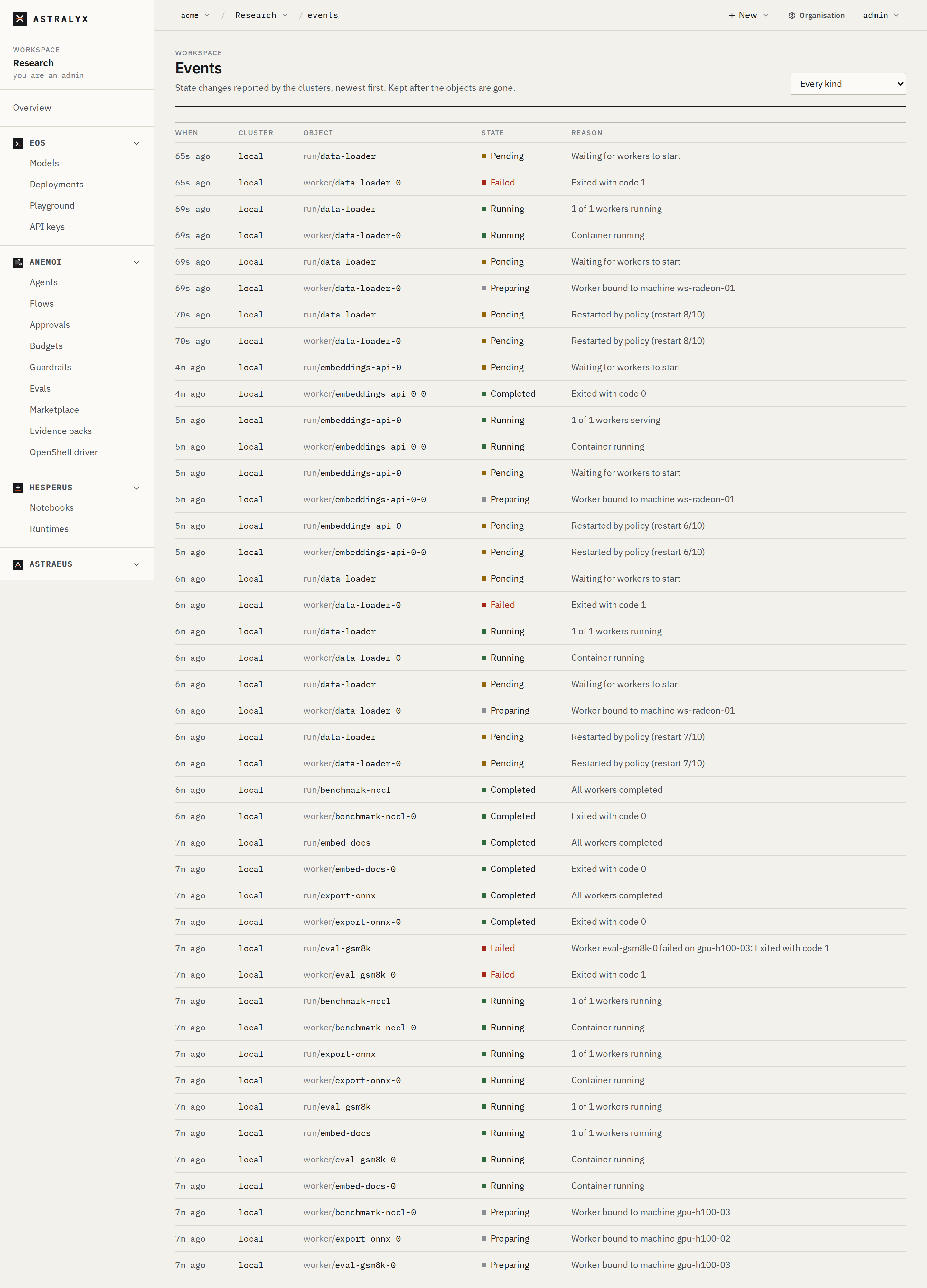
- Workspace → Events: the workspace's events, newest first, with When, Cluster, Object, State and Reason. Filter with the kind selector (Every kind, run, worker, schedule, replica group, drive, mount, data source, model). Events stay after the objects are deleted.
- Organisation → Clusters & machines → a cluster → Events: its machines' events.
$ curl -sS "$ASTRA_URL/api/v1/orgs/acme/workspaces/vision/events?kind=job&limit=2" \
    -H "Authorization: Bearer $ASTRA_TOKEN"
{"items":[
  {"id":91822,"cluster":"lab-a","kind":"job","name":"train","type":"StateChanged","state":"Failed","reason":"exit code 1","at":"2026-10-01T09:12:44.103Z","details":null},
  {"id":91790,"cluster":"lab-a","kind":"job","name":"train","type":"StateChanged","state":"Running","reason":"All workers running","at":"2026-10-01T08:02:10.553Z","details":null}],
 "next_before":91790}
| Parameter | Default | Description |
|---|---|---|
kind |
all | Only this kind. |
name |
all | Only this object. |
before |
none | Only events with a smaller id: pass the previous page's next_before. |
limit |
100 | Page size, 1 to 500. |
A cluster's machine events: GET /orgs/{org}/clusters/{cluster}/events,
same parameters (owners and admins).
To follow resources live rather than read history, watch them on the cluster
API (?watch=true); see REST API.
How long events are kept#
| Record | Kept | Who changes it |
|---|---|---|
| A workspace's events on the platform | Until removed by the workspace's retention; by default, kept | Workspace admins |
| A cluster's machine events on the platform | Kept | — |
A workspace's event retention is 1 to 3660 days, or none (kept). Events past it are removed once an hour — except events an enabled event stream of the organisation has not sent yet, which are kept until it has.
Open Workspace → Retention. Under On the platform, set Events
(days; empty keeps them) and save. The change is recorded in the audit
log as workspace.events_retention.
The audit log#
The platform records every change made through it — by people in the console, the CLI or the API — with who, what, on which target, from which address, and the details.
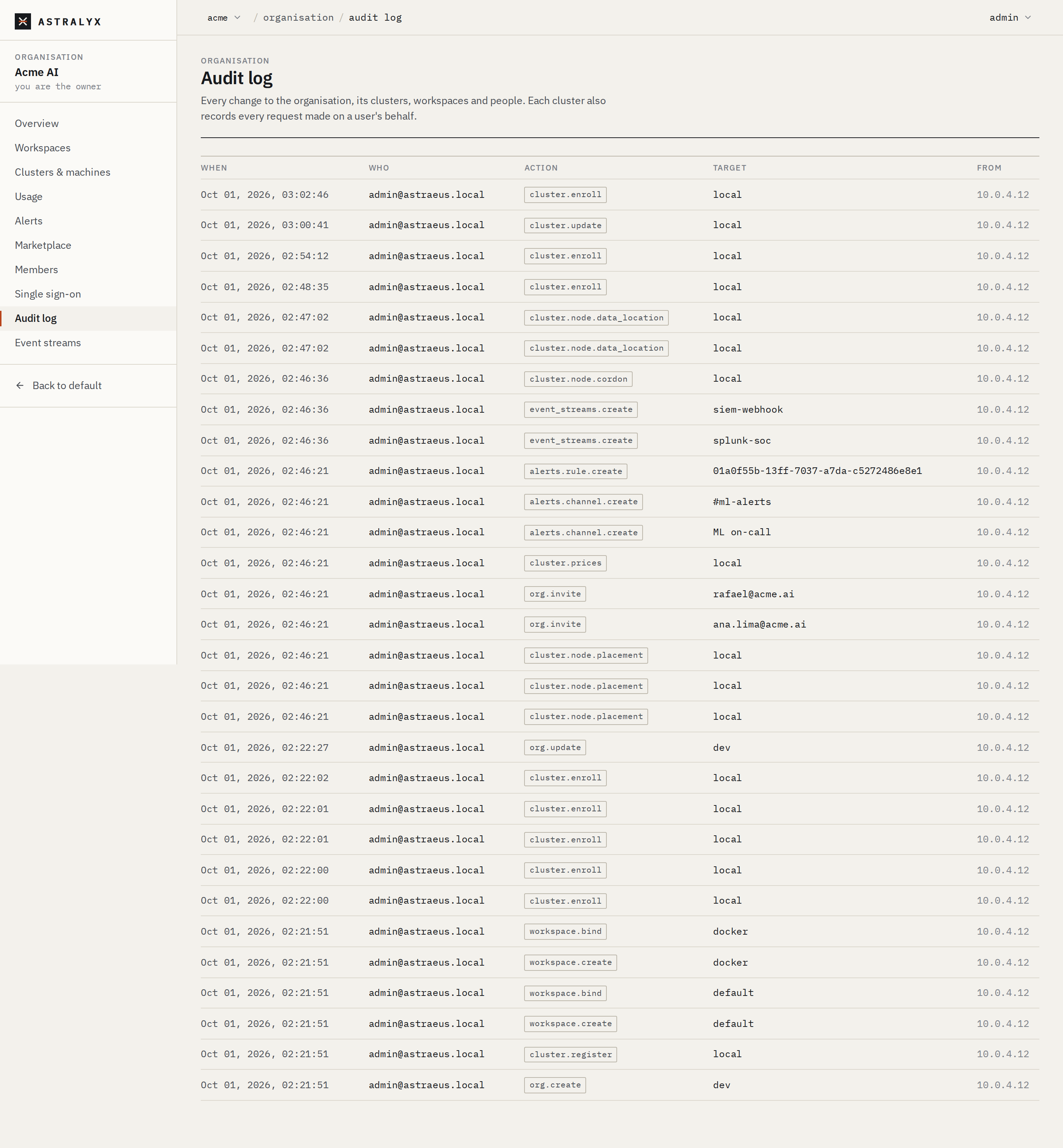
Open Organisation → Audit log (owners and admins). Each row shows When, Who, Action, Target and From (the client's address); select a row for its details. Older entries loads the next 100.
$ curl -sS "$ASTRA_URL/api/v1/orgs/acme/audit?limit=1" -H "Authorization: Bearer $ASTRA_TOKEN"
{"items":[{"id":5521,"at":"2026-10-01T08:55:02Z","user_id":"0192…","user_email":"[email protected]",
  "action":"workspace.binding.update","target":"vision","detail":{"cluster":"lab-a"},"ip":"203.0.113.7"}]}
| Parameter | Default | Description |
|---|---|---|
before |
none | Only entries with a smaller id. |
limit |
100 | 1 to 1000. |
The audit log is kept without a time limit.
Actions recorded#
| Area | Actions |
|---|---|
| Organisation | org.create, org.create_personal, org.update, org.invite, org.join, org.member.role, org.member.remove |
| Single sign-on | sso.configure, sso.remove, user.sso_login |
| Workspaces | workspace.create, workspace.delete, workspace.member.set, workspace.member.remove, workspace.bind, workspace.binding.update, workspace.unbind, workspace.events_retention, workspace.hosted_gateway, workspace.template.save, workspace.template.delete, workspace.model.add, workspace.marketplace.install |
| Clusters and machines | cluster.register, cluster.update, cluster.delete, cluster.hosted, cluster.enroll, cluster.node.cordon, cluster.node.uncordon, cluster.node.upgrade, cluster.node.placement, cluster.node.data_location, cluster.node.data_location.clear, cluster.node.remove, cluster.gpu.clear_fault, cluster.reservation.create, cluster.reservation.delete, cluster.prices |
| Alerts and streams | alerts.channel.create, alerts.channel.delete, alerts.rule.create, event_streams.create, event_streams.update, event_streams.delete |
| Governance | org.guardrail.put, org.guardrail.delete, org.marketplace.settings, org.marketplace.publish, org.marketplace.update, org.marketplace.approve, org.marketplace.reject, org.marketplace.withdraw, org.marketplace.delete, agent.run |
| Astralyx | operator.org.update (Astralyx changed the organisation's settings, for example its limits) |
Some actions are recorded but belong to no organisation, so they appear in
no organisation's audit log: sign-up, sign-in (user.login,
user.social_login), password changes and resets, API token creation and
deletion (token.create, token.delete), device approvals
(device.approve), the deletion of an organisation (org.delete), and the
actions Astralyx takes on accounts (grants, prices, disabling users).
Not recorded in the audit log: revoking an invitation, changing or deleting an alert rule. Operations inside a workspace — creating a run, deleting a drive — are not platform changes; they appear as events and in the cluster's request log below.
The cluster's request log#
Each cluster also logs every request made on a person's behalf, after it has checked that person's access: the person's ID, the workspace, the role, the verb and resource, the path and the HTTP status — refusals included. This log is kept by Astralyx; it is not shown in the console.
Event streams#
An event stream sends every event of the categories you choose to your SIEM, mapped to OCSF 1.3.0. Unlike alerts, it is meant for machines, not people.
| Kind | Address | Authentication |
|---|---|---|
webhook |
https://… (or http://) |
Each request is signed with HMAC-SHA256; the key is shown once. |
splunk_hec |
Splunk's HTTP Event Collector, https://…/services/collector/event |
Authorization: Splunk <token> |
syslog |
tls://host:port (port 6514 by default) |
TLS; optionally your own CA certificate (PEM) for the server. TCP with TLS only. |
The URL, the HEC token and the signing key are stored encrypted. The URL is shown afterwards only as its scheme and host. Addresses must be public.
Categories#
| Category | Carries |
|---|---|
runs |
Runs and workers: every state. High volume. |
machines |
Machines: joined, down, back, conditions. Only on streams for every workspace. |
outbound_denials |
Outbound connections and names a run's policy refused |
tool_denials |
Tool calls a run's policy refused |
shares |
Deployments shared with other workspaces, and revoked |
agents |
Agents: versions made, made current, rolled back |
approvals |
Approvals: asked, decided, used, expired |
budgets |
Budgets spent and within again |
receipts |
Agent run receipts kept (digests and counts) |
guardrails |
Guardrails changed or removed |
flows |
Flow executions and their steps |
evals |
Eval runs: started, graded, promoted |
evidence |
Evidence packs asked for and made |
retention |
Retention policies changed |
Add a stream#
- Open Organisation → Event streams and select Add stream.
- Choose the Kind, a Name, and the URL (or Address for syslog). For Splunk, enter the HEC token; for syslog with a private CA, paste the CA certificate (PEM).
- Under Where from, choose a workspace, or every workspace, and the machines.
- Under Carries, tick the categories. All are ticked by default except runs and machines.
- Select Add. For a webhook, copy the signing key from the next dialog: it is not shown again.
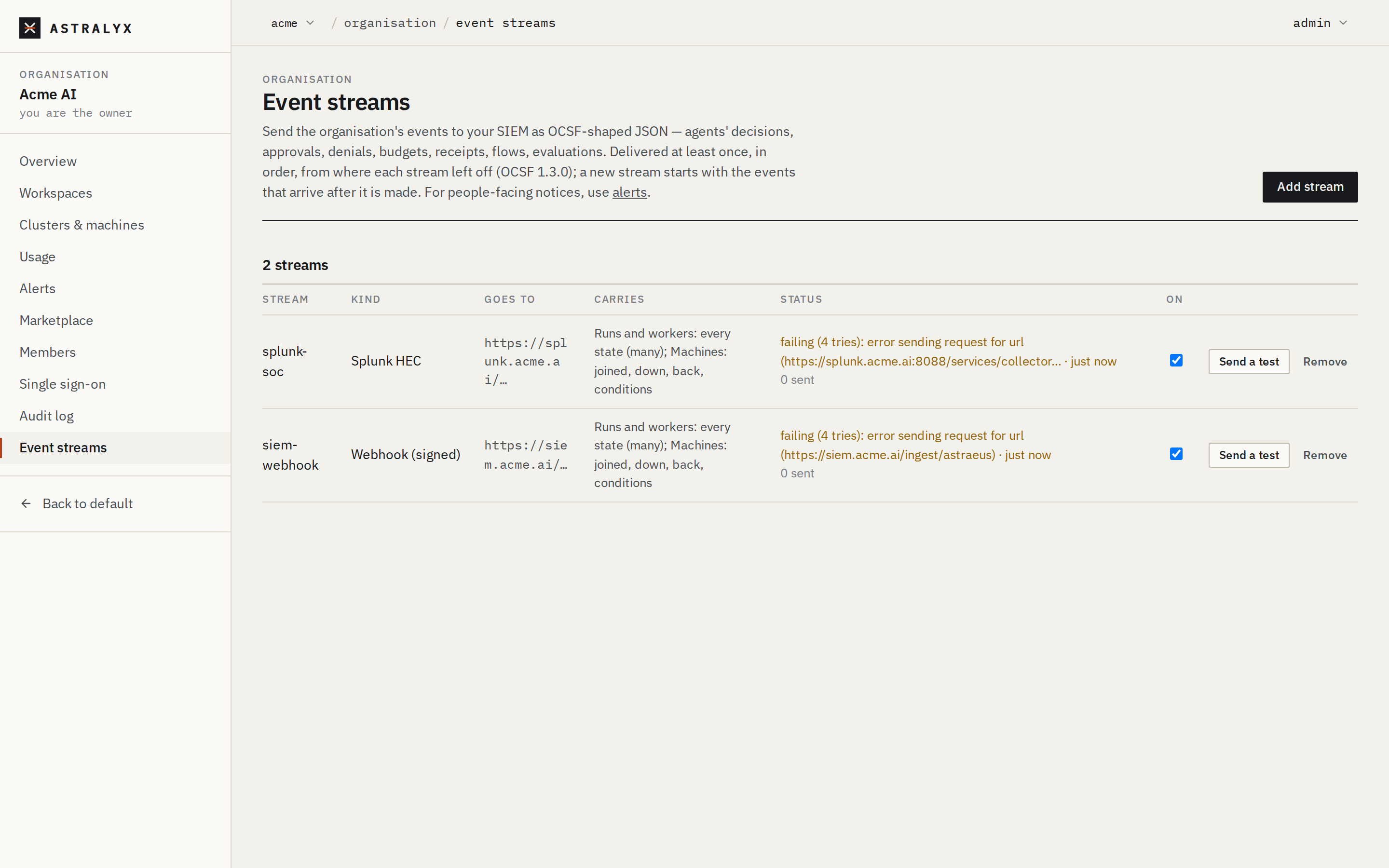
The table shows each stream's Status: when it last delivered, how many events wait to be sent, or why it is failing. Untick On to pause it; Remove deletes it.
$ curl -sS -X POST "$ASTRA_URL/api/v1/orgs/acme/event-streams" \
    -H "Authorization: Bearer $ASTRA_TOKEN" -H "Content-Type: application/json" \
    -d '{"kind": "splunk_hec", "name": "splunk", "url": "https://splunk.example.com:8088/services/collector/event",
         "token": "…", "categories": ["runs", "machines", "outbound_denials"], "workspace": null}'
{"id":"0192…","kind":"splunk_hec","name":"splunk","url":"https://splunk.example.com/…","categories":["runs","machines","outbound_denials"],"signing_key":null}
| Field | Required | Description |
|---|---|---|
kind |
yes | webhook, splunk_hec or syslog. |
name |
no | At most 100 characters; defaults to the kind. |
url |
yes | http(s)://… for webhook and HEC; tls://host:port for syslog. |
token |
HEC | The HEC token. |
ca_pem |
no | Syslog: the CA the server's certificate chains to, when it is not a public CA. |
categories |
yes | One or more categories. |
workspace |
no | A workspace's slug; null for every workspace and the machines. |
GET /orgs/{org}/event-streams lists streams with status (ok,
failing, disabled), behind (events not yet sent), delivered,
attempts, last_error and last_delivered_at.
PATCH /orgs/{org}/event-streams/{id} changes enabled, categories
and name; DELETE removes the stream. The address cannot be changed:
remove the stream and add a new one.
| Error | Cause |
|---|---|
400 INVALID_EVENT_STREAM |
Unknown kind or category; a URL that is not http(s) (or not tls:// for syslog); a missing HEC token; an unreadable CA. |
400 UNREACHABLE_ADDRESS |
The address is not public. |
404 EVENT_STREAM_NOT_FOUND |
No such stream in the organisation. |
Delivery#
- A new stream starts with the events that arrive after it is made; it does not replay history.
- Each stream keeps its own position. It sends up to 200 events at a time,
in order, and moves its position only after the batch is accepted
(a
2xxanswer, or a completed TLS write for syslog). - A failed batch is retried after 1 minute, then twice as long each time, up
to 1 hour, and never skipped. The stream shows
failingwith the last error meanwhile. Turning a paused stream back on retries at once. - Delivery is at least once: deduplicate on
metadata.uid. - Timeouts: 30 s per HTTP request; for syslog, 10 s to connect, 10 s for TLS, 30 s to write.
What is sent#
Webhook: a POST of
{"stream": "<id>", "ocsf_version": "1.3.0", "events": [ … ]} with headers
Content-Type: application/json, User-Agent: Astraeus-Events,
X-Astraeus-Stream: <id> and X-Astraeus-Signature: sha256=<hex HMAC-SHA256
of the body>. Verify the signature as for
alert webhooks.
Splunk HEC: one HEC event per line,
{"time": <seconds>, "source": "astraeus", "sourcetype": "ocsf:<class_uid>", "event": <OCSF event>}.
Syslog: one RFC 5424 message per event, framed with octet counting
(RFC 5425): facility 13 (log audit), severity 4 (warning) for refusals and 6
(informational) otherwise, HOSTNAME astraeus-platform, APP-NAME
astraeus, MSGID the OCSF class name without spaces, and the OCSF event as
JSON in the message.
OCSF mapping#
| Category | OCSF class | class_uid |
category_uid |
|---|---|---|---|
outbound_denials |
Network Activity | 4001 | 4 |
approvals |
Authorize Session | 3003 | 3 |
runs, machines, flows, evals |
Application Lifecycle | 6002 | 6 |
| every other category | API Activity | 6003 | 6 |
| OCSF field | Value |
|---|---|
activity_id / activity_name |
Network Activity: 5 Refuse. Application Lifecycle: 2 Remove (deleted), 3 Start (Running, Up), 4 Stop (Completed, Failed, Cancelled, Succeeded, Stopped, Down), else 99 named by the state. API Activity: 4 Delete (deleted), else 99 named by the state or event type. |
type_uid |
class_uid × 100 + activity_id |
time |
Milliseconds since the epoch. |
status_id / status |
2 Failure for refusals and the states Failed, Denied, Expired, Down; 1 Success for deletions and the states Completed, Succeeded, Approved, Used, Ready, Kept, Changed, Set; else 0 Unknown. |
severity_id / severity |
3 Medium for refusals, 2 Low for other failures, else 1 Informational. |
message |
<kind> <name>: <reason>. |
metadata |
version 1.3.0; uid <cluster>/<event id>; original_time; product (Astraeus, vendor Astralyx, feature.name the category); tenant_uid the organisation's slug; sequence the platform's position. |
action / disposition |
Refusals: Denied (2) / Blocked (2). |
src_endpoint.name |
Network Activity: the worker. |
api |
API Activity: operation (tools/call for tool refusals, else the kind) and service.name astraeus. |
app |
Application Lifecycle: name the object, feature.name the kind. |
unmapped.astraeus |
Everything Astraeus-specific: org, cluster, workspace, kind, name, type, state, reason, details. |
An example, a worker failing:
{
  "category_uid": 6, "category_name": "Application Activity",
  "class_uid": 6002, "class_name": "Application Lifecycle",
  "activity_id": 4, "activity_name": "Stop", "type_uid": 600204,
  "time": 1790845964103, "severity_id": 2, "severity": "Low",
  "status_id": 2, "status": "Failure",
  "message": "task train-0: exit code 1",
  "metadata": {"version": "1.3.0", "uid": "lab-a/88213:…",
               "original_time": "2026-10-01T09:12:44.103+00:00",
               "product": {"name": "Astraeus", "vendor_name": "Astralyx", "feature": {"name": "runs"}},
               "tenant_uid": "acme", "sequence": 91823},
  "app": {"name": "train-0", "feature": {"name": "task"}},
  "unmapped": {"astraeus": {"org": "acme", "cluster": "lab-a", "workspace": "vision", "kind": "task",
               "name": "train-0", "type": "StateChanged", "state": "Failed", "reason": "exit code 1", "details": null}}
}
Test a stream#
Select Send a test in the stream's row, or call
POST /orgs/{org}/event-streams/{id}/test. One test event (kind test,
reason "A test event: this stream works") is sent at once, outside the
stream's position; the answer is {"ok": true} or
{"ok": false, "error": "…"}.
Troubleshooting#
| Symptom | Cause | Fix |
|---|---|---|
| Events missing for a period, then resuming | A long interruption of the control plane; events of that period can be lost. | Read the resources' status and history for that period. |
A stream is failing |
The destination refused or was unreachable; last_error says how. |
Fix the destination; the stream resumes where it stopped. |
machines events missing from a stream |
The stream is for one workspace. | Make a stream for every workspace. |
| Old events still listed after setting retention | Retention runs hourly, and keeps events a stream has not sent. | Wait an hour; check that no enabled stream is behind. |