Nightly batch job#
You set up a schedule that starts a run every night at 01:30 Berlin time. The run evaluates the latest checkpoint of a model on its test set, appends the score to a history file, and fails if accuracy dropped below a threshold. An alert rule sends a Slack message whenever a run in the workspace fails, so a regression is reported the same night.
What you need:
- A workspace with a GPU machine, and a drive with a checkpoint to evaluate.
This recipe uses the
ft-ckptdrive and the checkpoint written in Preemptible fine-tuning with checkpoints; adapt the paths to yours. - The editor role in the workspace, an API token,
curlandjq(How the recipes are written). - For the alert: an organisation owner or admin, and a Slack incoming webhook URL (or an e-mail address).
What a schedule does#
| When | A time of day (hour 0–23, minute 0–59) in an IANA time zone (timezone, default UTC), every day, or on one day of the week (day_of_week, 0 = Sunday … 6 = Saturday). There is no cron expression. |
| What | A run made from job_template, a full run specification, checked when you create the schedule. |
| Names | Each run is <schedule>-<n>: nightly-eval-1, nightly-eval-2, … It carries the labels cronjob: <schedule>, cronjob-run: <n> and cronjob-trigger, plus the schedule's own labels. |
| Precision | Schedules are checked every 30 seconds: a run starts within about 30 seconds of its time, then waits in the queue like any run. |
| Overlap | None is prevented: each time fires a new run, even if the previous one is still running. Give the template a time limit shorter than the interval. |
| Missed times | Not caught up. If Astraeus was unavailable at 01:30, the schedule fires once when it is back, then at the next 01:30. |
| Daylight saving | A time that does not exist that day (clocks going forward) is skipped that day; a time that occurs twice (clocks going back) fires once, at the first. |
| End | max_runs stops it after that many runs (state Completed); 0 runs forever. |
Choose a time outside the change-over hour
In most of Europe, 02:00–02:59 does not exist on the last Sunday of March, so a 02:30 schedule skips that night. 01:30 never falls in a gap.
1. Write the evaluation script#
import datetime
import json
import os
import sys
import zoneinfo

import torch
import torch.nn as nn
import torchvision
import torchvision.transforms as T

CKPT = os.environ.get("CKPT", "/ckpt/finetune-r50/ckpt.pt")
HISTORY = os.environ.get("HISTORY", "/ckpt/finetune-r50/eval.jsonl")
MIN_ACC = float(os.environ.get("MIN_ACC", "0.70"))
TZ = zoneinfo.ZoneInfo(os.environ.get("REPORT_TZ", "Europe/Berlin"))
RUN = os.environ.get("ASTRAEUS_JOB_NAME", "local").rsplit(".", 1)[-1]

ck = torch.load(CKPT, map_location="cuda")
model = torchvision.models.resnet50()
model.fc = nn.Linear(model.fc.in_features, 100)
model.load_state_dict(ck["model"])
model = model.cuda().eval().to(memory_format=torch.channels_last)

tf = T.Compose([T.Resize(224), T.ToTensor(), T.Normalize((0.485, 0.456, 0.406), (0.229, 0.224, 0.225))])
test = torchvision.datasets.CIFAR100("/ckpt/data", train=False, download=True, transform=tf)
dl = torch.utils.data.DataLoader(test, 512, num_workers=6, pin_memory=True)

correct = 0
with torch.no_grad(), torch.autocast("cuda", dtype=torch.bfloat16):
    for x, y in dl:
        correct += (model(x.cuda(non_blocking=True).to(memory_format=torch.channels_last)).argmax(1).cpu() == y).sum().item()
acc = correct / len(test)

line = {"date": datetime.datetime.now(TZ).date().isoformat(), "run": RUN,
        "global_step": ck.get("global_step"), "test_acc": round(acc, 4)}
with open(HISTORY, "a") as f:
    f.write(json.dumps(line) + "\n")
print(json.dumps(line), flush=True)

if acc < MIN_ACC:
    print(f"FAIL: test accuracy {acc:.4f} is below {MIN_ACC}", flush=True)
    sys.exit(1)
The checkpoint is replaced by a rename when the fine-tune saves, so the evaluation always reads a whole file, even while the fine-tune runs.
2. Write the schedule#
{
  "metadata": {"name": "nightly-eval", "labels": {"team": "vision"}},
  "spec": {
    "schedule": {"hour": 1, "minute": 30, "timezone": "Europe/Berlin"},
    "max_runs": 0,
    "job_template": {
      "start": "Independent",
      "on_failure": "FailJob",
      "task_template": {
        "image": "pytorch/pytorch:2.4.1-cuda12.4-cudnn9-runtime",
        "command": "python",
        "args": ["/app/evaluate.py"],
        "env": {"MIN_ACC": "0.70", "REPORT_TZ": "Europe/Berlin"},
        "time_limit_seconds": 3600,
        "requested_resources": {
          "cpu_cores": 8,
          "memory_bytes": 34359738368,
          "gpu_requests": {"count": 1},
          "node_selection": {"mode": "Any"}
        },
        "datavolume_refs": [{"name": "ft-ckpt", "mount_path": "/ckpt", "mode": "ReadWrite"}],
        "configs": []
      }
    }
  }
}
$ jq --rawfile src evaluate.py \
    '.spec.job_template.task_template.configs = [{"mounts": ["/app/evaluate.py"], "value": $src}]' \
    schedule.json > schedule.full.json
| Field | Why |
|---|---|
schedule |
01:30 every day, Berlin time, summer and winter. Add "day_of_week": 1 for Mondays only. |
on_failure: FailJob |
No retries: a failed evaluation fails the run at once, and the alert goes out the same night. Without it, a failing worker is restarted up to 10 times with a back-off. |
time_limit_seconds: 3600 |
Stopped and failed after an hour, long before the next night's run. |
priority (not set) |
0, the default. Set it if nightly work must go before other runs, within your workspace's maximum. |
3. Create the schedule#
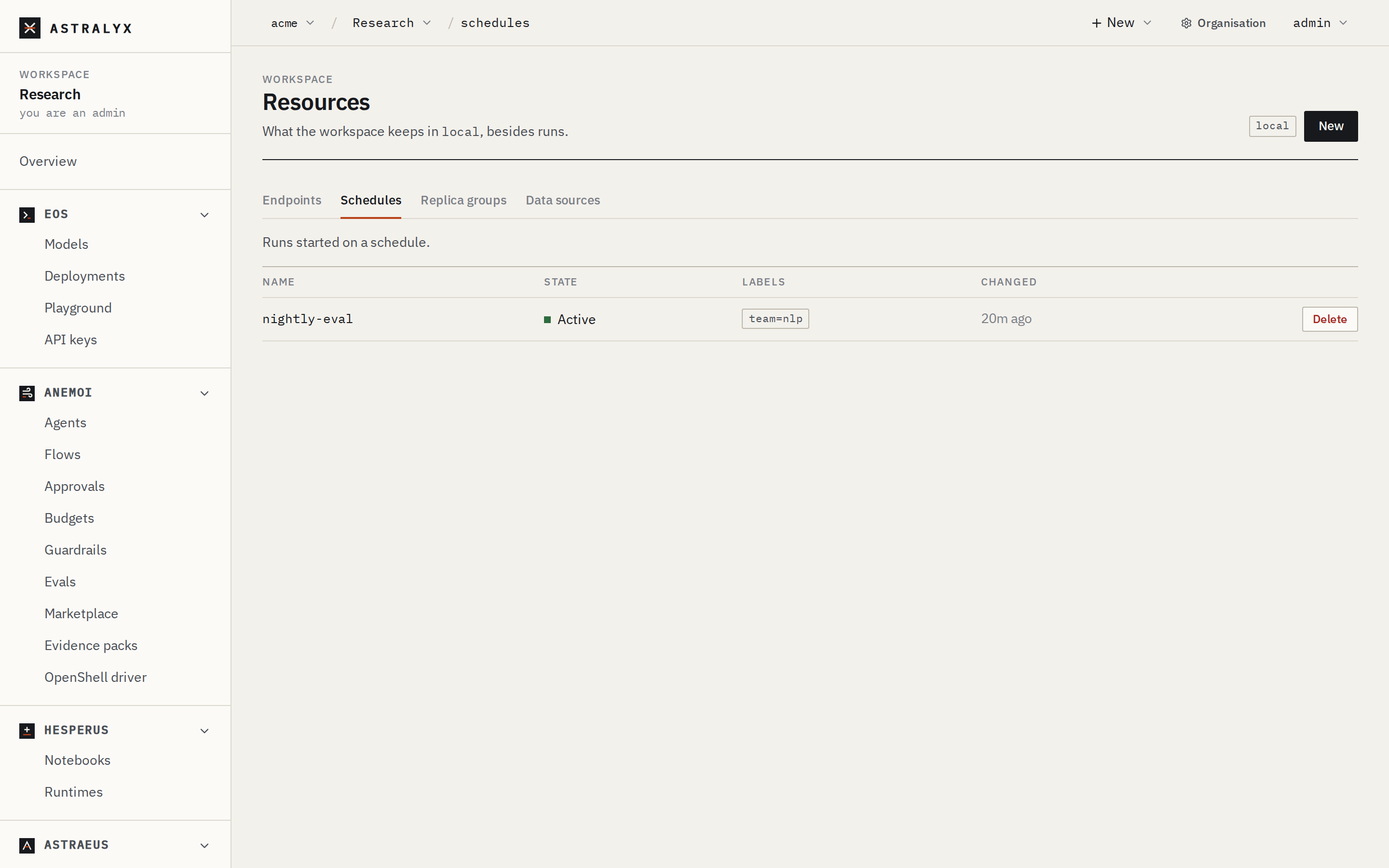
- In the sidebar, open Schedules (the Resources page, Schedules tab).
- Press New, replace the starting point with
schedule.full.json, and press Create.
The schedule appears with its state, Active. Click it to see the
whole object, including when it next runs.
4. Check the next time and try it now#
$ curl -fsS "$API/schedules/nightly-eval" -H "Authorization: Bearer $ASTRAEUS_TOKEN" \
    | jq '{state: .status.state, next_run_at, total_runs}'
{
  "state": "Active",
  "next_run_at": "2026-10-01T23:30:00Z",
  "total_runs": 0
}
01:30 in Berlin on 2 October is 23:30 UTC on 1 October: times are stored in UTC.
Do not wait for tonight to find a mistake: start a run now. It counts as a
run of the schedule (nightly-eval-1) and does not move the next time.
$ curl -fsS -X POST "$API/schedules/nightly-eval/trigger" -H "Authorization: Bearer $ASTRAEUS_TOKEN"
{"job":"nightly-eval-1","run":1}
$ astra astraeus logs nightly-eval-1-0
{"date": "2026-10-01", "run": "nightly-eval-1", "global_step": 7820, "test_acc": 0.7814}
$ astra astraeus runs --all
NAME                          CLUSTER       STATE       REASON
nightly-eval-1                main          Completed   All workers completed
A paused schedule cannot be triggered.
5. Get an alert when a run fails#
Alerts belong to the organisation: an owner or admin sets where they go and which events they cover. A rule can be limited to one workspace.
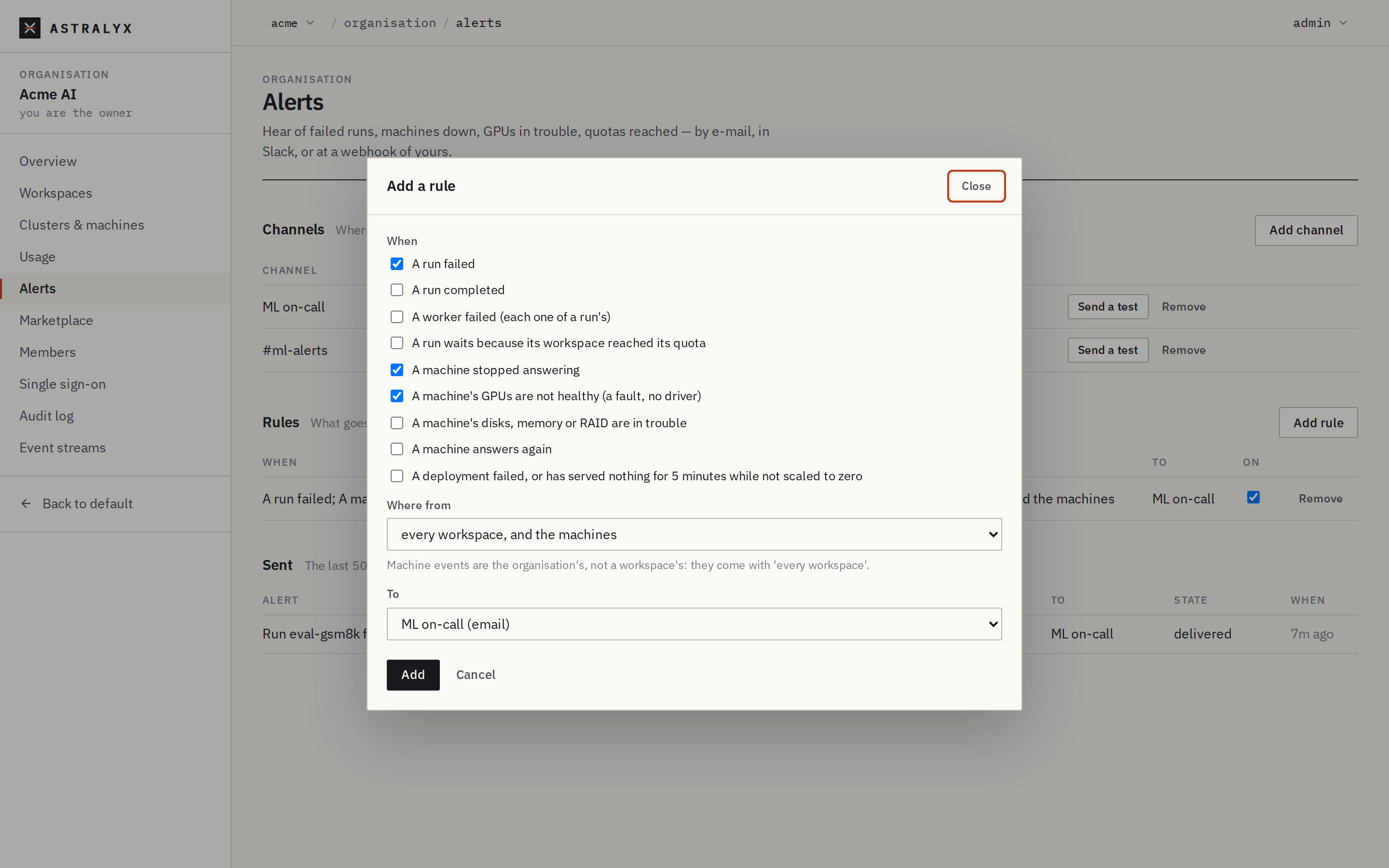
- Open Organisation → Alerts.
- Under Channels, add a channel: Kind Slack (an incoming webhook), a Name, the URL. Send a test from the channel's row.
- Under Rules, add a rule. When: tick A run failed (untick the rest if you only want this). Where from: your workspace. To: the channel.
The alert routes are the organisation's, not the cluster's:
$ ORG=https://console.astralyx.cloud/api/v1/orgs/acme
$ CHANNEL=$(curl -fsS -X POST "$ORG/alerts/channels" -H "Authorization: Bearer $ASTRAEUS_TOKEN" \
    -H 'content-type: application/json' \
    -d '{"kind": "slack", "name": "ml-oncall", "url": "https://hooks.slack.com/services/T000/B000/XXXX"}' | jq -r .id)
$ curl -fsS -X POST "$ORG/alerts/channels/$CHANNEL/test" -H "Authorization: Bearer $ASTRAEUS_TOKEN"
$ curl -fsS -X POST "$ORG/alerts/rules" -H "Authorization: Bearer $ASTRAEUS_TOKEN" \
    -H 'content-type: application/json' \
    -d "{\"channel_id\": \"$CHANNEL\", \"workspace\": \"vision\", \"events\": [\"job_failed\"]}"
The rule covers every run in the workspace that fails, not only this
schedule's; the message names the run (Run nightly-eval-3 failed: …), so
you can tell. The events you can alert on:
| Event | When |
|---|---|
job_failed |
A run failed. |
job_completed |
A run completed. |
task_failed |
A worker failed (each one of a run's). |
quota_reached |
A run waits because its workspace reached its quota. |
machine_down, machine_up |
A machine stopped answering; answers again. |
gpu_degraded, machine_condition |
A machine's GPUs, or its disks, memory or RAID, are in trouble. |
deployment_down |
An Eos deployment failed, or served nothing for 5 minutes while not scaled to zero. |
Machine events are the organisation's: a rule limited to a workspace does not receive them.
6. Check the alert fires#
Make the next run fail on purpose: trigger one with a threshold no model
reaches. A schedule cannot be edited, so use a second, paused schedule, or
run the template once by hand with MIN_ACC raised:
$ curl -fsS "$API/schedules/nightly-eval" -H "Authorization: Bearer $ASTRAEUS_TOKEN" \
    | jq '{metadata: {name: "eval-must-fail"}, spec: (.spec.job_template | .task_template.env.MIN_ACC = "0.99")}' \
    | curl -fsS -X POST "$API/runs" -H "Authorization: Bearer $ASTRAEUS_TOKEN" \
        -H 'content-type: application/json' -d @- | jq -r .metadata.name
eval-must-fail
Within a minute the run is Failed, its log ends with
FAIL: test accuracy 0.7814 is below 0.99, and the channel receives
Run eval-must-fail failed: …. Organisation → Alerts → Sent lists the
delivery and, if it failed, why.
7. Pause, resume, clean up#
$ curl -fsS -X POST "$API/schedules/nightly-eval/pause" -H "Authorization: Bearer $ASTRAEUS_TOKEN"
$ curl -fsS -X POST "$API/schedules/nightly-eval/resume" -H "Authorization: Bearer $ASTRAEUS_TOKEN"
$ curl -fsS -X DELETE "$API/schedules/nightly-eval" -H "Authorization: Bearer $ASTRAEUS_TOKEN"
A paused schedule is not evaluated at all; on resume it fires at the next
time after now. Deleting a schedule leaves its runs: delete them as any
run (astra astraeus delete nightly-eval-1). Delete them before you create a
schedule of the same name again, whose runs are numbered from 1.
Variations#
Weekly. "schedule": {"day_of_week": 0, "hour": 6, "minute": 0, "timezone": "America/New_York"}
runs every Sunday at 06:00 New York time.
Several times a day. One schedule fires once a day (or once a week). For 01:30 and 13:30, create two schedules with the same template.
A fixed number of runs. "max_runs": 7 stops after a week of nightly
runs; the schedule's state becomes Completed.
CPU-only batch. Drop gpu_requests and size cpu_cores and
memory_bytes for the work. Add "cpu_burst": true to let it use idle
cores beyond its share.
Notify on success too. Add job_completed to the rule, or a webhook
channel ("kind": "webhook") that your own service reads. Webhook payloads
are JSON and signed; the signing key is shown once, when you create the
channel.
Troubleshooting#
| Symptom | Cause | Fix |
|---|---|---|
invalid timezone "CET+1" on create |
timezone must be an IANA name. |
Use Europe/Berlin, America/New_York, UTC. |
hour must be between 0 and 23, got 24 |
Out-of-range time. | Midnight is "hour": 0. |
No run last night, and the schedule is Active |
The night's time did not exist (daylight saving), or the run is waiting in the queue. | Check last_run_at and the runs named nightly-eval-*. |
| Two nightly runs at once | The previous run was still running; schedules do not prevent overlap. | Set time_limit_seconds below the interval. |
| No alert | No rule matches: wrong workspace, or the event unticked; or the channel fails. | Alerts → Sent shows each delivery and its last error. |