GPUs and placement#
Placement decides which machines and which GPUs a run's workers get. You say what the run needs — how many GPUs, of which kind, with how much CPU and memory — and, when it matters, rules about where the workers may go. The scheduler does the rest: it picks the shape (how many machines), prefers the tightest network there is room on and healthy GPUs, and tells you, machine by machine, why a run waits.
Use this page when a run needs a particular GPU, several machines, a fast interconnect, or when it is Pending and you need to know why.
Ask for GPUs#
gpu_requests.count is the GPUs for the whole run, not per worker. The other fields narrow which GPUs will do.
| What you need | Field | Example |
|---|---|---|
| How many | count |
8 |
| Which models (any of them) | models |
["H100", "H200"] — matched as a case-insensitive substring of the model name the machine reports |
| At least this much memory per GPU | min_memory_gb |
80 — with 0.5 GB of slack, so an 80 GB H100 reporting 79.6 GB matches |
| A vendor | vendor |
nvidia, amd, intel |
| No GPU showing signs of failing | healthy_only |
true |
| Never fewer than N GPUs on one machine | min_per_machine |
8 |
The example asks for 8 H100 or H200 GPUs with at least 80 GB, none at risk, for a fine-tune.
- In New run, set GPUs to
8and GPU model to one of the models the workspace's machines report (the list is built from them). - Open More options: GPU memory at least
80; GPUs per machine at least8keeps it on one machine. - Open Network and placement: check Only healthy GPUs.
astra astraeus run sets the count, the machines and a pool, not the model:
A worker sees only the GPUs it was given. Their ids are on the worker as assigned_gpu_ids, and ASTRAEUS_GPU_COUNT says how many it has.
GPU health#
Machines report each GPU's health. A GPU with a fatal fault (an Xid error) is never used. A GPU at risk — correctable memory errors growing, PCIe link replays, NVLink errors, long thermal throttling, a pending row remap — is used only when no healthy GPU is free, and costs a machine 60 points in the score. With healthy_only: true the run never takes one and waits instead: needs 8 healthy GPUs, 6 free (2 more free but at risk). Use it for long runs, where a fault mid-run costs more than the wait. See GPUs.
CPU and memory for GPU runs#
Give CPU and memory per GPU (per_gpu) for GPU runs. A worker that gets 8 GPUs then gets 8 times the cores and memory, whatever shape the scheduler picks. The console and astra do this for you: with GPUs, their CPU and memory fields are per GPU. With a fixed per-worker ask (cpu_cores, memory_bytes), every worker gets the same amount however many GPUs it has.
GPU workers also get a larger /dev/shm and unlimited locked memory; see Inside a worker.
How many machines: the run's shape#
You ask for GPUs; the scheduler decides how many machines they run on, unless you say.
| You set | Result |
|---|---|
| Nothing (the default) | The scheduler tries every even split the machines could hold — 16 GPUs as 1×16, 2×8, 4×4… — and picks the one on the tightest network, then the fewest machines. |
machines: 2 |
Exactly 2 machines, one worker each, GPUs split evenly (8 + 8). The count must divide evenly. |
topology.min_nodes, max_nodes |
A range of machines, one worker each; the scheduler picks within it. |
gpu_requests.min_per_machine: 4 |
The scheduler never splits below 4 GPUs per machine. |
gpu_requests.policy: PerNode |
A power of two per worker, one worker per machine. |
While none of its workers has started, the scheduler may change the shape as the cluster changes: a 4×4 inside one InfiniBand fabric beats a 2×8 over Ethernet. The chosen shape and why are on the run as shape, for example {"tasks": 2, "gpus_each": 8, "why": "2 machines × 8 GPUs on InfiniBand fabric ib-0"}.
CPU-only runs have one worker unless you set machines, node_selection.count, node_selection.names (one worker per named machine, in the default Exact mode) or an array.
Choose machines: pools, labels and names#
Every workspace is granted machines on a cluster by pool (a pool=<name> label) — see Pools, labels and topology. The workspace's pools are added to every run's selection automatically; you never see machines outside them.
To narrow further:
- Site: one site, or Automatic. A distributed run always stays in one site.
- Machines to use → Choose machines…: tick machines (grouped by site, with their free GPUs). The scheduler still decides how many of them it needs.
--pool h100 adds pool=h100 to the selection.
node_selection field |
Meaning |
|---|---|
match_labels |
Only machines carrying every label. |
names |
Only these machines. |
mode: Any |
Workers may share a machine. Use it with names to pick among candidates. |
mode: Exact (the default) |
Workers never share a machine; with names and no count, exactly one worker on each named machine. |
mode: All |
One worker on every machine that could take it when the run is created. |
count |
How many workers, for a run without GPUs to split. |
Network and topology rules#
Without any rule, a run placed whole (a gang) gets the tightest network there is room on. The scheduler climbs down this ladder and stops at the first rung where the whole run fits:
- One machine.
- One multi-node NVLink domain (for example a GB200 NVL72 rack), with its IMEX channel.
- One InfiniBand fabric and one rack.
- One InfiniBand fabric.
- RDMA (InfiniBand or RoCE, fabric not labelled) in one rack.
- RDMA.
- One rack, over Ethernet.
- Ethernet.
On each rung the group that leaves the least room free wins — a small run does not take the NVLink domain a large one needs — then the best score. A run placed whole never spans sites: machines in different sites talk over the internet.
Rules are never broken: when one cannot be met, the run waits and says why.
| Rule | Field | Console (Network and placement) |
|---|---|---|
| Slowest link between workers | network.interconnect: auto, rdma, infiniband, nvlink |
Network between workers |
| RDMA port speed | network.min_gbps |
RDMA port speed at least |
| Never leave one machine, NVLink domain, fabric or rack | topology.keep_within: node, nvlink_domain, fabric, rack |
Never leave |
| One worker per machine, rack or fabric | topology.spread: node, rack, fabric |
One worker per |
| At most N machines | topology.max_nodes |
Machines → Between |
| Wait for a better network | topology.patience_seconds |
Wait for a better network |
Example: a 64-GPU pre-training run that must stay on InfiniBand at 400 Gb/s and in one rack, and may wait 30 minutes for a tighter fabric before taking what is free:
"requested_resources": {
  "gpu_requests": { "count": 64, "min_per_machine": 8 },
  "per_gpu": { "cpu_cores": 12, "memory_bytes": 128849018880 },
  "network": { "interconnect": "infiniband", "min_gbps": 400 },
  "topology": { "keep_within": "rack", "patience_seconds": 1800 }
}
What the machines are:
- Racks and fabrics are the labels
topology.astraeus.io/rackandtopology.astraeus.io/fabric. An InfiniBand fabric is also found on its own from the subnet its ports report; the label wins. Machines with RDMA and no fabric label count as one fabric (InfiniBand and RoCE never mixed) only while no machine of the cluster has a fabric label. - NVLink domains come from what the GPUs report, so they cannot be mislabelled. Workers placed in one domain get IMEX channel 0.
- Sites are the label
topology.astraeus.io/site, or the network a machine connects from.
What a worker gets for the network it was placed on: on a fabric or RDMA, the machine's RDMA devices, IPC_LOCK and NCCL_IB_HCA naming the ports that are up and fast enough; over Ethernet across machines, NCCL_IB_DISABLE=1. See Multi-machine runs.
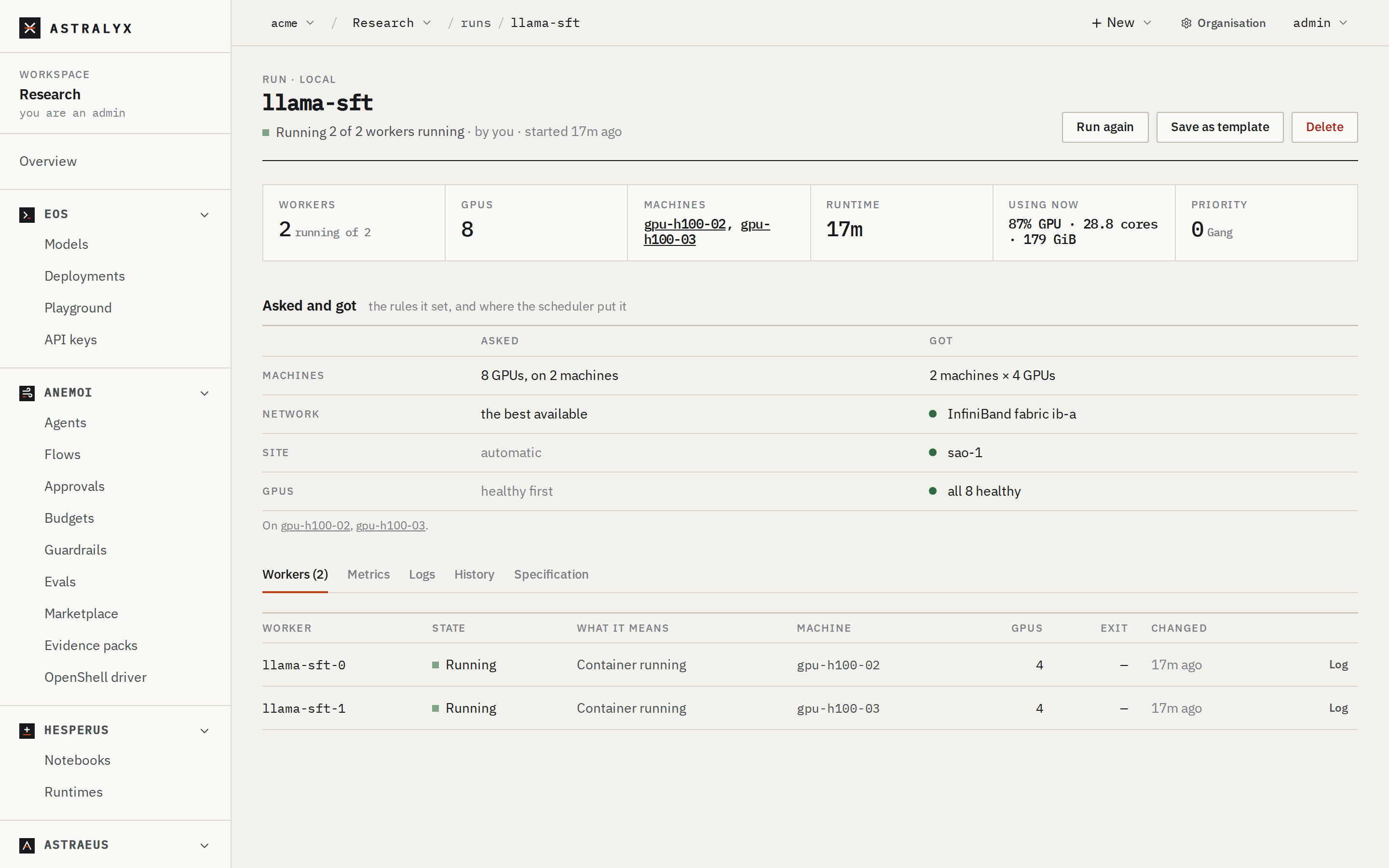
The run's page shows Asked and got: the rules it set, and where the scheduler put it ("one InfiniBand fabric, ib-0").
How filters and scores decide#
For each worker (or the whole gang), every machine the workspace may use goes through filters; a machine failing one is out, with that reason:
- Up and reporting capacity; not under memory or disk pressure.
- Accepting runs: not cordoned, and, for a machine reserved for some labels, the run selects them.
- Capabilities the run needs: outbound policy, sandbox, OpenShell, tool gateway; a Mac runs only its native engines.
- Your selection:
names,match_labelsand the workspace's pools. - RDMA ports up (and fast enough), when
networkasks for RDMA. - Spread: no other worker of the run already there, when workers must not share.
- Free cores, then free memory.
- GPUs: no faulted GPU; GPUs of the model, vendor and memory asked; enough of them free (healthy ones, with
healthy_only); pinnedidsfree. - Topology rules, against where the run's other workers already are.
- Drives: they exist, are reachable from the machine, and fit at its data location.
- Reservations: machines reserved for other workspaces, or soon reserved when the run has no time limit that ends first. See Reservations.
Among the machines left, a single worker goes to the highest score:
| Score | Points |
|---|---|
| Machine reserved for work with these labels | +100, less 5 per label it requires |
| GPUs packed: share of the machine's GPUs used after placing | up to +50 |
| CPU-only worker on a GPU machine | −30 |
| Cores and memory left free | up to +25 each |
| Each GPU at risk taken | −60 |
| CPU pressure on the machine | −20 |
| RDMA port at risk, for RDMA work | −25 |
| A drive the worker mounts is on this machine | +40 per drive |
| A drive is near (same rack, fabric or NVLink domain; RDMA at both ends) | +15, +10 |
A gang is placed as a whole on the ladder above; data counts only within a rung.
Read a pending reason#
A run waiting for room is Pending, and its reason says why. The console turns it into a sentence and advice; the API has the exact text and, for each machine, what keeps it out.
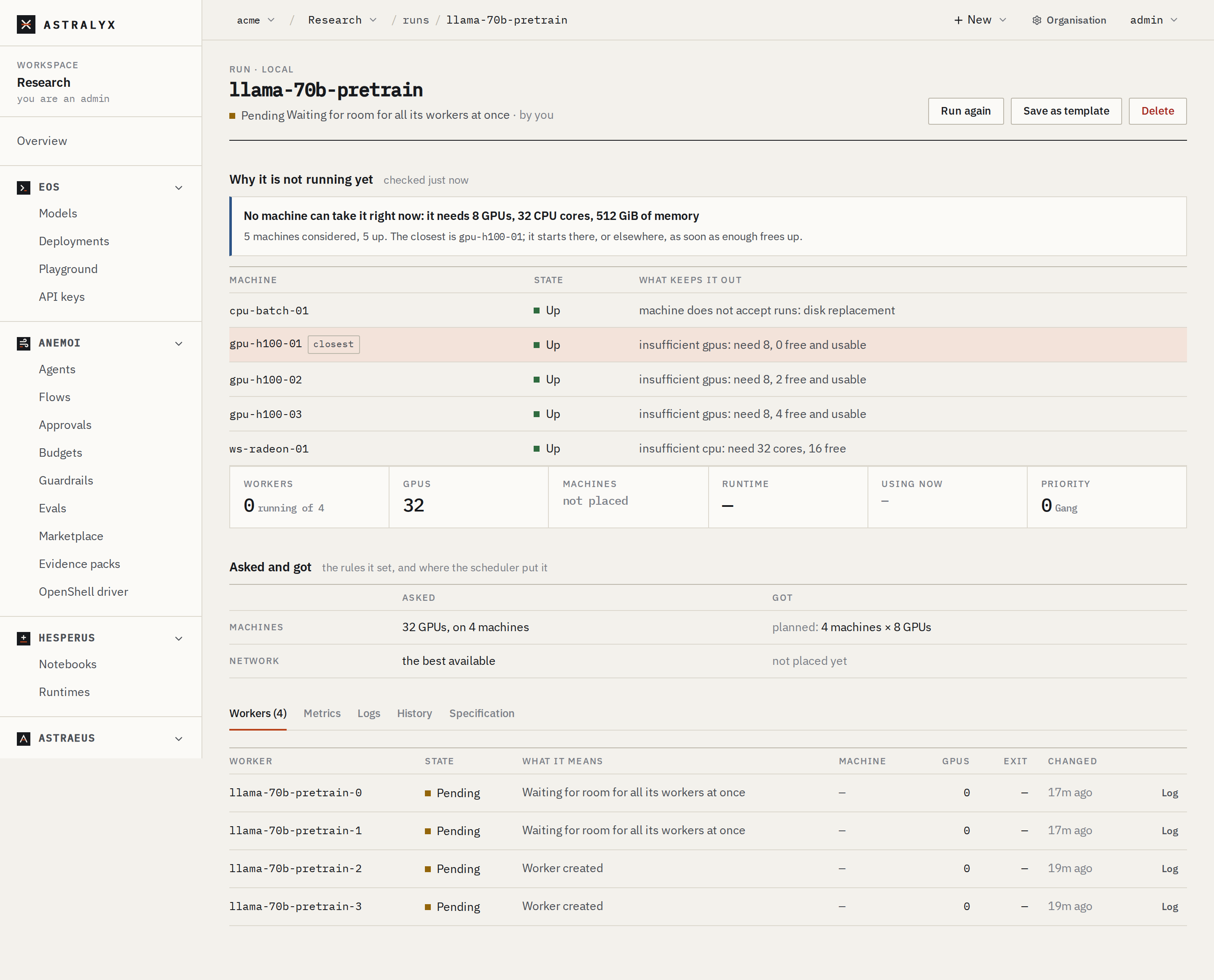
Open the run. Under the readout, Why it is not running yet says how many machines were considered and how many are up, names the closest machine, and lists every machine with What keeps it out.
$ curl -sS "$API/tasks/finetune-0" -H "Authorization: Bearer $ASTRA_TOKEN" | jq .placement
{
  "checked_nodes": 3,
  "ready_nodes": 3,
  "down_nodes": 0,
  "closest": "gpu-02",
  "nodes": [
    { "name": "gpu-01", "state": "Up", "reasons": ["no H100 or H200 with at least 80 GB GPU"] },
    { "name": "gpu-02", "state": "Up", "reasons": ["insufficient gpus: need 8, 4 free and usable"] },
    { "name": "gpu-03", "state": "Up", "reasons": ["machine is cordoned: firmware update"] }
  ],
  "evaluated_at": "2026-10-01T09:14:02.511843+00:00"
}
How to read it:
closestis set: some machine falls short only on room (cores, memory, GPUs). The run starts when enough frees up. Nothing to do, unless it should start sooner: see Priorities.- No
closest, machines up: no machine could ever take it as asked. Read each machine's reason and change the run (another GPU model, fewer GPUs per machine, a looser rule) or the machines. - Every machine gives the same non-room reason (
machine lacks label pool=h100): that reason is the problem. The console shows it as the headline. - A queue reason instead (
Queued behind …,Next to run …,Waits for namespace quota: …,Array runs at most …): the run fits, and the queue holds it back. See the pending reasons table.
Troubleshooting#
| Reason | Cause | Fix |
|---|---|---|
no H100 GPU on every machine |
No machine in the workspace's pools has that model. | Pick a model from the console's GPU model list, or ask for another pool. |
insufficient gpus: need 8, 4 free and usable |
Room: other runs hold the GPUs. | Wait; or split across machines (drop min_per_machine); or use a higher priority if granted. |
machine lacks label pool=h100 |
The run or the workspace selects a pool those machines are not in. | Remove the selector, or move the machines to the pool. |
no single site can hold the whole run; it would span 2 sites (networks), … |
A gang larger than any one site. | Fewer GPUs, or label machines that share a network with the same site. |
no InfiniBand fabric has room for the whole run |
interconnect: infiniband and no fabric has room. |
Wait, use rdma, or auto with patience_seconds. |
no rack set on this machine (topology.astraeus.io/rack) |
keep_within: rack or spread: rack on unlabelled machines. |
Label the racks (organisation admins, machine page) or drop the rule. |
Cannot plan workers: cannot evenly distribute 12 gpus across 5 machines |
machines does not divide the GPU count. |
Change one of them. |
under pressure: MemoryPressure |
The machine is out of memory or disk. | It takes work again once it recovers. |