Add a machine#
You add a machine by running one command on it. The command installs the Astraeus agent, which connects out to the cluster and register the machine; nothing ever connects in. This page covers a single server from the console, scripted installs through the API, cloud VMs with cloud-init and fleets with Ansible.
Before you begin#
- You are an admin of the organisation that owns the cluster. Only organisation admins create join tokens.
- The machine meets the requirements: Linux with systemd on x86-64 or ARM64, root access, and outbound HTTPS to the cluster. For a Mac, see macOS.
- For GPUs, the driver is installed, or you let the installer install it (see GPUs).
How joining works#
sequenceDiagram
    participant You
    participant Console
    participant Machine
    participant Astralyx as Astralyx control plane (SaaS)
    You->>Console: Add machine (pool)
    Console->>Astralyx: create a join token
    Console-->>You: install command (token inside)
    You->>Machine: run the command as root
    Machine->>Machine: download the agent, check SHA256SUMS, install units
    Machine->>Astralyx: register with the token (HTTPS, outbound)
    Astralyx-->>Machine: name accepted, token becomes its credential
    Machine->>Astralyx: connects out over HTTPS and stays connected
Astralyx-->>Machine: work arrives on that connection- A join token is single-use. The first machine that registers with it
claims it; it then becomes that machine's own credential. A second machine
using the same token is refused (
ENROLLMENT_USED). - An unused token expires: after 24 hours for tokens made in the console; between 60 seconds and 7 days (default 1 hour) for tokens made through the API.
- The token carries the machine's labels, usually its pool. The machine cannot choose its own labels or its organisation.
- After registering, the machine authenticates with a short-lived certificate of its own, renewed automatically, or with its token. Either way, a machine can only act as itself: it sees only the work placed on it and can only report on that work.
Add one machine#
-
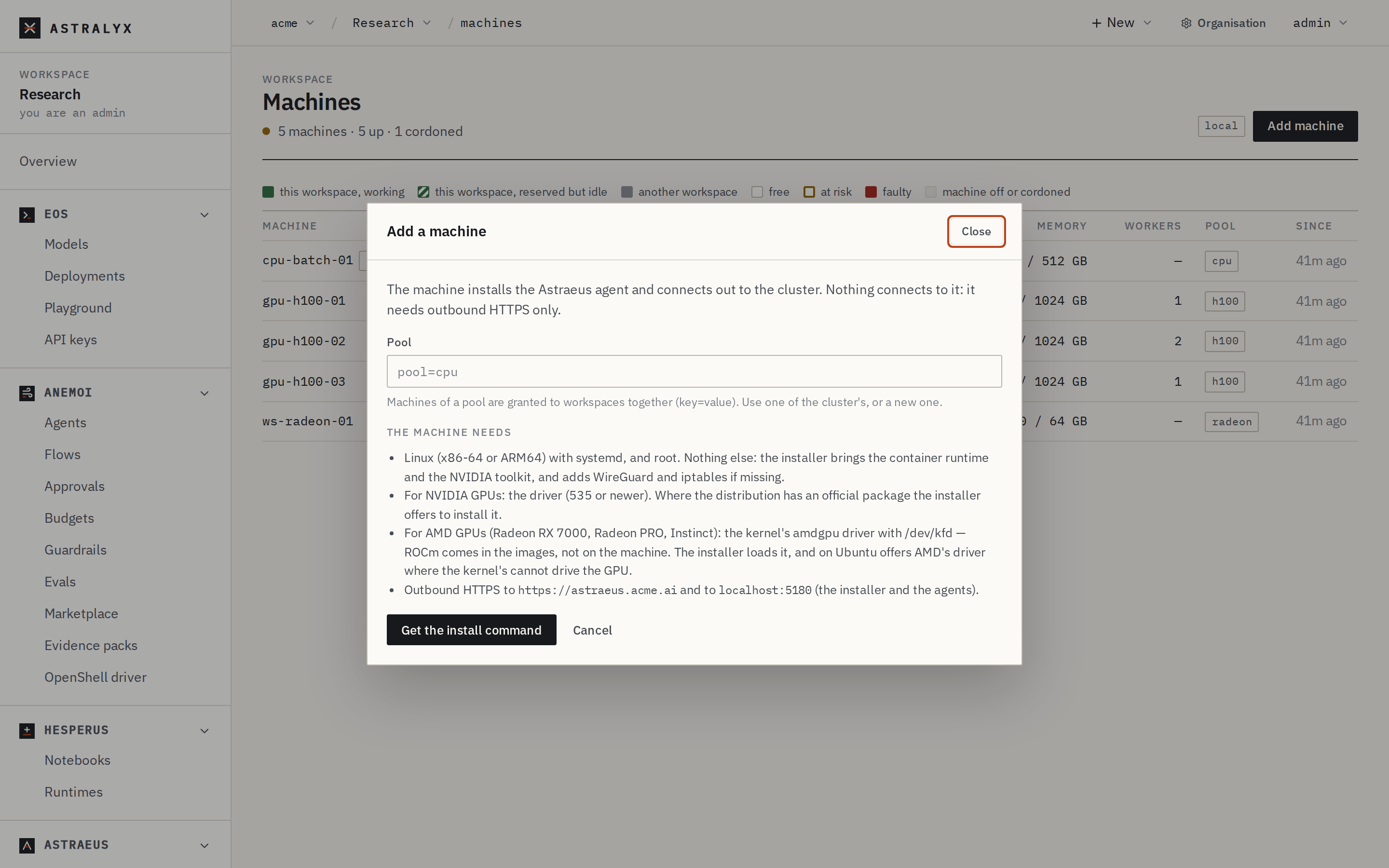
Open the workspace, then Compute → Machines, and click Add machine. (From the organisation: Clusters, open the cluster, Add machine.)
-
If the organisation has several clusters, choose the Cluster.
-
In Pool, type the machine's pool as
key=value, for examplepool=h100, or pick one of the cluster's existing pools. Workspaces granted that pool can use the machine.Note
If you leave Pool empty and the cluster already has pools, the console uses the first one shown in the placeholder. Type the pool you want to be sure.
-
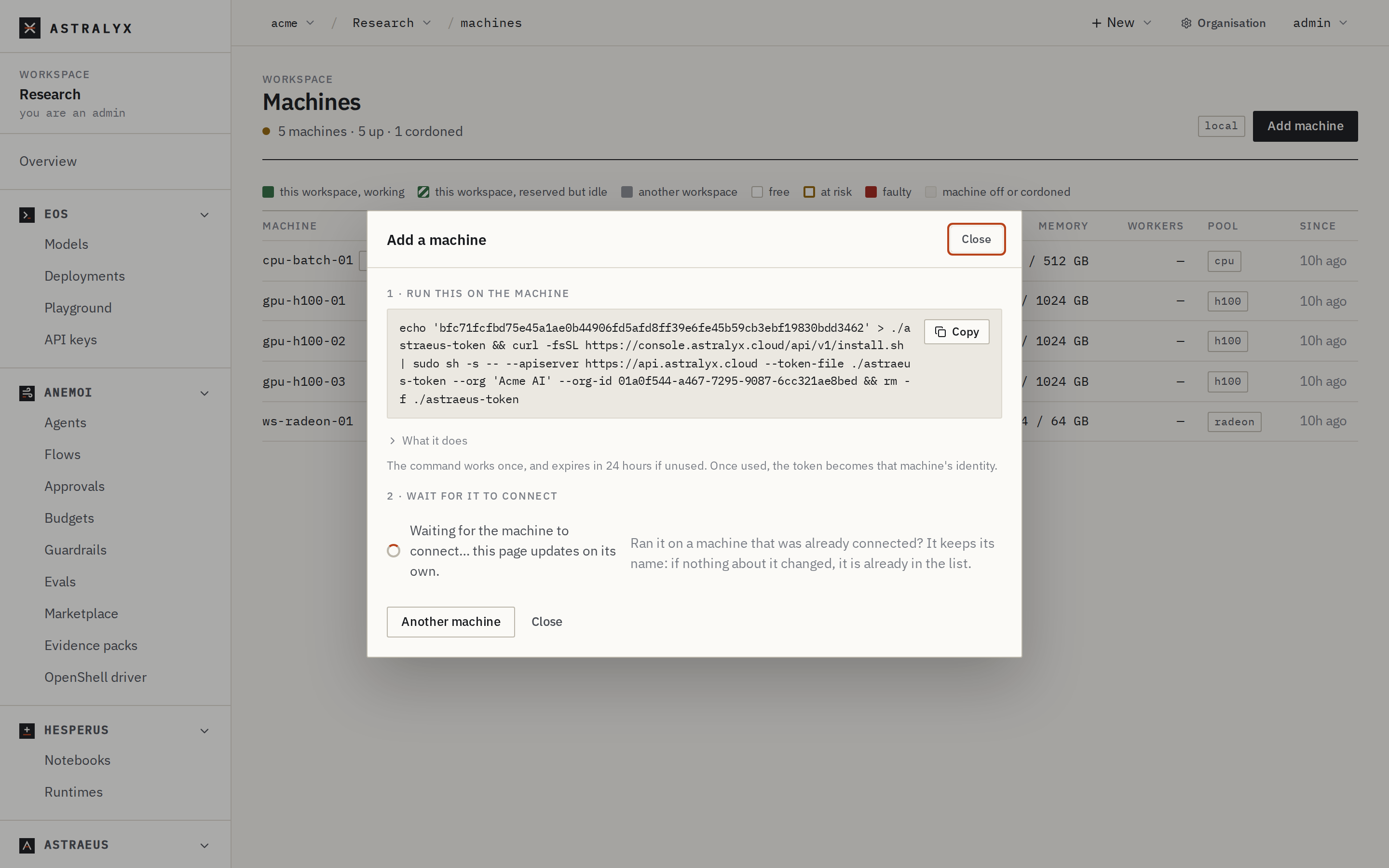
Click Get the install command. The dialog shows a command that works once and expires in 24 hours.
-
Copy the command and run it in a shell on the machine. It looks like this:
$ echo '9c4e…' > ./astraeus-token && curl -fsSL https://console.astralyx.cloud/api/v1/install.sh | sudo sh -s -- --apiserver https://api.astralyx.cloud --token-file ./astraeus-token --releases https://console.astralyx.cloud/releases --org 'Acme Research' --org-id 0192f0c4-7d1e-7a51-9c33-5e8b2a4f6d10 && rm -f ./astraeus-token -
Keep the dialog open. When the machine registers, it shows Machine gpu-01 connected. with a link to the machine.
If the workspace had no access to a cluster yet, getting the command gives it access to the organisation's cluster (or Astraeus Cloud, when the organisation has none) with no limits. Set limits and pools later in Workspaces, quotas and pools.
astra has no command for join tokens. Use the console or the API.
Create a token with a personal API token of an organisation admin:
$ curl -sS -X POST \
    "https://console.astralyx.cloud/api/v1/orgs/acme/clusters/fra-1/enrollment-tokens" \
    -H "Authorization: Bearer $ASTRAEUS_TOKEN" \
    -H 'content-type: application/json' \
    -d '{"labels": {"pool": "h100"}, "ttl_seconds": 86400}' | jq
{
  "id": "2b7e51c0a4d9f3e8b6c1d0a7f5e4c3b2a19087f6e5d4c3b2a1f0e9d8c7b6a5f4",
  "token": "9c4e7a1f3b5d2c8e0f6a4b9d1c3e5f7a2b4d6c8e0a1f3b5d7c9e2a4b6d8f0c1e",
  "labels": {
    "pool": "h100"
  },
  "expires_at": "2026-10-02T09:12:44.512398417Z",
  "install": "echo '9c4e7a1f3b5d2c8e0f6a4b9d1c3e5f7a2b4d6c8e0a1f3b5d7c9e2a4b6d8f0c1e' > ./astraeus-token && curl -fsSL https://console.astralyx.cloud/api/v1/install.sh | sudo sh -s -- --apiserver https://api.astralyx.cloud --token-file ./astraeus-token --releases https://console.astralyx.cloud/releases --org 'Acme Research' --org-id 0192f0c4-7d1e-7a51-9c33-5e8b2a4f6d10 && rm -f ./astraeus-token"
}
Run install on the machine, or build your own command from token
and the flags in it (see Installer reference).
| Field | Type | Default | Description |
|---|---|---|---|
labels |
map of string | {} |
Labels the machine gets when it registers, usually {"pool": "…"}. Keys in the astraeus.io domain (including topology.astraeus.io/…) are refused with RESERVED_LABEL. |
ttl_seconds |
integer | 3600 |
How long the token stays usable unused: 60 to 604800 (7 days). Outside that range: INVALID_TTL. |
What the installer does#
When you run the command, the installer:
- Checks that it runs as root, with systemd, on x86-64 or ARM64, and that
--apiserverand--releasesarehttps://addresses (the token crosses the network; the agent runs as root). - Chooses the container runtime: the bundled containerd, or Docker with
--runtime docker. A machine installed before keeps the runtime it has. - Installs
iproute2andiptablesif they are missing. - Chooses the network: installs
wireguard-toolsif missing and checks the kernel can create a WireGuard interface (mesh), or keeps the host network (a machine with RDMA,--network host, or no WireGuard). - Reads the token from the file (or standard input with
--token-file -). The token is never a command-line argument. - Checks whether the machine is already connected. The same cluster, name
and organisation is an upgrade; anything else is a move, which it asks
about (or
--move/--no-move). - Asks where the machine keeps data, when there is a terminal and no
--data-dir: it lists the local disks, fastest first, and recommends one. Nothing is chosen without an answer. - Checks the GPUs: an NVIDIA GPU without a driver, or an AMD GPU
amdgpudoes not drive, gets a driver where the distribution has an official way (asking first when that adds a repository). - Downloads
astraeus-agent-linux-<arch>.tar.gzandSHA256SUMSfrom the releases address and refuses to install on a checksum mismatch. - Installs the agent (
astraeus-agent) in/usr/bin, the bundled runtime in/usr/lib/astraeus, the systemd units in/lib/systemd/system, the configuration in/etc/astraeus/agent.env, and the token in/etc/astraeus/token(mode0600). - With SELinux enabled, labels the bundled runtime. With firewalld
running, creates the
astraeuszone and opens UDP 51820. - Starts
astraeus-containerd,astraeus-agentand the services of the chosen parts (by defaultastraeus-agent-drives,astraeus-agent-credentialsandastraeus-agent-data), and waits up to 30 seconds for the agent to sayworker started.
Everything it writes is listed in the Installer reference.
Examples#
A GPU server#
A rack server with eight NVIDIA GPUs, the driver installed, and an NVMe disk
for data. Name it, choose its data location up front, and run the command
from the console with two flags added before &&:
$ echo '9c4e…' > ./astraeus-token && curl -fsSL https://console.astralyx.cloud/api/v1/install.sh | sudo sh -s -- --apiserver https://api.astralyx.cloud --token-file ./astraeus-token --releases https://console.astralyx.cloud/releases --org 'Acme Research' --org-id 0192f0c4-7d1e-7a51-9c33-5e8b2a4f6d10 --name gpu-01 --data-dir /mnt/nvme0/astraeus && rm -f ./astraeus-token
· installing wireguard-tools (for the machines' mesh)
· network: each task gets an address of its own, the machines are joined by WireGuard (UDP 51820)
· NVIDIA GPU with its driver: ready (the NVIDIA Container Toolkit comes with the agent)
· downloading astraeus-agent-linux-amd64.tar.gz (latest)
· installing
· starting
astraeus-containerd is running: journalctl -u astraeus-containerd -f
astraeus-agent is running: journalctl -u astraeus-agent -f
astraeus-agent-drives is running: journalctl -u astraeus-agent-drives -f
astraeus-agent-credentials is running: journalctl -u astraeus-agent-credentials -f
astraeus-agent-data is running: journalctl -u astraeus-agent-data -f
· gpu-01 is connected to https://api.astralyx.cloud
A server with InfiniBand or RoCE ports keeps the host network instead (what NCCL over RDMA needs):
· this machine has RDMA: tasks use the host network (what NCCL over RDMA needs); --network mesh to override
A workstation#
A desktop with one GPU, installed interactively. Without --data-dir, the
installer asks where to keep data:
$ echo '9c4e…' > ./astraeus-token && curl -fsSL https://console.astralyx.cloud/api/v1/install.sh | sudo sh -s -- --apiserver https://api.astralyx.cloud --token-file ./astraeus-token --releases https://console.astralyx.cloud/releases --org 'Acme Research' --org-id 0192f0c4-7d1e-7a51-9c33-5e8b2a4f6d10 && rm -f ./astraeus-token
· network: each task gets an address of its own, the machines are joined by WireGuard (UDP 51820)

Where should this machine keep data? Drives kept "on each machine" put their
copies in a folder on this disk; nothing is written elsewhere.
  1) NVMe SSD, 2.0 TB, 1.7 TB free — /data  (recommended)
  2) System disk, 512 GB, 301 GB free — /
Choose a number, type a folder, Enter for 1, or s to choose later in the console: 1
· data location: /data/astraeus
· NVIDIA GPU with its driver: ready (the NVIDIA Container Toolkit comes with the agent)
· downloading astraeus-agent-linux-amd64.tar.gz (latest)
· installing
· starting
astraeus-containerd is running: journalctl -u astraeus-containerd -f
astraeus-agent is running: journalctl -u astraeus-agent -f
astraeus-agent-drives is running: journalctl -u astraeus-agent-drives -f
astraeus-agent-credentials is running: journalctl -u astraeus-agent-credentials -f
astraeus-agent-data is running: journalctl -u astraeus-agent-data -f
· ws-maria is connected to https://api.astralyx.cloud
Choosing a disk mounted at / puts data in /var/lib/astraeus/data; any
other mount point gets an astraeus folder at its root. Type s to choose
later in the console.
A cloud VM with cloud-init#
Each VM needs its own token: a token is single-use, so one user-data file cannot serve an autoscaling group. Create a token per VM through the API, then pass it in the VM's user data:
#cloud-config
write_files:
  - path: /run/astraeus-token
    owner: root:root
    permissions: "0600"
    content: |
      9c4e7a1f3b5d2c8e0f6a4b9d1c3e5f7a2b4d6c8e0a1f3b5d7c9e2a4b6d8f0c1e
runcmd:
  - - sh
    - -c
    - >-
      curl -fsSL https://console.astralyx.cloud/api/v1/install.sh | sh -s --
      --apiserver https://api.astralyx.cloud
      --token-file /run/astraeus-token
      --releases https://console.astralyx.cloud/releases
      --org 'Acme Research' --org-id 0192f0c4-7d1e-7a51-9c33-5e8b2a4f6d10
      --name gpu-vm-07
      --data-dir /mnt/astraeus
      --install-nvidia-driver;
      rm -f /run/astraeus-token
- cloud-init runs as root without a terminal: nothing is asked. Pass
--data-dir(or--no-data-dir) and, if the image has no NVIDIA driver,--install-nvidia-driverso the installer may add the distribution's driver repository. - Set
--name: a cloud hostname such asip-10-0-1-23is a poor machine name, and the name stays when the hostname changes. - A freshly installed driver often needs a reboot. The installer says so; the machine runs CPU work until then and picks up its GPUs after the reboot.
- Mint the token with a
ttl_secondsthat covers the time until the VM boots (at most 7 days).
User data is readable on the VM
Any process on the VM that can reach the instance metadata service can read the user data, token included, until the token is used. Once the machine registers, the token in the user data is its credential: delete the user data or restrict metadata access where your cloud allows it.
A fleet with Ansible#
This playbook mints one token per host on the control node, copies it to the
host, and runs the installer without a terminal. Hosts that already have
/etc/astraeus/token are skipped; update them from the console instead
(Update, drain and remove).
- name: Add machines to Astraeus
  hosts: gpu_servers
  become: true
  vars:
    astraeus_console: https://console.astralyx.cloud
    astraeus_org: acme                 # organisation slug in the console URL
    astraeus_cluster: fra-1            # cluster slug
    # Copy these three from an install command the console gave you.
    astraeus_agent_url: https://api.astralyx.cloud
    astraeus_org_name: Acme Research
    astraeus_org_id: 0192f0c4-7d1e-7a51-9c33-5e8b2a4f6d10
    astraeus_releases: https://console.astralyx.cloud/releases
    astraeus_pool: h100
    astraeus_data_dir: /mnt/nvme0/astraeus
  tasks:
    - name: Is the machine already connected?
      ansible.builtin.stat:
        path: /etc/astraeus/token
      register: astraeus_installed

    - name: Create a join token for this host
      ansible.builtin.uri:
        url: "{{ astraeus_console }}/api/v1/orgs/{{ astraeus_org }}/clusters/{{ astraeus_cluster }}/enrollment-tokens"
        method: POST
        headers:
          Authorization: "Bearer {{ lookup('ansible.builtin.env', 'ASTRAEUS_TOKEN') }}"
        body_format: json
        body:
          labels:
            pool: "{{ astraeus_pool }}"
          ttl_seconds: 3600
        status_code: 201
      delegate_to: localhost
      become: false
      register: enrollment
      no_log: true
      when: not astraeus_installed.stat.exists

    - name: Copy the token to the host
      ansible.builtin.copy:
        content: "{{ enrollment.json.token }}"
        dest: /root/astraeus-token
        owner: root
        mode: "0600"
      no_log: true
      when: not astraeus_installed.stat.exists

    - name: Install the Astraeus agent
      ansible.builtin.shell: >-
        set -o pipefail &&
        curl -fsSL {{ astraeus_console }}/api/v1/install.sh | sh -s --
        --apiserver {{ astraeus_agent_url }}
        --token-file /root/astraeus-token
        --releases {{ astraeus_releases }}
        --org '{{ astraeus_org_name }}' --org-id {{ astraeus_org_id }}
        --name {{ inventory_hostname_short }}
        --data-dir {{ astraeus_data_dir }}
        --no-move
      args:
        executable: /bin/bash
      when: not astraeus_installed.stat.exists

    - name: Remove the token file
      ansible.builtin.file:
        path: /root/astraeus-token
        state: absent
$ export ASTRAEUS_TOKEN=$(cat ~/.astraeus-api-token)
$ ansible-playbook -i inventory.ini astraeus-machines.yml
- Pass
--org-id(and--org) as the console does. A rerun with the same organisation is then recognised as an upgrade that keeps the machine's identity; without it, a rerun is treated as a move. --no-movemakes the play fail instead of moving a machine that is connected to another organisation or cluster.- The installer exits
0once the agent is running, even if the machine has not connected within 30 seconds (it keeps trying). It exits1on any error, including a name already taken.
Pools and labels at join time#
The token decides the machine's labels. In the console that is the Pool
field; through the API, the token's labels. You can give several labels
(pool=h100, team=vision).
Site, rack and InfiniBand fabric are topology.astraeus.io/… labels, which a
token cannot carry. Set them after the machine joins, or let the machine
discover them; see Pools, labels and topology.
Check that it joined#
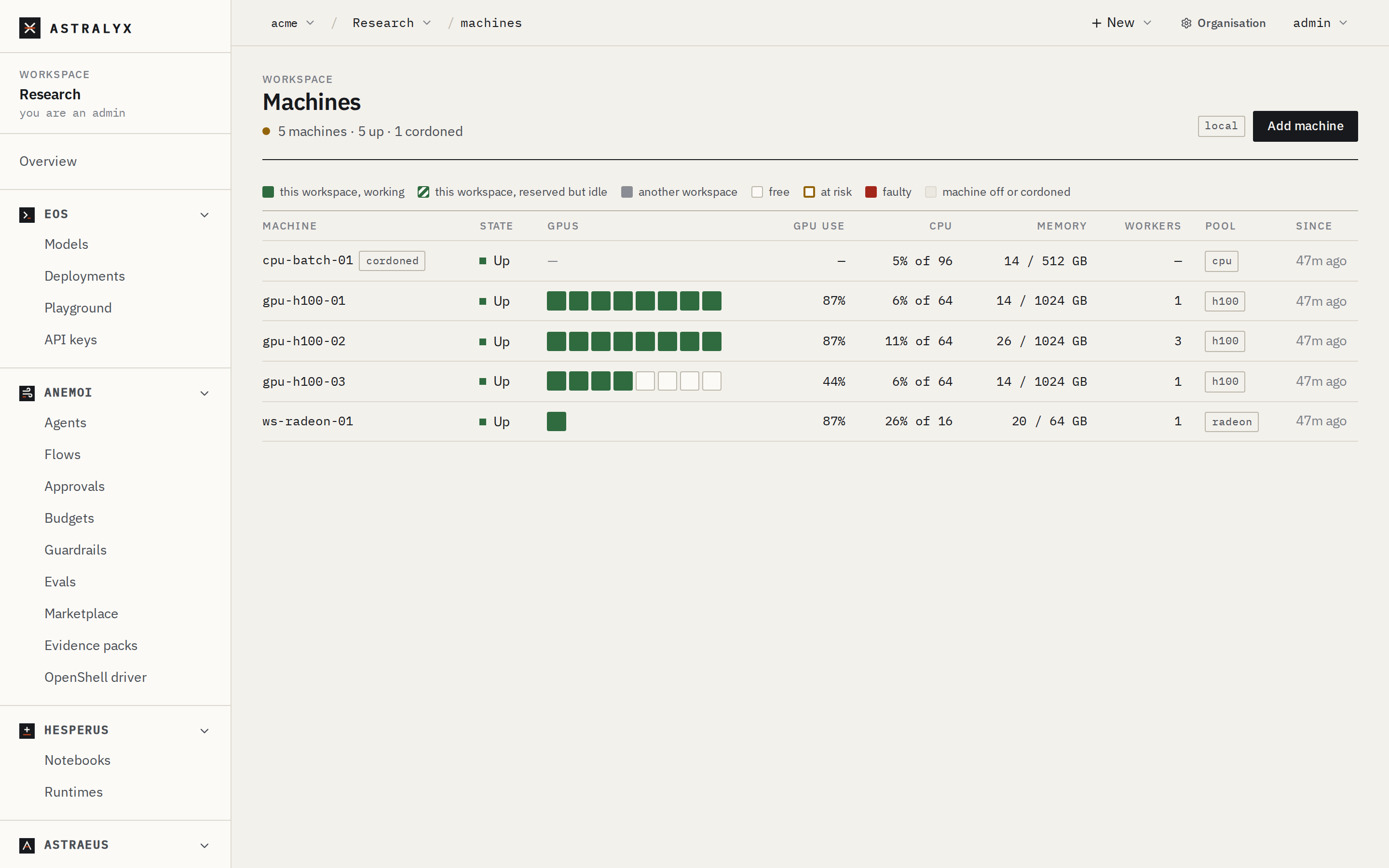
The machine appears in Compute → Machines with the state Up a few seconds after the installer says it is connected. Its GPUs, CPU, memory and pool fill in with its first reports.
$ astra astraeus machines
MACHINE               STATE     GPUS                CPU    POOL
gpu-01                Up        8× NVIDIA H100 80GB HBM3  224    h100
ws-maria              Up        1× NVIDIA GeForce RTX 4090  32     h100
astra lists the machines the current workspace may use
(Install the CLI).
$ curl -sS "https://console.astralyx.cloud/api/v1/orgs/acme/clusters/fra-1/nodes" \
    -H "Authorization: Bearer $ASTRAEUS_TOKEN" \
  | jq '.items[] | {name: .metadata.name, state: .status.state, pool: .metadata.labels.pool, agent: .spec.info.agent_version}'
{
  "name": "gpu-01",
  "state": "Up",
  "pool": "h100",
  "agent": "sha-1a2b3c4"
}
On the machine itself:
$ systemctl is-active astraeus-containerd astraeus-agent
active
active
$ journalctl -u astraeus-agent -o cat | grep 'worker started'
2026-10-01T09:14:02.481233Z  INFO astraeus_worker::agent: worker started node=gpu-01
A machine is Idle from the moment it registers until its first report, then Up. If it stays away, see Troubleshooting.
Behind a proxy or without internet#
The installer and the agent need no inbound access, but they do need to
reach the Astraeus address (--apiserver) and the releases address. There
is no fully offline install:
- Releases. The console's command passes
--releases: the machine downloads the agent from the console (https://console.astralyx.cloud/releases), the version Astraeus runs. Without--releases, the installer downloads from GitHub. - An HTTP proxy. Pass the proxy to the installer through
sudo, and give the agent and containerd their own proxy settings; see Network and firewalls. - Packages and drivers. Without access to the distribution's
repositories, install
iproute2,iptables,wireguard-toolsand the GPU driver beforehand; the installer then has nothing to install. - Images. Runs pull their images from the registries they name. Point them at a registry the machine can reach.