Your first run#
This walkthrough runs a small PyTorch training loop on one GPU. You write the script, describe the run in a spec file, submit it, follow its state and log, delete it, and start it again. Every field used is explained; the full list is in the Run specification.
Before you begin#
- A workspace with at least one machine with an NVIDIA GPU that is
Upunder Astraeus → Machines. See the Quick start. No GPU? Set the GPU count to0below: the script falls back to the CPU. - For the CLI tab:
astra, signed in and working in your workspace. See Install the CLI. - For the API tab: a personal API token (account menu → Account &
tokens → API tokens → New token) in
ASTRAEUS_TOKEN. jq, to build the spec file below.
The image is large
nvcr.io/nvidia/pytorch:24.08-py3 is several gigabytes. The first run on
a machine spends minutes in Pulling; later runs on that machine start
at once.
1. Write the script#
The script trains a small network on random data, so it needs no dataset. It prints its rank, its machine and its GPU, then its progress every 200 steps.
import os, time, torch

device = "cuda" if torch.cuda.is_available() else "cpu"
gpu = torch.cuda.get_device_name(0) if device == "cuda" else "no GPU"
print(f"rank {os.environ['RANK']} of {os.environ['WORLD_SIZE']} on {os.environ['ASTRAEUS_NODE_NAME']}: {gpu}", flush=True)

steps = int(os.environ.get("STEPS", "2000"))
model = torch.nn.Sequential(torch.nn.Linear(4096, 4096), torch.nn.ReLU(), torch.nn.Linear(4096, 10)).to(device)
opt = torch.optim.AdamW(model.parameters(), lr=1e-3)
start = time.time()
for step in range(1, steps + 1):
    x = torch.randn(512, 4096, device=device)
    y = torch.randint(0, 10, (512,), device=device)
    loss = torch.nn.functional.cross_entropy(model(x), y)
    opt.zero_grad()
    loss.backward()
    opt.step()
    if step % 200 == 0:
        print(f"step {step}/{steps} loss {loss.item():.4f} {step / (time.time() - start):.0f} it/s", flush=True)
print("done", flush=True)
Every worker gets RANK, WORLD_SIZE and ASTRAEUS_NODE_NAME in its
environment, among others. See Inside a worker.
2. Describe the run#
A run is a JSON object: metadata.name and a spec. The script travels
inside the spec as a file mounted into the container, so the run needs
nothing on the machine. Build the spec from the script with jq:
$ jq -n --rawfile code train.py '{
    metadata: {name: "first-train"},
    spec: {
      task_template: {
        image: "nvcr.io/nvidia/pytorch:24.08-py3",
        command: "python",
        args: ["/workspace/train.py"],
        env: {STEPS: "3000"},
        configs: [{mounts: ["/workspace/train.py"], value: $code}],
        requested_resources: {
          gpu_requests: {count: 1},
          per_gpu: {cpu_cores: 8, memory_bytes: 34359738368}
        },
        restart_policy: "Never",
        time_limit_seconds: 3600
      }
    }
  }' > run.json
The result, with the script shortened:
{
  "metadata": {"name": "first-train"},
  "spec": {
    "task_template": {
      "image": "nvcr.io/nvidia/pytorch:24.08-py3",
      "command": "python",
      "args": ["/workspace/train.py"],
      "env": {"STEPS": "3000"},
      "configs": [{"mounts": ["/workspace/train.py"], "value": "import os, time, torch\n…"}],
      "requested_resources": {
        "gpu_requests": {"count": 1},
        "per_gpu": {"cpu_cores": 8, "memory_bytes": 34359738368}
      },
      "restart_policy": "Never",
      "time_limit_seconds": 3600
    }
  }
}
The fields#
| Field | Value here | What it does |
|---|---|---|
metadata.name |
first-train |
The run's name: lower-case letters, digits and dashes, unique in the workspace. Its workers are named <name>-<rank>: here first-train-0. |
spec.task_template |
The worker template: what each worker runs and needs. A run without worker groups has one template. | |
image |
nvcr.io/nvidia/pytorch:24.08-py3 |
The container image. A private registry needs a registry credential (registry_secret_ref). |
command |
python |
Replaces the image's entrypoint. Empty: the image's own. |
args |
["/workspace/train.py"] |
The command's arguments, one string each. No shell is involved: to use pipes or $VARS, run sh -c. |
env |
{"STEPS": "3000"} |
Environment variables, as strings. Variables Astraeus sets (RANK, MASTER_ADDR…) are only set when you do not set them yourself. |
configs |
One file | Literal files written into the container at each path in mounts. For small files such as scripts and configuration — the whole specification is kept by Astraeus and limited in size, so keep data on a drive. |
requested_resources.gpu_requests.count |
1 |
GPUs for the whole run. Astraeus decides how many machines they span unless you say. 0: a CPU-only run. |
requested_resources.per_gpu |
8 cores, 32 GiB | CPU cores and memory for each GPU, so the total follows the shape Astraeus picks. Without GPUs, use cpu_cores and memory_bytes on requested_resources instead. Memory is in bytes: 34359738368 is 32 GiB. |
restart_policy |
Never |
A worker that fails is not restarted, and the run fails. The default, OnFailure, restarts a failed worker up to 10 times, waiting 10 s and doubling up to 5 min between attempts. |
time_limit_seconds |
3600 |
The worker is stopped after one hour and is not restarted. A time limit also lets the queue start your run sooner, in the gaps before large runs (backfill). |
Fields not set take their defaults: start is Independent for a run that
fits on one machine, priority is 0, lifetime is Batch (the run ends
when its workers end). A GPU worker's /dev/shm is half its memory, between
1 GiB and 64 GiB — what PyTorch's data loaders need.
Unknown fields are refused with 400 UNKNOWN_FIELD, so a typo never passes
silently.
3. Submit it#
- Choose New → Run.
- Choose Edit as JSON (worker groups, drives, probes…).
- Replace the text in Run (JSON) with the contents of
run.json. - Choose Start run.
The console opens the run's page.
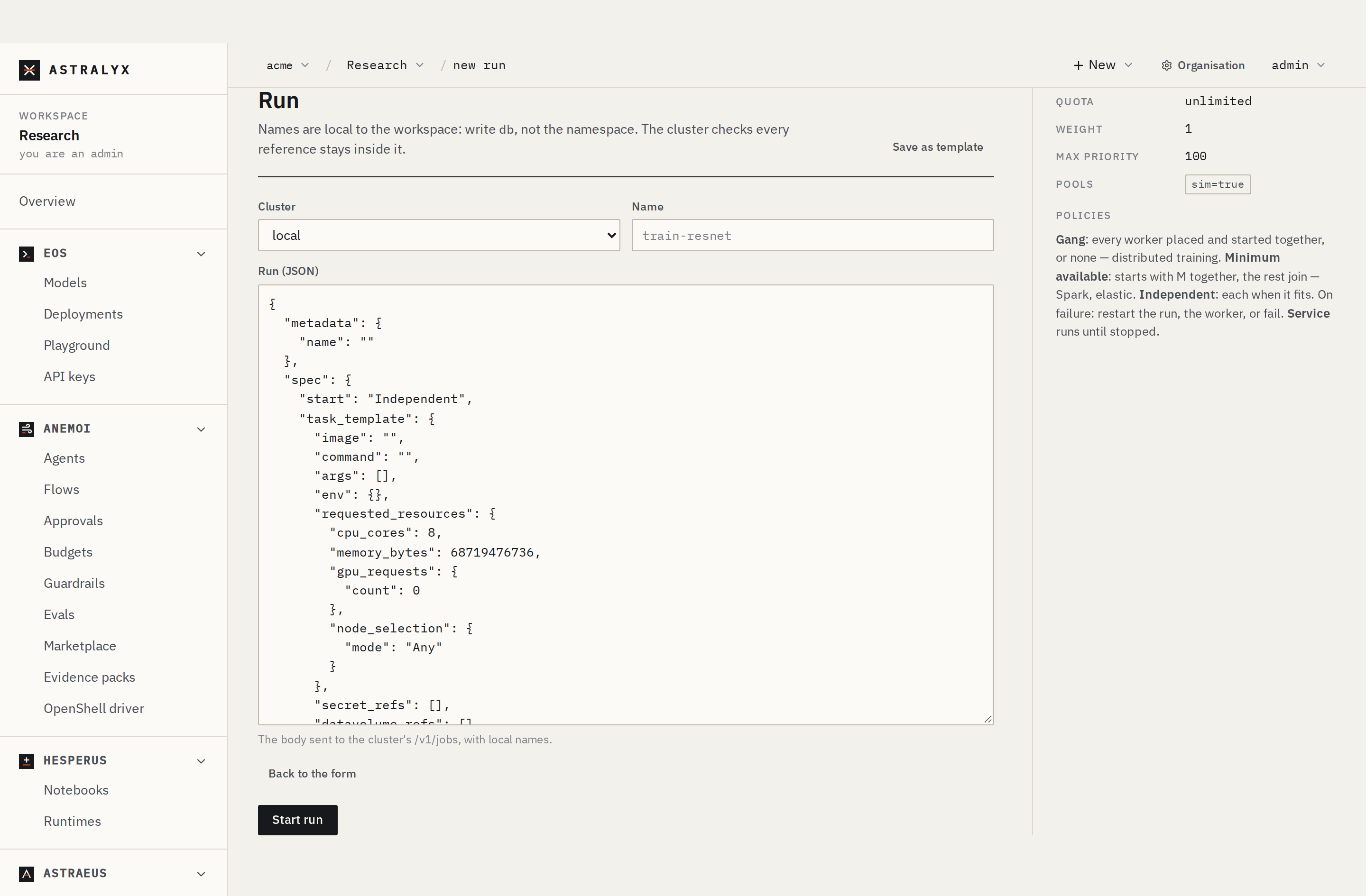
The form without JSON covers the same run: Name first-train,
Image, Command python, GPUs 1, CPU cores per GPU
8, Memory per GPU 32Gi, and under More options a Time
limit of 1h and the Environment STEPS=3000. It cannot add the
script file: use JSON for that, or bake the script into your image.
astra astraeus run builds the same run from flags. --code . packs the
current directory (with train.py) into the run and unpacks it in
/workspace, where the command runs:
$ astra astraeus run --name first-train \
    --image nvcr.io/nvidia/pytorch:24.08-py3 \
    --gpus 1 --cpus 8 --mem 32G \
    --time 1h -e STEPS=3000 \
    --code . -- python train.py
first-train submitted to default: https://console.astralyx.cloud/o/my-org/w/default/jobs/default/first-train
With GPUs, --cpus and --mem are per GPU. astra astraeus run always
sets restart_policy: Never. See the
CLI reference for every flag.
Through the console's API, inside your workspace. <org>, <cluster>:
your organisation's and cluster's short names (the workspace's
Settings lists its clusters).
$ WS_API=https://console.astralyx.cloud/api/v1/orgs/<org>/workspaces/default/clusters/<cluster>/api
$ curl -sS -X POST "$WS_API/runs" \
    -H "Authorization: Bearer $ASTRAEUS_TOKEN" \
    -H 'content-type: application/json' \
    -d @run.json | jq .metadata.name
"first-train"
The answer is 201 Created with the stored run (its metadata and
spec). A name already taken is 409 JOB_ALREADY_EXISTS.
4. Follow its state#
A run goes Pending → Running → Completed. Its worker shows more detail:
Pending (waiting for a machine), Preparing, Pulling (the image),
Starting, Running, then Completed or Failed. See Run and worker
states.
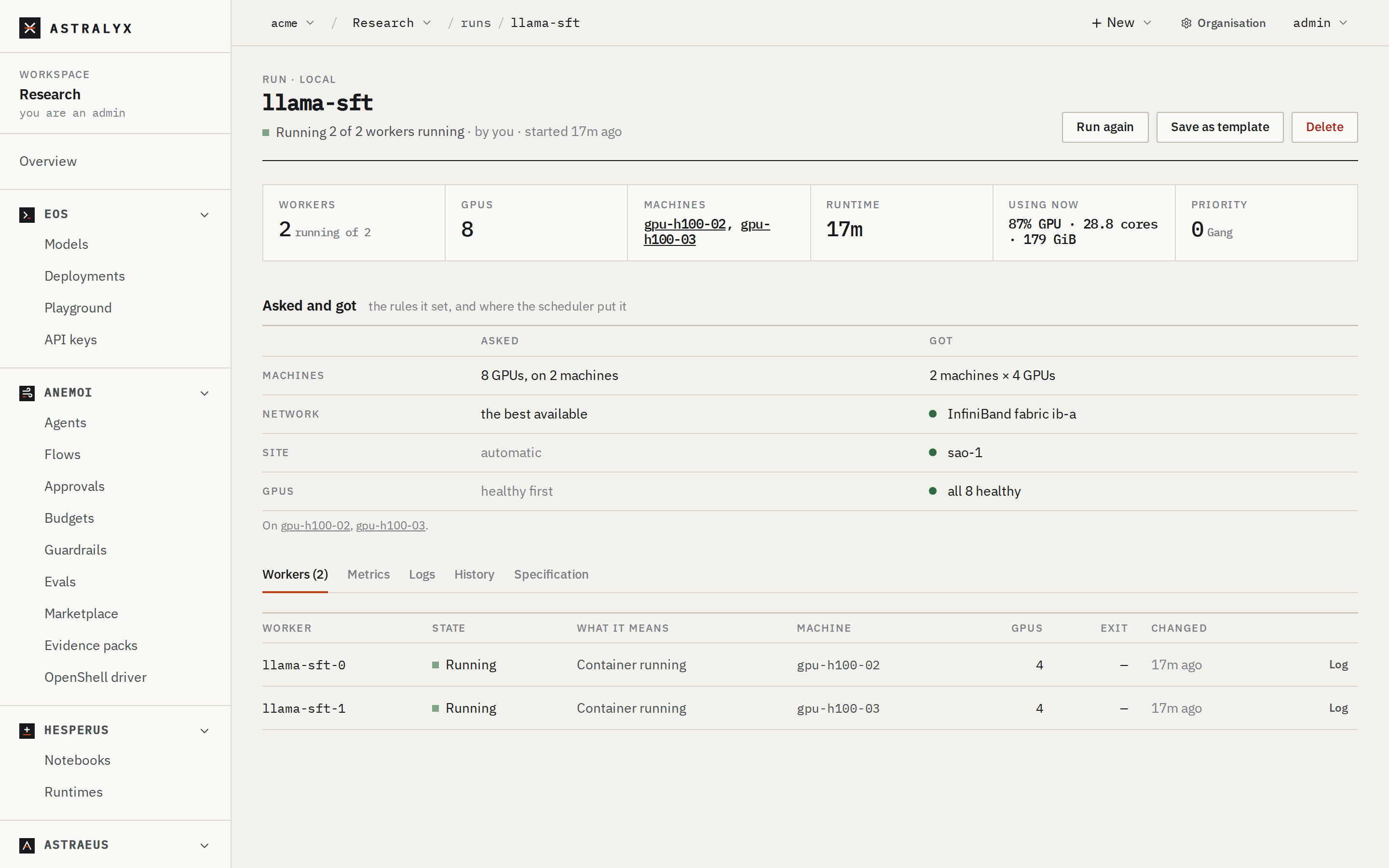
The run's page shows the state in its header, with the reason in words.
Workers lists first-train-0 with its state, machine, GPUs and exit
code. While it waits, Why it is not running yet says why, machine by
machine.
$ curl -sS "$WS_API/runs/first-train" -H "Authorization: Bearer $ASTRAEUS_TOKEN" | jq .status.state
"Running"
$ curl -sS "$WS_API/workers?job=first-train" -H "Authorization: Bearer $ASTRAEUS_TOKEN" \
    | jq -r '.items[] | [.metadata.name, .status.state, .spec.assigned_node.name] | @tsv'
first-train-0   Running gpu-01
5. Read its log#
Logs stay on the machine. Each request asks the machine for the latest lines over the machine's own connection.
Open Logs on the run's page. Choose the worker in Log ·, tick Follow to keep it updating, Errors only to filter, Download to save it.
The output above is illustrative: the rates depend on your GPU.
6. Stop it#
Deleting a run stops its workers and removes it. The machine stops each container, giving it 30 seconds after the stop signal before it is killed (the machine's stop grace), so a script can save a checkpoint.
Warning
Deleting a run removes its workers and their logs. Download a log you want to keep first. Data written to a drive stays.
7. Run it again#
On the run's page, choose Run again. The form opens in JSON mode with
the same specification under the name first-train-again. Change what
you need and choose Start run.
To reuse a specification often, choose Save as template on the run's page, then pick it from the template list of New run.
Run the same astra astraeus run command again. A name can be reused once the
earlier run is deleted.
POST the same run.json again, or change metadata.name to keep both.
Next steps#
- Use more GPUs: set
gpu_requests.countto 16 and let Astraeus pick the machines — see Multi-machine runs. - Read training data from a drive: see Drives.
- Use a secret (an API key, a database password): see Credentials.