Credentials#
A credential tells Astraeus where a secret is kept — in HashiCorp Vault,
AWS Secrets Manager, Google Secret Manager, Azure Key Vault and others — and
how the machine proves itself to that store. It never holds the value. The
machine that runs a worker needing it fetches the value with its own
identity, writes it where only the worker can read it, and gives it to the
worker as files or environment variables. The value never passes through the
control plane or the console. In the API a credential is an
externalsecret (/external-secrets, also /credentials).
Use a credential when a run needs:
- A key for an API or a model hub: a Hugging Face token, a W&B API key, an OpenAI key.
- A database or warehouse password, or a connection string.
- Access to a private container registry, as the run's registry credential.
- Object-storage access for a data source (S3, Google Cloud Storage, Azure Blob): data sources name a credential instead of holding keys.
- Anything you would not paste into a run specification, which is kept by Astraeus and readable by everyone in the workspace.
How a credential reaches a worker#
sequenceDiagram
    participant C as Astralyx control plane (SaaS)
    participant S as Agent's credentials part (on the machine)
    participant V as Your secret store
    participant W as Worker container
    C-->>S: Credential reference needed on this machine
    S->>V: Authenticate with the machine's identity, read the secret
    S->>S: Write files, root-only, under the worker's work root
    S->>C: Report: synced on this machine (never the value)
S-->>W: Files mounted read-only, or values as environment variables- A run that references a credential is placed on a machine.
- The machine's agent, through its credentials part
(
astraeus-agent-credentials), receives the reference, over the connection the machine opened — only for credentials that workers on that machine need. - It authenticates to your secret store with what the machine already has: its cloud instance role, managed identity or service account, or a certificate, token or key file on the machine.
- It writes the values to
/var/lib/astraeus/worker/secrets/<credential>/(directory mode0700, files0600), replacing them atomically. - The worker mounts that directory read-only into the container, or reads chosen keys into environment variables.
- It reports synced on <machine> or an error — never a value. Files are removed when no worker on the machine needs them.
The specification has no field for a value: everything outside the auth
block locates the secret, and everything inside it is an identifier or a
path on the machine. That is why a credential cannot leak from Astralyx: it
never holds the value.
Secret stores and how machines authenticate#
Store (backend_type) |
Machine authentication (auth.mode) |
|---|---|
AWS Secrets Manager (AWSSecretsManager) |
instance_profile, roles_anywhere, assume_role, shared_config |
AWS Parameter Store (AWSParameterStore) |
as above |
Google Secret Manager (GCPSecretManager) |
metadata, workload_identity_federation, service_account_key_file |
Azure Key Vault (AzureKeyVault) |
managed_identity, workload_identity, client_certificate |
HashiCorp Vault (Vault) |
cert, app_role, jwt, token_file |
Oracle Cloud Vault (OCIVault) |
instance_principal, config_file |
CyberArk Conjur (CyberArkConjur) |
api_key_file, jwt |
1Password, through a Connect server (OnePassword) |
token_file |
Doppler (Doppler) |
token_file |
Infisical (Infisical) |
universal_auth, token_file |
Prefer modes that store nothing: an instance role, a managed identity, a metadata-server service account. Every field and mode is in Credentials.
The machine's identity is the authority
Any workspace whose work runs on a machine can reference credentials that machine's identity can read. Scope each machine's cloud role or Vault policy to what the workspaces granted that machine's pool should read, and use pools to keep sensitive workspaces on their own machines.
Using a credential in a run#
A run's worker template lists credentials in secret_refs:
"secret_refs": [
  {"external_secret_name": "hf-token", "env_vars": {"token": "HF_TOKEN"}},
  {"external_secret_name": "db", "mount_path": "/run/secrets/db"}
]
| Field | Description |
|---|---|
external_secret_name |
The credential. |
env_vars |
File name → environment variable: the content of that file becomes the variable's value. |
mount_path |
Mount the credential's directory read-only at this path. |
Set env_vars, mount_path or both: with neither, the value reaches the
machine but not the container. A worker waits until its credentials have
synced on its machine.
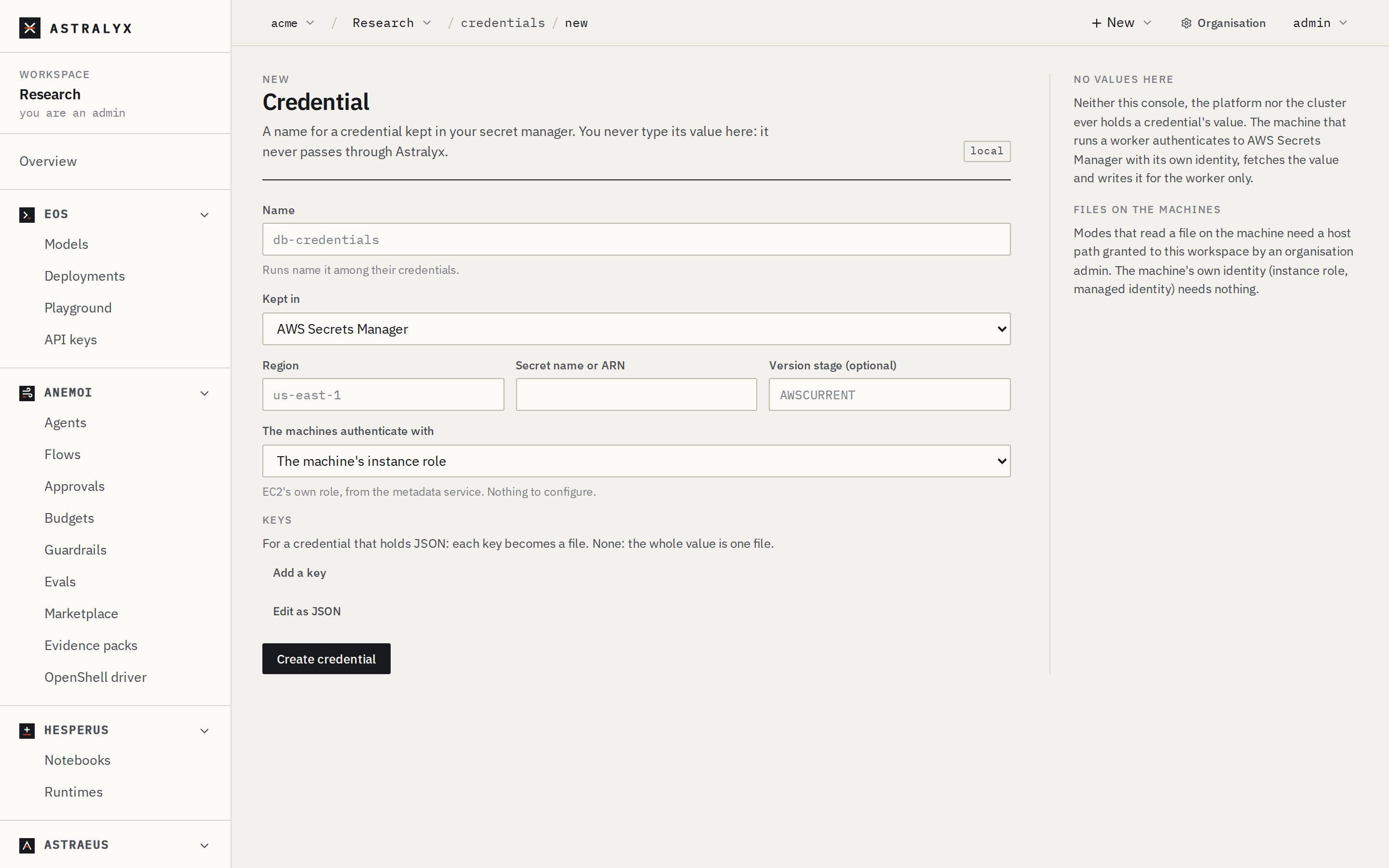
Create one#
A Hugging Face token kept in AWS Secrets Manager as the secret ml/hf with a
key token, read by GPU machines on EC2 with their instance role:
- New → Credential.
- Name
hf-token. - Kept in AWS Secrets Manager; Region
us-east-1; Secret name or ARNml/hf. - The machines authenticate with The machine's instance role.
- Map the Key
tokento the Filetoken. - Create credential.
The credential's page shows, machine by machine, whether it synced.
{
  "metadata": {"name": "hf-token"},
  "spec": {
    "backend_type": "AWSSecretsManager",
    "region": "us-east-1",
    "secret_name": "ml/hf",
    "auth": {"mode": "instance_profile"},
    "data": [{"key": "token", "file_name": "token"}]
  }
}
$ curl -sS -X POST "$WS_API/credentials" -H "Authorization: Bearer $ASTRAEUS_TOKEN" \
    -H 'content-type: application/json' -d @hf-token.json
The same in HashiCorp Vault, the machine authenticating with a token a local Vault agent keeps in a file:
Then use it in a run with "secret_refs": [{"external_secret_name":
"hf-token", "env_vars": {"token": "HF_TOKEN"}}]. The astraeus CLI has no
credential commands.