Organisation#
An organisation is the top of everything you administer: it owns the members, the workspaces, the clusters and their machines, single sign-on, alerts, prices and the audit log. This page covers the organisation itself — creating one, switching between them, renaming, its limits, and leaving or deleting it.
Your personal organisation#
At their first sign-in, everyone gets an organisation of their own, named
<their name> (personal), with one workspace, Default (short name
default), and themselves as its owner. It is an ordinary organisation: you
can invite people to it, add machines and create workspaces.
Nobody gets a personal organisation if they already belong to one when they first sign in — typically because they joined through their company's single sign-on. While a person's personal organisation exists, they never get another, even if they leave it.
Create an organisation#
Anyone signed in can create an organisation and becomes its only owner.
- Open the organisation menu (the organisation's short name, top left) and choose New organisation.
- Enter a Name (
Acme AI). The Short name is filled in from it (acme-ai); change it if you want another. - Select Create organisation. The console opens its overview.
The short name (slug) is permanent. It appears in console addresses
(/o/acme/…), API paths (/orgs/acme/…), astra use acme/<workspace>, and
is what people type to sign in with your single sign-on.
| Field | Rules |
|---|---|
Short name (slug) |
2 to 40 characters: lower-case letters, digits and -, not starting or ending with -. Unique on Astralyx. |
Name (name) |
Free text, shown in the console. Leading and trailing spaces are removed. |
| Error | Cause |
|---|---|
400 INVALID_SLUG |
The short name breaks the rules above. |
409 ORG_EXISTS |
Another organisation has that short name. |
Switch between organisations#
You can belong to several organisations. The organisation menu in the top bar lists them, each with your role, and opens the workspace you last used in it.
On the command line, astra orgs lists your organisations and their
workspaces, and astra use <org>/<workspace> chooses where commands act; see
CLI. Through the API,
GET /orgs lists your organisations with your role, whether each is your
personal one, and whether it is suspended.
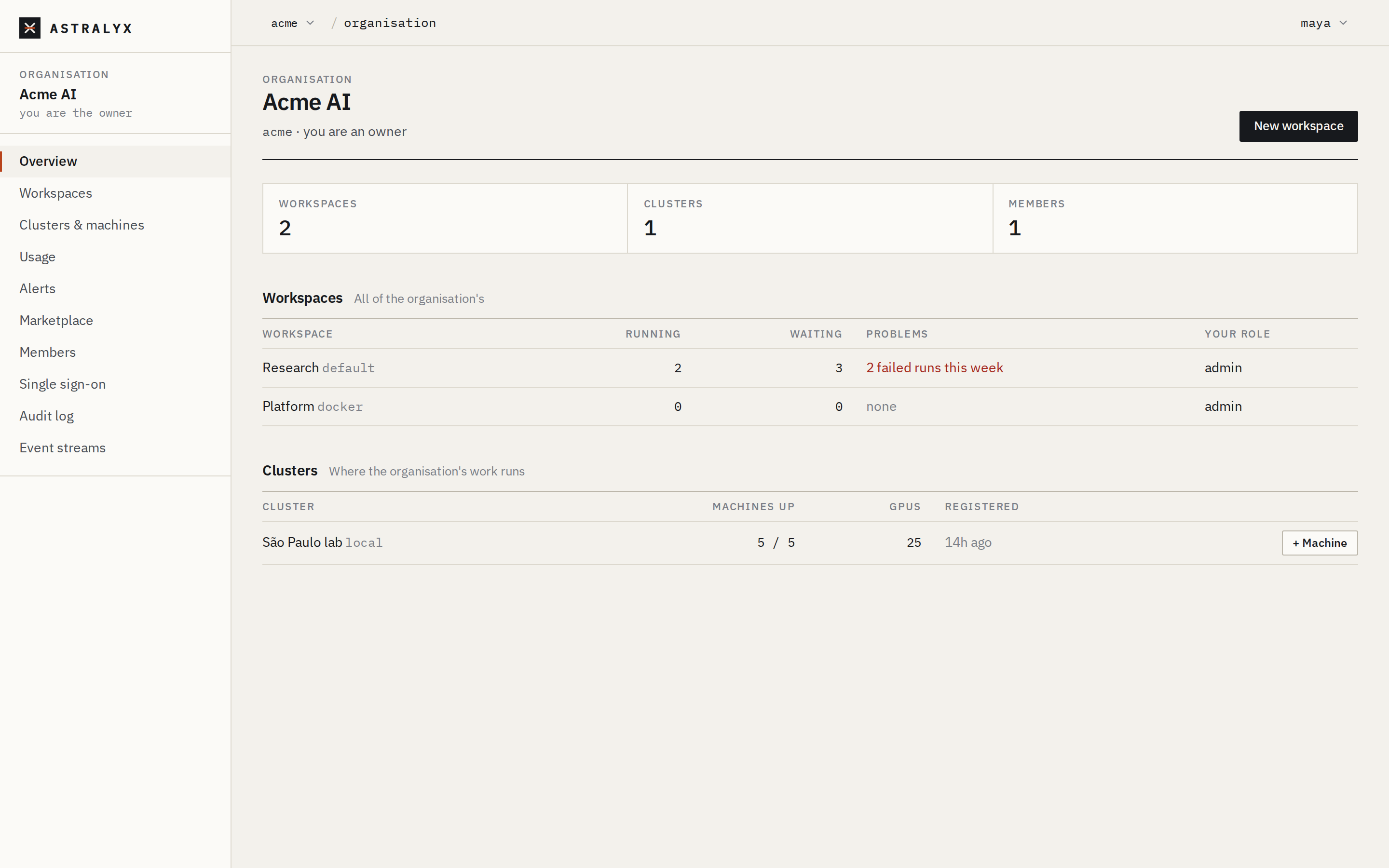
The overview#
Organisation → Overview shows, at a glance:
- the number of workspaces, clusters and members;
- Workspaces: every workspace (for owners and admins; members see theirs), with its running and waiting runs, failed runs in the last 7 days, and your role in it;
- Clusters: each cluster with, for owners and admins, its machines up out of all its machines, its GPUs, and + Machine to add a machine.
Rename the organisation#
Owners and admins can change the display name. The short name never changes. The console has no form for this; use the API:
$ curl -sS -X PATCH "$ASTRA_URL/api/v1/orgs/acme" \
    -H "Authorization: Bearer $ASTRA_TOKEN" -H "Content-Type: application/json" \
    -d '{"name": "Acme AI Research"}'
{"id":"0192f0c4-…","slug":"acme","name":"Acme AI Research"}
The change is recorded in the audit log as org.update.
Limits#
Astralyx can cap, per organisation:
| Limit | Default on Astraeus Cloud | When it is reached |
|---|---|---|
| Workspaces | no limit | 403 LIMIT_REACHED when creating a workspace |
| Machines on Astraeus Cloud, counting those enrolled and the join tokens not used yet | 10 | 403 LIMIT_REACHED when getting an install command |
Machines on a cluster dedicated to your organisation are not capped. Read
the current limits with GET /orgs/{org}:
$ curl -sS "$ASTRA_URL/api/v1/orgs/acme" -H "Authorization: Bearer $ASTRA_TOKEN"
{"id":"0192f0c4-…","slug":"acme","name":"Acme AI","role":"owner","created_at":"2026-09-02T10:00:00Z",
 "suspended":false,"suspended_reason":"","limits":{"max_workspaces":null,"max_hosted_machines":10}}
null is no limit. To raise a limit, write to
[email protected]. When Astralyx changes an
organisation's settings, the audit log records operator.org.update.
Suspension#
Astralyx can suspend an organisation, for example for an unpaid invoice or abuse. While it is suspended:
- its members still see that it exists, and why (the organisation menu and
GET /orgsshowsuspendedandsuspended_reason); - everything else in it is refused with
403 ORG_SUSPENDED, whose message gives the reason: its pages, its workspaces, the API andastra.
Contact Astralyx support to lift a suspension.
Leave an organisation#
Anyone can leave an organisation, except its last owner.
Leaving removes you from every workspace of the organisation at once. The
last owner is refused with 409 LAST_OWNER: make someone else an owner first
(Members and invitations).
Delete an organisation#
Only owners can delete an organisation, and only once it has no clusters. The console has no button for it; use the API.
Danger
Deleting an organisation deletes its workspaces, memberships, invitations, single sign-on settings, alert channels and rules, event streams, guardrails and marketplace. Its audit entries are kept by Astralyx but are no longer shown to anyone. It cannot be undone.
- Remove every workspace's access to every cluster, or delete the workspaces. Removing access deletes what the workspace runs on that cluster. See Workspaces.
- Remove each cluster from the organisation: open Clusters &
machines, select the cluster, then Settings → Remove cluster. This
is refused while a workspace still has access to it
(
409 CLUSTER_IN_USE). -
Delete the organisation:
The answer is
204 No Content.
| Error | Cause |
|---|---|
403 ORG_OWNER_REQUIRED |
You are not an owner. |
409 ORG_HAS_CLUSTERS |
The organisation still has clusters (step 2). |
Machines enrolled in a cluster are not uninstalled by any of this. Remove and uninstall them first if you are retiring them; see Clusters and machines.
The deletion is recorded as org.delete, outside any organisation's audit
log.