Add a model#
A model must be in your workspace before a deployment can serve it. This page shows the three ways to add one, how to download its weights onto a machine ahead of time, and how to delete it. For what a model is, see Models and sources.
Before you begin#
- The editor or admin role in the workspace. Viewers see models but cannot add them.
- A machine with a data location, for models from the library or Hugging Face: that is where their weights are written (Choose where a machine keeps data).
-
For the API examples:
$ export ASTRAEUS_TOKEN=$(cat ~/.astraeus-token)
$ export CONSOLE=https://console.astralyx.cloud/api/v1/orgs/acme/workspaces/vision
$ export API=$CONSOLE/clusters/main/api
Replace
acme,visionandmainwith your organisation, workspace and cluster. Create the token under Account → API tokens.
From the model library#
- Open Eos → Models. The Library tab lists the families, with a fit badge on each size for the machines under Runs on.
- Search or filter (category, publisher, size, engine, license, Hide gated). Tick Only what fits to hide what none of your machines can run.
- Open a family. Under Sizes and variants, click a cell: the panel below shows the download, the GPU memory needed, the RAM on a CPU and the fit machine by machine.
- Press Add. In Add …, check Name in this workspace (the
default is
<family>-<size>-<tag>, for exampleqwen2-5-coder-7b-q4-k-m), choose a Hugging Face credential if the model is gated, and press Add. - The Added dialog offers Deploy, Pull onto a machine or Later. Nothing is downloaded until you pull or deploy.
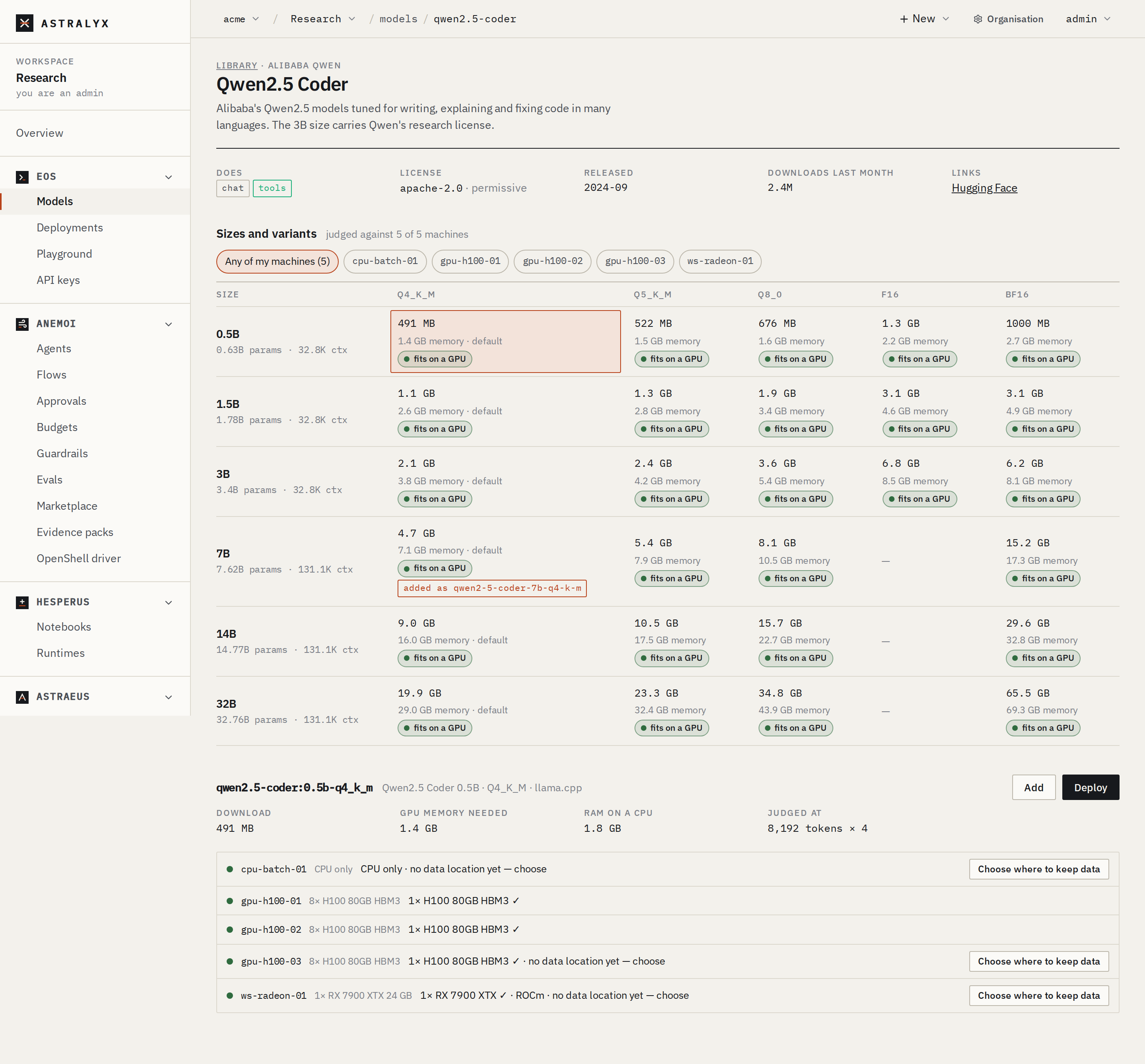
Deploy on a variant adds the model if needed and opens New deployment with the GPUs and requests at once the fit chose.
$ astra inference library coder --fits
$ astra inference show qwen2.5-coder
$ astra inference add qwen2.5-coder:7b-q4_k_m
qwen2-5-coder-7b-q4-k-m added: its weights are pulled onto a machine when it is first deployed (or now: astra inference pull qwen2-5-coder-7b-q4-k-m)
--name sets the name; --credential names a credential for a gated
model. See CLI.
$ curl -fsS -X POST "$CONSOLE/clusters/main/models" \
    -H "Authorization: Bearer $ASTRAEUS_TOKEN" -H 'content-type: application/json' \
    -d '{"catalog": "qwen2.5-coder:7b-q4_k_m"}' | jq -r .metadata.name
qwen2-5-coder-7b-q4-k-m
The body takes catalog (family:size-tag, or family:size for the
default variant), and optionally name and credential. A gated entry
without a credential is refused with CREDENTIAL_REQUIRED.
From Hugging Face#
Use this for a repository the library does not have, such as a fine-tune someone published or a private repository of yours.
- Open Eos → Models and press Add from Hugging Face.
- Repository:
owner/name, for examplebartowski/Qwen2.5-7B-Instruct-GGUF. Revision: a branch, tag or commit (defaultmain). Press Look up. - The files are listed with their sizes and the commit the revision
points to now, which is pinned.
- A GGUF repository holds one file per quantization: tick one (or every part of a split one).
- A checkpoint for vLLM needs its
*.safetensorsand the configuration and tokenizer files beside them; they are selected for you.
- Set Name in this workspace and, for a gated or private repository, a Hugging Face credential.
- Press Add. The Pull dialog opens.
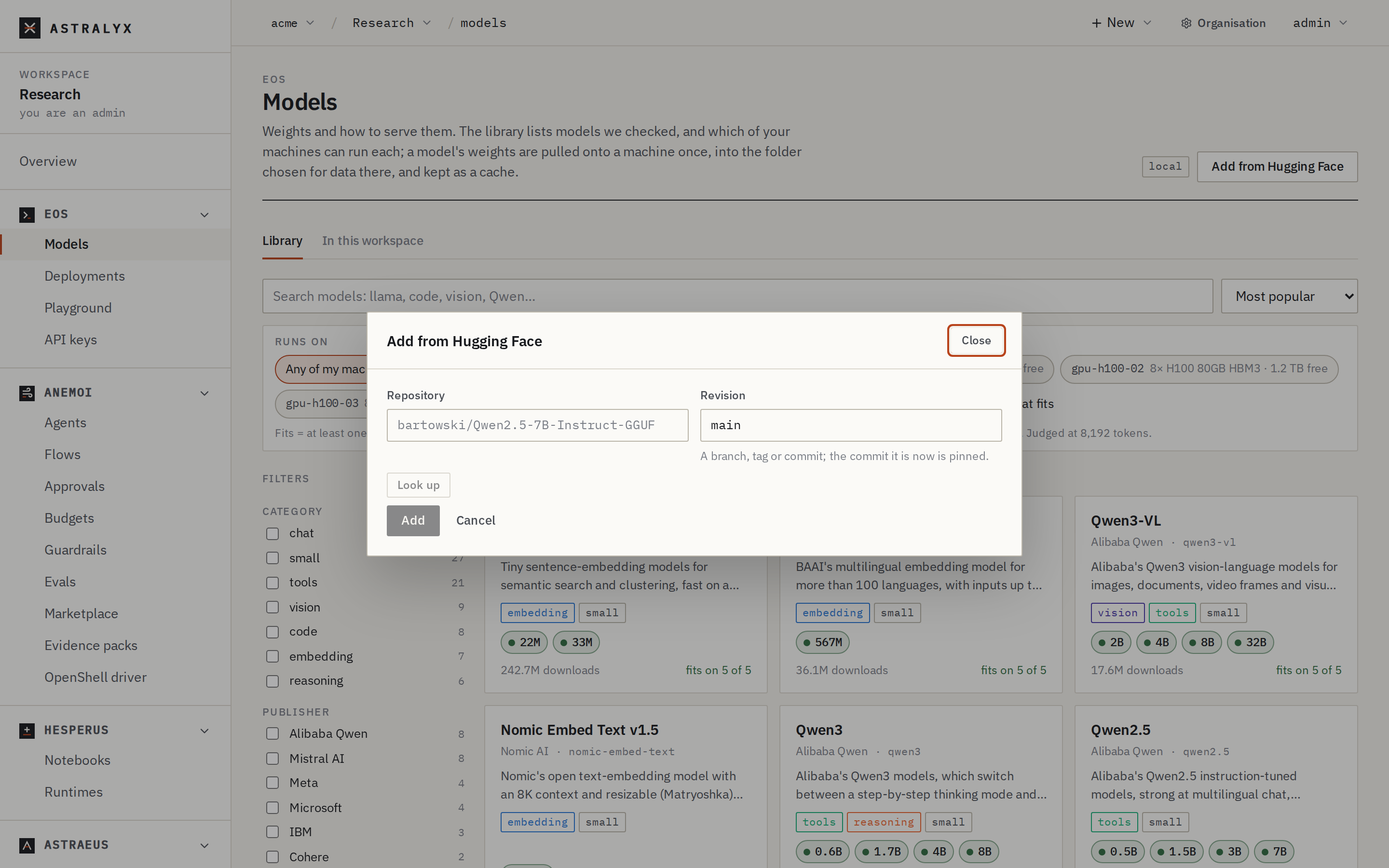
The lookup reads the repository anonymously. A private or gated
repository cannot be listed this way (REPO_GATED): add it with the
API, listing its files yourself.
{
  "metadata": {"name": "qwen-7b"},
  "spec": {
    "source": {
      "huggingface": {
        "repo": "bartowski/Qwen2.5-7B-Instruct-GGUF",
        "revision": "<the commit, 40 hexadecimal characters>",
        "files": [
          {"path": "Qwen2.5-7B-Instruct-Q4_K_M.gguf", "size_bytes": 4683073536, "sha256": "<its SHA-256>"}
        ],
        "credential": ""
      }
    },
    "display": "Qwen2.5 7B Instruct",
    "context_length": 32768,
    "capabilities": ["chat", "tools"]
  }
}
$ curl -fsS -X POST "$API/models" -H "Authorization: Bearer $ASTRAEUS_TOKEN" \
    -H 'content-type: application/json' -d @model.json | jq '{name: .metadata.name, format: .spec.format, engine: .spec.engine}'
{
  "name": "qwen-7b",
  "format": "gguf",
  "engine": "llama.cpp"
}
To find the commit and each file's size and SHA-256, ask the console:
GET https://console.astralyx.cloud/api/v1/catalog/huggingface?repo=<owner/name>&revision=main
returns {repo, revision, gated, files: [{path, size_bytes, sha256}]}
for a public repository.
From a drive#
When the weights are already on your machines — your own fine-tune, a converted checkpoint, a model repository on a shared filesystem — register them where they are. Nothing is downloaded and nothing is copied.
This is done with the API (the console lists such models but has no form for them):
{
  "metadata": {"name": "my-model"},
  "spec": {
    "source": {"drive": {"name": "llm-runs", "path": "merged/my-model-q4_k_m.gguf"}},
    "format": "gguf",
    "display": "My fine-tune (Q4_K_M)",
    "context_length": 8192
  }
}
$ curl -fsS -X POST "$API/models" -H "Authorization: Bearer $ASTRAEUS_TOKEN" \
    -H 'content-type: application/json' -d @model-from-drive.json | jq -r .metadata.name
my-model
formatis required: a drive does not say what it holds.- For llama.cpp,
pathnames the.gguffile (the first part of a split one). For vLLM ("format": "safetensors"),pathis the folder that holdsconfig.json, the*.safetensorsfiles and the tokenizer. - The model is
Readywhile the drive exists (Weights in drive llm-runs). Deleting the model never touches the drive.
See Serve a fine-tuned model for a complete example.
Pull onto a machine#
A deployment downloads the weights onto the machine its replica lands on, so pulling is optional. Pull ahead of time to make the first start quick.
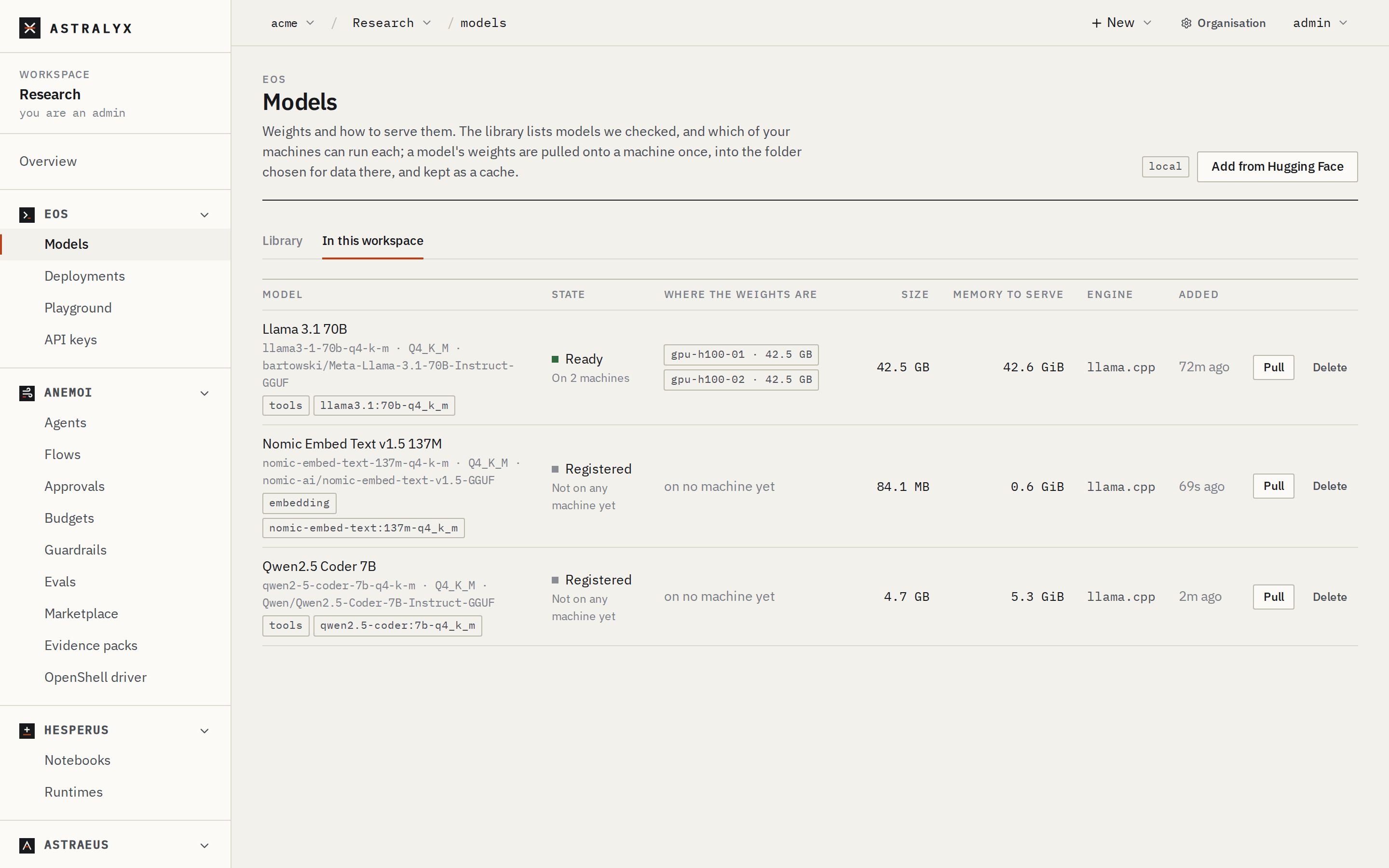
- Open Eos → Models → In this workspace. The table shows each model's state, where its weights are, its size, the memory to serve it and its engine.
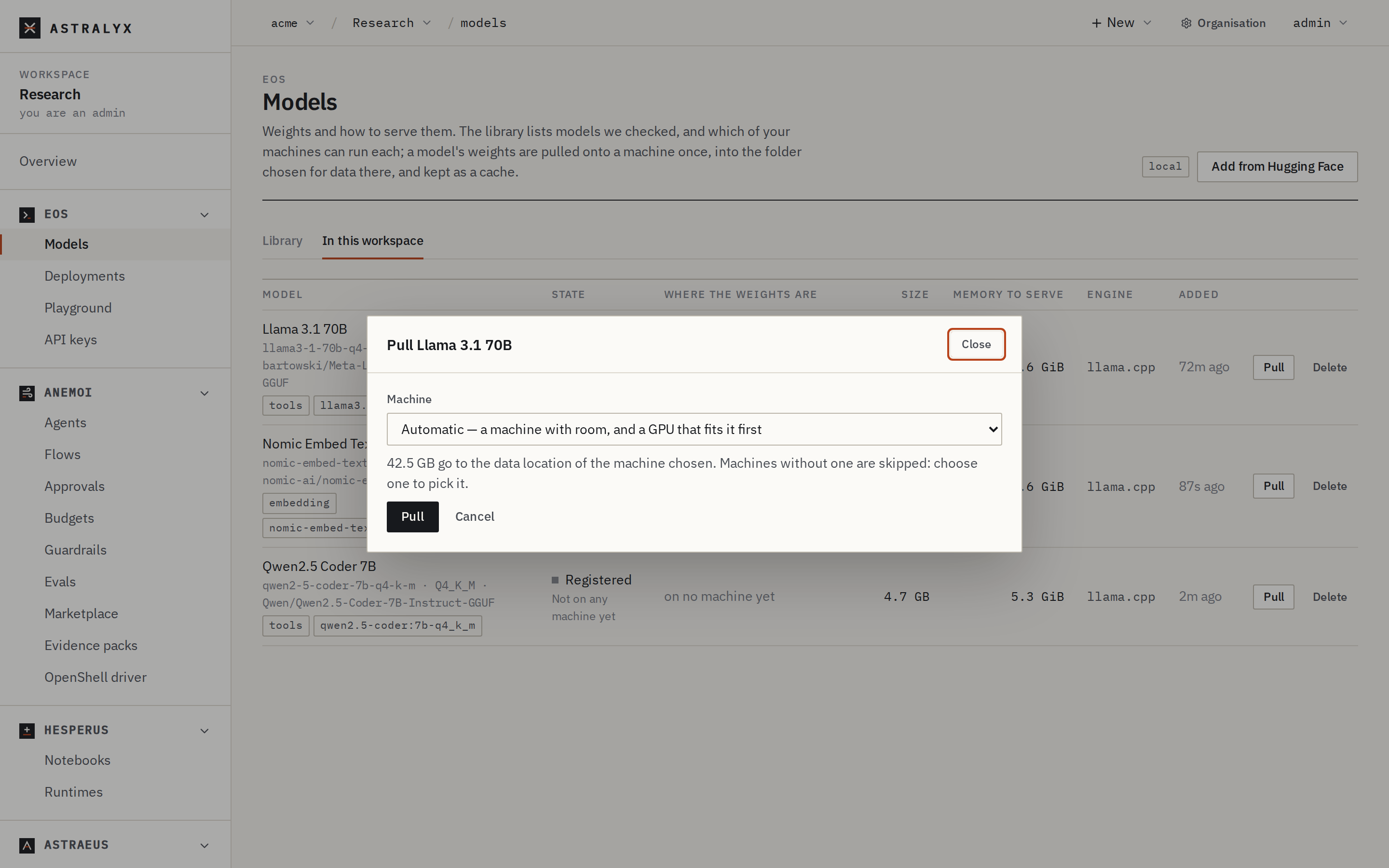
- Press Pull on the model's row.
- Machine: Automatic — a machine with room, and a GPU that fits it first, or a machine. The dialog says how much goes where and how much room there is; on a machine without a data location, an organisation admin can choose one right there.
- Press Pull. Pulling onto gpu-01 by the run fill-model-…: its
logs show the progress. The model is
Readyonce every file is fetched and checked.
$ curl -fsS -X POST "$API/models/qwen2-5-coder-7b-q4-k-m/pull" \
    -H "Authorization: Bearer $ASTRAEUS_TOKEN" -H 'content-type: application/json' \
    -d '{"machine": "gpu-01"}'
{"machine":"gpu-01","run":"fill-model-qwen2-5-coder-7b-q4-k-m-gpu-01","outcome":"created"}
outcome is created, running (already pulling there) or done (a
whole copy is there). Without machine, the machine with a copy, then
one whose GPU fits, then the most free space is chosen. Errors:
NO_DATA_LOCATION (choose where to keep data on that machine),
NO_ROOM (not enough free space, or no machine may hold it),
NODE_NOT_FOUND.
Delete a model#
On Models → In this workspace, press Delete on the row and type the model's name. The dialog says what goes: for a model from the library or Hugging Face, its weights on every machine.
Deleting a model deletes its weights
A model from the library or Hugging Face takes its weights with it, on every machine. Adding it again downloads them again. Its deployments stay and fail with Model … does not exist. A model whose weights are in your drive leaves the drive alone.
Troubleshooting#
| Symptom | Cause | Fix |
|---|---|---|
| A pull waits with Choose where to keep data on gpu-01 | The machine has no data location. | An organisation admin chooses one on the machine's page, or in the Pull dialog. |
409 NO_ROOM: the model needs 42.5 GB, and gpu-01 has 30.1 GB free at its data location |
Not enough free disk. | Pull onto another machine, free space, or raise the limit set for drive copies. |
The model is Failed: Pulling onto gpu-01 failed: … |
The download failed after its retries (network, a gated repository without a valid credential, a checksum mismatch). | Read the fill run's log; fix the credential; press Pull again. |
CREDENTIAL_REQUIRED when adding from the library |
The model is gated. | Accept its terms on Hugging Face, add a credential with your token under token, and choose it. |
400 INVALID_MODEL: spec.format: gguf or safetensors (weights in a drive do not say) |
A drive source without format. |
Add "format". |
409 MODEL_CONFLICT: a drive named model-… exists |
One of your drives has the name the model's drive would take. | Name the model differently. |