Create and manage deployments#
A deployment serves a model behind an OpenAI-compatible endpoint. This page covers its whole life: create, choose the engine and quantization, set the context length, scale, change, call and delete. For what a deployment is, see Deployments and engines.
Before you begin#
- The editor or admin role in the workspace.
- A model in the workspace, or a library entry (the console adds it on the way). See Add a model.
- A machine whose GPUs (or CPUs) can hold the model, with a data location for the weights.
- For the API examples,
ASTRAEUS_TOKENandAPIas in Add a model.
Create a deployment#
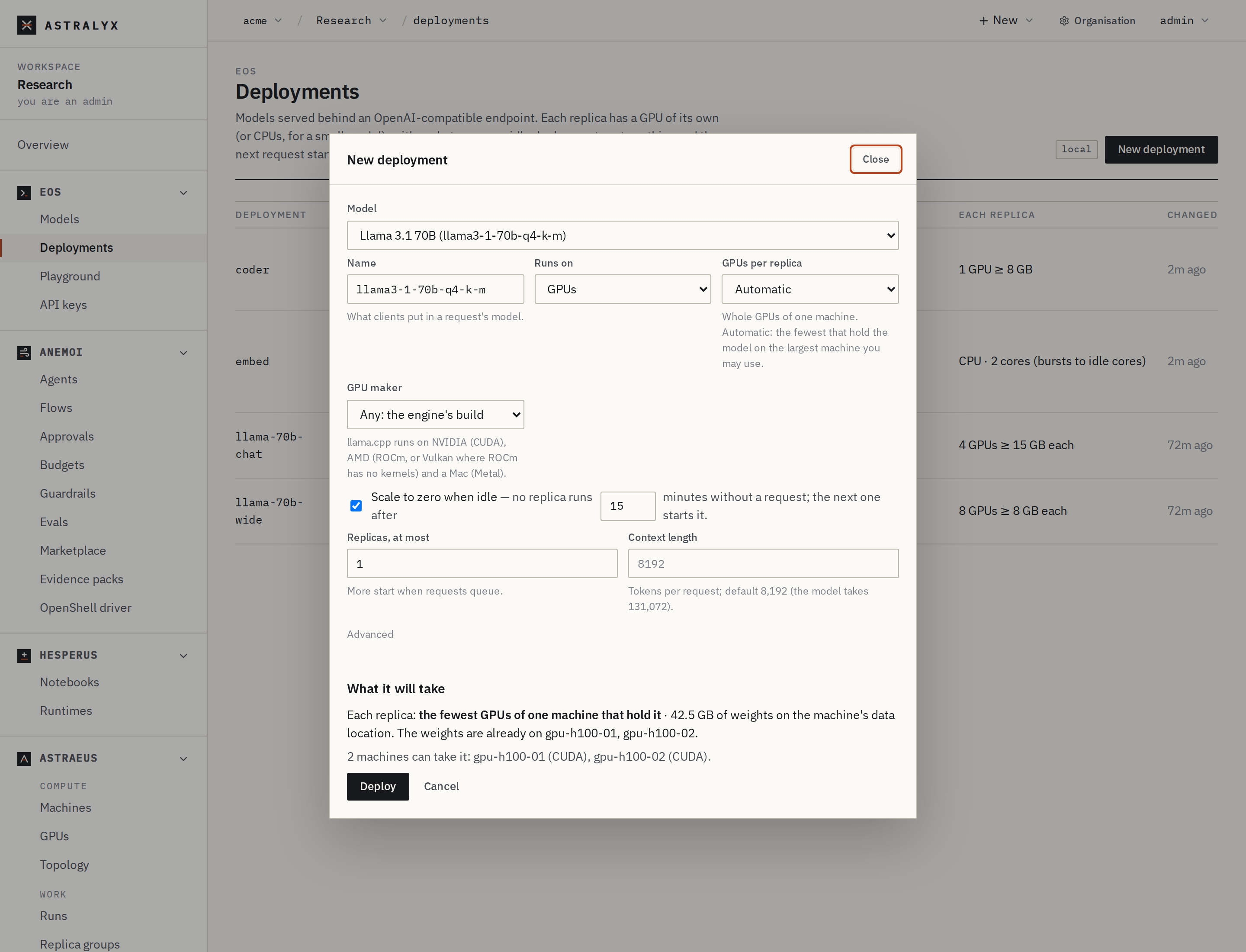
- Open Eos → Deployments and press New deployment (or Deploy on a library variant).
- Model: one of In this workspace, or one From the catalog (added on the way). For a gated library model, choose a Hugging Face credential.
- Name: what clients put in a request's
model. Lowercase letters, digits and-, at most 40 characters. - Runs on: GPUs, or CPUs only (small GGUF model), offered for GGUF models up to 8 GB.
- GPUs per replica: Automatic (the fewest that hold the model on the largest machine you may use), or 1, 2, 4 or 8.
- GPU maker: Any: the engine's build for the machine chosen, NVIDIA only or AMD only.
- Scale to zero when idle (on by default, after 15 minutes), or clear it and set Replicas, at least. Replicas, at most: more start when requests queue.
- Context length: tokens per request. Empty takes the default the hint shows.
- Optional, under Advanced: Requests at once, per replica and Engine arguments, one flag per line followed by its value.
- Read What it will take: what each replica asks for, where the weights go, and which machines can take it. Press Deploy.
$ astra inference deploy qwen2-5-coder-7b-q4-k-m --name coder --min 1 --max 2
coder deployed: `astra inference deployments` shows when it is Ready; `astra inference chat coder` talks to it
$ astra inference deployments
DEPLOYMENT   MODEL                     KIND   STATE     REPLICAS  GATEWAY
coder        qwen2-5-coder-7b-q4-k-m   chat   Starting  0/1-2     http://10.0.4.12:8800/v1
  Loading the model on gpu-01
Flags: --name (default: the model's name), --cpu, --min (default
1; 0 scales to zero), --max (default 1), --context (tokens),
--gpus (1, 2, 4 or 8; default: the fewest that hold the model). For
the engine, parallel requests, GPU vendor or engine arguments, use the
console or the API.
{
  "metadata": {"name": "coder"},
  "spec": {
    "model": "qwen2-5-coder-7b-q4-k-m",
    "replicas": {"min": 1, "max": 2},
    "context_length": 16384,
    "engine_args": ["--flash-attn", "on"]
  }
}
$ curl -fsS -X POST "$API/deployments" -H "Authorization: Bearer $ASTRAEUS_TOKEN" \
    -H 'content-type: application/json' -d @deployment.json | jq .spec
{
  "accelerator": "gpu",
  "context_length": 16384,
  "engine": "auto",
  "engine_args": ["--flash-attn", "on"],
  "gpus": 1,
  "model": "qwen2-5-coder-7b-q4-k-m",
  "parallel": 4,
  "replicas": {"max": 2, "min": 1}
}
gpus and, for llama.cpp, parallel are filled in when you leave them
out. Every field is in the
Deployment specification.
The deployment goes Pending → Starting (the weights are downloaded if
the machine has no copy, then the engine loads them) → Ready.
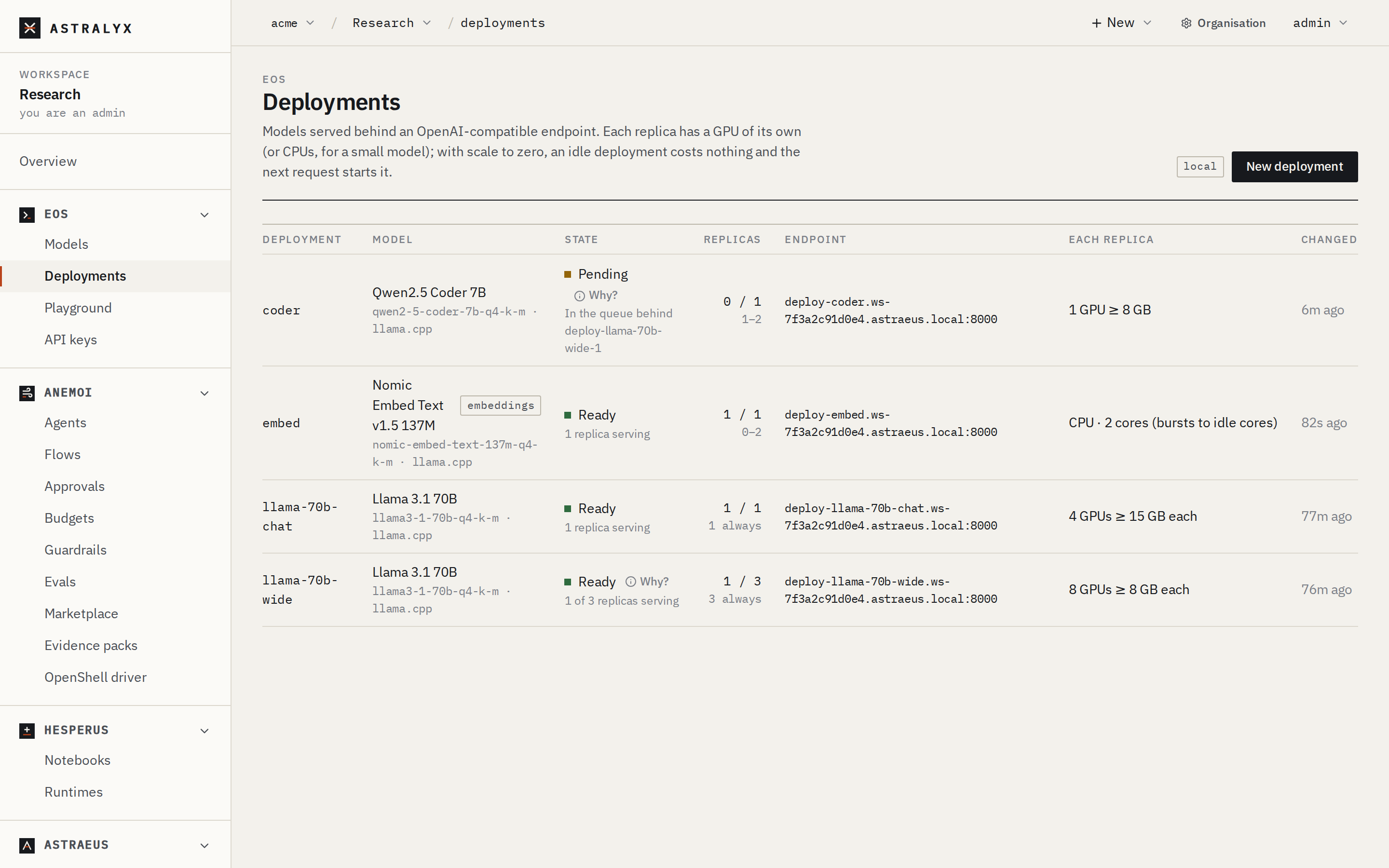
Eos → Deployments lists every deployment with its model, state,
replicas, endpoint and what each replica takes.
Choose the engine and quantization#
The engine follows the model's format: a GGUF model is served by
llama.cpp, a safetensors checkpoint by vLLM. To use the other engine, add
the model's other variant from the library — each family offers GGUF
quantizations and, for most, a bf16 checkpoint.
| You want | Choose |
|---|---|
| The model to fit on fewer or smaller GPUs | A GGUF quantization: q4_k_m (the default), q5_k_m, q8_0 |
| The best quality the GPUs hold | The largest quantization that fits, or bf16 with vLLM |
| Many concurrent users per GPU | vLLM (bf16, or an FP8 checkpoint) |
| CPUs only, a Mac, or an AMD Radeon card vLLM does not support | llama.cpp |
The library shows, for each variant, its download, the memory it needs and
where it fits (Fit and quantization). In the API,
spec.engine may be auto, llama.cpp or vllm; llama.cpp cannot serve
safetensors, and vLLM is not used for GGUF.
Set the context length#
context_length is the longest context of one request, in tokens. The
default is the model's, at most 8192 for llama.cpp and 32768 for vLLM. It
can be raised up to the model's maximum:
$ curl -fsS -X PUT "$API/deployments/coder" -H "Authorization: Bearer $ASTRAEUS_TOKEN" \
    -H 'content-type: application/json' \
    -d '{"spec": {"model": "qwen2-5-coder-7b-q4-k-m", "replicas": {"min": 1, "max": 2}, "context_length": 32768}}'
A longer context needs more GPU memory, for every request held at once
with llama.cpp: if the deployment no longer fits its GPUs, it waits and
says why. Lower parallel, add GPUs, or quantize the cache
(--cache-type-k q8_0 --cache-type-v q8_0 with --flash-attn on for
llama.cpp, --kv-cache-dtype fp8 for vLLM).
Scale#
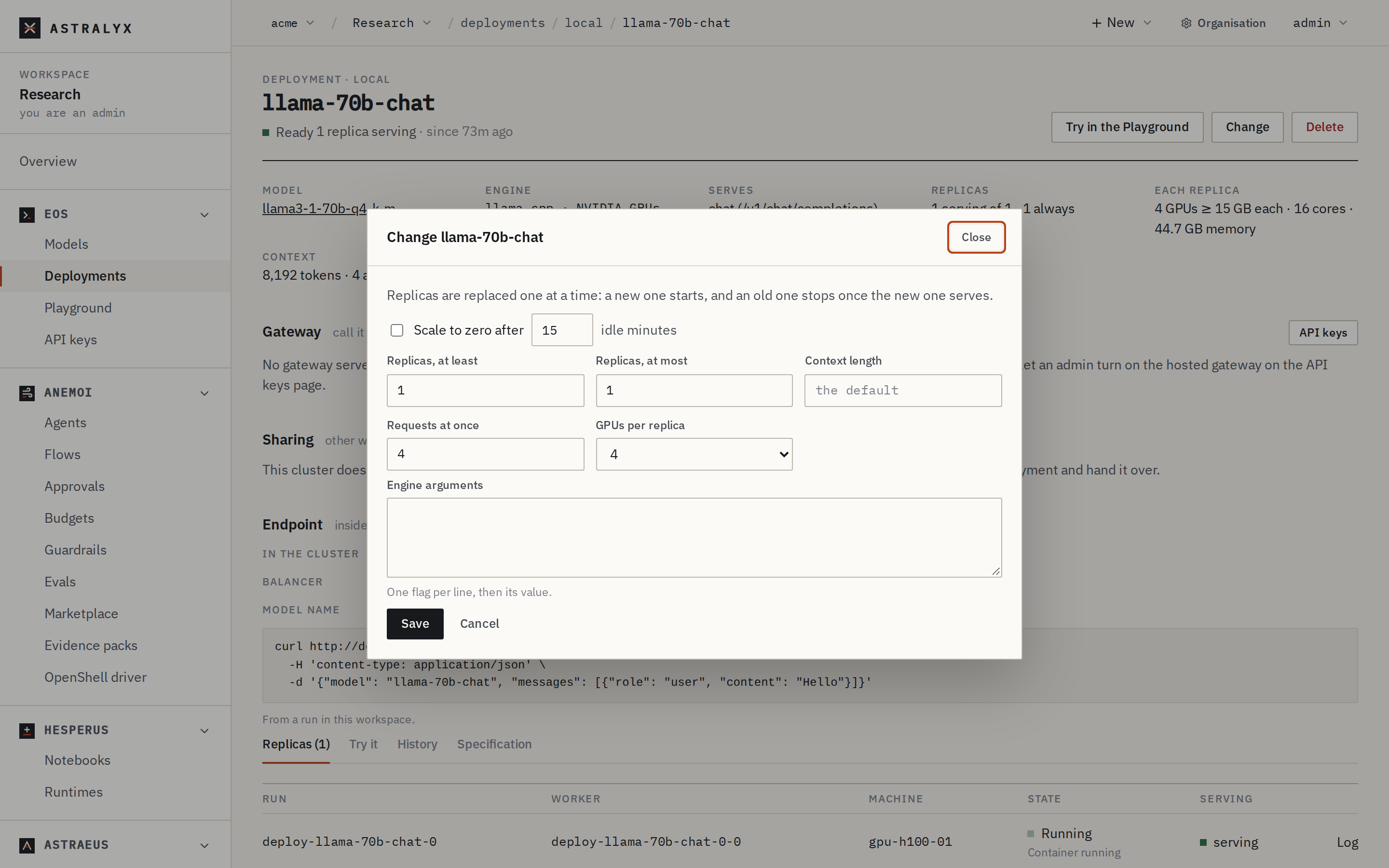
On the deployment's page, press Change and set Replicas, at least and at most, or Scale to zero after N idle minutes. Press Save.
PUT the whole specification with new replicas:
$ curl -fsS "$API/deployments/coder" -H "Authorization: Bearer $ASTRAEUS_TOKEN" | jq .spec > spec.json
$ jq '{spec: (. + {replicas: {min: 0, max: 4, idle_minutes: 30}})}' spec.json > change.json
$ curl -fsS -X PUT "$API/deployments/coder" -H "Authorization: Bearer $ASTRAEUS_TOKEN" \
    -H 'content-type: application/json' -d @change.json > /dev/null
min=max: that many replicas, always.min<max: replicas are added when requests queue, at most 64.min: 0: none afteridle_minutes(default 15) without a request; the next request starts one.
Change a deployment#
Everything in the specification can change: the model, context, parallel requests, GPUs, engine arguments, priority. The cluster checks the new specification against the model before accepting it. Replicas are then replaced one at a time: a new one starts, and an old one stops once the new one serves, so a deployment with two or more replicas keeps answering.
Change on the deployment's page: scale to zero, replicas, context length, requests at once, GPUs per replica and engine arguments. Press Save.
PUT $API/deployments/<name> with {"spec": {…}}, the whole
specification. A concurrent change is refused with the deployment
changed concurrently; retry.
Call it#
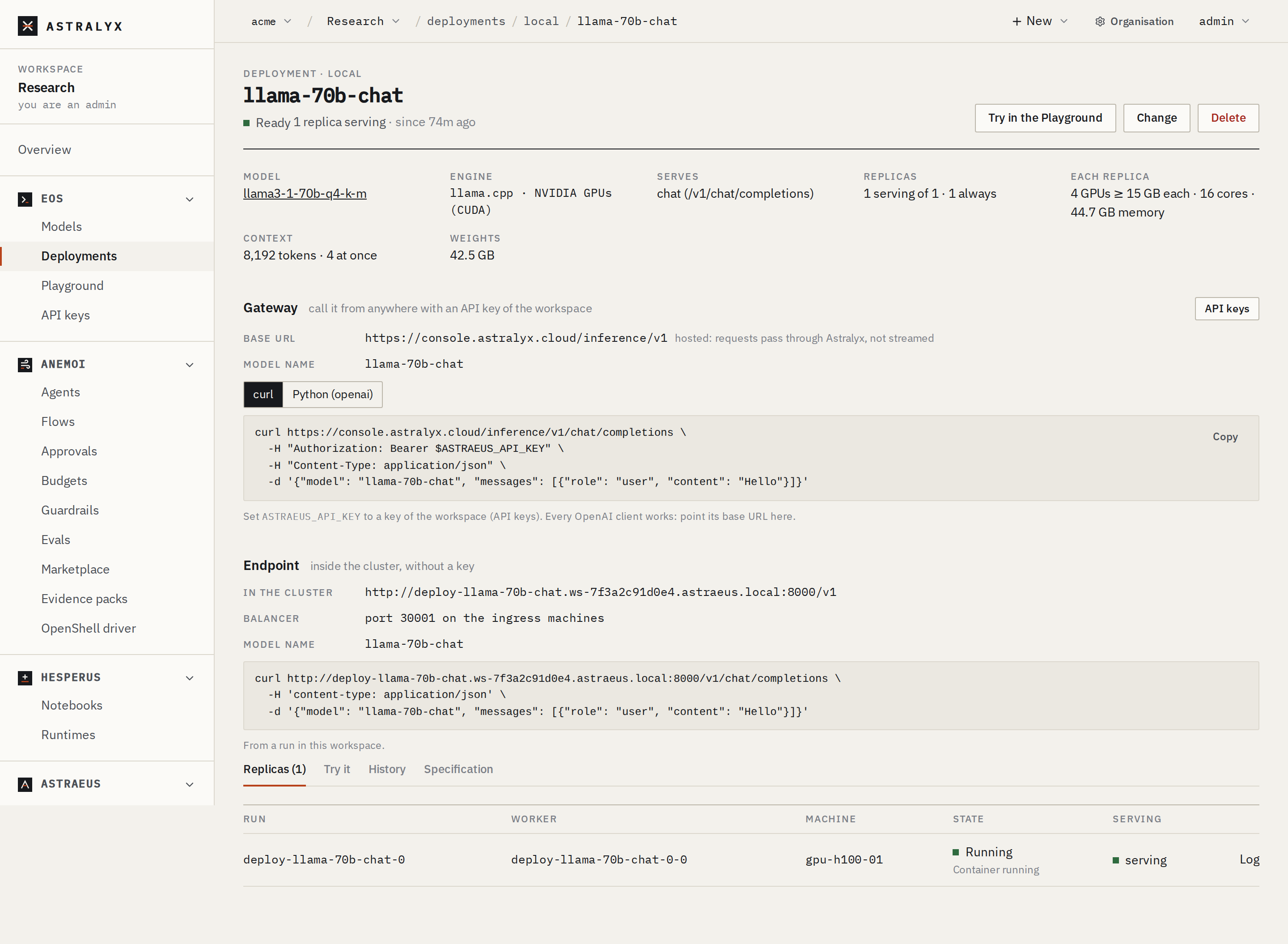
The deployment's page shows, under Gateway, the base URL, the model
name and examples for curl and Python. Make an API key,
then:
$ export ASTRAEUS_API_KEY=ak-…
$ curl http://10.0.4.12:8800/v1/chat/completions \
    -H "Authorization: Bearer $ASTRAEUS_API_KEY" -H "Content-Type: application/json" \
    -d '{"model": "coder", "messages": [{"role": "user", "content": "Write a Python function that reverses a string."}]}'
Other ways in:
- Try it, a tab on the deployment's page, sends one message and shows the answer, its tokens and its time.
- Try in the Playground opens the Playground on it.
- From a run of the same workspace, with no key, at the address under
Endpoint (
http://deploy-coder.<namespace>.astraeus.local:8000/v1). At zero replicas that name has no address until a request through a gateway (or Try it) wakes the deployment.
See its replicas and logs#
The deployment's page lists each replica under Replicas: its run, worker, machine, state and whether it is serving, with a link to its Log (the engine's output). History lists its state changes; Specification shows the specification and the plan (image, GPUs, memory and context each replica gets).
$ curl -fsS "$API/deployments/coder" -H "Authorization: Bearer $ASTRAEUS_TOKEN" \
    | jq '{state: .status.state, reason: .status.reason, replicas: [.members[] | {machine, state, ready}]}'
$ astra astraeus logs deploy-coder-0-0 | tail -n 50
A replica's run is deploy-<name>-<index> and its worker
deploy-<name>-<index>-0.
Delete a deployment#
Its shares go with it. API keys that listed it stay; calls to it are
answered model_not_found.