Models and sources#
A model is a set of weights and how to serve them. You add a model to a workspace once; then any number of deployments serve it, and batch runs can read it. This page explains where a model's weights come from, where they are kept, and what a model knows about itself.
Three ways to add a model#
| Source | What you give | Where the weights are kept | When to use it |
|---|---|---|---|
| The model library | A library entry, such as llama3.2:3b-q4_k_m |
Downloaded from Hugging Face into a drive the model manages, on each machine that needs them | Most of the time: the library's entries are checked, pinned, and come with what Eos needs to serve them well |
| Hugging Face | A repository, a revision, and the files to fetch | The same as the library | A model the library does not have, a fine-tune someone published, a private repository |
| A drive | One of your drives and the folder (or file) in it | Where they already are, in your drive | Weights you produced yourself — a fine-tune, a merged LoRA, a conversion — or a model repository you keep on a shared filesystem |
A model from the library or from Hugging Face is pinned: its revision is a commit, never a branch or a tag, so the weights never change under you. Each file's size, and its SHA-256 when the hub has one, is recorded; the download is checked against it.
The model library#
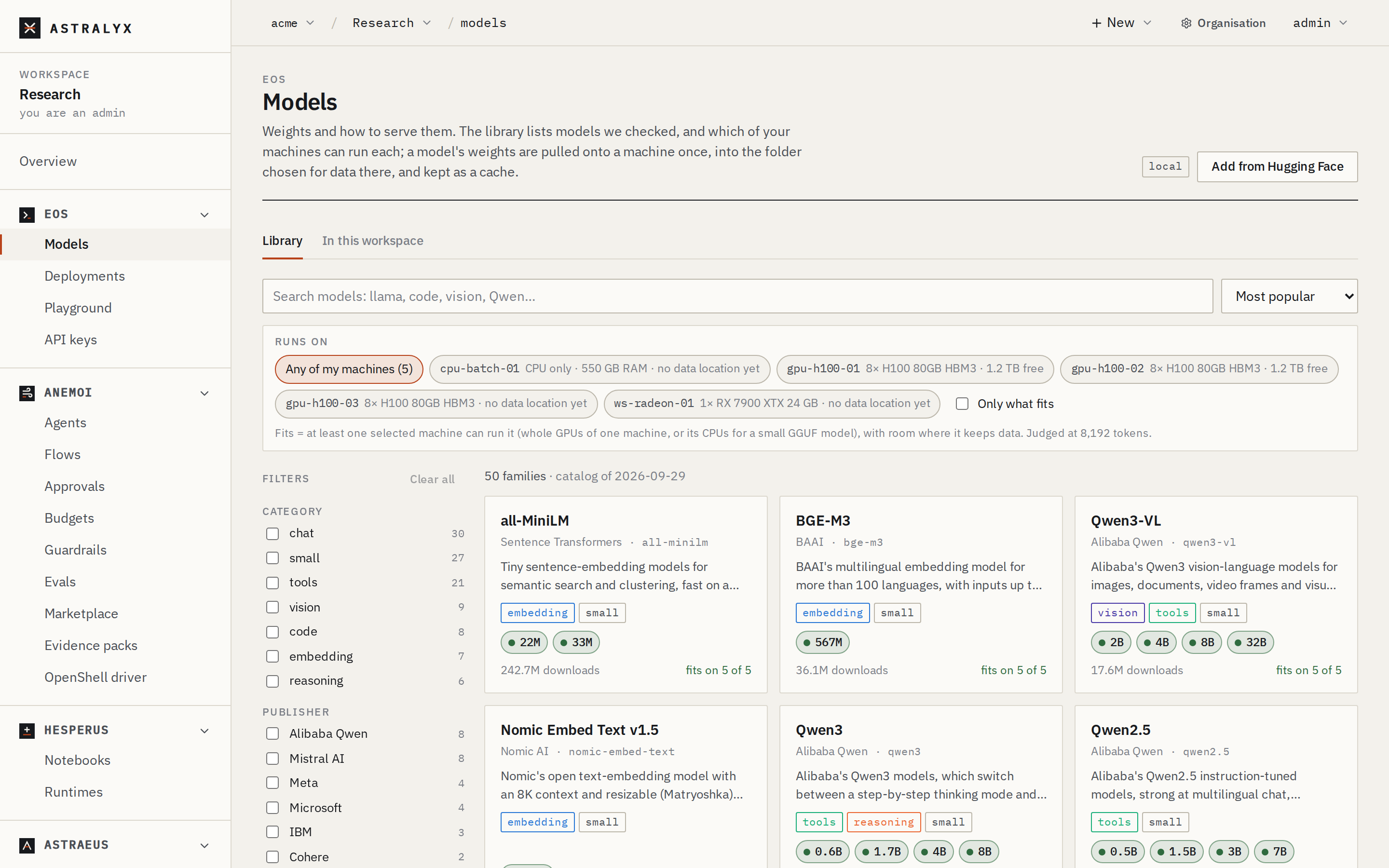
Eos → Models → Library lists the models Astralyx checked: families
(Llama 3.x, Qwen 2.5 and 3, Gemma, Mistral, gpt-oss, DeepSeek R1, embedding
models and more) by publisher. A family has sizes (3B, 8B, 70B),
and each size has variants:
- GGUF quantizations for llama.cpp (
q4_k_m,q5_k_m,q8_0…), on GPUs or, when small enough, on CPUs; - full checkpoints (safetensors) for vLLM, on GPUs.
An entry is named family:size-tag (llama3.2:3b-q4_k_m) or
family:size for its default variant (q4_k_m when there is one).
For each variant the library shows, machine by machine, whether it will run: on one GPU, on several GPUs of one machine, on CPUs only, or not at all — and why. See Fit and quantization.
Gated models#
Some publishers (Meta's Llama checkpoints, for example) require you to accept their terms on Hugging Face before you can download. The library marks them gated. To use one:
- Accept the terms on Hugging Face with your account.
- Create a Hugging Face access token and store it in your secret store.
- Add a credential in the workspace
whose key
tokenholds it. - Choose that credential when you add the model.
The machine that downloads the weights fetches the token itself; Astralyx only ever stores the credential's name.
What a model knows#
Besides its source, a model carries what Eos needs to serve it:
| Property | Why it matters |
|---|---|
| Format | gguf or safetensors. Decides the engine: GGUF is served by llama.cpp, safetensors by vLLM. |
| Engine | llama.cpp or vllm; the format's by default. |
| Capabilities | chat, vision, embedding, tools, reasoning, audio, video, transcription. They shape the engine's flags and what the Playground offers. An embedding model serves /v1/embeddings only; a speech-to-text model (Whisper) serves transcription only. |
| Context length | The longest context it takes. A deployment cannot ask for more. |
| Quantization, parameters | Shown, and used to size CPU replicas. |
| Shape (layers, KV heads, head dimension) | Used to estimate the memory the KV cache takes before any machine has read the weights. |
| Chat template | Optional: one to use instead of the model's own. |
| Engine hints | vLLM's tool-call and reasoning parsers, llama.cpp's pooling for embeddings. |
A model from the library gets all of these from its library entry. A model you add from Hugging Face or a drive gets what you give; the format is derived from the file names of a Hugging Face model, and must be stated for a drive.
Every field is listed in the Model specification.
Where the weights are kept#
Weights are written only where a person chose. Each machine has a data location: the folder where it keeps copies of drives, chosen by an organisation admin when the machine is installed or on its page (Choose where a machine keeps data). A machine without a data location holds no weights; a download onto it waits with Choose where to keep data on gpu-01.
A model from the library or Hugging Face keeps its weights in a drive it
manages, named model-<name>, with one copy per machine that needed them,
at <data location>/drives/<namespace>.model-<name>/. These copies are a
cache of the hub:
- When a machine's disk fills up, copies no worker uses can be removed and downloaded again where next needed.
- Deleting the model deletes its weights on every machine.
A model whose weights are in your drive uses the drive as it is. Nothing is downloaded, and deleting the model never touches your files.
Getting the weights onto a machine#
You do not have to do anything: a deployment's first replica downloads the
weights onto the machine it is placed on, then starts. To download ahead of
time — so the first start is quick, or to check a gated model's access —
pull the model onto a machine. A download is a run named
fill-model-<name>-<machine>, visible like any other: its log prints
progress every ten seconds, it resumes where it stopped when retried, and
it fails if a file does not match its hash.
When no machine is named, the pull goes to a machine with room at its data location: one that already has a copy first, then one whose GPU fits the model, then the one with the most free space.
Once a copy is whole, the machine reads the GGUF file's header (not the weights) and the model shows the memory it needs to serve: weights, the KV cache at its context, and the engine's overhead.
States#
| State | Meaning |
|---|---|
Registered |
On no machine yet (Not on any machine yet). |
Pulling |
A download is running (Pulling onto gpu-01). |
Ready |
At least one whole copy (On gpu-01, On 2 machines). For a drive source: while the drive exists (Weights in drive llm-runs). |
Failed |
A download failed and no copy is whole, or the drive is gone. The reason says which. Pull again to retry. |
Batch runs that read a model#
A model is not only for deployments. A run
can mount a model's weights read-only — to embed a corpus, score a dataset,
evaluate a checkpoint — with "model": {"name": "bge-m3"} in its
specification. The weights appear at /model (or mount_path), downloaded
first if the machine has no copy, and the workers get:
| Variable | Value |
|---|---|
ASTRAEUS_MODEL |
The model's name. |
ASTRAEUS_MODEL_PATH |
Where the weights are mounted. |
ASTRAEUS_MODEL_FILE |
For a GGUF model, the file to load (the first part of a split one). |
With "engine": true, the run also gets the model's engine beside it, as a
deployment's replica runs it (on one GPU): your workers start once it is healthy and are
given OPENAI_BASE_URL, OPENAI_MODEL and a placeholder OPENAI_API_KEY.
The run completes when your workers do, and the engine is stopped then.