Workspaces#
A workspace is where one team works, in every product: its runs and drives
(Astraeus), its models, deployments and API keys (Eos), its agents and flows
(Anemoi), its notebooks (Hesperus). What is in one workspace is invisible to
the others, and names are its own: two workspaces may each have a run called
train. This page covers the workspace's life as an admin sees it:
creating it, its people, its access to clusters, its settings, and deleting
it.
Before you begin#
- Creating and deleting workspaces, and giving them access to clusters, are for organisation owners and admins.
- Adding people, renaming the workspace and its event retention are for workspace admins — which organisation owners and admins always are.
How a workspace maps to clusters#
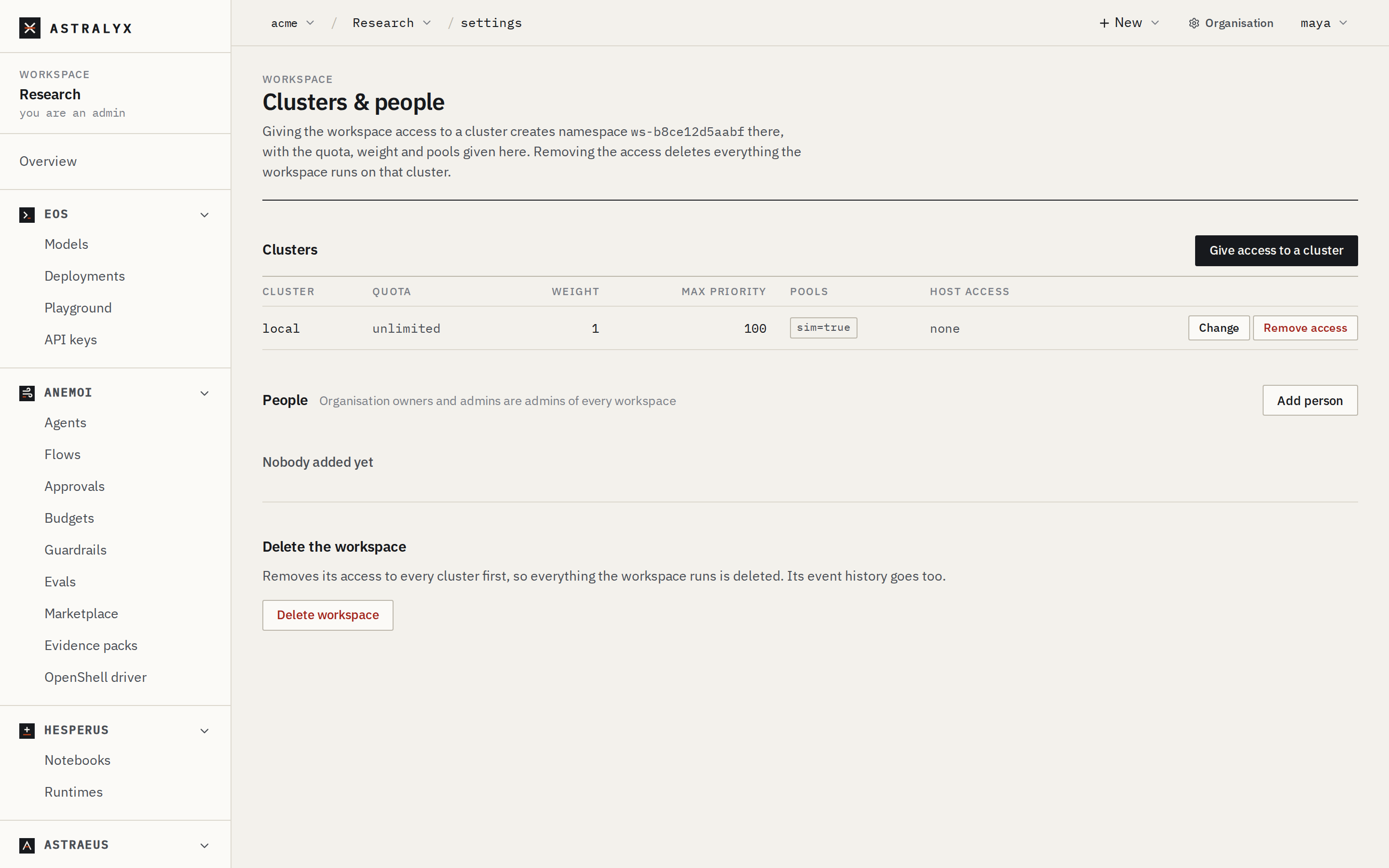
Each workspace has one namespace name, ws- followed by 12 hexadecimal
digits (for example ws-3f9a1c07b2e4), shown at the top of its Settings.
It is the same on every cluster the workspace has access to. You rarely type
it: the console, astra and the API take the workspace's short name and
local names. It appears in messages such as
priority 50 is above namespace ws-3f9a1c07b2e4's maximum of 0.
A new workspace has access to no cluster, so it can run nothing yet. Give it access to a cluster, with its terms, as the next step; see Quotas, pools and terms.
Create a workspace#
- Open Organisation → Workspaces and select New workspace (also in the workspace menu of the top bar).
- Enter a Name (
Research). The Short name is filled in from it (research); change it if you want another. - Select Create workspace. The console opens its Settings.
| Field | Rules |
|---|---|
Short name (slug) |
2 to 40 characters: lower-case letters, digits and -, not starting or ending with -. Unique in the organisation. Permanent. |
Name (name) |
Free text, shown in the console. |
| Error | Cause |
|---|---|
400 INVALID_SLUG |
The short name breaks the rules above. |
409 WORKSPACE_EXISTS |
The organisation has a workspace with that short name. |
403 LIMIT_REACHED |
The organisation has as many workspaces as its limits allow; see Organisation. |
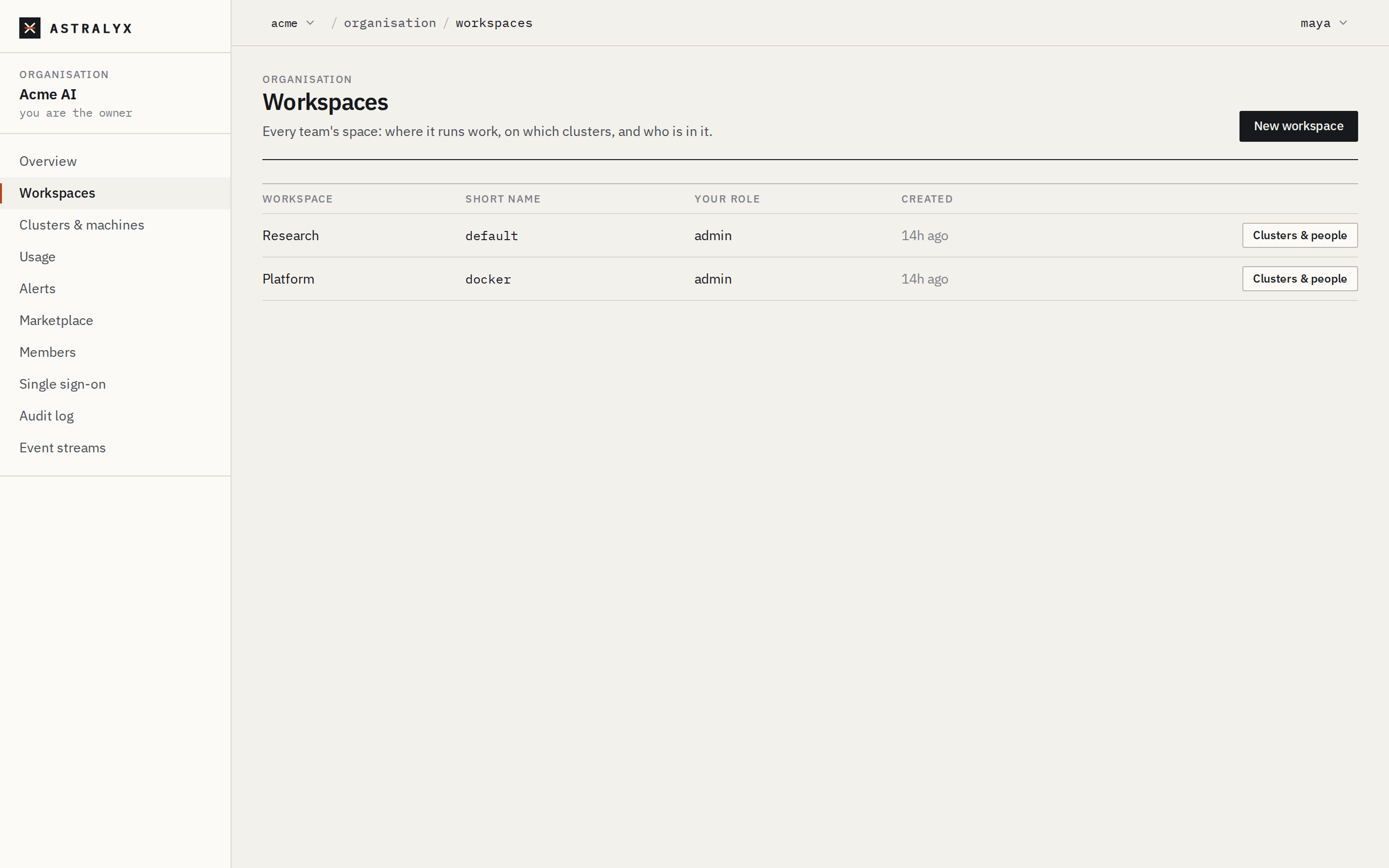
Organisation → Workspaces lists every workspace for owners and admins (members see theirs), with your role in each and a Clusters & people button for the ones you administer.
The workspace's settings#
A workspace's Settings page (Clusters & people) has three sections:
- Clusters: the clusters it has access to, each with its quota, weight, maximum priority, pools and host access; Give access to a cluster, Change and Remove access for organisation admins.
- People: who is in the workspace and their roles; Add person for workspace admins.
- Delete the workspace, for organisation admins.
Add people to a workspace#
A person must belong to the organisation before they can be added to one of its workspaces (Invite a member).
- Open the workspace, then Settings.
- Under People, select Add person.
- Choose the Person and the Role (
editoris preselected), then select Add.
The list offers organisation members with the member role who are not
in the workspace yet: owners and admins are already admins of every
workspace. Change a role with the selector in the person's row;
Remove takes them out of the workspace at once.
$ curl -sS -X PUT "$ASTRA_URL/api/v1/orgs/acme/workspaces/research/members/$USER_ID" \
    -H "Authorization: Bearer $ASTRA_TOKEN" -H "Content-Type: application/json" \
    -d '{"role": "editor"}'
{"user_id":"0192…","role":"editor"}
The same call changes an existing role.
DELETE /orgs/{org}/workspaces/{ws}/members/{user} removes the person;
anyone may remove themselves. GET /orgs/{org}/members gives user IDs;
GET /orgs/{org}/workspaces/{ws}/members lists the workspace's people.
| Role | Gives |
|---|---|
viewer |
sees everything, changes nothing |
auditor |
reads the agents' governance record, makes evidence packs |
editor |
runs and changes work |
admin |
also manages people |
Roles and permissions has the full table.
| Error | Cause |
|---|---|
400 NOT_IN_ORG |
The person is not a member of the organisation. |
400 INVALID_ROLE |
The role is not admin, editor, viewer or auditor. |
403 WORKSPACE_ADMIN_REQUIRED |
You are not an admin of the workspace. |
The People list shows the people added to the workspace; organisation owners and admins act as its admins without being listed.
To leave a workspace you are not an admin of, remove yourself through the
API (DELETE …/members/{your user ID}); the console offers Remove to
workspace admins only.
Give the workspace a cluster#
A workspace runs work on a cluster only once an organisation admin gives it access, with its terms: quota, weight, pools, maximum priority and host access.
- Open the workspace, then Settings.
- Under Clusters, select Give access to a cluster.
- Choose the cluster, fill in the terms, and select Give access.
Quotas, pools and terms explains every term and how it is enforced.
When a workspace with no cluster adds its first machine (Machines → Add machine in the workspace), the console gives it access in the same step: to the organisation's only cluster, or to Astraeus Cloud when the organisation has none, with no limits. Set limits once there is capacity to share.
Rename a workspace#
Workspace admins can change the display name; the short name never changes. The console has no form for this; use the API:
$ curl -sS -X PATCH "$ASTRA_URL/api/v1/orgs/acme/workspaces/research" \
    -H "Authorization: Bearer $ASTRA_TOKEN" -H "Content-Type: application/json" \
    -d '{"name": "Research (vision)"}'
{"id":"0192…","slug":"research","name":"Research (vision)","hosted_gateway":false}
Workspace settings owned by a product#
| Setting | Who | Where |
|---|---|---|
| How long the workspace's events are kept on the platform | Workspace admins | Retention → On the platform → Events; see Events, audit and event streams |
| Hosted inference gateway: let the workspace's Eos API keys call its deployments through Astralyx's gateway | Workspace admins | The workspace's API keys page; see Eos |
| Agent guardrails, budgets and retention policies | Workspace admins | Guardrails, Budgets, Retention; see Anemoi |
| Run templates | Editors and admins save; everyone uses | New run; see Submit a run |
Delete a workspace#
Danger
Deleting a workspace removes its access to every cluster first, which deletes everything it has there: runs, drives, data sources, credential references, endpoints, schedules, replica groups, models, deployments, agents, flows and notebooks. Its event history is deleted too. This cannot be undone.
If a cluster does not answer while access is being removed
(503 CLUSTER_REFUSED or 503 CLUSTER_UNREACHABLE), the workspace is not
deleted; try again. Copy out what you need first: results on drives,
model weights you uploaded, notebooks.