Troubleshoot a deployment#
Every deployment and each of its replicas carries a reason, in words. Start there. This page explains how to read it, what the common reasons mean, and what to do.
Why is it not running?#
On Eos → Deployments, a deployment that waits shows Why? next to
its state; on its page the same link sits beside the state (Why are
replicas waiting? when it is Ready but some replicas wait).
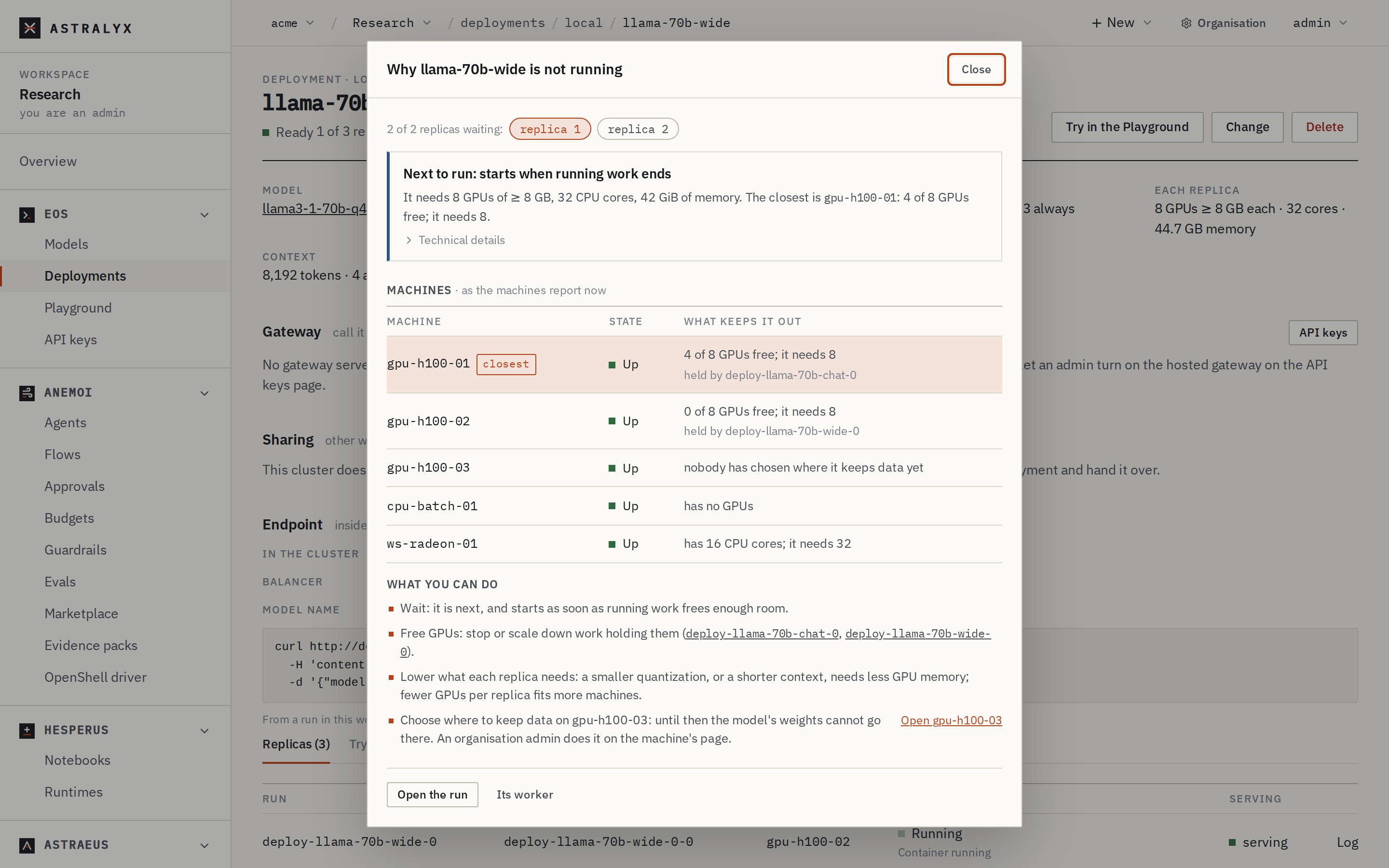
The dialog, Why … is not running, shows:
- with several waiting replicas, N of M replicas waiting and a chip per replica;
- a headline and the advice for it, for example Next to run: starts when running work ends — It needs 8 GPUs of ≥ 8 GB, 32 CPU cores, 42 GiB of memory. The closest is gpu-h100-01: 4 of 8 GPUs free; it needs 8. — with Technical details;
- Machines: every machine and What keeps it out, the closest marked, and what holds its GPUs;
- What you can do: only the steps that apply.
$ astra inference deployments
DEPLOYMENT   MODEL                 KIND   STATE     REPLICAS  GATEWAY
llama-wide   llama3-1-70b-q4-k-m   chat   Ready     1/3-3     http://10.0.4.12:8800/v1
$ astra astraeus workers deploy-llama-wide
A deployment that is not Ready prints its reason on the next line. The
waiting replicas' workers (deploy-<name>-<index>-0) carry the precise
reason in their REASON column.
Reasons and fixes#
Pending#
| Reason | Cause | Fix |
|---|---|---|
| Waiting for a machine with a GPU with at least 15 GB (or N GPUs with at least X GB each, on one machine, or N CPU cores) | No machine your workspace may use has that much free. | See Why?: wait for running work to end, free GPUs, or lower what each replica needs — a smaller quantization, a shorter context, fewer requests at once, fewer GPUs per replica. |
| Choose where to keep data on gpu-01 | The machine has no data location, so the weights cannot go there. | An organisation admin chooses one on the machine's page. |
| Waiting for the workspace's quota | Your workspace's GPU quota on the cluster is used. | Stop other work, or ask an admin for more quota (Quotas). |
| Next to run… | It is next in the queue, behind running work. | Wait, or raise the deployment's priority if your workspace may. |
| A machine listed as has no GPUs, or the GPU maker not accepted | gpu_vendor excludes those GPUs, or the engine does not run on them (vLLM on a Mac, or on an AMD GPU its ROCm build does not support). |
Use llama.cpp and a GGUF variant, or another machine. |
Starting#
| Reason | Meaning |
|---|---|
| Preparing on gpu-01: the image and the model's weights | The engine's image is pulled and the weights are downloaded onto the machine. The first start of a large model takes as long as its download; the fill run's log shows the progress. |
| Waiting for drive model-… to be filled on gpu-01 | The download runs first; the replica starts once the copy is whole. |
| Starting the engine on gpu-01 | The container starts. |
| Loading the model on gpu-01 | The engine loads the weights onto the GPU; it serves once its health check passes. |
Failed#
| Reason | Fix |
|---|---|
| Model … does not exist | The model was deleted. Add it again, or change the deployment's model. |
| Model …: Pulling onto gpu-01 failed: … | The download failed. Read the fill run's log (a gated model without a valid credential, a network error, a checksum mismatch); then Pull again. |
| Replica deploy-…-0 keeps exiting: … | The engine exits: 3 restarts without serving. Open the replica's Log. Usual causes: not enough GPU memory (raise gpus, lower context_length or parallel), an engine argument the engine rejects, a checkpoint the engine cannot load. |
| llama.cpp serves GGUF; model … is a safetensors checkpoint: serve it with vllm | Set engine to auto or vllm, or use a GGUF variant. |
| spec.context_length 200000: model … takes at most 131072 tokens | Lower context_length. |
ScaledToZero#
No replica runs until the first request, or Idle for 15 minutes: no
replica runs; the next request starts one. This is expected with
min: 0. Send a request (or Try it, or the Playground) to start a
replica. If you need answers at once, set min to 1.
The gateway answers an error#
| Error | Cause | Fix |
|---|---|---|
503 model_unavailable, The model chat is starting; retry shortly. with Retry-After: 5 |
The deployment was at zero, and its replica did not serve within the gateway's wait (2 minutes by default). | Retry after a few seconds. For large models, keep min: 1. |
503 model_unavailable, No replica of chat is serving; retry shortly. |
No replica is ready and none can be woken (it is Pending or Failed). |
See the deployment's reason. |
502 upstream_error, did not answer / stopped answering |
A replica was unreachable, or cut the answer (restart, out of memory, 10 minutes of silence). | Retry; read the replica's log. |
404 model_not_found |
No deployment of that name in the key's workspace. | Use the deployment's name (see Model name on its page). |
413 request_too_large |
The body is over 16 MiB (1 MB through the hosted gateway). | Send less; for images, resize them. |
400 stream_unsupported |
stream: true through the hosted gateway. |
Use the gateway on your machines, or stream: false. |
504 timeout |
The hosted gateway gives a call 90 s. | Ask for fewer tokens, or call the gateway on your machines with stream: true. |
The keys' errors (401, 403) are in Manage API keys.
Every code is in OpenAI-compatible API.
Slow answers#
- First token slow on every request: long prompts on a CPU replica, or a model larger than its GPU on llama.cpp. Check Each replica on the deployment's page and the fit in the library.
- Throughput drops with users: llama.cpp serves
parallelrequests at once (4 by default); more wait. Raiseparallel(more cache memory), add replicas (max), or serve the model with vLLM. - The first request after a while is slow: the deployment scaled to
zero. Keep
min: 1, or raiseidle_minutes.