Use the Playground#
The Playground lets people try a deployment from the console, without an API key: chat with it, compare two, embed texts, or transcribe speech. Use it to check a model before you wire it into an application, to tune its parameters, and to copy the exact request as code.
Before you begin#
- The editor or admin role in the workspace. Viewers cannot talk to deployments.
- A deployment of the workspace, or one another workspace shares with yours for the Playground.
Open it#
- Eos → Playground in the sidebar, or
- Try in the Playground on a deployment's page, or
- Playground next to a deployment under Shared with this workspace on the Deployments page.
Pick the Deployment on the left: the deployments of this workspace, and
under Shared with this workspace those shared with it (… · shared by
…). Under the picker: its model, its state (N of M replicas serving, or
at zero: the first message starts it) and what it can do: tools,
reasoning, vision, audio, video, speech to text.
The tabs Chat, Compare, Embeddings and Transcribe appear when a deployment can serve them.
Chat#
- Write a System prompt (default You are a helpful assistant.).
- Type a message and press Send (Enter sends, Shift+Enter is a new line). The answer is written as the model writes it; Stop ends it.
- Under each answer: tokens in and out (and thinking), time to the first token, tokens per second and the whole time.
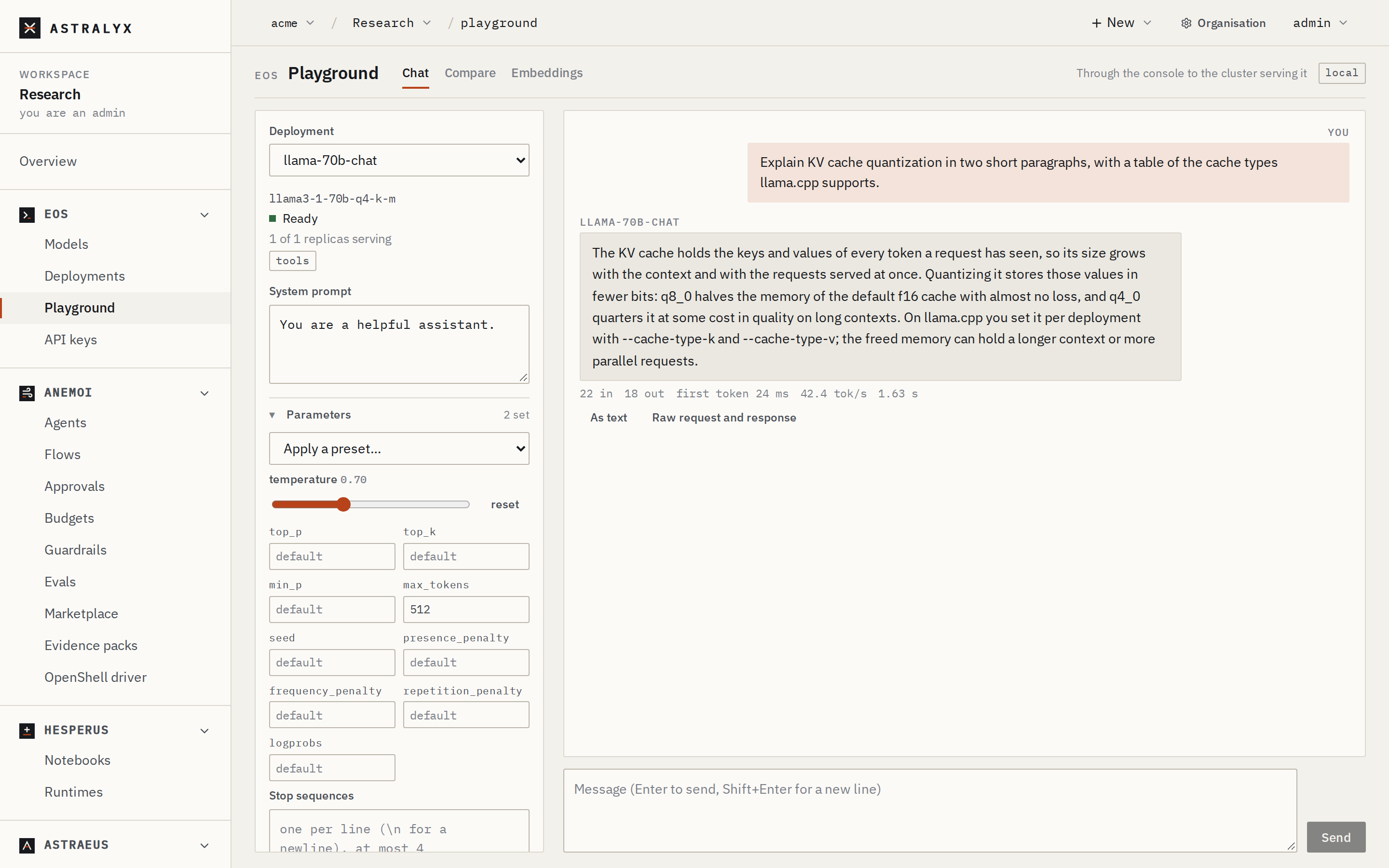
Answers are shown as markdown — headings, lists, tables, code with a Copy button. As text shows exactly what the model wrote. Text from the model is sanitised before it is shown, and an image it links from the web is shown as a link, not loaded.
A deployment at zero starts with the first message: the page says Starting… a replica is being started for this message, and waits up to 15 minutes.
New conversation starts over; Export and Import move a conversation as a JSON file. Conversations are kept in your browser only; Astralyx keeps none.
Parameters#
Under Parameters: temperature (0 to 2), top_p, top_k, min_p,
max_tokens (1 to 131072), seed, presence_penalty,
frequency_penalty, repetition_penalty, logprobs (0 to 20) and up to 4
Stop sequences. An empty field is not sent: the engine's default
applies. Apply a preset… offers Precise, Balanced, Creative,
Deterministic, Qwen3 thinking and Qwen3 non-thinking; Save as a
preset keeps your own in the browser. With logprobs, Show token
probabilities under an answer shows each token's alternatives.
Reasoning#
For a model that reasons (the reasoning tag):
- Thinking: default, on or off, sent as
chat_template_kwargs.enable_thinking(Qwen3 and models like it). - Effort:
reasoning_effort(gpt-oss): minimal, low, medium or high.
The thinking is folded above the answer (Thought).
Structured output#
Under Structured output, choose text, JSON (JSON mode) or a JSON
schema (response_format), optionally strict. Answers are
checked against the schema here, in the browser, and marked ✓ valid JSON,
matches the schema.
Tools#
For a model that calls tools (the tools tag): Add a tool (a name, a
description and the arguments' JSON Schema) or Add an example…, and
choose Tool choice (auto, none, required, or one tool). When the model
calls a tool, its call is shown: type the result in its box and press
Send results and continue. The page never runs anything.
A vLLM deployment parses tool calls only with a tool-call parser. When it was deployed without one and the library knows the right one, the page offers Redeploy with --enable-auto-tool-choice --tool-call-parser ….
Images, audio and video#
For a model that takes them, Attach files, drop or paste them, or Record from the microphone:
| Kind | Tag | What is sent | Limits |
|---|---|---|---|
| Images | vision |
Resized in the browser to at most 1568 px on the longer side, sent as JPEG (PNG when transparent) | Files up to 40 MiB |
| Audio | audio |
WAV and MP3 as they are; anything else (a recording, M4A…) converted in the browser to 16 kHz mono WAV | Files up to 100 MiB before conversion |
| Video | video |
MP4 or WebM, as it is | 6 MiB; vLLM only |
Up to 8 files at a time, and 8 MiB of attachments per request in all. Everything is sent inline in the request: the engine never fetches a URL. A model that takes text only says This model takes text only.
Which models listen and watch is in the library: for example Qwen2.5-Omni listens (vLLM, or llama.cpp with its projector), and Qwen2.5-VL, Qwen3-VL and Qwen2.5-Omni watch videos on vLLM.
Compare#
Compare sends each message to two sides, Side A and Side B: two deployments, or the same deployment with different settings. Copy side A's settings to side B starts from the same parameters.
Embeddings#
For an embedding deployment (a model with the embedding capability):
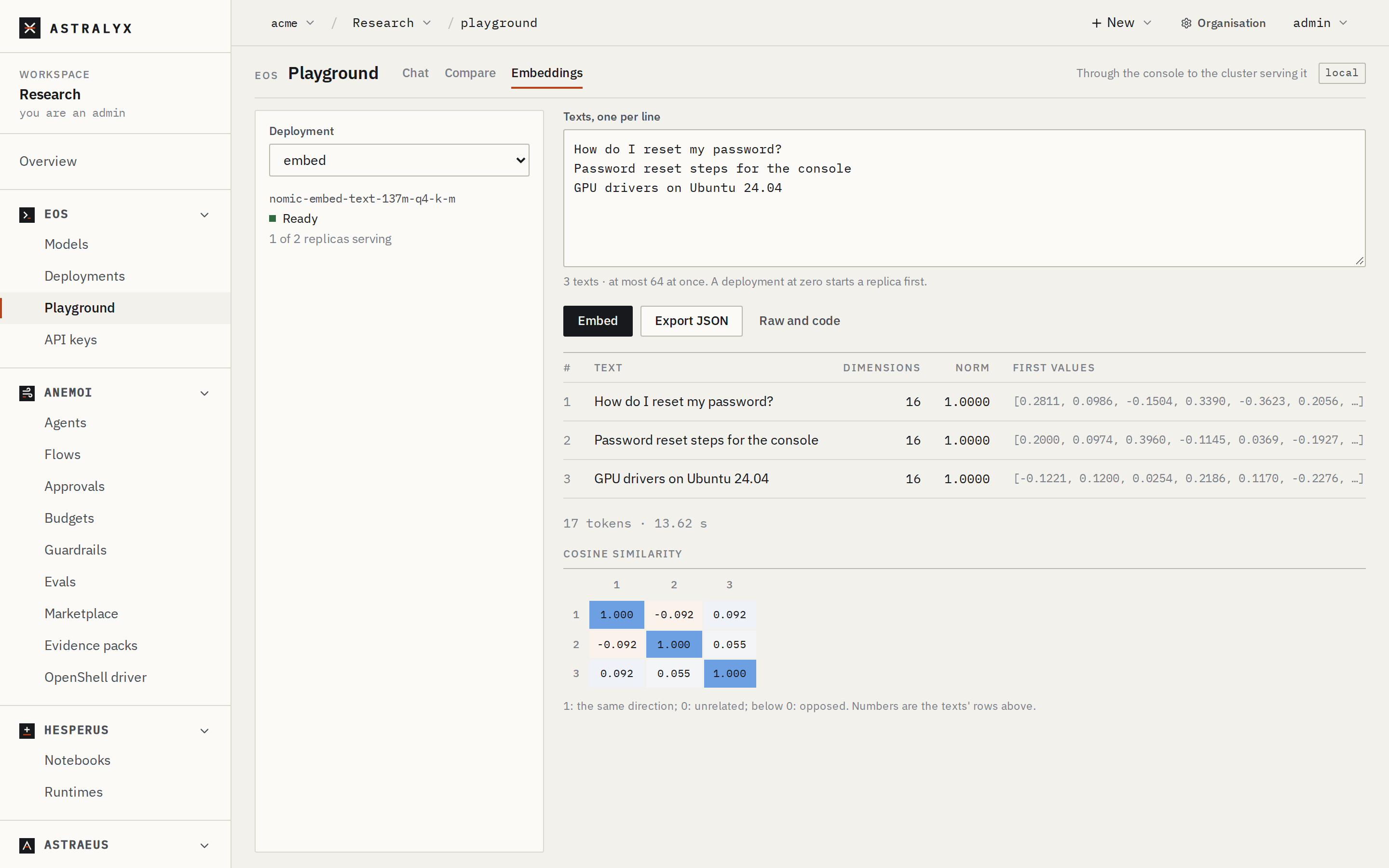
- Type Texts, one per line — at most 64 at once.
- Press Embed.
- The table shows each text's dimensions, norm and first values, and a Cosine similarity matrix between them. Export JSON saves the vectors.
Transcribe#
For a speech-to-text deployment (Whisper, served by vLLM):
- Record, or Upload audio (or drop a file). WAV, MP3, FLAC and OGG go as they are; anything else — a recording, M4A, a video's sound — is converted in the browser to 16 kHz WAV. At most 8 MiB: about four minutes of recorded speech.
- Choose the Language, or Detect.
- Optionally, Context: names and terms it should spell right (up to
4000 characters). Tick Timestamps for
[m:ss.s → m:ss.s]segments. - Press Transcribe. Copy or Download .txt the text.
The audio goes to the machine serving the model and is not kept.
Get the request as code#
Under every answer, Raw request and response (Raw and code for
embeddings) shows the JSON request and response, and the same request as
curl, Python (OpenAI SDK) and TypeScript against your gateway, with
$ASTRAEUS_API_KEY. The Python version passes the fields the SDK does not
know (such as top_k) in extra_body.
What passes where#
Playground messages go from your browser through the Astralyx console to the machine serving the deployment, as you; the answer is read back the same way, a piece at a time. The console keeps none of it; an answer is kept on its machine for 10 minutes after it ends. Your applications use the gateway instead, which on your machines never passes through Astralyx.
Playground tokens count toward the workspace's usage like a gateway's (a stopped answer counts what was written), and show in the side panel as N prompt · M completion tokens in this conversation.