Embeddings for retrieval (RAG)#
You serve an embedding model, BGE-M3 (multilingual, 1024 dimensions, inputs up to 8K tokens), on CPUs, and build a small retrieval-augmented answerer: embed your documents, find the passages closest to a question, and ask a chat deployment to answer from them. Everything — documents, vectors, questions and answers — stays on your machines.
What you need:
- A machine with a few free CPU cores and 2 GB of RAM (any machine of the cluster, GPU or not), with a data location.
- A chat deployment, here
chat(Serve an open chat model on one GPU machine). - A key that may call both, a gateway, and the variables in How the recipes are written.
- Python with
openaiandnumpy.
1. Deploy the embedding model on CPUs#
The library's embedding category has BGE-M3, Nomic Embed Text,
mxbai-embed-large, Snowflake Arctic Embed, all-MiniLM, Granite Embedding
and Qwen3 Embedding. An embedding deployment serves /v1/embeddings only.
- Eos → Models → Library, Category: embedding, open BGE-M3,
click the
Q4_K_Mcell (438 MB) and press Deploy. - Name:
embed. Runs on: CPUs only (small GGUF model). - Clear Scale to zero when idle; Replicas at least
1, at most2. - Press Deploy. Each replica asks for 2 CPU cores and uses the machine's idle cores beyond them.
$ curl -fsS -X POST "$CONSOLE/clusters/main/models" -H "Authorization: Bearer $ASTRAEUS_TOKEN" \
    -H 'content-type: application/json' -d '{"catalog": "bge-m3:567m"}' | jq -r .metadata.name
bge-m3-567m-q4-k-m
$ curl -fsS -X POST "$API/deployments" -H "Authorization: Bearer $ASTRAEUS_TOKEN" \
    -H 'content-type: application/json' \
    -d '{"metadata": {"name": "embed"}, "spec": {"model": "bge-m3-567m-q4-k-m", "accelerator": "cpu", "replicas": {"min": 1, "max": 2}}}' > /dev/null
The deployment's page says Serves embeddings (/v1/embeddings).
2. Try it#
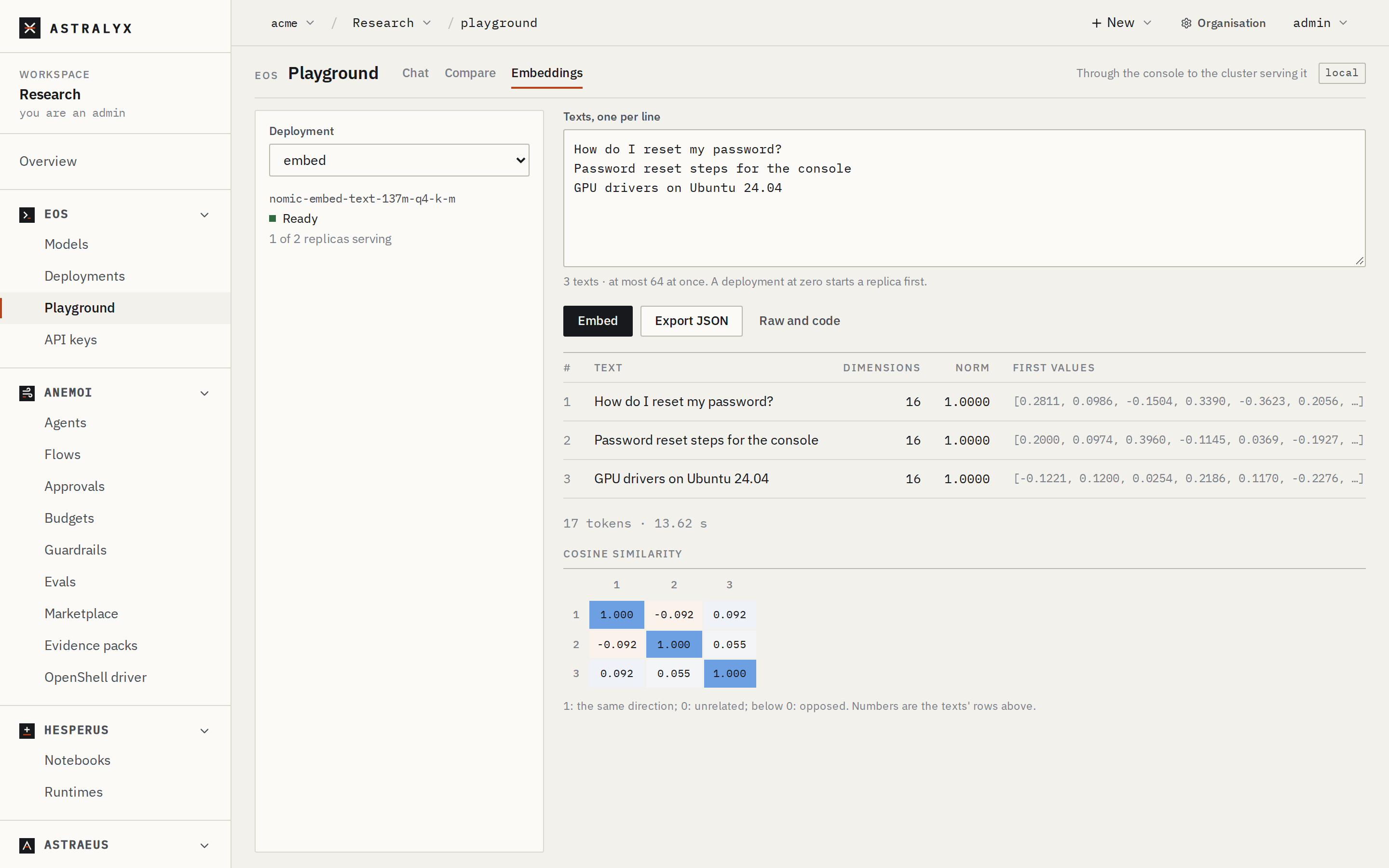
Eos → Playground → Embeddings, pick embed, type a few texts one per
line and press Embed. The table shows each vector's dimensions and
norm, and a cosine similarity matrix: related texts score higher.
3. Embed your documents#
import json, os
import numpy as np
from openai import OpenAI

client = OpenAI(base_url=os.environ["EOS_URL"], api_key=os.environ["ASTRAEUS_API_KEY"])

def chunks(text, size=300, overlap=50):   # about 400 tokens: within llama.cpp's batch
    words = text.split()
    step = size - overlap
    for i in range(0, max(len(words) - overlap, 1), step):
        yield " ".join(words[i:i + size])

passages = []
for name in os.listdir("docs"):
    with open(os.path.join("docs", name), encoding="utf-8") as f:
        passages += [{"source": name, "text": c} for c in chunks(f.read())]

vectors = []
for i in range(0, len(passages), 32):                       # 32 passages per request
    batch = [p["text"] for p in passages[i:i + 32]]
    out = client.embeddings.create(model="embed", input=batch)
    vectors += [d.embedding for d in out.data]

v = np.array(vectors, dtype=np.float32)
v /= np.linalg.norm(v, axis=1, keepdims=True)                # unit length: dot product = cosine
np.save("index.npy", v)
json.dump(passages, open("passages.json", "w"))
print(f"{len(passages)} passages, {v.shape[1]} dimensions")
4. Retrieve and answer#
import json, os, sys
import numpy as np
from openai import OpenAI

client = OpenAI(base_url=os.environ["EOS_URL"], api_key=os.environ["ASTRAEUS_API_KEY"])
v = np.load("index.npy")
passages = json.load(open("passages.json"))

question = sys.argv[1]
q = np.array(client.embeddings.create(model="embed", input=[question]).data[0].embedding, dtype=np.float32)
q /= np.linalg.norm(q)
top = np.argsort(v @ q)[::-1][:4]
context = "\n\n".join(f"[{passages[i]['source']}] {passages[i]['text']}" for i in top)

reply = client.chat.completions.create(
    model="chat",
    temperature=0.1,
    messages=[
        {"role": "system", "content": "Answer only from the context. Cite sources in brackets. If the context does not say, say so."},
        {"role": "user", "content": f"Context:\n{context}\n\nQuestion: {question}"},
    ],
)
print(reply.choices[0].message.content)
Passages of 300 words stay under llama.cpp's default physical batch of
512 tokens, which bounds one embedding input. For longer inputs, deploy
with engine_args: ["--batch-size", "8192", "--ubatch-size", "8192"].
Four such passages fit easily in the chat deployment's context.
5. Check that it worked#
curl -sS $EOS_URL/embeddings -H "Authorization: Bearer $ASTRAEUS_API_KEY" -H "Content-Type: application/json" -d '{"model": "embed", "input": "hello"}' | jq '.data[0].embedding | length'prints1024.- A chat request to
embedis refused by the engine: an embedding deployment serves embeddings only. - Organisation → Usage → Tokens by model shows
bge-m3-567m-q4-k-mwith prompt tokens only.
Variation: embed a large corpus in a batch run#
For millions of passages, skip the deployment: a run can mount the model's
weights and embed with its own code, on as many workers as you like. With
"engine": true, the run gets the model's own engine beside it and your
code calls it as above, at OPENAI_BASE_URL, without a key. The engine
runs as a deployment's replica would, on one GPU:
{
  "metadata": {"name": "embed-corpus"},
  "spec": {
    "model": {"name": "bge-m3-567m-q4-k-m", "engine": true},
    "task_template": {
      "image": "python:3.12-slim",
      "command": "sh",
      "args": ["-c", "pip install --quiet openai numpy && python /data/index.py"],
      "requested_resources": {"cpu_cores": 2, "memory_bytes": 4294967296, "node_selection": {"mode": "Any"}},
      "datavolume_refs": [{"name": "docs", "mount_path": "/data", "mode": "ReadWrite"}]
    }
  }
}
In index.py, use OpenAI() (it reads OPENAI_BASE_URL and
OPENAI_API_KEY) and model=os.environ["OPENAI_MODEL"]. The run completes
when your workers do, and its engine stops with it. See
Batch runs that read a model.
Clean up#
Delete the embed deployment, and the model to free its weights.