Serve on AMD GPUs#
You serve a model on a machine with AMD GPUs. Nothing in the model or the deployment is AMD-specific: each machine runs the engine release built for its own GPUs — ROCm, or Vulkan for Radeon cards ROCm has no kernels for — with the same arguments, through the same gateway, metering and Playground. This recipe uses a workstation with a Radeon RX 7900 XTX (24 GB), and notes what changes on Instinct servers.
What you need:
- A machine with an AMD GPU in the cluster, its GPU listed under GPUs
(GPUs: the
amdgpudriver and/dev/kfd; the installer can set them up). It needs no ROCm on the host: the engine images bring it. - A data location on it.
- The variables in How the recipes are written.
1. Which engine runs on your GPU#
| GPU (architecture) | llama.cpp (GGUF) | vLLM (safetensors) |
|---|---|---|
Instinct MI300X/A, MI325X (gfx942), MI210/MI250 (gfx90a) |
ROCm | ROCm |
Instinct MI100 (gfx908) |
ROCm | — |
Instinct MI350/MI355 (gfx950) |
— | ROCm |
Radeon RX 7900 XTX/XT/GRE, PRO W7900/W7800 (gfx1100), RX 7800/7700 (gfx1101) |
ROCm | ROCm |
Radeon RX 9070/9060 (gfx1201, gfx1200), Ryzen AI (gfx1150, gfx1151) |
ROCm | ROCm |
Radeon RX 7600 (gfx1102), RX 6800/6900 (gfx1030) |
ROCm | — |
| Any other Radeon (RX 6700, 6600, 5000…) | Vulkan | — |
The machine's architecture is what it reports (gfx1100), or is read from
the GPU's name. A deployment is placed only on GPUs its engine runs on, and
the others are listed with the reason.
AMD support
These lists are the GPUs the pinned llama.cpp (v0.5.0, ROCm 7.2.1) and
vLLM (v0.30.0) releases are built for. Serving on AMD hardware is
newer than on NVIDIA; tell us what you see.
2. See what fits on the machine#
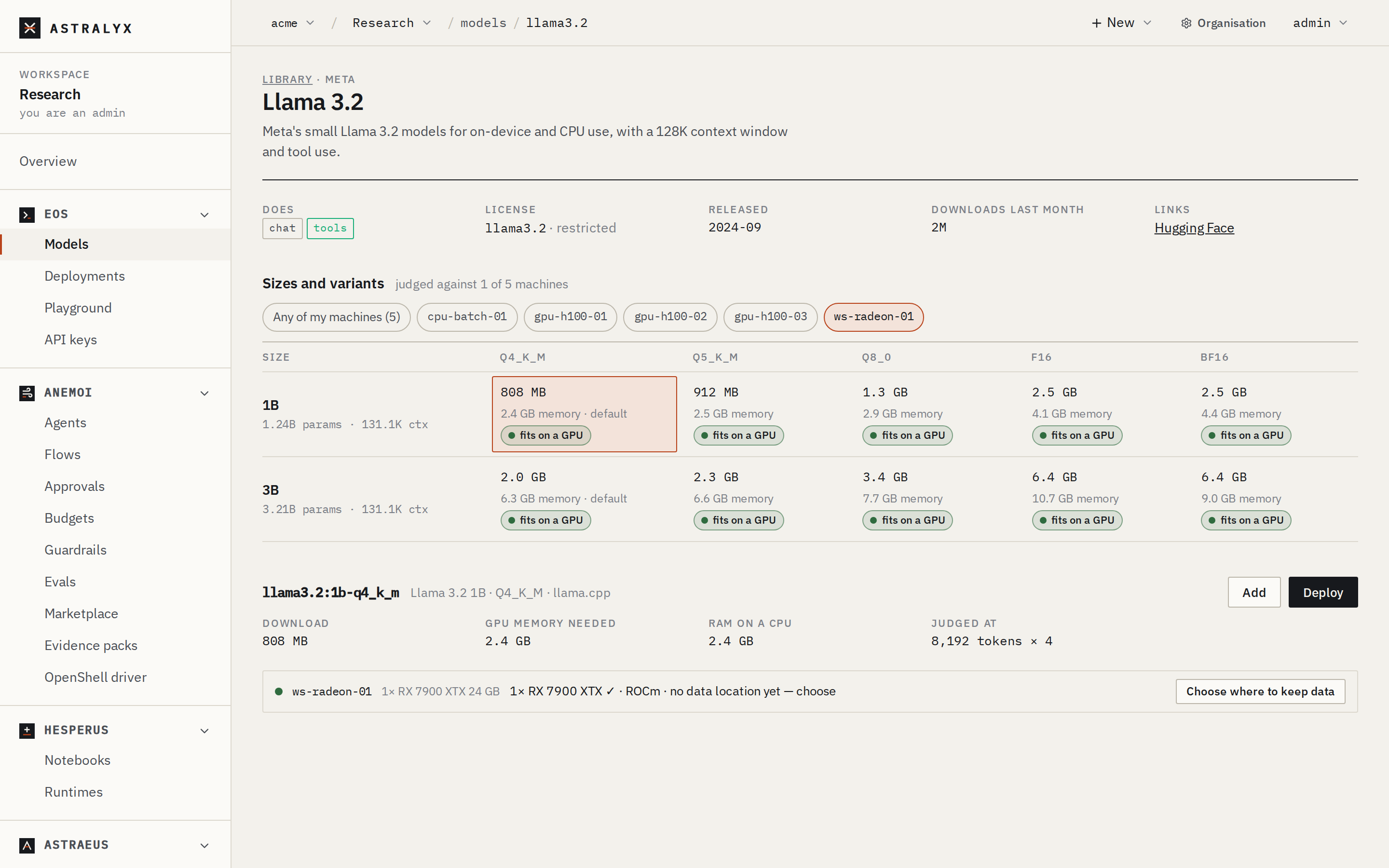
Open Eos → Models → Library, and under Runs on pick the AMD machine. Open a family — here Llama 3.2 — and click a cell: the machine is listed as 1× RX 7900 XTX ✓ · ROCm.
$ curl -fsS "$CONSOLE/library/llama3.1?machines=ws-radeon-01" -H "Authorization: Bearer $ASTRAEUS_TOKEN" \
    | jq -r '.family.models[].variants[] | "\(.ref)  \(.fit.machines[0].text)"'
llama3.1:8b-q4_k_m  1× RX 7900 XTX ✓ · ROCm
llama3.1:8b-bf16  1× RX 7900 XTX ✓ · ROCm
llama3.1:70b-q4_k_m  CPU only · slow
llama3.1:70b-q5_k_m  needs 4 GPUs, has 1
…
A 24 GB Radeon holds what a 24 GB NVIDIA GPU does: 90% of its memory is usable.
3. Deploy on the AMD GPU#
Set the deployment's GPU maker to AMD only so its replicas go to the AMD machine (with Any, they go to whichever machine fits, NVIDIA or AMD).
- Click the
llama3.1:8b-q4_k_mcell and press Deploy. - Name:
chat-amd. GPU maker: AMD only. - Press Deploy.
$ curl -fsS -X POST "$CONSOLE/clusters/main/models" -H "Authorization: Bearer $ASTRAEUS_TOKEN" \
    -H 'content-type: application/json' -d '{"catalog": "llama3.1:8b-q4_k_m"}' > /dev/null
$ curl -fsS -X POST "$API/deployments" -H "Authorization: Bearer $ASTRAEUS_TOKEN" \
    -H 'content-type: application/json' \
    -d '{"metadata": {"name": "chat-amd"}, "spec": {"model": "llama3-1-8b-q4-k-m", "gpu_vendor": "amd"}}' > /dev/null
$ curl -fsS "$API/deployments/chat-amd" -H "Authorization: Bearer $ASTRAEUS_TOKEN" | jq '.plan | {image, amd_images, gpu_vendor}'
{
  "image": "ghcr.io/ggml-org/llama.cpp:server-cuda-v0.5.0@sha256:…",
  "amd_images": [
    "ghcr.io/ggml-org/llama.cpp:server-rocm-v0.5.0@sha256:…",
    "ghcr.io/ggml-org/llama.cpp:server-vulkan-v0.5.0@sha256:…"
  ],
  "gpu_vendor": "amd"
}
The plan names the CUDA image and, in amd_images, what an AMD machine runs
in its place; the machine picks ROCm for the RX 7900 XTX. The deployment's
page shows the engine and the GPUs it runs on under Engine.
The replica is given only its own GPU's device files (/dev/kfd and the
GPU's /dev/dri nodes), which the engine sees as GPU 0.
4. Call it#
As any deployment: through the gateway, with a key, model: "chat-amd".
$ curl -sS $EOS_URL/chat/completions -H "Authorization: Bearer $ASTRAEUS_API_KEY" \
    -H "Content-Type: application/json" \
    -d '{"model": "chat-amd", "messages": [{"role": "user", "content": "Which GPU are you running on?"}]}'
The replica's Log shows llama.cpp finding the ROCm device at start.
Variations#
vLLM on the RX 7900 XTX. llama3.1:8b-bf16 (16.1 GB, 18.7 GB needed)
fits the card; vLLM's ROCm build serves gfx1100. The checkpoint is gated:
add it with a credential.
Instinct MI300X servers. With 192 GB per GPU, a 70B model in bf16
(about 145 GB needed with vLLM) fits one MI300X, where it needs two
80 GB GPUs. Deploy it with gpu_vendor: amd and leave GPUs per replica
on Automatic.
An older Radeon (RX 6700 XT). llama.cpp runs through its Vulkan build; vLLM is not offered there, and the library says serve a GGUF of the model with llama.cpp.
A mixed fleet. With Any GPU maker, one deployment's replicas can run on NVIDIA and AMD machines at once, behind the same endpoint.
Troubleshooting#
| Symptom | Cause | Fix |
|---|---|---|
| The AMD machine is listed as not fitting a vLLM variant, with the GPU's architecture | vLLM's ROCm build has no kernels for that GPU. | Use a GGUF variant with llama.cpp. |
Pending, the AMD machine has no GPUs in Why? |
The machine reports no usable AMD GPU (no amdgpu, no /dev/kfd). |
See GPUs; install the driver and reboot. |
| Replicas go to NVIDIA machines | gpu_vendor is Any, and those fit. |
Set GPU maker to AMD only. |