Fit and quantization#
Before you add or deploy anything, Eos tells you where a model will run: on one GPU, on several GPUs of one machine, on CPUs only, or nowhere — and why. The same numbers decide how many GPUs a deployment asks for by default, so what the library promises is what the deployment requests. This page explains the calculation and how to change its outcome.
Memory needed#
To serve a model, a replica holds:
- Weights: the size of the model's files (and a vision model's projector).
- KV cache:
2 × layers × context × kv_heads × head_dim × 2 bytesper request held at once (an f16 cache). For llama.cpp that is every parallel slot (4 on a GPU by default); for vLLM one whole sequence, since it pages its cache. - Overhead: 0.5 GiB, plus 1 GiB for vLLM's own runtime.
The library judges at a context of 8192 tokens (or the model's, when shorter). Before any machine has downloaded the weights, the cache is estimated from the model's shape in the library; once a machine holds a whole copy of a GGUF model, it reads the file's header and the estimate is made from that.
GPUs#
A replica uses whole GPUs of one machine: 1, 2, 4 or 8. The fit takes the fewest GPUs whose usable memory holds the model:
- 90% of each GPU's memory is usable (vLLM's share; the rest is the GPU runtime's). A Mac's GPU reports what macOS lets it use and is counted whole.
- When llama.cpp splits layers across several GPUs, it needs 5% more.
- Unless you set the requests at once, llama.cpp's are fitted too: each GPU count is tried at 4, then 2, then 1 request at a time before the next count. Fewer GPUs come before more parallel requests — an 8 GB laptop GPU serves an 8B model one request at a time (1 request at a time) rather than being judged CPU-only for four.
CPU only#
When no GPU fits, a GGUF variant runs CPU only if 80% of the machine's RAM holds the weights, the cache (for 2 requests at once) and 1 GiB. Above 8B parameters the library adds slow: decoding on a CPU is bound by memory bandwidth. vLLM always needs a GPU.
Disk#
The download must fit in the free space at the machine's data location (within the limit set for drive copies, if any), unless a whole copy is already there. A machine without a data location is listed with choose where to keep data, never hidden: an organisation admin can choose one from the library page.
The badges#
| Badge | Meaning |
|---|---|
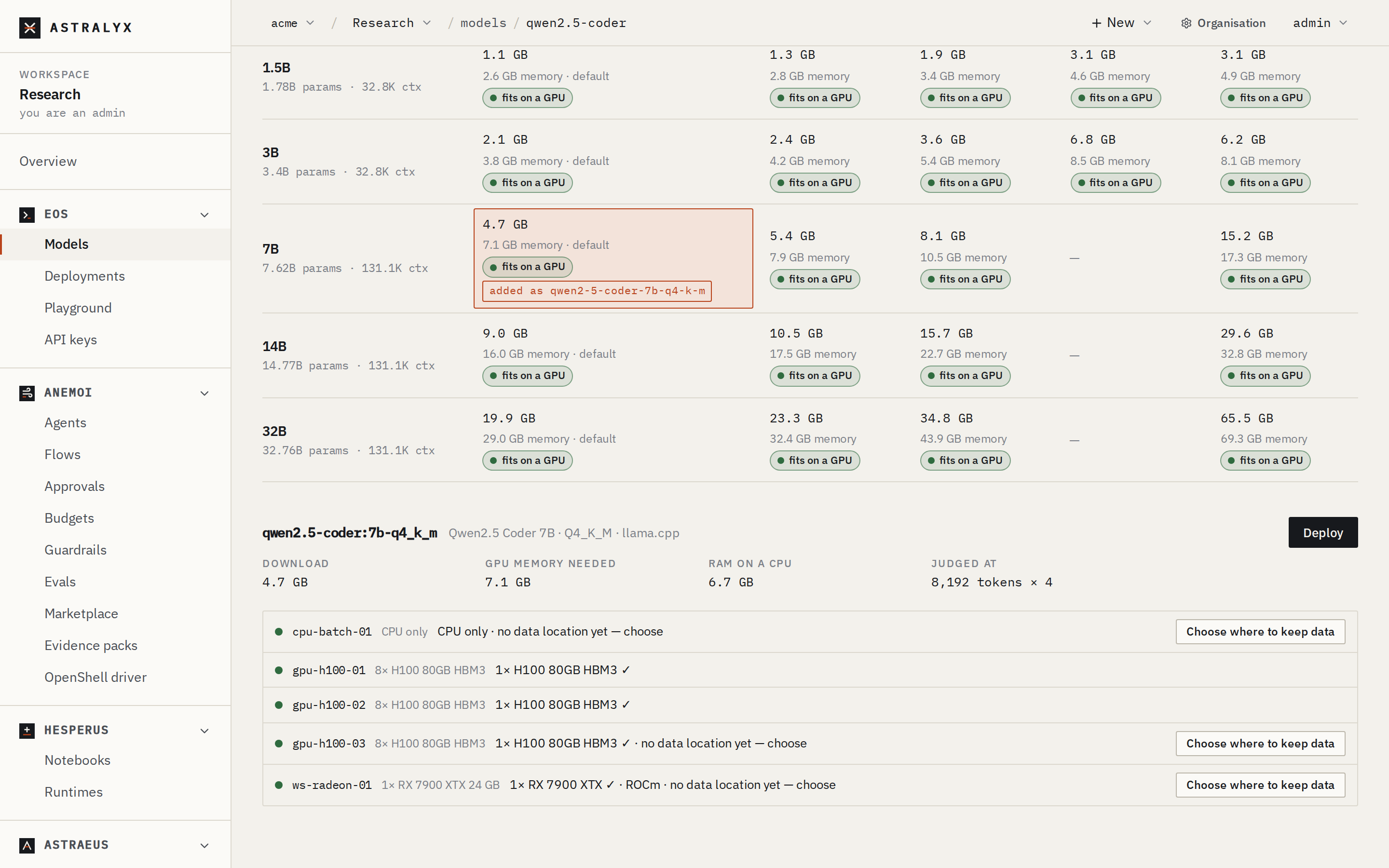
| fits on a GPU | One GPU of at least one selected machine holds it. |
| needs N GPUs | It needs N GPUs of one machine. |
| · N at a time | It fits only with fewer requests at once than the default. |
| CPU only | No GPU holds it; the machine's RAM does. |
| CPU only · slow | As above, for a model over 8B parameters. |
| doesn't fit | No selected machine can run it. |
| no machines to judge | The workspace has no machine yet. |
The library judges against Runs on: every machine your workspace may use (its cluster's machines in the workspace's pools), or the ones you select. A family's page shows each variant machine by machine, for example 1× RX 7900 XTX ✓ · ROCm, needs 45 GB of GPU memory; its GPUs have 8 GB, or no data location yet — choose.
Quantization#
Quantization stores the weights in fewer bits. It is the main way to make a model fit, and to fit it on fewer GPUs:
Llama 3.1 as the library judges it, at 8192 tokens (llama.cpp with 4 requests at once, vLLM with one sequence):
| Variant | Download | GPU memory needed | Machine with 8× H100 80 GB | Machine with 1× Radeon RX 7900 XTX 24 GB |
|---|---|---|---|---|
llama3.1:8b-q4_k_m (llama.cpp) |
4.9 GB | 9.8 GB | 1× H100 | 1× RX 7900 XTX · ROCm |
llama3.1:8b-bf16 (vLLM) |
16.1 GB | 18.7 GB | 1× H100 | 1× RX 7900 XTX · ROCm |
llama3.1:70b-q4_k_m (llama.cpp) |
42.5 GB | 53.8 GB | 1× H100 | needs 4 GPUs (or CPU only, slow, if its RAM holds it) |
llama3.1:70b-q5_k_m (llama.cpp) |
49.9 GB | 61.2 GB | 1× H100 | needs 4 GPUs, has 1 |
llama3.1:70b-q8_0 (llama.cpp) |
75.0 GB | 86.2 GB | 2× H100 | needs 4 GPUs, has 1 |
llama3.1:70b-bf16 (vLLM) |
141.1 GB | 145.4 GB | 2× H100 | needs 8 GPUs, has 1 |
What each choice costs:
| Quantization | Bits per weight (about) | Quality | When |
|---|---|---|---|
F16 / BF16 |
16 | Reference | Small models, evaluations, vLLM throughput on large GPUs |
Q8_0 |
8.5 | Indistinguishable for most uses | When it fits |
Q5_K_M |
5.7 | Very close | A good middle |
Q4_K_M |
4.8 | Small loss; the library's default | Most deployments |
The library shows each variant's download size, memory needed and fit side by side, so you can pick the largest quantization that fits.
Other ways to need less memory
- A shorter context (
context_length) shrinks the cache. - Fewer requests at once (
parallel) shrinks llama.cpp's cache. - A quantized cache:
engine_args: ["--cache-type-k", "q8_0", "--cache-type-v", "q8_0"]for llama.cpp (with--flash-attn on), or["--kv-cache-dtype", "fp8"]for vLLM. - More GPUs per replica, all of one machine.
See Fit a big model with quantization.
What a deployment asks for#
When you create a deployment without saying how many GPUs, it takes the
fewest that hold the model on the machine with the largest GPUs your
workspace may use, and asks each of them for its share of the memory (the
plan's min_gpu_memory_gb). That figure comes from, in order: the header a
machine read (estimate), the shape the library gave (arch), the
library's own figure (catalog), or the weights' size and overhead
(weights); the deployment's plan.memory_basis says which.
If no machine can take it, the deployment is still created at one GPU and waits, saying why.