Quick start#
In this page you serve Llama 3.2 3B Instruct on one of your machines and call it from your terminal and from Python. It takes a few minutes, most of them downloading 2 GB of weights.
Before you begin#
- A workspace with a cluster and at least one machine (see the Astraeus Quick start). A GPU with 8 GB or more is best; a machine with 8 GB of RAM and no GPU works too, slowly.
- A data location on that machine, where weights are kept: open Machines → the machine and, under Data location, press Confirm.
- The editor or admin role in the workspace.
- A machine your computer can reach on TCP 8800 running the agent's edge part, for the gateway — or ask a workspace admin to turn on the hosted gateway (Gateways). The deployment's page tells you which you have.
1. Deploy a model#
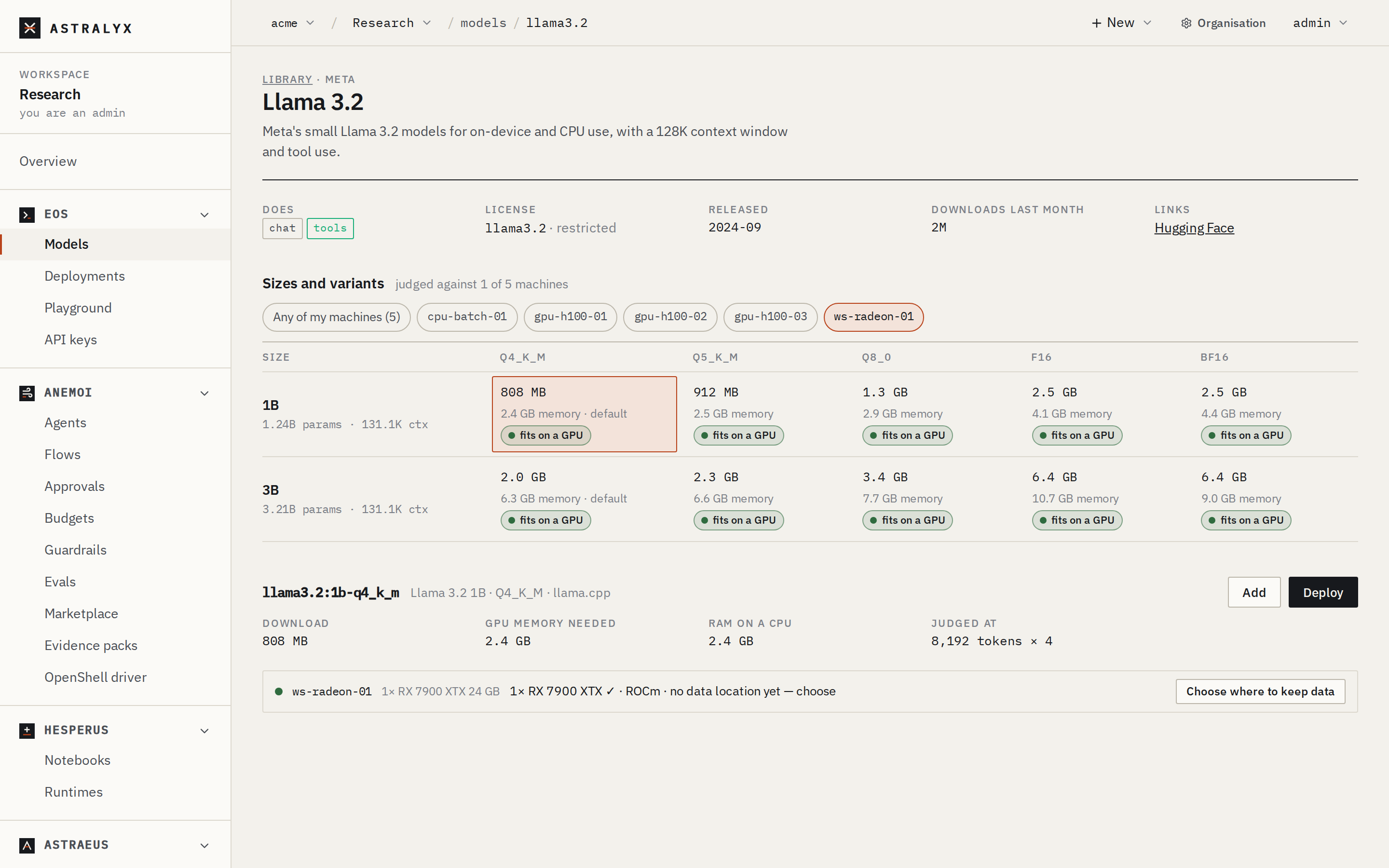
- Open Eos → Models. The Library shows, on each size, whether it fits your machines.
- Search for
llama 3.2and open Llama 3.2. - Under Sizes and variants, click the 3B row's
Q4_K_Mcell (marked default). The panel shows 2.0 GB to download and where it fits. - Press Deploy. New deployment opens with the model added on the way.
- Set Name to
chat. Clear Scale to zero when idle so a replica stays up. Leave the rest. - Press Deploy. The deployment's page opens.
$ astra inference add llama3.2:3b
llama3-2-3b-q4-k-m added: its weights are pulled onto a machine when it is first deployed (or now: astra inference pull llama3-2-3b-q4-k-m)
$ astra inference deploy llama3-2-3b-q4-k-m --name chat
chat deployed: `astra inference deployments` shows when it is Ready; `astra inference chat chat` talks to it
$ export ASTRAEUS_TOKEN=$(cat ~/.astraeus-token)
$ export CONSOLE=https://console.astralyx.cloud/api/v1/orgs/acme/workspaces/vision
$ export API=$CONSOLE/clusters/main/api
$ curl -fsS -X POST "$CONSOLE/clusters/main/models" -H "Authorization: Bearer $ASTRAEUS_TOKEN" \
    -H 'content-type: application/json' -d '{"catalog": "llama3.2:3b"}' | jq -r .metadata.name
llama3-2-3b-q4-k-m
$ curl -fsS -X POST "$API/deployments" -H "Authorization: Bearer $ASTRAEUS_TOKEN" \
    -H 'content-type: application/json' \
    -d '{"metadata": {"name": "chat"}, "spec": {"model": "llama3-2-3b-q4-k-m"}}' > /dev/null
2. Wait until it is Ready#
The deployment goes Pending → Starting (Preparing on gpu-01: the image
and the model's weights, then Loading the model on gpu-01) → Ready
(1 replica serving).
The deployment's page shows the state and, under Replicas, the machine and the replica's Log. If it waits, Why? says what for. Press Try it and Send: the model answers.
3. Make an API key#
- Open Eos → API keys and press New key.
- Name:
quickstart. May call: Only these:chat. - Press Make the key and copy it now: it is not shown again.
4. Call it#
Use the base URL from the deployment's page (Gateway → Base URL):
$ export EOS_URL=http://10.0.4.12:8800/v1
$ curl -sS $EOS_URL/chat/completions \
    -H "Authorization: Bearer $ASTRAEUS_API_KEY" -H "Content-Type: application/json" \
    -d '{"model": "chat", "messages": [{"role": "user", "content": "Say hello in French."}]}' \
    | jq -r '.choices[0].message.content'
Bonjour !
With the OpenAI Python SDK (pip install openai):
import os
from openai import OpenAI

client = OpenAI(base_url=os.environ["EOS_URL"], api_key=os.environ["ASTRAEUS_API_KEY"])

reply = client.chat.completions.create(
    model="chat",
    messages=[{"role": "user", "content": "Explain what a KV cache is in one sentence."}],
)
print(reply.choices[0].message.content)

# Streamed, token by token.
stream = client.chat.completions.create(
    model="chat",
    messages=[{"role": "user", "content": "Write a haiku about GPUs."}],
    stream=True,
)
for chunk in stream:
    if chunk.choices:
        print(chunk.choices[0].delta.content or "", end="", flush=True)
print()
The hosted gateway (https://console.astralyx.cloud/inference/v1) does not
stream: drop stream=True there.
5. Try it in the Playground#
Open Eos → Playground, pick chat, and talk to it: system prompt,
temperature, markdown answers, and Raw request and response to copy the
same request as code. See Use the Playground.
Clean up#
On the deployment's page press Delete (or
curl -X DELETE "$API/deployments/chat" …). Its replica stops and the GPU
is free; the model and its weights stay for next time. To free the disk
too, delete the model under Models → In this workspace.