Quotas, pools and terms#
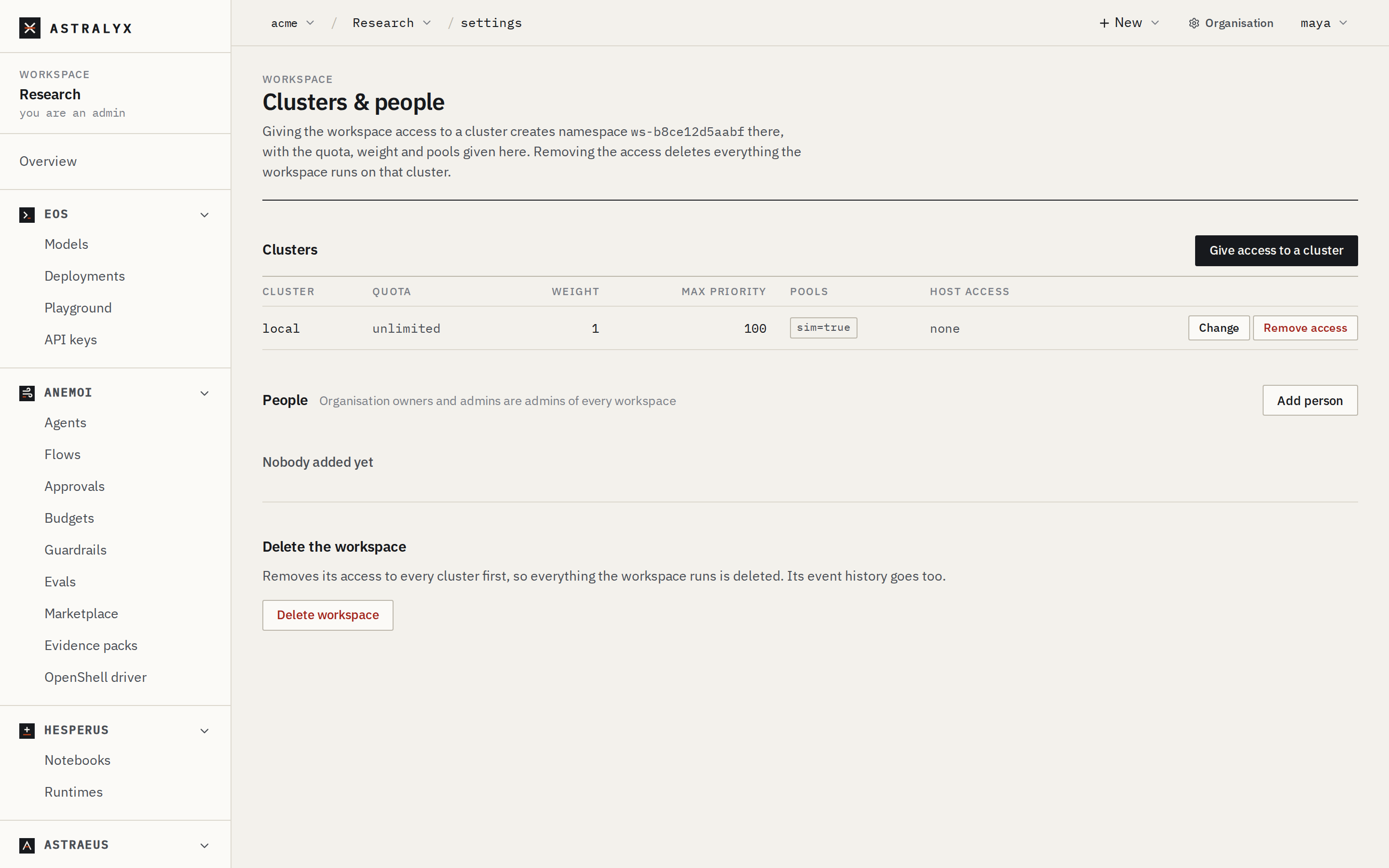
A workspace runs work on a cluster only once an organisation admin gives it access to that cluster. The access carries the workspace's terms on that cluster: how much it may hold at once (quota), its fair-share weight, the pools of machines it may use, the highest priority it may ask for, and what it may take from the machines themselves. This page shows how to set the terms and how they are enforced.
The terms hold for everything the workspace places on the cluster, whatever the product: an Astraeus run, an Eos deployment's replicas, an Anemoi agent's sandbox and a Hesperus notebook runtime all count against the same quota, run only in the same pools, and are limited by the same host access.
How cluster access works#
Every workspace has one namespace name, ws- followed by 12 hexadecimal
digits (for example ws-3f9a1c07b2e4), the same on every cluster. Giving the
workspace access to a cluster creates that namespace there, with the terms you
choose. Removing the access deletes the namespace and everything the workspace
ran on that cluster.
flowchart LR
  W[Workspace vision] -->|access + terms| N1[namespace ws-3f9a… on cluster lab-a]
  W -->|access + terms| N2[namespace ws-3f9a… on cluster cloud]
The terms are kept with the cluster, which enforces them for every request and every placement. They are per cluster: the same workspace can have 8 GPUs on one cluster and no limit on another.
Before you begin#
- You are an owner or admin of the organisation. Workspace admins who are only organisation members can see the terms but not change them.
- The organisation has a dedicated cluster, or you use Astraeus Cloud. See Clusters and machines.
- The workspace exists (Workspaces).
- For pools: the machines carry the labels you will grant (Clusters and machines).
Terms reference#
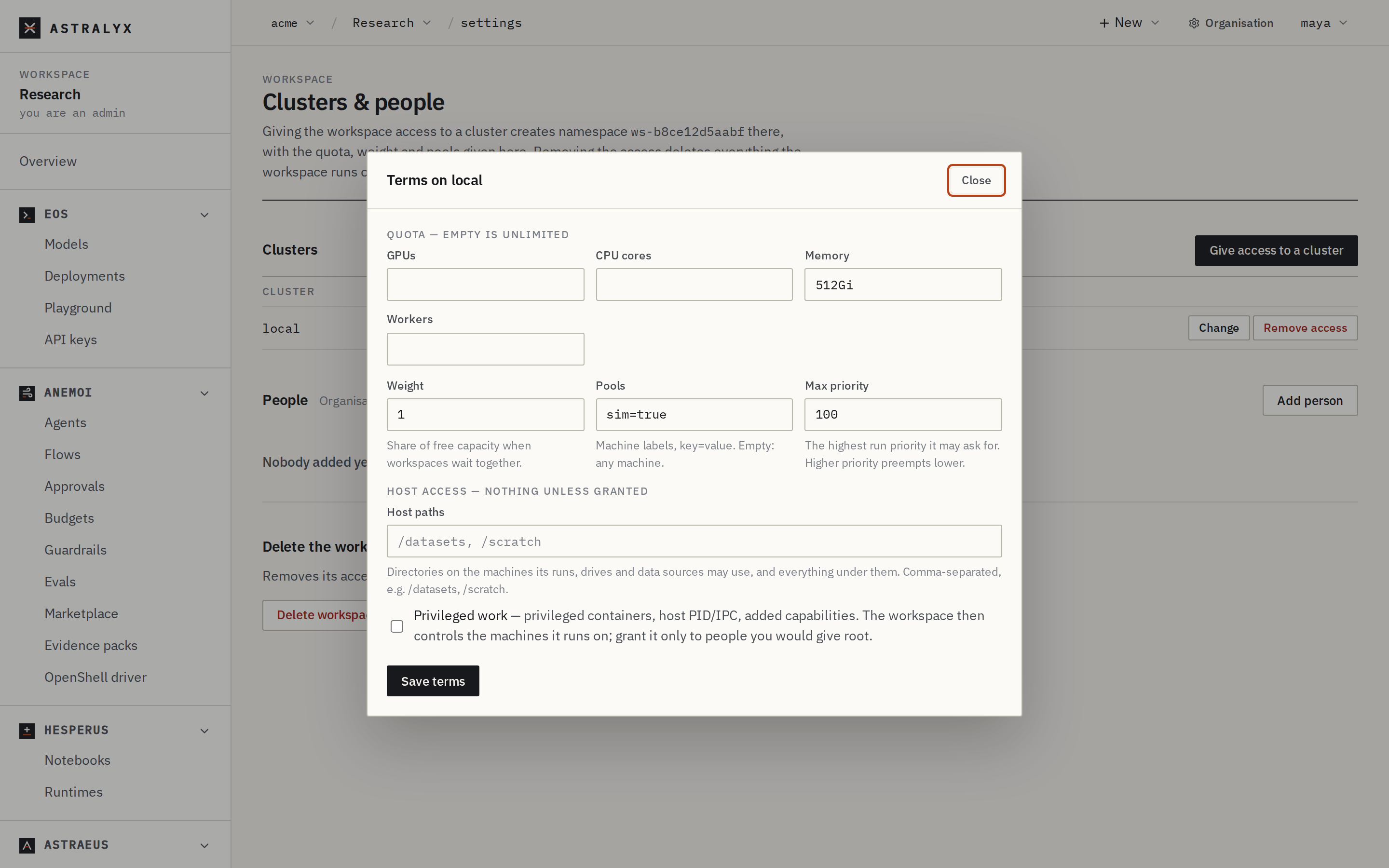
| Field | Type | Default | Description |
|---|---|---|---|
quota.gpus |
integer | none (unlimited) | GPUs the workspace's workers may hold at once on the cluster. |
quota.cpu_cores |
integer | none (unlimited) | CPU cores its workers may hold at once. |
quota.memory_bytes |
integer, bytes | none (unlimited) | Memory its workers may hold at once. The console takes 512Gi, 2Ti. |
quota.tasks |
integer | none (unlimited) | Workers placed at once. Shown as Workers in the console. |
weight |
integer ≥ 1 | 1 |
Fair-share weight: a weight of 2 is entitled to twice the share of a weight of 1 when workspaces wait together. Values below 1 are stored as 1. |
node_selector |
map of labels | {} (any machine) |
The pools: the workspace's workers run only on machines carrying every one of these labels, and the workspace sees only those machines. |
max_priority |
integer | 0 |
The highest run priority the workspace may ask for. Runs use priorities from −1000 to 1000. |
host_access.privileged |
boolean | false |
Whether its work may run privileged containers, share the host's PID or IPC namespace, add capabilities or pass security options to the runtime. |
host_access.paths |
list of absolute paths | [] |
Host directories its work may use, and everything below them. |
A quota limit of 0 means "none of this resource", not "unlimited"; omit the
field for unlimited. The cluster refuses negative limits: 400
INVALID_NAMESPACE when changing terms, 503 CLUSTER_REFUSED (with the
cluster's reason) when giving access.
Give a workspace access to a cluster#
- Open the workspace, then Settings.
- Under Clusters, select Give access to a cluster.
- Choose the Cluster. If the platform offers Astraeus Cloud and the organisation does not use it yet, it is listed as "(run for you)".
- Fill in the terms (see Terms reference). Leave a quota field empty for unlimited.
- Select Give access. The cluster appears in the Clusters table with its quota, weight, max priority, pools and host access.
$ curl -sS -X POST "$ASTRA_URL/api/v1/orgs/acme/workspaces/vision/clusters" \
    -H "Authorization: Bearer $ASTRA_TOKEN" -H "Content-Type: application/json" \
    -d '{
          "cluster": "lab-a",
          "quota": {"gpus": 16, "cpu_cores": 256, "memory_bytes": 2199023255552},
          "weight": 2,
          "node_selector": {"pool": "h100"},
          "max_priority": 100,
          "host_access": {"paths": ["/datasets"]}
        }'
{"cluster":"lab-a","namespace":"ws-3f9a1c07b2e4"}
GET /orgs/{org}/workspaces/{ws}/clusters lists the workspace's clusters
with their terms.
Adding the first machine to a workspace from the console connects it in one
step: the workspace gets access to the organisation's only cluster (or to
Astraeus Cloud when the organisation has none) with no limits, every machine,
max_priority 0 and no host access. The API for that is
POST /orgs/{org}/workspaces/{ws}/connect with an optional
{"cluster": "<slug>"}; it fails with 409 CHOOSE_CLUSTER when the
organisation has several clusters and none is named. Set limits once there is
capacity to share.
| Error | Cause |
|---|---|
409 ALREADY_BOUND |
The workspace already has access to that cluster. Change the terms instead. |
404 CLUSTER_NOT_FOUND |
No cluster with that slug in the organisation. |
503 CLUSTER_REFUSED / 503 CLUSTER_UNREACHABLE |
The cluster refused or did not answer; nothing was changed on the platform. |
403 LIMIT_REACHED |
Creating a workspace: the organisation has as many as its limits allow. |
Change the terms#
New terms replace the old ones as a whole: send every field you want to keep.
- Open the workspace, then Settings.
- In the cluster's row, select Change.
- Edit the terms in the Terms on <cluster> dialog and select Save terms.
$ curl -sS -X PATCH "$ASTRA_URL/api/v1/orgs/acme/workspaces/vision/clusters/lab-a" \
    -H "Authorization: Bearer $ASTRA_TOKEN" -H "Content-Type: application/json" \
    -d '{"quota": {"gpus": 24}, "weight": 2, "node_selector": {"pool": "h100"}, "max_priority": 100,
         "host_access": {"paths": ["/datasets"]}}'
{"cluster":"lab-a","namespace":"ws-3f9a1c07b2e4"}
New terms apply at once to what is decided next: the next placement, the next run submitted. Work already running is not stopped when you lower a quota, take a pool away or lower the maximum priority.
Console: a quota of 0
The console shows a limit of 0 as empty, and saving the dialog again
turns it into "unlimited". To keep a workspace at zero of a resource,
set the terms through the API.
Remove access#
Danger
Removing a workspace's access to a cluster deletes its namespace there: every run, drive, data source, credential reference, endpoint, schedule, replica group, model, deployment, agent, flow and notebook the workspace has on that cluster is deleted. This cannot be undone.
In the workspace's Settings, select Remove access in the cluster's row and confirm.
Deleting a workspace (Settings → Delete workspace, or
DELETE /orgs/{org}/workspaces/{ws}) removes its access to every cluster
first, then the workspace and its event history.
How quotas are enforced#
A quota limits what the workspace's workers hold, not what they use. A worker holds its GPUs, CPU cores and memory from the moment it is placed on a machine (bound) until it is released, whatever it does with them.
The cluster checks the quota at the moment a worker is placed:
- It adds up what the workspace's live, placed workers hold, from the machines' own reservations for them. A worker lost with its machine keeps its share while its reservation stands; finished workers hold nothing.
- It adds what the new worker asks for: its GPUs, cores, memory, and one worker.
- If any limit would be exceeded, the worker is not placed. The check is serialised per workspace, so two placements on different machines cannot both pass it.
Astraeus applies the same rule before it tries to place anything:
- A run that would go over the quota waits without blocking anyone:
other runs, of this workspace or others, can still start. Its reason says
why, for example
Waits for namespace quota: gpus 6 in use + 4 asked > 8. - A gang (workers that start together) is counted whole: all its workers must fit in the quota at once.
- A run that asks for more than the quota allows even with nothing else
running says so:
more than the namespace's quota allows at all (…): raise
  the quota or ask for less
. It waits until the quota is raised or the run is changed. - The first time a run waits on the quota, the cluster records an event;
an alert rule for
quota_reachedturns it into a notification. See Alerts.
Fair share#
When capacity frees and several workspaces have work waiting, Astraeus orders it by priority first, then by fair share. A workspace's standing is its dominant share — the largest fraction of any limited resource it holds (for example 6 of 8 GPUs is 0.75) — divided by its weight. The lowest standing goes first.
A workspace with no quota on a cluster has a standing of 0 there, so fair share alone never puts it behind a workspace with a quota. Give every workspace that competes for a cluster a quota for fair share to divide it.
See The queue for how priority, backfill and preemption combine with fair share.
Pools#
A pool is a set of machines sharing labels, such as pool=h100. The
workspace's node_selector lists labels a machine must carry, all of them,
for the workspace's workers to run there.
- Workers of the workspace are placed only on machines in its pools; a run that names a machine outside them is never placed there.
- Listings in the workspace show only the machines in its pools, and their
GPUs. A machine outside them is
404 NODE_NOT_FOUNDto the workspace. - An empty
node_selectorallows every machine of the cluster the workspace may use.
On a cluster shared by several organisations, such as Astraeus Cloud, each workspace is also limited to its own organisation's machines, whatever its pools say.
To label machines into pools, see Pools, labels and topology.
Maximum priority#
Higher priority runs first and may preempt lower priority work, so the
priority a workspace may use is granted, not chosen. A run asking for a
priority above the workspace's max_priority is refused with
403 PRIORITY_NOT_ALLOWED:
{"code": "PRIORITY_NOT_ALLOWED", "message": "priority 50 is above namespace ws-3f9a1c07b2e4's maximum of 0"}
The default maximum is 0: runs may use priority 0 or any negative
priority. See Priorities, preemption and checkpoints.
Host access#
By default a workspace's work takes nothing from the machines beyond what
its containers are given: no privileged containers and no host paths. A
workspace that may bind / or run privileged controls the whole machine, and
every other workspace's work on it.
Warning
Grant privileged only to workspaces whose people you would give root on
the machines. Prefer narrow paths, such as /datasets, over broad ones.
privileged: true allows, in worker templates:
security_context.privileged: truesecurity_context.pid_mode: hostandsecurity_context.ipc_mode: host- a non-empty
security_context.cap_addorsecurity_context.security_opt
paths allows host paths at or below the listed directories, in:
volumes[].host_pathof worker templates, in runs, schedules, replica groups and flows;- a run's
shared_volumes[].host_pathandoutput_volumes[].host_path; - a drive's
sources[].path(except sources placed under a machine's data location, which need no host access) and its fill template; - a data source's
local.paths,local.node_pathsandnfs.host_path; - a credential's file paths under
auth(anypathor*_pathfield) and itstarget_path.
Paths are matched by whole segments: /data grants /data/imagenet but not
/database. Paths must be absolute and may not contain . or ... Listing
/ grants nothing.
A request that takes more than the workspace is granted is refused with
403 HOST_ACCESS_FORBIDDEN, naming each field:
{"code": "HOST_ACCESS_FORBIDDEN", "message": "spec.task_template.volumes[].host_path \"/scratch\": this namespace may not use that path on the machines"}
Organisation limits#
Astralyx can cap how many workspaces an organisation has, and how many machines it has on Astraeus Cloud. See Organisation.
Troubleshooting#
| Symptom | Cause | Fix |
|---|---|---|
A run stays Pending with Waits for namespace quota: … |
The workspace holds as much as its quota allows. | Wait for its other work to finish, or raise the quota. |
… more than the namespace's quota allows at all … |
The run alone asks for more than the quota. | Raise the quota, or ask for fewer GPUs, cores or memory. |
403 PRIORITY_NOT_ALLOWED |
The run's priority is above the workspace's max_priority. |
Lower the priority, or raise max_priority. |
403 HOST_ACCESS_FORBIDDEN |
The spec uses a host path or privilege not granted. | Grant the path or privileged in the terms, or remove it from the spec. |
| A machine is missing from the workspace's Machines | It is outside the workspace's pools. | Add its labels to the pools, or label the machine. |
403 NAMESPACE_TERMINATING |
The access is being removed; the namespace accepts no writes. | Wait for it to finish, then give access again if needed. |