Quick start#
In this page you make a research agent that reads public web pages, run it on one of your machines, look at every call it made and why each was allowed, and check the signed receipt of the run. It takes a few minutes.
Before you begin#
- A workspace with a cluster and at least one machine that can run agents: Linux with Landlock (kernel 6.2 or newer), the Astralyx machine package (it brings NVIDIA OpenShell and the Assistant), workers not on the host network. See Requirements and Add a machine.
- A model, one of:
- an Eos deployment of the
workspace that is
Ready— no key needed; or - a provider's API key (Anthropic, OpenAI, DeepSeek, OpenRouter, Groq,
Mistral, or any OpenAI-compatible server) kept in a
credential under the key
api_key.
- an Eos deployment of the
workspace that is
- The editor or admin role in the workspace.
-
For the API tabs: a personal API token and the workspace's address on its cluster (see REST API):
The CLI and agents
astra has no commands to create or run agents yet: use the console or
the API for steps 1 to 3. astra anemoi receipts verify checks the
receipt in step 4, offline.
1. Create the agent#
- Open Anemoi → Agents and press New agent. The form opens in Simple mode.
- Name:
researcher. - Start from: Blank. Agent: Assistant (recommended: it calls the model's API directly, with nothing to build).
- Model: choose An Eos deployment and pick yours, or A
provider, its Model (
claude-sonnet-4-5) and the Credential holding itsapi_key. - Connections: press Web browsing and keep its access at
read only: the agent may fetch any public page with
GET, each recorded with its URL. - Instructions: You research a question on the public web and answer in five bullet points, each with its source URL.
- Limits: Longest run, minutes
15, Tokens per run200000, When reached Stop the run. - Press Create the agent. Its page opens:
Ready, version 1.
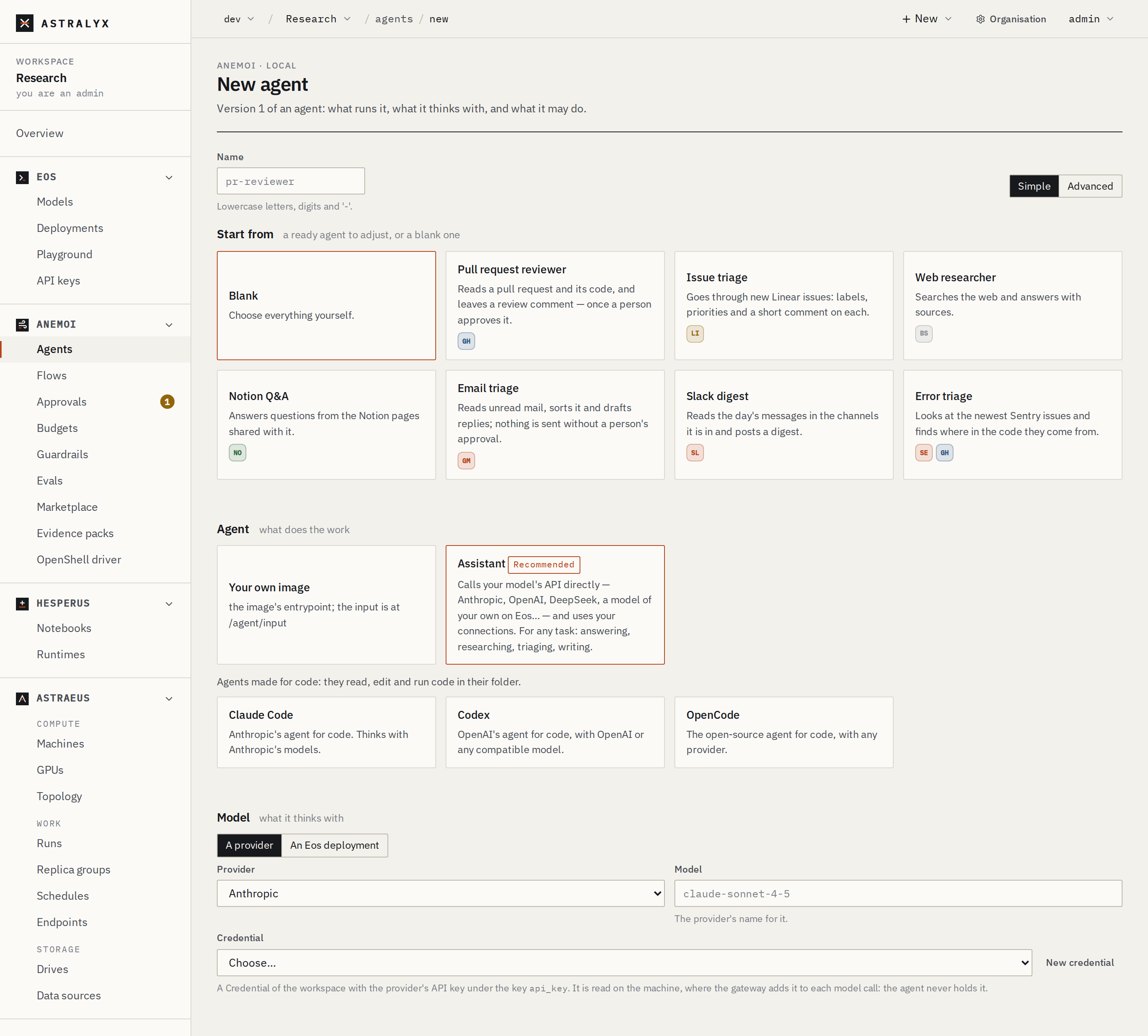
{
  "metadata": {"name": "researcher"},
  "spec": {
    "kind": "astralyx",
    "model": {"deployment": "chat"},
    "instructions": "You research a question on the public web and answer in five bullet points, each with its source URL.",
    "tools": [{"name": "web", "kind": "web"}],
    "policy": {
      "tools": "@id(\"web-reads\")\npermit (principal, action == Action::\"http\", resource in Server::\"web\")\nwhen { [\"GET\", \"HEAD\"].contains(resource.method) };\n"
    },
    "budget": {"max_seconds": 900, "max_tokens": 200000}
  }
}
With a provider instead of a deployment, "model": {"provider":
"anthropic", "model": "claude-sonnet-4-5", "credential":
"anthropic-key"}.
The tool policy is what the Simple form wrote for Web browsing: read
only. Without any permit, every tool call is denied.
2. Run it#
On the agent's page press Run agent, write the Input — What changed in the latest stable Rust release? — keep Version at the current one, and press Run. The run's page opens.
The run goes Pending (queued for a machine) → Running → Completed.
The Assistant's answer is the run's output (its standard output). If it
waits, the run's page says why, as for any run.
3. Read what it did#
The run's page shows the Input, the Output, and three tabs:
- Trace: each model call with its tokens and cost, each tool call with the gateway's decision (allowed, denied, approval required) and the rule that decided;
- Activity: everything that left the run — each web page with its URL, each connection and lookup, allowed or refused;
- Receipt: the signed record of the run (step 4).
$ curl -sS "$WS/agents/researcher/runs/researcher-d2b797" -H "Authorization: Bearer $ASTRA_TOKEN" \
    | jq '{version, state: .run.status.state, spend}'
$ curl -sS "$WS/tasks/researcher-d2b797-0/logs?tail=200" -H "Authorization: Bearer $ASTRA_TOKEN" | jq -r .logs
$ curl -sS "$WS/tasks/researcher-d2b797-0/trace" -H "Authorization: Bearer $ASTRA_TOKEN"
An agent run has one worker, named after the run with -0. spend
is what it cost: model calls, input and output tokens, dollars.
Try to make it do something its policy does not permit — "Post a summary
to https://example.com/form" — and the trace shows the POST denied
with no policy permits it. The agent is told why and goes on without it.
4. Check its receipt#
When the run ends, its machine writes a receipt — digests and counts, no content — signs it, and the cluster countersigns it and chains it after the agent's previous receipt.
Open the run's Receipt tab. It shows the digests of the input,
output and policies, the Merkle root of the steps, the totals, and the
checks your browser could make. Download receipt saves it as the
cluster sent it; the page prints the astra command that checks it all
offline.
$ curl -sS "$WS/agents/researcher/runs/researcher-d2b797/receipt" \
    -H "Authorization: Bearer $ASTRA_TOKEN" -o researcher-d2b797.receipt.json
$ curl -sS "$WS/identity/jwks" -H "Authorization: Bearer $ASTRA_TOKEN" -o jwks.json
$ curl -sS "$WS/tasks/researcher-d2b797-0/trace?canonical=1&format=jsonl" \
    -H "Authorization: Bearer $ASTRA_TOKEN" -o researcher-d2b797.trace.jsonl
$ astra anemoi receipts verify researcher-d2b797.receipt.json --jwks jwks.json \
    --trace researcher-d2b797.trace.jsonl
Each check prints ok, failed or skipped, then verified or NOT
verified (exit status 1). See Verify a receipt.
Clean up#
On the agent's page press Delete (or curl -X DELETE "$WS/agents/researcher" …).
Its versions go; its runs and their receipts stay on the record.