Build and run a flow#
This page covers writing a flow three ways — the console's editor, YAML
with astra, Python — and running and following its executions. The
concepts are in Flows; every field is in
Flow specification.
Before you begin#
- The editor or admin role (viewers watch executions).
- The agents, flows and drives the flow names, in the workspace.
- For the CLI:
astra loginandastra use <org>/<workspace>(see Install the CLI). - For the API:
ASTRA_TOKENandWSas in the REST API page.
Write the flow#
This flow collects a day's incidents, has an agent summarise them, asks an admin, then publishes:
apiVersion: anemoi.astralyx/v1
kind: Flow
metadata:
  name: nightly-digest
spec:
  description: Collect yesterday's incidents, summarise them, ask, then publish.
  drive: digests                      # a shared drive: every step sees /flow
  inputs:
    - name: day
      description: The day to report on (YYYY-MM-DD)
      required: true
  timeout_seconds: 21600
  steps:
    - id: collect
      kind: run
      retry: {max: 3, backoff_seconds: 60}
      timeout_seconds: 1800
      template:
        image: ghcr.io/acme/incident-export:2.1
        command: export
        args: ["--day", "${{ inputs.day }}", "--out", "/flow/collect/incidents.json"]
        requested_resources: {cpu_cores: 1, memory_bytes: 268435456}
    - id: summarise
      kind: agent
      needs: [collect]
      when: steps.collect.outputs.count != '0'
      agent: researcher
      input: "Summarise the ${{ steps.collect.outputs.count }} incidents of ${{ inputs.day }} in /flow/collect/incidents.json."
      retry: {max: 2, backoff_seconds: 120}
    - id: ok
      kind: approval
      needs: [summarise]
      when: steps.summarise.state == 'Succeeded'
      target: "Publish the incident digest for ${{ inputs.day }}?"
      approvers: ["role:admin"]
      wait_seconds: 28800
    - id: publish
      kind: run
      needs: [ok]
      when: steps.summarise.state == 'Succeeded'
      template:
        image: ghcr.io/acme/digest-publisher:1.0
        command: publish
        args: ["/flow/summarise/answer.md"]
        requested_resources: {cpu_cores: 1, memory_bytes: 268435456}
  outputs:
    incidents: "${{ steps.collect.outputs.count }}"
The collect step writes its outputs with echo "count=3" >>
"$ASTRAEUS_OUTPUTS"; the agent's answer lands in
/flow/summarise/answer.md.
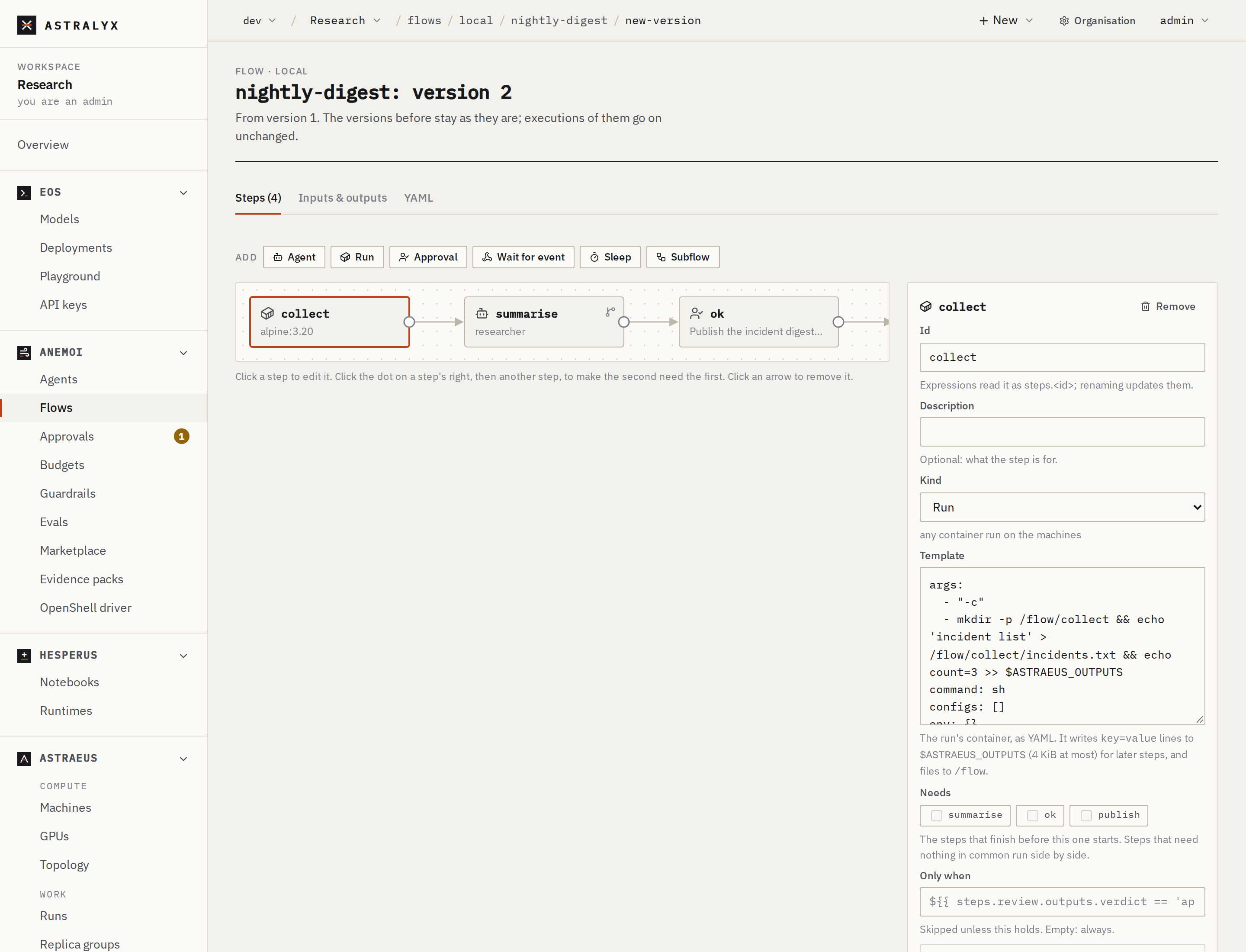
- Open Anemoi → Flows and press New flow.
- Name:
nightly-digest. - On Steps, Add each step — Agent, Run, Approval, Wait for event, Sleep, Subflow — and fill it in on the right (Id, Description, Kind and its fields, needs, when, retry, repeat, timeout). Click the dot on a step's right, then another step, to make the second need the first; click an arrow to remove it.
- On Inputs & outputs, declare
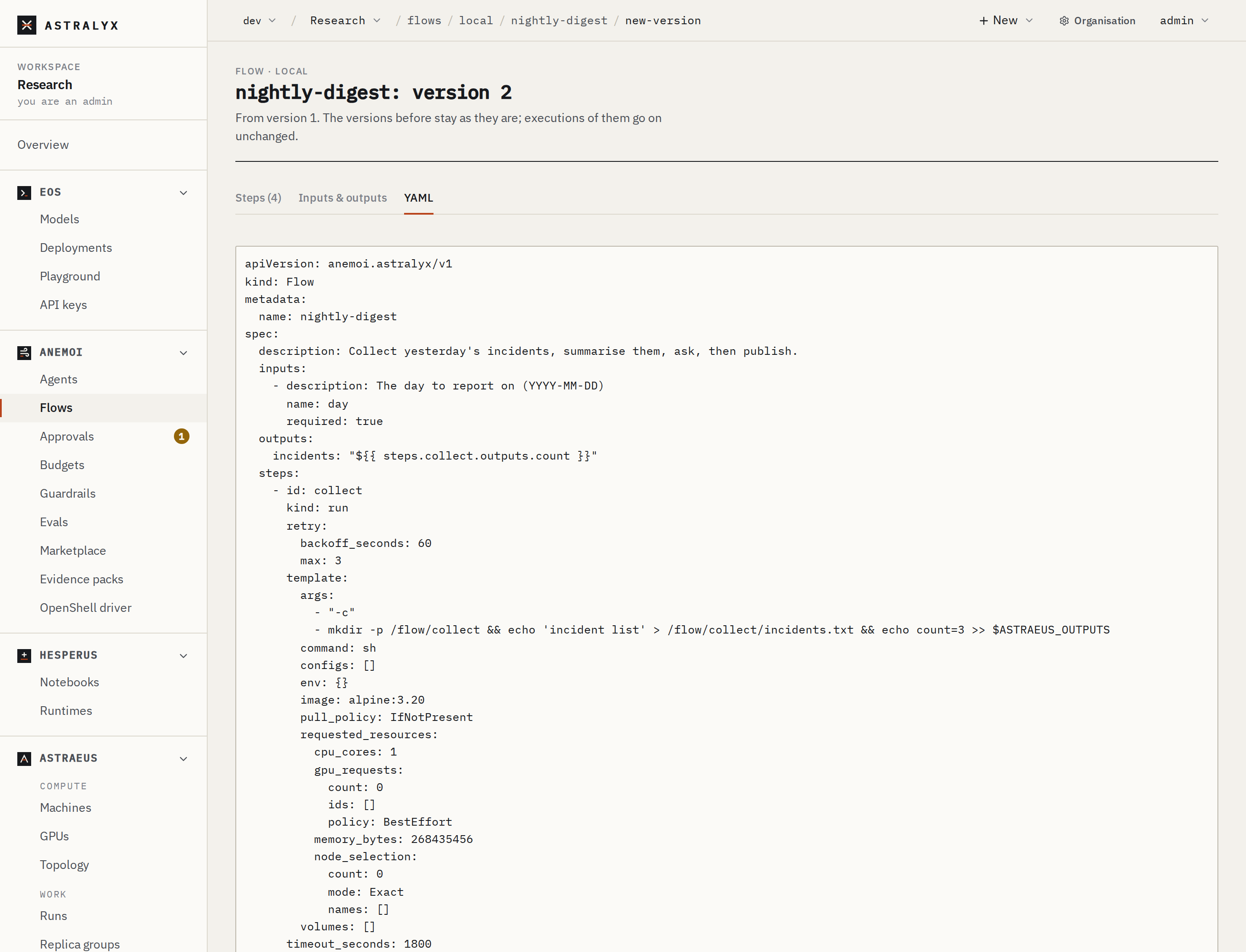
dayand the outputincidents. - YAML shows the same flow as a file; you can paste a flow there.
- Problems are listed under the editor as you go, checked by the cluster too. Press Create the flow.
$ astra anemoi flows validate -f nightly-digest.yaml
nightly-digest.yaml: flow nightly-digest is valid
$ astra anemoi flows validate -f nightly-digest.yaml --remote
nightly-digest.yaml: flow nightly-digest is valid
$ astra anemoi flows apply -f nightly-digest.yaml
flow nightly-digest: version 1 written, now current
validate runs the cluster's own checks on the file, here; --remote
also asks the cluster, which knows whether the agents, flows and drives
named exist. apply creates the flow, or writes its next version
(--no-current keeps the current one). A flow file may also be JSON.
The astralyx package (Python 3.9 or newer, standard library only):
from astralyx.anemoi import Client, Flow, Retry

flow = Flow("nightly-digest", description="Collect, summarise, ask, publish.",
            drive="digests", timeout_seconds=21600)
day = flow.input("day", description="The day to report on (YYYY-MM-DD)", required=True)

collect = flow.run("collect", retry=Retry(max=3, backoff_seconds=60), timeout_seconds=1800, template={
    "image": "ghcr.io/acme/incident-export:2.1", "command": "export",
    "args": ["--day", day, "--out", "/flow/collect/incidents.json"],
    "requested_resources": {"cpu_cores": 1, "memory_bytes": 256 << 20}})
summarise = flow.agent("summarise", agent="researcher", needs=[collect],
                       when=f"{collect.outputs.count} != '0'", retry=Retry(max=2, backoff_seconds=120),
                       input=f"Summarise the {collect.output('count')} incidents of {day} in /flow/collect/incidents.json.")
ok = flow.approval("ok", needs=[summarise], when=f"{summarise.state} == 'Succeeded'",
                   target=f"Publish the incident digest for {day}?", approvers=["role:admin"], wait_seconds=28800)
flow.run("publish", needs=[ok], when=f"{summarise.state} == 'Succeeded'", template={
    "image": "ghcr.io/acme/digest-publisher:1.0", "command": "publish",
    "args": ["/flow/summarise/answer.md"],
    "requested_resources": {"cpu_cores": 1, "memory_bytes": 256 << 20}})
flow.output("incidents", collect.output("count"))

assert flow.validate() == [], flow.validate()
c = Client.from_config()           # what `astra login` and `astra use` saved
c.flows.apply(flow)                 # a new flow, or its next version
print(c.flows.check(flow))          # the cluster's checks: {ok, errors, warnings}
step.output(key) is ${{ steps.<id>.outputs.<key> }}, for
templates; step.outputs.<key> and step.state are the bare names,
for when and until. flow.to_json() is the same document as the
YAML file. Client.from_config() reads ~/.config/astra/config.json
and the ASTRA_URL, ASTRA_TOKEN, ASTRA_ORG, ASTRA_WORKSPACE and
ASTRA_CLUSTER variables.
$ yq -o=json '{"metadata": .metadata, "spec": .spec}' nightly-digest.yaml \
    | curl -sS -X POST "$WS/flows" -H "Authorization: Bearer $ASTRA_TOKEN" \
        -H "Content-Type: application/json" -d @-
POST $WS/flow-checks with {"name", "spec"} checks without writing:
{"ok", "errors": [{"path", "message"}], "warnings": [...]}. A new
version is PUT $WS/flows/{name} with {"spec", "current"}.
Without a drive, the check warns: each execution gets a drive of its
own, a copy on each machine: steps on different machines do not see each
other's files. Name a shared drive to share them.
Run it#
On the flow's page press Run flow, fill in its inputs (and a Version other than the current one if you like) and confirm. The execution's page opens.
$ astra anemoi flows run nightly-digest --input day=2026-09-30 --wait
execution nightly-digest-cb4855 of flow nightly-digest started
nightly-digest-cb4855: Running
nightly-digest-cb4855: Waiting
--input key=value (repeatable), --version N, --wait to follow it
until it ends and print its steps (exit status 1 unless it
Succeeded).
Follow an execution#
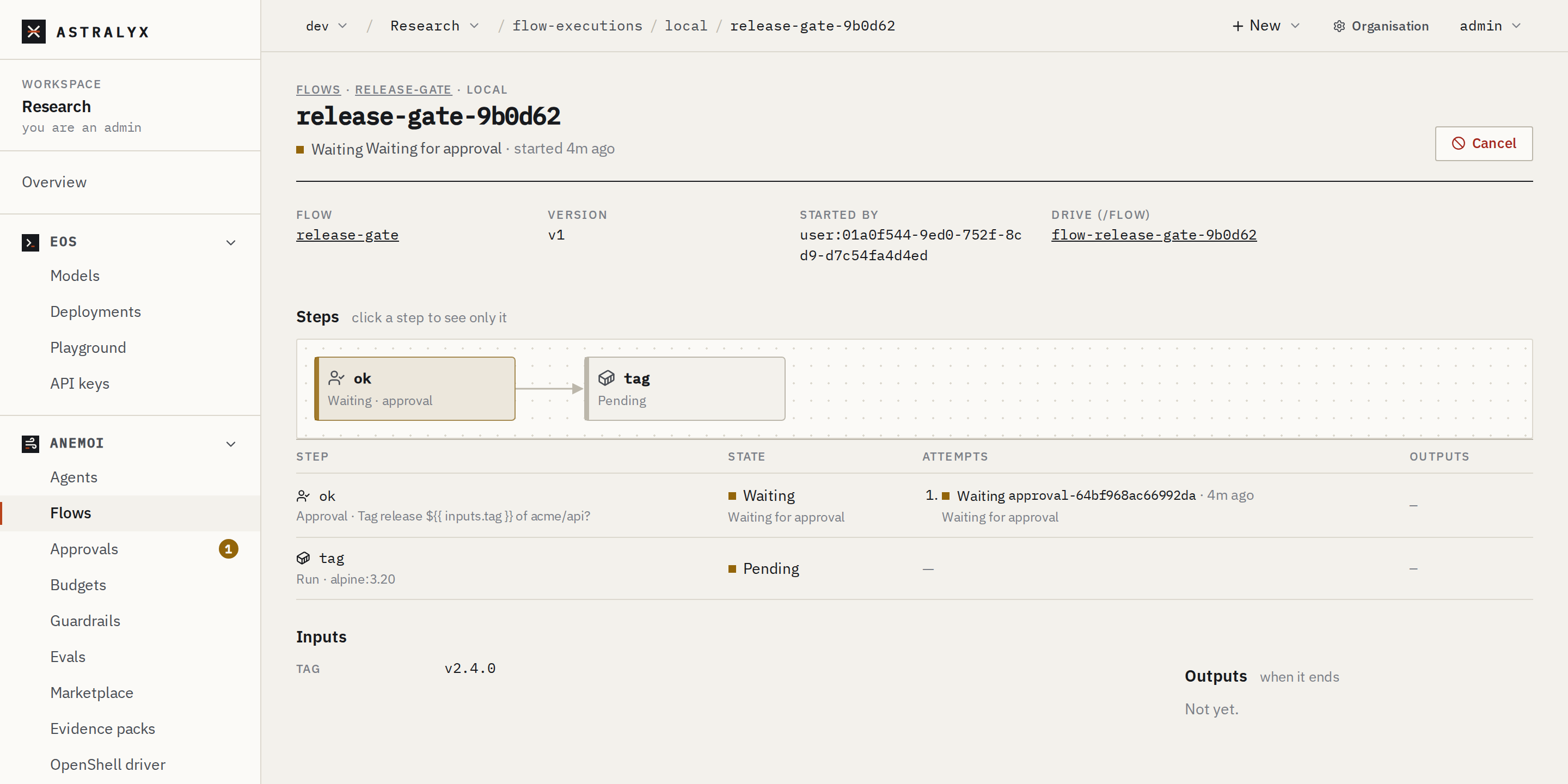
The execution's page draws the graph live: each step's state (pending, running, waiting, succeeded, failed, skipped), its attempts with links to their runs and approvals, the machine, the outputs; then the execution's Inputs, Outputs, the Receipts of its agent runs and the Events it received. Click a step to see only it.
$ astra anemoi flows executions --flow nightly-digest
$ astra anemoi flows get nightly-digest-cb4855
$ astra anemoi flows get nightly-digest-cb4855 --json
get prints the state, then STEP STATE ATTEMPTS LAST MACHINE WHY
OUTPUTS, the receipts of its agent runs, and its outputs.
$ curl -sS "$WS/flow-executions?flow=nightly-digest&state=Running" -H "Authorization: Bearer $ASTRA_TOKEN"
$ curl -sS "$WS/flow-executions/nightly-digest-cb4855" -H "Authorization: Bearer $ASTRA_TOKEN" \
    | jq '{state: .status.state, steps: (.steps | map_values({state, reason, attempts: (.attempts | length)}))}'
Send an event, retry a step, cancel#
On the execution's page: Send event on a waiting wait_event step
(its name and key=value data); Retry step on a failed step (a new
attempt); Cancel stops its running steps.
$ astra anemoi flows events send nightly-digest-cb4855 deployed env=prod sha=4be1c2
execution nightly-digest-cb4855: event deployed sent
$ astra anemoi flows retry nightly-digest-cb4855 summarise
execution nightly-digest-cb4855: step summarise runs again
$ astra anemoi flows cancel nightly-digest-cb4855
execution nightly-digest-cb4855: cancelling
$ curl -sS -X POST "$WS/flow-executions/nightly-digest-cb4855/events/deployed" -H "Authorization: Bearer $ASTRA_TOKEN" \
    -H "Content-Type: application/json" -d '{"data": {"env": "prod"}}'
$ curl -sS -X POST "$WS/flow-executions/nightly-digest-cb4855/steps/summarise/retry" -H "Authorization: Bearer $ASTRA_TOKEN"
$ curl -sS -X POST "$WS/flow-executions/nightly-digest-cb4855/cancel" -H "Authorization: Bearer $ASTRA_TOKEN"
An event's data is key=value text, at most 4 KiB. A retried approval or
event step asks again. DELETE $WS/flow-executions/{name} removes an
execution that ended, with its own drive.
Change a flow#
Edit (new version) on the flow's page opens the editor with the current version; tick Runs use this version from now on or not, and press Write the version. Versions lists them, with Make current.
astra anemoi flows apply -f again writes the next version;
astra anemoi flows list shows FLOW CURRENT LATEST AGE.
Executions keep the version they started with.
Run a flow on a schedule#
Flows have no schedule of their own yet. Start executions from outside —
your CI, a cron job — with astra anemoi flows run and a personal API
token in ASTRA_TOKEN, or the API. See
A nightly flow with retries.