Create and publish a template#
A template your organisation's workspaces install is made one of two ways:
from resources you have — a function, the service it calls, its drive —
which the console turns into a draft, or written in YAML
(Template format). Either way you read and change the draft,
check it, and publish it. Publishing needs templates:publish in the
workspace.
From your resources#
Pick the resources, in the order they are made. The draft:
- names them after the installation: one resource is
{{ install }}; several are{{ install }}-<name>; - makes references between them follow (a function's
http://docs-index:8080becomeshttp://{{ resources.docs-index.name }}:8080); - turns the Credentials they use into inputs of type
secret, with their names as defaults; - turns a picked function that a picked deployment uses as a tool into a link;
- turns the values you choose into inputs, their current values the defaults.
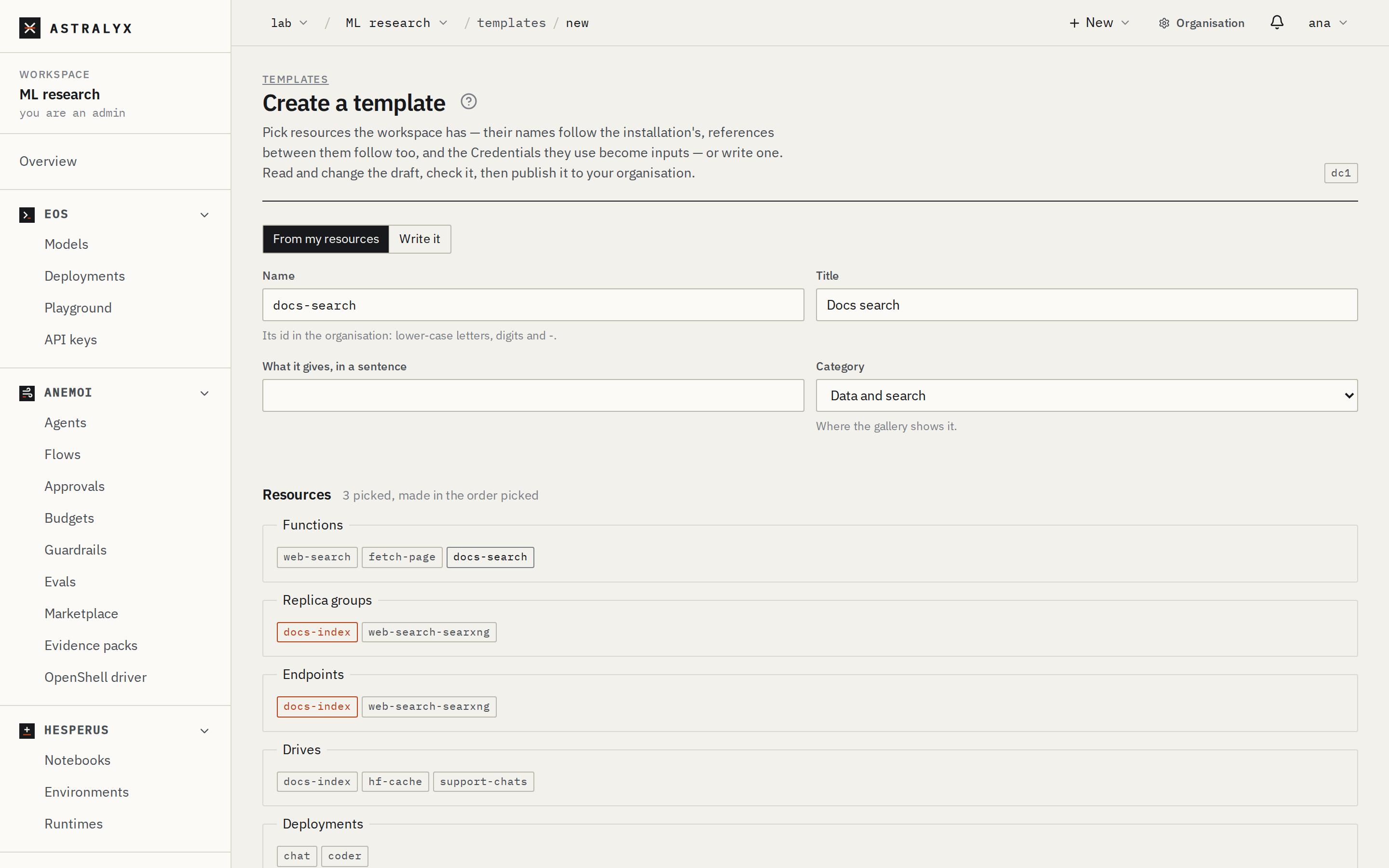
- Astraeus → Templates → Create a template, From my resources.
- Name (its id:
docs-search), Title, a sentence, and its Category — where the gallery shows it. - Tick the resources under Resources. Under Values that become
inputs, add a row per value: the resource, where in its
specification (
template.task_template.env.SITES), the input's name. - Make the draft. The editor shows it as YAML.
$ astra templates create docs-search --title "Docs search" --category data \
    --from replica-group/docs-index --from endpoint/docs-index --from function/docs-search \
    --input docs-index:template.task_template.env.SITES=sites -o docs-search.yaml
docs-search.yaml written: read it, change it, then astra templates publish docs-search.yaml
$ curl -fsS -X POST "$ASTRALYX_API/template-drafts" -H "Authorization: Bearer $ASTRALYX_TOKEN" \
    -H 'content-type: application/json' \
    -d '{"name": "docs-search", "title": "Docs search", "category": "data",
         "resources": [{"kind": "replica-group", "name": "docs-index"}, {"kind": "endpoint", "name": "docs-index"}, {"kind": "function", "name": "docs-search"}],
         "inputs": [{"resource": "docs-index", "path": "template.task_template.env.SITES", "name": "sites", "type": "text"}]}' \
    | jq -r .yaml > docs-search.yaml
A draft makes resources in the order picked and waits for nothing: to
make a part wait for a service to be ready or a run to finish, add needs
and wait to it (Template format).
A resource is read as you, from the workspace: what you may not read cannot be drafted. One that looks like it holds a secret value is refused: move the value into a Credential first.
Write one#
Start from the example in the console (Create a template → Write it),
or from an official template (View the template on its page, or
astra templates show web-search --yaml). Template format is
the reference.
Check it#
Check under the editor lists every problem, or what it makes.
Publish it#
| Who sees it | visibility |
|---|---|
| Every workspace of the organisation (the default) | organization |
| Only this workspace (and those you add in Marketplace) | workspace |
Publishing a template whose name the organisation has makes its next
version (by those who manage it: organisation admins, whoever published it,
who publishes templates in the workspace it came from). Its version number
is the organisation's next, whatever metadata.version says. If your
organisation reviews templates (Marketplace → Settings → Require
approval), a version published by someone who is not an organisation
admin waits as pending until an admin approves it in Marketplace.
Choose Who sees it, say what this version is, and Publish.
A template is in one of the organisation's categories (metadata.category:
tools, training, batch, evaluation, data, apps, or one your
organisation added): publishing without one, or with one it does not have,
is refused and says which there are. Who manages the organisation's
marketplace adds categories under Templates → Categories, or:
$ astra templates categories --add "Customer support" --description "Agents and tools for the support team"
added customer-support (Customer support)
$ curl -fsS -X POST "$ASTRALYX_API/organizations/<org>/template-categories" -H "Authorization: Bearer $ASTRALYX_TOKEN" \
    -H 'content-type: application/json' -d '{"title": "Customer support"}'
A template's name cannot be an official template's. Installations of an
older version are offered the upgrade (Upgrade it).
A template is deleted from its page (Delete) or with DELETE
/v1/templates/{name}; its installations stay as they are.