Give your model web search#
An open model knows what it read up to its training cut-off, and nothing
after. You give a deployment two tools from Astralyx's official templates:
Web search (web_search: the top results of a query, each with its
title, address and a snippet) and Fetch page (fetch_page: a page's
readable text). The gateways run them for the model: it searches, reads what
it found, and answers with sources. You install both, try them in the
Playground, then call the deployment from curl and Python, streamed.
What you need:
- A workspace with a cluster, a machine with a GPU of 12 GB or more, and a data location chosen on it (Machines → the machine → Data location → Confirm).
- The editor role, an API token, an API key and the variables in How the recipes are written.
- A gateway: the hosted one, or a machine running the agent's edge part (Gateways).
- For the default search, nothing else. For Tavily, Brave or Google, an account with that service (step 3).
1. Serve a model that calls tools well#
Tool use is a skill: a model must decide to call a tool, write its
arguments as JSON, and use what comes back. Qwen3 8B or larger does this
reliably; models of 4B parameters or fewer often answer from memory instead
of searching, or call the tool with arguments it does not take. Qwen3 8B at
Q4_K_M needs about 6 GB of GPU memory with an 8K context.
- Eos → Models → Library, search
qwen3, open Qwen3, and pick the 8B row'sQ4_K_Mvariant on your machine. Press Deploy. - Name:
chat. Keep the rest, press Deploy.
$ curl -fsS -X POST "$ASTRALYX_API/eos/catalog-models" -H "Authorization: Bearer $ASTRALYX_TOKEN" \
    -H 'content-type: application/json' -d '{"catalog": "qwen3:8b-q4_k_m"}' | jq -r .metadata.name
qwen3-8b-q4-k-m
$ curl -fsS -X POST "$ASTRALYX_API/eos/deployments" -H "Authorization: Bearer $ASTRALYX_TOKEN" \
    -H 'content-type: application/json' \
    -d '{"metadata": {"name": "chat"}, "spec": {"model": "qwen3-8b-q4-k-m", "replicas": {"min": 1, "max": 1}}}' > /dev/null
Wait until the deployment is Ready. Its Capabilities list tools:
the model is known to call them.
2. Install web search, on your own machines#
The Web search template asks where searches go. The default, On my machines (SearXNG, free), needs no account and no key: the template runs SearXNG, an open-source search service, on the workspace's machines, reachable only from inside the workspace, and points the function at it.
What SearXNG is, and is not
SearXNG asks public search engines on your behalf, as a browser would. Their terms may limit automated use, and when it asks a lot they may slow it down or refuse it — a search then answers "its engines did not answer". It is a good way to start and for light use. For production, use a search API (step 3), or Search my sites for your own documentation.
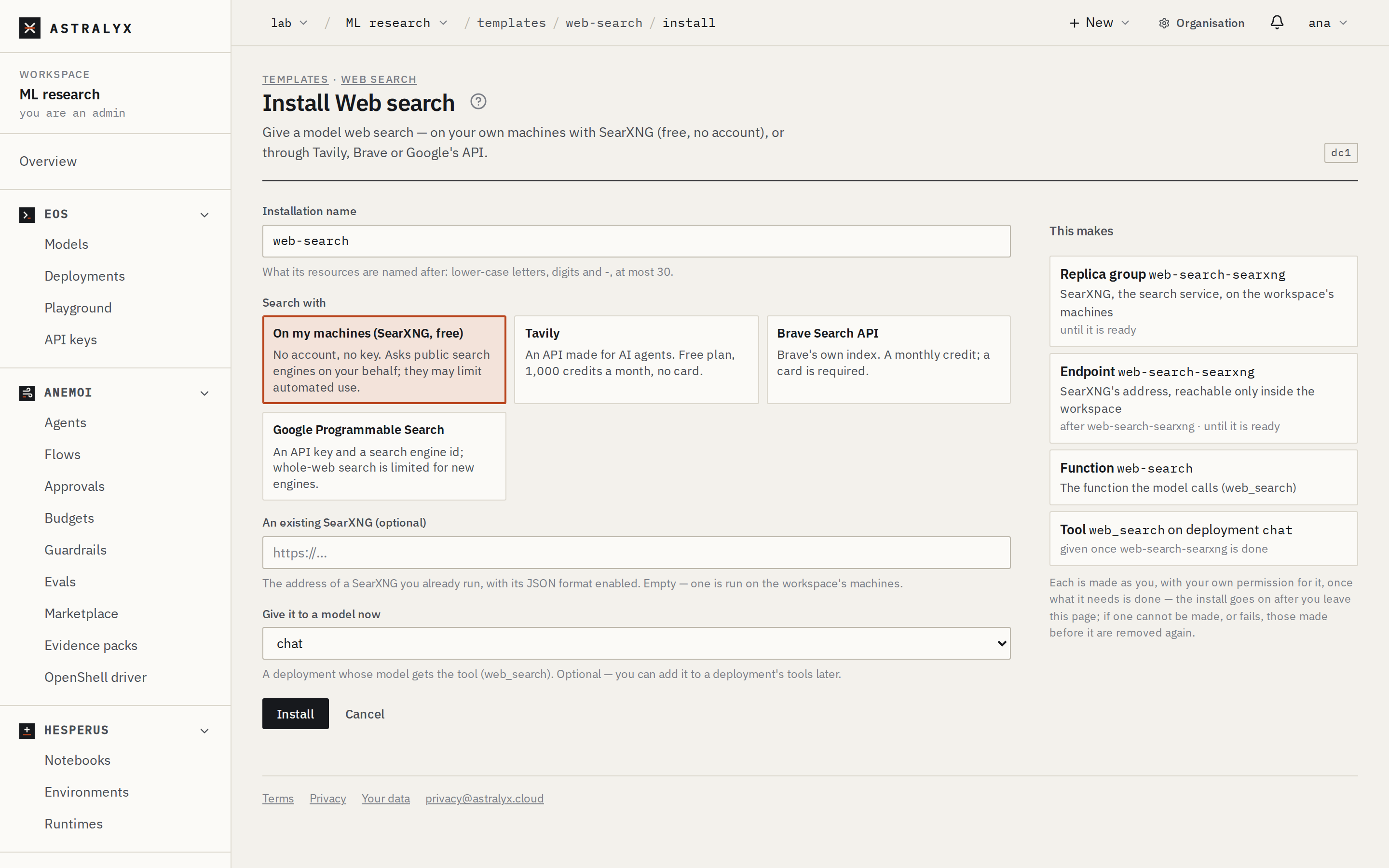
- Open the deployment: Eos → Deployments → chat → Tools → Add a template, and choose Web search.
- Search with: On my machines (SearXNG, free). Give it to a
model now already says
chat. - The panel This makes lists a replica group and an endpoint
(
web-search-searxng), the functionweb-search, and the toolweb_searchonchat. Press Install.
$ astra templates install web-search --backend searxng --attach chat
installed:
web-search  (template web-search v1)
  Replica group  web-search-searxng               0 of 1 ready
  Endpoint       web-search-searxng               0 of 0 workers ready
  Function       web-search                       v1, prod → v1
  tool web_search              on deployment chat (attached)

Try it: astra templates test web-search
The installation's page (Astraeus → Templates → Installations → web-search) shows its parts. SearXNG's image is pulled once (about 100 MB); it is ready in a minute or two.
3. Or search with an API#
Each API's key goes in a Credential of the workspace — never in the template or the installation. The simplest is a sealed secret: the value is encrypted on your computer and opened only on machines an admin approved; a Credential of the same name comes with it.
| Search with | What it is | Plan | Credential keys |
|---|---|---|---|
| Tavily | A search API made for AI agents: each snippet is the relevant text of the page, and it adds a short answer. | Free plan: 1,000 credits a month, no card. | api_key |
| Brave Search API | Brave's own index of the web. | A monthly credit; a card is required. | api_key |
| Google Programmable Search | Google's Custom Search JSON API. Google limits searching the whole web for new search engines: check your engine in the Programmable Search console. | Free daily quota, then paid. | api_key and engine_id (the engine's cx) |
For Tavily, with a key from app.tavily.com (tvly-…):
Tools → Add a template → Web search, Search with: Tavily;
Tavily API key: the Credential tavily, key api_key. Press
Install.
Brave is the same with --backend brave --secret brave_key=<credential>:api_key;
Google takes --secret google_key=<credential>:api_key --secret google_engine=<credential>:engine_id.
Nothing runs on your machines for an API but the function. One installation
of Web search per deployment is enough: to switch, uninstall it and install
it again, or upgrade it with another input.
4. Let it read pages#
A snippet is often not enough to answer. Fetch page gives the model
fetch_page(url): the page's title and readable text, without scripts,
styles or markup, cut at 8,000 characters by default. It reads the public
internet only: addresses on private networks, the machine itself and the
clouds' metadata services are refused, also after a redirect.
Tools → Add a template → Fetch page, press Install.
The deployment's Tools tab now lists web_search and fetch_page.
5. Test them#
Test on an installation's page calls its function with a sample input and shows the answer — the first call starts the function, a few seconds.
$ astra templates test web-search
ok in 2140 ms
{
  "backend": "searxng",
  "query": "open-source large language models",
  "results": [
    {"title": "…", "url": "https://…", "snippet": "…"},
    …
  ]
}
(POST "$ASTRALYX_API/installations/web-search/test" with the API.)
6. Try it in the Playground#
Eos → Playground, the deployment chat. Ask something the model cannot
know:
What is the latest stable version of Rust, and when was it released? Give the source.
The conversation shows each call while it runs: web_search with the query
the model chose, its results, then fetch_page on the release notes, and
the answer with the address it came from.
7. Call it through the gateway#
Your client sends one request and gets one answer: the gateway runs the calls and asks the model again until it answers. Streamed, the answer's text comes as the model writes it; while a tool runs, a comment line every 10 seconds keeps the connection open.
$ curl -sSN $EOS_URL/chat/completions \
    -H "Authorization: Bearer $ASTRAEUS_API_KEY" -H "Content-Type: application/json" \
    -d '{"model": "chat", "stream": true,
         "messages": [{"role": "system", "content": "Search the web before answering anything about current events, and cite your sources."},
                      {"role": "user", "content": "What is the latest stable version of Rust?"}]}'
import os
from openai import OpenAI

client = OpenAI(base_url=os.environ["EOS_URL"], api_key=os.environ["ASTRAEUS_API_KEY"])
stream = client.chat.completions.create(
    model="chat",
    stream=True,
    messages=[
        {"role": "system", "content": "Search the web before answering anything about current events, and cite your sources."},
        {"role": "user", "content": "What is the latest stable version of Rust?"},
    ],
)
for chunk in stream:
    if chunk.choices and chunk.choices[0].delta.content:
        print(chunk.choices[0].delta.content, end="", flush=True)
print()
What a good answer looks like#
- The answer names a version and a date that are recent, not the ones the model learned in training, and gives an address from the results.
-
The last chunk (or a whole answer's
astraeusfield) lists what ran:"astraeus": {"rounds": 2, "limit": null, "tools": [ {"name": "web_search", "function": "web-search", "alias": "prod", "version": 1, "outcome": "ok", "duration_ms": 1830, "receipt": "chat-41"}, {"name": "fetch_page", "function": "fetch-page", "alias": "prod", "version": 1, "outcome": "ok", "duration_ms": 640, "receipt": "chat-42"}]} -
Each call has a signed receipt: Tools → Receipts.
Troubleshooting#
| Symptom | Cause | Fix |
|---|---|---|
The model answers from memory; astraeus.tools is empty. |
Small models often do not call tools; or the question did not seem to need one. | Use Qwen3 8B or larger. Say so in the system prompt (Search the web before answering anything about current events). To check the wiring, send "tool_choice": "required" once. |
| The deployment's Capabilities do not list tools. | The model is not known to call tools, or vLLM serves it without a tool parser. | Use a model the library marks for tools; with vLLM, the deployment's page names the engine arguments it needs. |
A call ends with "error": "SearXNG found nothing because its engines did not answer (…)". |
The public engines slowed SearXNG down or refused it. | Wait, or search with an API (step 3). |
"error": "… refused the key (401)" or "TAVILY_API_KEY is empty". |
The Credential is missing on the machine, holds the wrong key, or names another key. | Check the Credential's keys (astra secrets keys tavily) and the input's key (api_key); the Credential's page shows on which machines it synced. |
"error": "… did not answer within 15 s", or the completion ends with 504 tool_loop_timeout. |
The search service, or a page, is slow; or the loop's limit (120 s) was reached. | Try again. Raise tool_limits.max_seconds on the deployment; stream long answers. |
| The installation's replica group stays at 0 of 1 ready. | No machine with room for SearXNG (1 CPU core, 512 MiB), or the image is still pulling. | The replica group's page says why it waits. |
fetch_page answers "… is refused: it points to a private or internal address". |
The page is on a private network. | Fetch page reads the public internet only, by design. |
Clean up#
Uninstalling takes each tool off the deployment, then removes every part (SearXNG included):