Test, upgrade and uninstall#
An installation is managed as one: its page in the console (Astraeus →
Templates → Installations), astra templates …, or
/v1/installations/{name}.
Test it#
A template may declare a test: one of its functions, called with a sample input. Test calls it and shows what it answered and how long it took. The first call after an install starts the function's instance from zero: a few seconds.
Test on the installation's page.
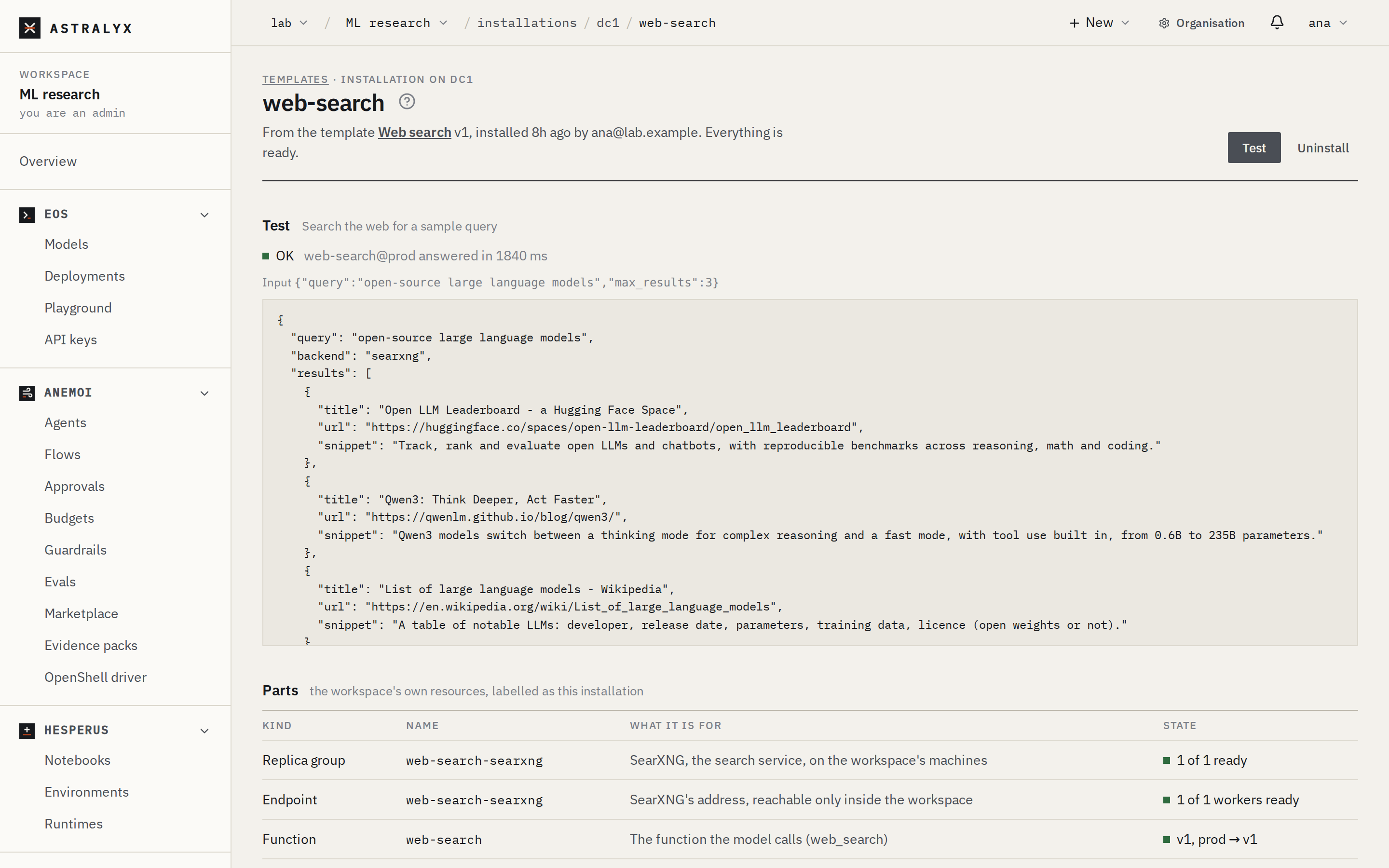
The answer is the function's own output. A test needs functions:call;
a template without a test answers 409 NO_TEST.
Upgrade it#
When a newer version of its template is published, the installation says so (v2 available). An upgrade plans the new version with the inputs as installed, and shows first what changes, part by part:
| Change | Means |
|---|---|
added |
A part the new version makes and the old one did not. |
changed |
Changed in place (a function gets a new version, its alias moved; a replica group, an endpoint, a deployment, an agent or a flow updated). The fields that differ are listed. |
replaced |
Removed and made again: a run, a schedule or a Credential is not changed in place. |
removed |
A part the new version no longer makes. |
kept |
A drive or a model: never made again by an upgrade (their data would go). |
unchanged |
Nothing differs. |
Links follow: a tool the new version no longer gives is taken off its deployment first; a new one is added last.
Upgrade to v2 on the installation's page shows the changes; press Upgrade.
Change an input#
An upgrade also takes new inputs, to the same version or a newer one:
astra templates upgrade web-search --set backend=brave --yes (with
brave_key set too), or {"inputs": {...}} in the body. Web search
switching from SearXNG to an API removes the SearXNG service and changes
the function's settings; the tool stays on its deployment.
Parts you changed yourself
An installation's parts are the workspace's: you may edit them. An
upgrade writes what the template says over what you changed in a part
it changes — for a function, as a new version, so the one you made
stays and moving prod back to it is a rollback.
Uninstall it#
Uninstalling takes the installation's tools off their deployments first — so no model keeps calling a function that is gone — then deletes every part in the reverse of the order they were made: a drive with its data. A part already deleted is skipped. If something cannot be removed (a drive still in use by a stopping run), the installation stays with what is left: uninstall again to finish.
An install still going (Installing) is stopped first — Stop and uninstall — and what it made so far is removed. A failed one has nothing left to remove: Remove forgets it (or install again under its name). Only a ready installation is upgraded or tested.
Uninstall on the installation's page, and type its name.