Install a template#
You install a template from its page in the console, with astra
templates install, or with POST /v1/installations. Below,
<org>/<workspace> stands for yours, as astra use set them, and the
API calls use the variables of How the recipes are
written.
1. Find it#
Astraeus → Templates. Choose a category — Tools for models, Training and fine-tuning, Batch inference, Evaluation, Data and search, Apps and services, or one of your organisation's —, filter by Official or My organisation, or search. A card says what a template makes and the tool it gives a model; its page says what it asks, what it makes (when, and after what), what a model is told its tool takes, and its versions. View the template shows it whole, as YAML.
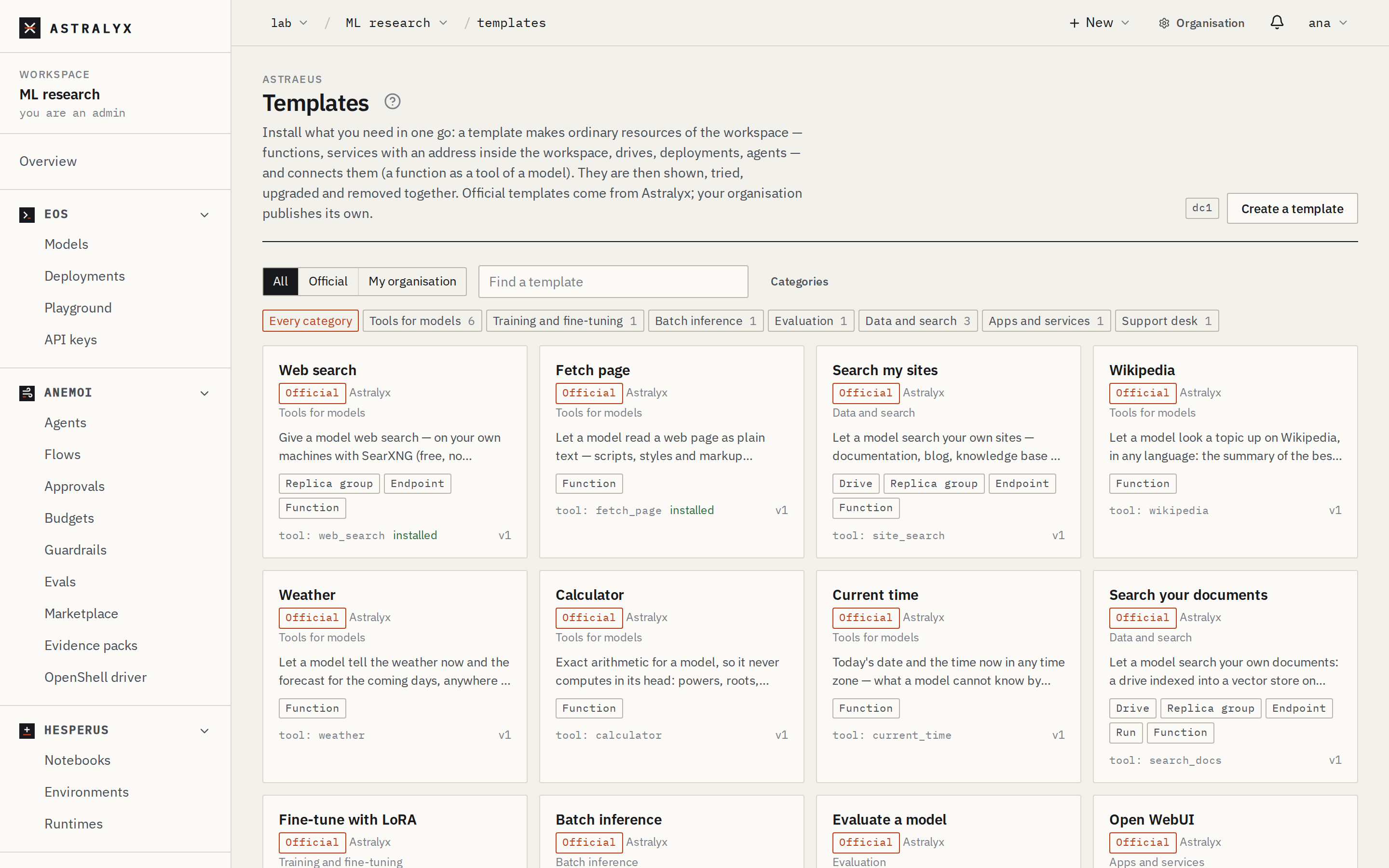
$ astra templates list
TEMPLATE               SOURCE        CATEGORY     VER  SUMMARY
web-search             official      tools        1    Give a model web search — on your own machines with SearXNG (free, no account), or through Tavily, Brave or Google's API.
fetch-page             official      tools        1    Let a model read a web page as plain text — scripts, styles and markup removed — to quote or summarise it.
…
$ astra templates list --category training
$ astra templates categories
$ astra templates show web-search
$ curl -fsS "$ASTRALYX_API/templates?source=official" -H "Authorization: Bearer $ASTRALYX_TOKEN" | jq -r '.items[].ref'
$ curl -fsS "$ASTRALYX_API/templates?category=training" -H "Authorization: Bearer $ASTRALYX_TOKEN" | jq -r '.items[].ref'
$ curl -fsS "$ASTRALYX_API/templates/web-search" -H "Authorization: Bearer $ASTRALYX_TOKEN" | jq '.inputs'
2. Install it#
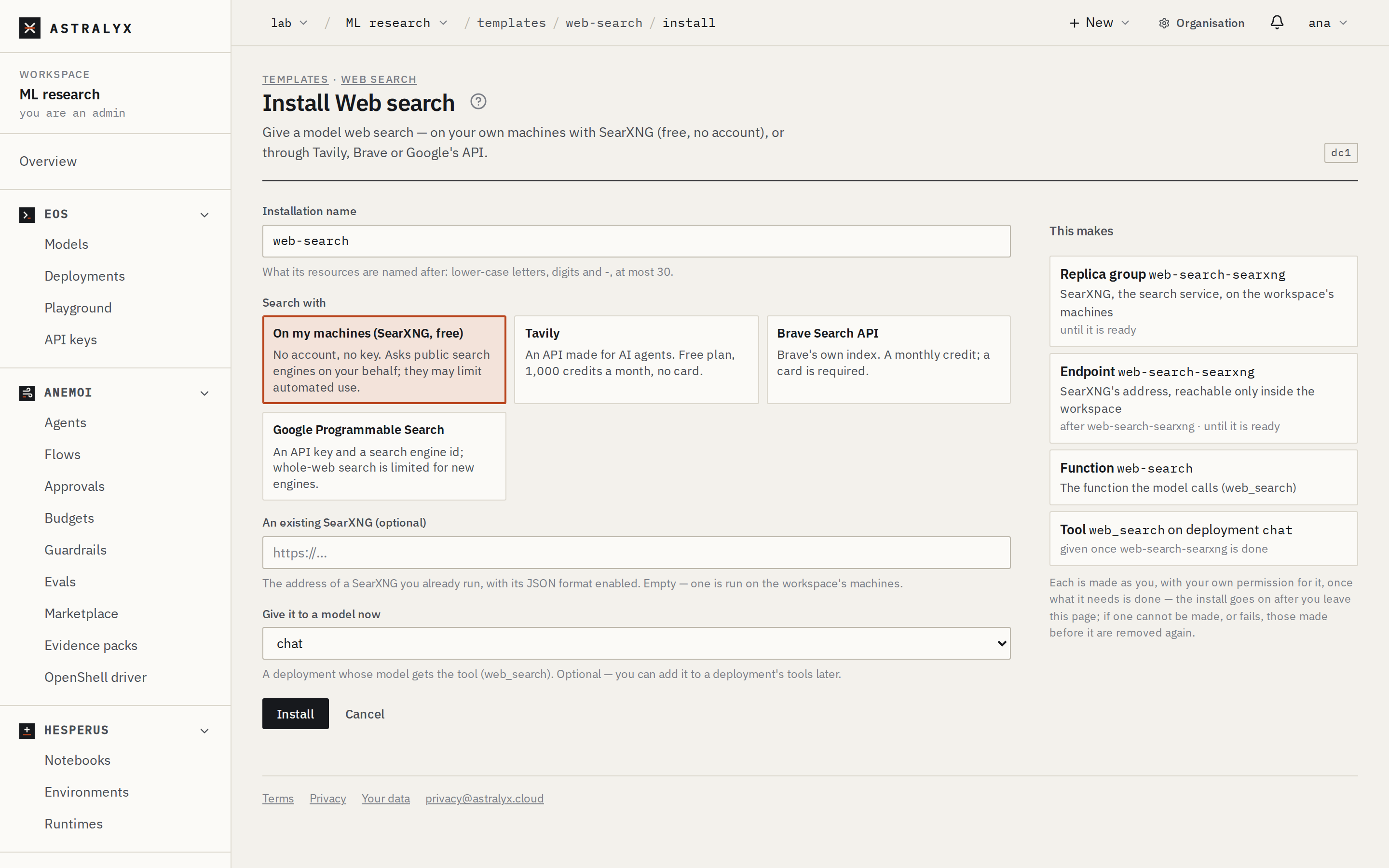
The installation's name is the template's unless you give one; its
resources are named after it (web-search, web-search-searxng), so two
installations of a template need two names. At most 30 characters:
lower-case letters, digits and -.
Press Install on the template's page. The form asks the inputs that apply — choosing Search with: Tavily asks for the Tavily key, and hides the SearXNG address — and This makes shows, as you choose, exactly what will be made. Press Install: the installation's page opens.
--set name=value for an input (numbers, true/false and JSON read
as such), --secret name=<credential>[:<key>] for a secret,
--attach <deployment> for the input attach_to:
$ curl -fsS -X POST "$ASTRALYX_API/installations" -H "Authorization: Bearer $ASTRALYX_TOKEN" \
    -H 'content-type: application/json' \
    -d '{"template": "web-search", "name": "web-search",
         "inputs": {"backend": "tavily", "tavily_key": {"credential": "tavily", "key": "api_key"}, "attach_to": "chat"}}'
| Field | Type | Default | Description |
|---|---|---|---|
template |
string | required | The template's name. |
source |
official | organization |
an official one first | Where it comes from, when both have the name. |
version |
integer | the newest published | Its version. |
name |
string | the template's | The installation's name. |
inputs |
object | {} |
{<input>: <value>}. A secret: "<credential>" or {"credential", "key"}. |
Inputs#
| Type | A value is | In the console |
|---|---|---|
string, text |
Text (a text has several lines). format: url must be an http(s) address; urls, one per line. |
A field |
number |
A number, within min and max if set. |
A field |
bool |
true or false. |
A checkbox |
choice |
One of its choices' values. | A card per choice |
secret |
A Credential of the workspace and its key — never the value. | The Credentials, and the key |
deployment, drive, function, model, agent, flow |
The name of one of the workspace's. | Those of the workspace |
pool |
A pool's name. | A field |
An input with a condition (when) is asked only when it holds; a value
given for one that does not apply is ignored.
Give a model the template's tools#
A template that makes a function for models asks Give it to a model now
(attach_to): the deployment whose model gets the tool. From a
deployment's page, Tools → Add a template lists those templates and
opens the install form with the deployment chosen. Without one, add the
function to a deployment's tools later
(Give a model tools).
An install that waits#
When a template's parts wait for each other — a service to be ready, a run to finish successfully — the install answers at once, Installing, and goes on by itself, as you, after you leave the page. The installation's page shows the step it is on and why it waits (Waiting for run ft-train to finish: Running, for how long), and Steps lists every part in order: done, waiting, or pending with what it waits for.
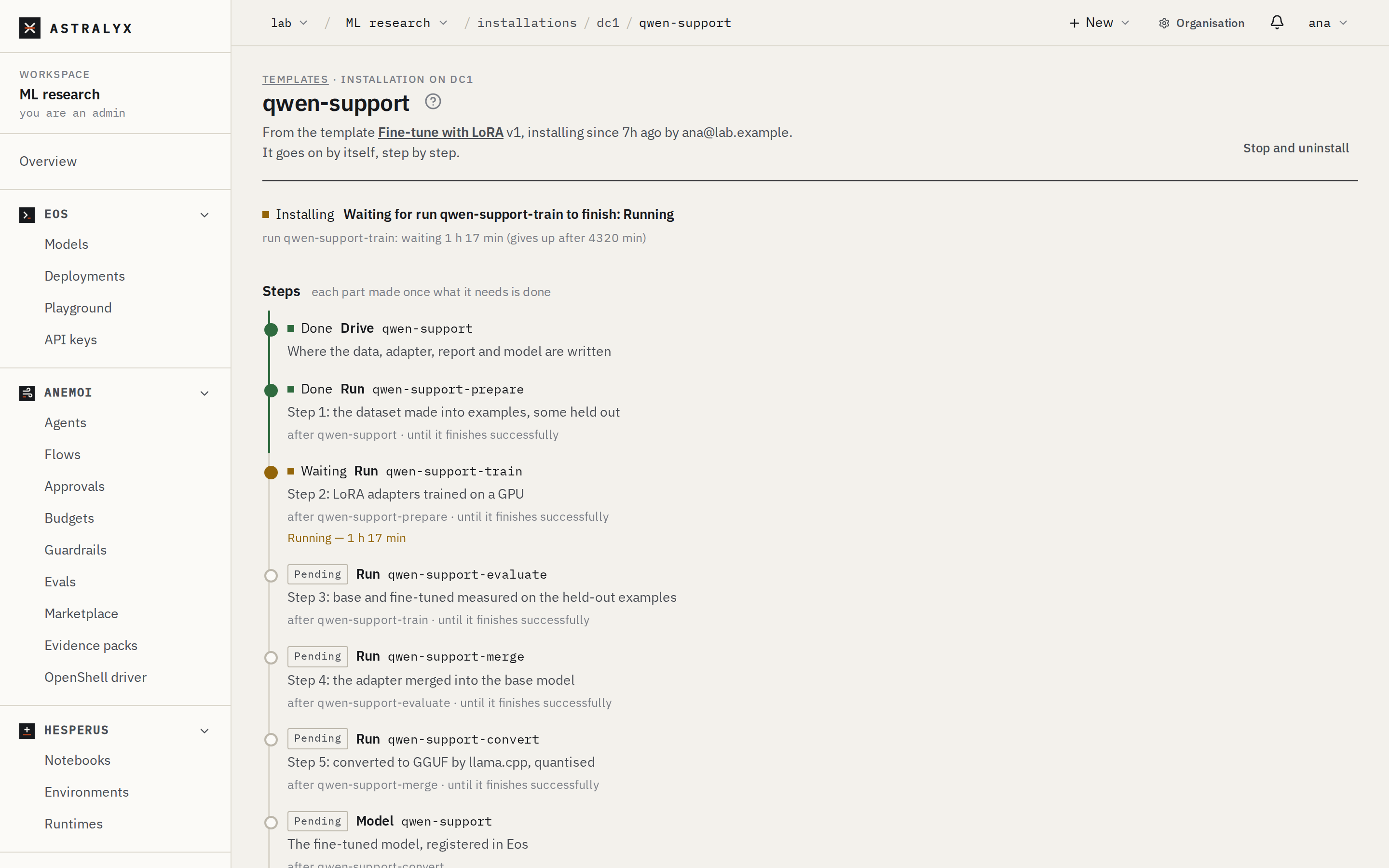
$ astra templates install finetune-lora --set dataset=HuggingFaceH4/no_robots --wait
10:02:11 Waiting for run finetune-lora-prepare to finish: Running
10:04:40 Waiting for run finetune-lora-train to finish: Running
…
installed:
$ astra templates status finetune-lora --wait     # follow it later
A step that fails — a run that ends with an error, a part waited for longer than the template allows — fails the install: what was made is removed again, and the installation stays, Failed, saying which step and why, until you remove it or install again under the same name. A run or service that ended with an error is kept, so you can read its state and logs (the installation links to it); uninstalling, or installing again under the same name, removes it. A part that only took too long is removed with the rest, so it does not go on running unwatched. Stop and uninstall stops an install that is still going.
3. Read the installation#
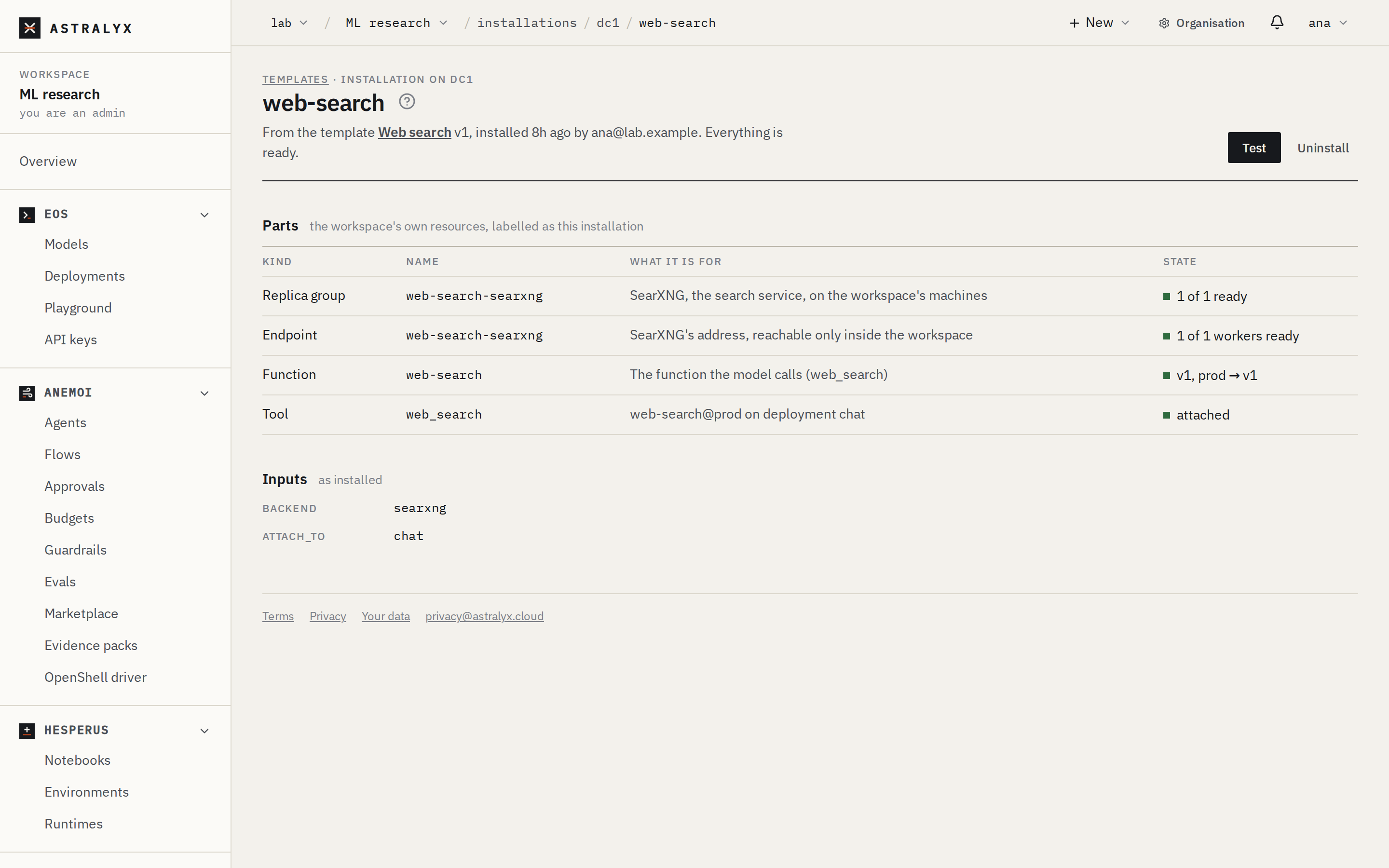
Astraeus → Templates, under Installations, or the link the install opened. The installation's page lists every part — its kind, name, what it is for, and its state (v1, prod → v1; 1 of 1 ready; Ready) — and its tools on deployments (attached), with Test, Upgrade and Uninstall.
state is installing, ready or failed; step says what it is doing
now; steps lists each part with what it needs, what it is waited for
until (wait) and its stage.
A part's state is read from the cluster each time: a service starting shows 0 of 1 ready, with why; a part someone deleted shows missing.
Errors#
| Code | Meaning |
|---|---|
400 INVALID_INSTALL |
An input or the plan has problems; every one is listed. Nothing was made. |
404 TEMPLATE_NOT_FOUND |
No such template for this workspace. |
404 DEPLOYMENT_NOT_FOUND |
The deployment to give the tool to is not there. Nothing was made. |
409 INSTALLATION_EXISTS |
An installation of that name exists: choose another name. |
409 NAME_TAKEN |
A resource the template would make is already called so: choose another name. |
409 TOOL_NAME_TAKEN |
The deployment already has a tool of that name. |
403 PERMISSION_DENIED |
You may not make one of the parts; what was made is removed again. |
| Another code | The cluster refused a part (its specification, the fields named); what was made is removed again (details). |
STEP_FAILED (the installation's failure) |
A run a later step waited for ended with an error, or a service failed; what was made is removed again, except that part, kept for its logs (kept). |
STEP_TIMED_OUT |
A part was waited for longer than its template allows (wait_minutes); what was made is removed again. |